ENTRY AND START SYSTEM(for Entry Function) DATA LIST / ACTIVE TEST
-
DATA LIST
Note
-
In the table below, the values listed under "Normal Condition" are reference values. Do not depend solely on these reference values when deciding whether a part is faulty or not.
-
When using the GTS with the power switch off, connect the GTS to the DLC3 and turn a courtesy light switch on and off at intervals of 1.5 seconds or less until communication between the GTS and the vehicle begins. Then select Model Code "KEY REGIST" under manual mode and enter the following menus: Body Electrical / Entry&Start(CAN). While using the GTS, periodically turn a courtesy light switch on and off at intervals of 1.5 seconds or less to maintain communication between the GTS and the vehicle.
Tech Tips
Using the GTS to read the Data List allows the values or states of switches, sensors, actuators and other items to be read without removing any parts. This non-intrusive inspection can be very useful because intermittent conditions or signals may be discovered before parts or wiring is disturbed. Reading the Data List information early in troubleshooting is one way to save diagnostic time.
-
Connect the GTS to the DLC3.
-
Turn the power switch on (IG).
-
Turn the GTS on.
-
Enter the following menus: Body Electrical / Entry&Start, Main Body, Power Source Control or Combination Meter / Data List.
-
Read the Data List according to the display on the GTS.
Body Electrical > Entry&Start > Data ListTester Display Measurement Item Range Normal Condition Diagnostic Note D-Door Touch Sensor Driver door touch sensor (unlock sensor)* ON or OFF ON: Driver door touch sensor (unlock sensor) touched
OFF: Driver door touch sensor (unlock sensor) not touched
-
Displays whether the unlock sensor is on or off (even if the sensor is touched and contact is maintained, "ON" is displayed only momentarily).
-
Use this Data List item to help determine if there is an unlock sensor malfunction when the entry unlock function does not operate.
P-Door Touch Sensor Front passenger door touch sensor (unlock sensor)* ON or OFF ON: Front passenger door touch sensor (unlock sensor) touched
OFF: Front passenger door touch sensor (unlock sensor) not touched
-
Displays whether the unlock sensor is on or off (even if the sensor is touched and contact is maintained, "ON" is displayed only momentarily).
-
Use this Data List item to help determine if there is an unlock sensor malfunction when the entry unlock function does not operate.
D-Door Trigger Switch Driver door touch sensor (lock sensor)* ON or OFF ON: Driver door touch sensor (lock sensor) touched
OFF: Driver door touch sensor (lock sensor) not touched
-
Displays whether the lock sensor is on or off (even if the sensor is touched and contact is maintained, "ON" is displayed only momentarily).
-
Use this Data List item to help determine if there is a lock sensor malfunction when the entry lock function does not operate.
P-Door Trigger Switch Front passenger door touch sensor (lock sensor)* ON or OFF ON: Front passenger door touch sensor (lock sensor) touched
OFF: Front passenger door touch sensor (lock sensor) not touched
-
Displays whether the lock sensor is on or off (even if the sensor is touched and contact is maintained, "ON" is displayed only momentarily).
-
Use this Data List item to help determine if there is a lock sensor malfunction when the entry lock function does not operate.
Tr/B-Door Lock SW Back door opener switch assembly (lock switch) ON or OFF ON: Back door opener switch assembly (lock switch) pressed
OFF: Back door opener switch assembly (lock switch) not pressed
-
Displays whether the back door opener switch assembly (lock switch) is on or off.
-
Use this Data List item to help determine if there is a switch malfunction when the back door lock function does not operate.
Tr/B-Door Unlock SW Back door opener switch assembly (open switch) ON or OFF ON: Back door opener switch assembly (open switch) pressed
OFF: Back door opener switch assembly (open switch) not pressed
-
Displays whether the back door opener switch assembly (open switch) is on or off.
-
Use this Data List item to help determine if there is a switch malfunction when the back door open function does not operate.
Unmatched Vehicle-ID Key No. (incorrect or correct) Yes or No Yes: Communication malfunction
No: Communication normal
The vehicle ID registered in the vehicle and the vehicle ID registered in the electrical key transmitter sub-assembly are different (if a key from another vehicle is brought into the vehicle exterior detection area while the doors are locked, "Yes" is displayed for "Unmatched Vehicle-ID" in the Data List).
Other potential causes:
-
An electrical key transmitter sub-assembly from a different vehicle is being used.
-
A communication error due to wave interference.
-
The electrical key transmitter sub-assembly or certification ECU (smart key ECU assembly) is malfunctioning.
No Response Communication response Yes or No Yes: Communication malfunction
No: Communication normal
The vehicle IDs registered in the vehicle and electrical key transmitter sub-assembly match, but there is no response from the electrical key transmitter sub-assembly. (If the electrical key transmitter sub-assembly is not in the detection area or the transmitter battery is depleted resulting in a matching code not being detected when a lock switch or the power switch is pressed, etc., "Yes" is displayed for "No Response" in the Data List. If there is wave interference in the LF band that the vehicle uses for transmission or the RF band that the electrical key transmitter sub-assembly uses for transmission, "Yes" may be displayed for "No Response" in the Data List.)
Other potential causes:
-
An electrical key transmitter sub-assembly from a different vehicle is being used.
-
The electrical key transmitter sub-assembly or certification ECU (smart key ECU assembly) is malfunctioning.
Unmatch Code or Form Code format (incorrect or correct) Yes or No Yes: Communication malfunction
No: Communication normal
There is an error in the data sent from the electrical key transmitter sub-assembly (if there is wave interference in the RF band that the electrical key transmitter sub-assembly uses for transmission, "Yes" may be displayed for "Unmatch Code or Form", "No Response", "ID Code Difference(Resp)" and "C Code Difference" in the Data List).
Other potential causes:
-
An electrical key transmitter sub-assembly from a different manufacturer is being used.
-
The electrical key transmitter sub-assembly or certification ECU (smart key ECU assembly) is malfunctioning.
Key Low Battery Transmitter battery depleted Yes or No Yes: Transmitter battery depleted
No: Transmitter battery not depleted
The electrical key transmitter sub-assembly sends voltage information to the certification ECU (smart key ECU assembly) when it is transmitting. "Yes" is displayed for the Data List item "Key Low Battery" when this voltage information indicates 2.2 V or less. This Data List item should be checked when the electrical key transmitter sub-assembly is at room temperature (example: at -20°C (-4°F), "Yes" may be displayed even if the transmitter battery is new). Power Save Cnt 10 Min. Number of times power saving control is activated due to electrical key transmitter sub-assembly being in detection area for 10 minutes or more 0 to 255 Within range of 0 to 255 If the electrical key transmitter sub-assembly is in a vehicle exterior detection area, communication is frequently performed between the vehicle and electrical key transmitter sub-assembly, resulting in an increase in transmitter battery power consumption. To prevent the transmitter battery from becoming fully depleted, if the electrical key transmitter sub-assembly is left in the detection area for 10 minutes or more, the entry and start system automatically deactivates the exterior detection area the electrical key transmitter sub-assembly is in. If the doors are locked/unlocked with a wireless operation or by the mechanical key, the system resumes operation. Power Save Cnt 5 Days Number of times power saving control 1 (vehicle exterior periodic signal transmission stop) is activated due to hybrid control system not being started for 5 days or more 0 to 255 Within range of 0 to 255 - Power Save Cnt 14 Days Number of times power saving control 2 (lock/unlock sensor of front door outside handle assembly of front passenger door disabled) is activated due to hybrid control system not being started for 14 days or more 0 to 255 Within range of 0 to 255 - # Codes Number of trouble codes 0 to 255 Number of stored DTCs displayed - ID Code Difference(Resp) ID code (incorrect or correct) Yes or No Yes: Communication malfunction
No: Communication normal
The ID code registered in the vehicle and the ID code registered in the electrical key transmitter sub-assembly are different (if there is wave interference in the RF band that the electrical key transmitter sub-assembly uses for transmission, "Yes" may be displayed for "Unmatch Code or Form", "No Response", "ID Code Difference(Resp)" and "C Code Difference" in the Data List).
Other potential causes:
-
An electrical key transmitter sub-assembly from a different vehicle is being used.
-
The electrical key transmitter sub-assembly or certification ECU (smart key ECU assembly) is malfunctioning.
C Code Difference Challenge code (incorrect or correct) Yes or No Yes: Communication malfunction
No: Communication normal
The electrical key transmitter sub-assembly sends a response code in response to the challenge code from the vehicle, but the response code is incorrect (if there is wave interference in the RF band that the electrical key transmitter sub-assembly uses for transmission, "Yes" may be displayed for "Unmatch Code or Form", "No Response", "ID Code Difference(Resp)" and "C Code Difference" in the Data List).
Other potential causes:
-
The electrical key transmitter sub-assembly or certification ECU (smart key ECU assembly) is malfunctioning.
ID Code Difference Wireless ID code (incorrect or correct) Yes or No Yes: Communication malfunction
No: Communication normal
The ID code registered in the vehicle and the ID code registered in the electrical key transmitter sub-assembly are different. (If a wireless ID other than those for any of the registered electrical key transmitter sub-assemblies is detected, "Yes" is displayed for "ID Code Difference" in the Data List. If a wireless signal from the electrical key transmitter sub-assembly of another vehicle is detected, "Yes" is displayed for "ID Code Difference(Resp)" in the Data List.)
Other potential causes:
-
An electrical key transmitter sub-assembly from a different vehicle is being used.
-
A communication error due to external noise (RF).
-
The electrical key transmitter sub-assembly or certification ECU (smart key ECU assembly) is malfunctioning.
Immobiliser Immobiliser system status determined by certification ECU Set or Unset Set: Immobiliser set (hybrid control system start prohibited) (power switch off)
Unset: Immobiliser unset (hybrid control system start permitted) (power switch on (ACC) or on (IG))
When the immobiliser system does not change to the unset state, this item can be used to determine if the cause is the certification ECU or ID code box. Different Rolling Code Rolling code (incorrect or correct) Yes or No Yes: Communication malfunction
No: Communication normal
The rolling code registered in the vehicle and the rolling code registered in the electrical key transmitter sub-assembly are different
Other potential causes:
-
An electrical key transmitter sub-assembly switch is pressed 100 times or more in a location where the radio waves cannot reach the vehicle.
-
A communication error due to external noise (RF).
-
The electrical key transmitter sub-assembly or certification ECU (smart key ECU assembly) is malfunctioning.
S Code Check S code verification result OK or NG OK: S code verification result normal
NG: S code verification result abnormal
Problems may be caused by the following:
-
Registration has not been performed for the certification ECU (smart key ECU assembly) or ID code box (immobiliser code ECU).
-
Malfunctions in the certification ECU (smart key ECU assembly) or ID code box (immobiliser code ECU).
L Code Check L code verification result OK or NG OK: L code verification result normal
NG: L code verification result abnormal
Problems may be caused by the following:
-
Registration has not been performed for the ID code box (immobiliser code ECU) or hybrid vehicle control ECU.
-
Malfunctions in the ID code box (immobiliser code ECU) or hybrid vehicle control ECU.
Unlock Request Receive Status of parking lock unlock command from certification ECU (smart key ECU assembly) OK or NG OK: Certification ECU (smart key ECU assembly) sends parking lock unlock command (within 10 seconds of power switch turned on (ACC) or on (IG), or hybrid control system start operation performed)
NG: Certification ECU (smart key ECU assembly) does not send parking lock unlock command (power switch not turned on (ACC) or on (IG), and hybrid control system start operation not performed)
- Lock Request Receive Status of parking lock lock command from certification ECU (smart key ECU assembly) OK or NG OK: Certification ECU (smart key ECU assembly) sends parking lock lock command (within 10 seconds of any door opened with shift lever in P and power switch off)
NG: Certification ECU (smart key ECU assembly) does not send parking lock lock command (no door opened with shift lever in P and power switch off)
- S Code Check(Past) S code verification result (past) OK or NG(Past) OK: Verification result normal (past)
NG(Past): Verification result abnormal (past)
- L Code Check(Past) L code verification result (past) OK or NG(Past) OK: Verification confirmed (past)
NG(Past): Verification not confirmed (past)
- Steering Lock State of whether hybrid vehicle control ECU has determined parking lock is locked Set or Unset Set: Parking lock locked
Unset: Parking lock unlocked
If this item displays "Unset", the parking lock is not locked. Steering Unlock State of whether hybrid vehicle control ECU determined parking lock is unlocked Set or Unset Set: Parking lock unlocked
Unset: Parking lock locked
If this item displays "Unset", the parking lock is not unlocked (hybrid control system cannot be started). B Code Difference B code mismatch Yes or No Yes: Communication malfunction
No: Communication normal
- B Code B code registration status Regd or No Regd Regd: B code registered correctly
No Regd: B code not registered correctly
- Door Unlock Mode2 Door unlock mode All or Driver Customize setting displayed - Ignition Available Area Ignition available area Front or All Customize setting displayed - Parking Wait Time Parking wait time 0.5s, 1.5s, 2.5s or 5s Customize setting displayed - B-Dr Opening Operation Back door opening operation Long,Twice or OFF Customize setting displayed - Touch Activation Over Threshold Consecutive entry lock operation Active or Not Active Customize setting displayed - Wireless Signal Encryption Support Wireless signal encryption support Yes or No Yes: Wireless signal encryption supported
No: Wireless signal encryption not supported
- Key Low Battery Warning Low transmitter battery warning ON or OFF Customize setting displayed - Engine Start Indicator Entry warning light lights ON or OFF Customize setting displayed - Door Unlock Sensor Touch Time Adjust Door unlock sensor touch time adjust OFF, Short, Middle or Long Customize setting displayed - Number of Registered Key Codes Number of registered electrical key transmitter sub-assemblies 0 to 8 Number of registered electrical key transmitter sub-assemblies Up to 7 electrical key transmitter sub-assemblies can be registered. Short in Fr P Side Door Oscillators Circuit (Hist) Short in front passenger door electrical key antenna circuit (history) OK or NG(Hist) OK: Front passenger door electrical key antenna circuit was normal
NG(Hist): Front passenger door electrical key antenna circuit was abnormal
- Short in D Side Door Oscillators Circuit (Hist) Short in driver door electrical key antenna circuit (history) OK or NG(Hist) OK: Driver door electrical key antenna circuit was normal
NG(Hist): Driver door electrical key antenna circuit was abnormal
- Short in Front P Side Door Oscillators Circuit Short in front passenger door electrical key antenna circuit OK or NG OK: Front passenger door electrical key antenna circuit is normal
NG: Front passenger door electrical key antenna circuit is abnormal
- Short in Driver Side Door Oscillators Circuit Short in driver door electrical key antenna circuit OK or NG OK: Driver door electrical key antenna circuit is normal
NG: Driver door electrical key antenna circuit is abnormal
-
-
*: Data from an actual vehicle provided for reference.
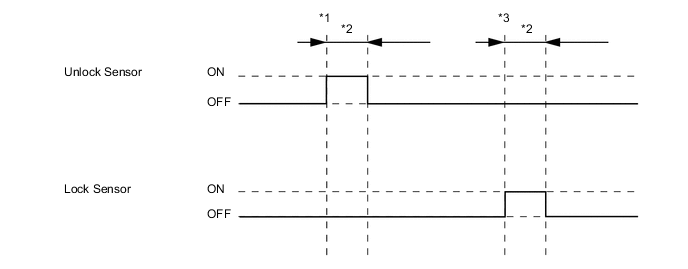
Tech Tips
-
*1: With power switch off, all doors closed, electrical key transmitter sub-assembly not inside vehicle and all doors locked, the unlock sensor of the front door outside handle assembly is touched.
-
*2: Approximately 150 ms
-
*3: With power switch off, all doors closed, electrical key transmitter sub-assembly not inside vehicle and all doors unlocked, the lock sensor of the front door outside handle assembly is touched.
Body Electrical > Main Body > Data ListTester Display Measurement Item Range Normal Condition Diagnostic Note ACC SW Power switch status ON or OFF ON: Power switch on (ACC)
OFF: Power switch off
"ON" is also displayed when the power switch is on (IG). IG SW Power switch status ON or OFF ON: Power switch on (IG)
OFF: Power switch off
"OFF" is also displayed when the power switch is on (ACC). RR Door Courtesy SW Rear door RH courtesy light switch ON or OFF ON: Rear door RH open
OFF: Rear door RH closed
- RL Door Courtesy SW Rear door LH courtesy light switch ON or OFF ON: Rear door LH open
OFF: Rear door LH closed
- Back Door Courtesy SW Back door courtesy light switch ON or OFF ON: Back door open
OFF: Back door closed
- FR Door Lock Pos Front door RH unlock detection switch signal UNLOCK or LOCK UNLOCK: Front door RH unlocked
LOCK: Front door RH locked
- FR Door Courtesy SW Front door RH courtesy light switch signal ON or OFF ON: Front door RH open
OFF: Front door RH closed
- FL Door Lock Pos Front door LH unlock detection switch signal UNLOCK or LOCK UNLOCK: Front door LH unlocked
LOCK: Front door LH locked
- FL Door Courtesy SW Front door LH courtesy light switch signal ON or OFF ON: Front door LH open
OFF: Front door LH closed
- RR-Door Lock Pos SW Rear door RH unlock detection switch signal ON or OFF ON: Rear door RH unlocked
OFF: Rear door RH locked
- RL-Door Lock Pos SW Rear door LH unlock detection switch signal ON or OFF ON: Rear door LH unlocked
OFF: Rear door LH locked
- Wireless Control Wireless door lock function ON or OFF Customize setting displayed - Hazard Answer Back Hazard answer-back of entry function ON or OFF Customize setting displayed - Open Door Warning Open door warning ON or OFF Customize setting displayed - Auto Lock Time Automatic lock time 30 s, 60 s or 120 s Customize setting displayed - Wireless Buzzer Resp Wireless buzzer answer-back of entry function ON or OFF Customize setting displayed - Wireless Buzzer Vol Wireless buzzer volume Level7, Level6, Level5, Level4, Level3, Level2, Level1 or Level0 Customize setting displayed -
Body Electrical > Power Source Control > Data ListTester Display Measurement Item Range Normal Condition Diagnostic Note Steering Unlock Switch State of parking lock motor signal output from hybrid vehicle control ECU ON or OFF ON: Parking lock unlocked
OFF: Parking lock locked
-
When the park (P) and the power switch is off, if any door is opened then closed, the parking lock is locked.
-
When the key is in the cabin and the power switch is turned on (ACC) or on (IG), the parking lock unlocks.
-
The hybrid control system cannot be started when the parking lock motor signal is OFF.
Stop Light Switch1 State of brake pedal ON or OFF ON: Brake pedal depressed
OFF: Brake pedal released
-
Use this item to determine whether the stop light switch assembly is malfunctioning.
-
The hybrid control system cannot be started when this item is OFF.
-
When stop light switch assembly is malfunctioning, the hybrid control system can be started by pressing and holding the power switch for a certain period of time.
Start Switch1 Power switch 1 status ON or OFF ON: Power switch pressed
OFF: Power switch not pressed
-
If the power switch is pressed for a short time, the display may not change.
-
Use this item to determine whether the power switch input signal is malfunctioning.
Start Switch2 Power switch 2 status ON or OFF ON: Power switch pressed
OFF: Power switch not pressed
-
Backup for "Start Switch 1". However, when the power switch is pressed and held, the control functions only when both Start Switch 1 and 2 are normal.
-
Behaves the same way as "Start Switch 1".
Vehicle Speed Signal Vehicle being driven or stopped Stop or Run Stop: Vehicle stopped
Run: Vehicle being driven at 5 km/h (3 mph) or more
- Shift P Signal Pulse P position signal status Normal1, Normal2, Normal3, Error1, Error2, Error3 or Unknown Normal1: Signal normal and park (P) state cannot be determined
Normal2: Signal normal and park (P) selected
Normal3: Signal normal and R, N, D or B selected
Error1: Signal abnormal and park (P) state cannot be determined
Error2: Signal abnormal and park (P) selected
Error3: Signal abnormal and R, N, D or B selected
Unknown: Other
- Power Supply Condition Power supply state All OFF, ACC ON, IG ON or ST ON All OFF: Power switch off
ACC ON: Power switch on (ACC)
IG ON: Power switch on (IG)
ST ON: Sending hybrid control system start request signal
-
Body Electrical > Combination Meter > Data ListTester Display Measurement Item Range Normal Condition Diagnostic Note Vehicle Speed Meter Vehicle speed Min.: 0 km/h (0 mph), Max.: 255 km/h (158 mph) Almost the same as actual vehicle speed - -
-
-
ACTIVE TEST
Tech Tips
Using the GTS to perform Active Tests allows relays, VSVs, actuators and other items to be operated without removing any parts. This non-intrusive functional inspection can be very useful because intermittent operation may be discovered before parts or wiring is disturbed. Performing Active Tests early in troubleshooting is one way to save diagnostic time. Data List information can be displayed while performing Active Tests.
-
Connect the GTS to the DLC3.
-
Turn the power switch on (IG).
-
Turn the GTS on.
-
Enter the following menus: Body Electrical / Entry&Start or Main Body / Active Test.
-
Perform Active Test according to the display on the GTS.
Body Electrical > Entry&Start > Active TestTester Display Measurement Item Control Range Diagnostic Note Overhead Tuner Power Supply ON Door control receiver OFF/ON - Power for P-Seat Sens Front door outside handle (for front passenger door) OFF/ON - Multi Channel SW Door control receiver CH1/CH2 -
Body Electrical > Main Body > Active TestTester Display Measurement Item Control Range Diagnostic Note Door Lock Door lock motor OFF/Unlock/Lock - D-Door Unlock Driver door lock motor OFF/ON - Trunk and Back-Door Open Back door lock motor OFF/ON - Wireless Buzzer Wireless door lock buzzer OFF/ON -
-