CAN COMMUNICATION SYSTEM DIAGNOSIS SYSTEM
-
CHECK FOR INSTALLED SYSTEMS (ECUS AND SENSORS) THAT USE CAN COMMUNICATION (for LHD)
-
The systems (ECUs and sensors) that use CAN communication vary depending on the vehicle and optional equipment. Check which systems (ECUs and sensors) are installed to the vehicle.
-
GTS display and installed systems
Tech Tips
The names of ECUs and sensors shown on the GTS display may differ from those shown in DTC Table by ECU.
Connected to Code ECU/Sensor Name GTS Display Applicability - CGW Central gateway ECU (network gateway ECU) - Installed on all vehicles - DLC3 DLC3 - Installed on all vehicles Bus 1 BSM Blind spot monitor sensor LH Blind Spot Monitor Master Vehicles with Blind Spot Monitor System CS Clearance warning ECU assembly Clearance Warning (Clearance Sonar) Vehicles with Simple Intelligent Parking Assist System GRS Swing grille actuator assembly Grill Shutter Vehicles with Grille Shutter System DS Driving support ECU assembly Driving Support (Cruise Control-ACC) Vehicles with Toyota Safety Sense F-CAM Forward recognition camera Front Camera Module Vehicles with Toyota Safety Sense F-MR Millimeter wave radar sensor assembly Front Radar Vehicles with Toyota Safety Sense R-CA Rear television camera assembly Parking Assist Monitor System Vehicles with Parking Assist Monitor System Bus 2 HV Hybrid vehicle control ECU Hybrid Vehicle Control2 Installed on all vehicles F-MGC Inverter with converter assembly Motor Generator Installed on all vehicles BRK Brake booster with master cylinder assembly Skid Control (ABS/VSC/TRAC) Installed on all vehicles ENG ECM ECM (Engine) Installed on all vehicles Bus 3 AV Navigation receiver assembly Display and Navigation (AVN) Vehicles with navigation receiver Radio and display receiver assembly Display and Navigation (AVN) Vehicles with radio and display Telematics transceiver DCM Vehicles with telematics transceiver Bus 4 HV Hybrid vehicle control ECU Hybrid Vehicle Control Installed on all vehicles ENG ECM ECM (Engine) Installed on all vehicles STR Steering sensor Spiral cable (Steering Angle Sensor) Installed on all vehicles EPS Power steering ECU assembly Power Steering (EPS) Installed on all vehicles BRK Brake booster with master cylinder assembly Skid Control (ABS/VSC/TRAC) Installed on all vehicles SRS Airbag ECU assembly Airbag Installed on all vehicles OCS Occupant detection ECU Occupant Detection Vehicles with Occupant Classification System Bus 5 A/C Air conditioning amplifier assembly Air Conditioning Amplifier Installed on all vehicles SMT Certification ECU (smart key ECU assembly) Certification (Smart) Installed on all vehicles MB Main body ECU (multiplex network body ECU) Main Body Installed on all vehicles HUD Combination meter mirror ECU Head Up Display Vehicles with Headup Display System MET Meter circuit plate Combination Meter Installed on all vehicles LIT No. 1 headlight ECU sub-assembly LH Headlight swivel (AFS) Installed on all vehicles
-
-
-
CHECK FOR INSTALLED SYSTEMS (ECUS AND SENSORS) THAT USE CAN COMMUNICATION (for RHD)
-
The systems (ECUs and sensors) that use CAN communication vary depending on the vehicle and optional equipment. Check which systems (ECUs and sensors) are installed to the vehicle.
-
GTS display and installed systems
Tech Tips
The names of ECUs and sensors shown on the GTS display may differ from those shown in DTC Table by ECU.
Connected to Code ECU/Sensor Name GTS Display Applicability - CGW Central gateway ECU (network gateway ECU) - Installed on all vehicles - DLC3 DLC3 - Installed on all vehicles Bus 1 BSM Blind spot monitor sensor LH Blind Spot Monitor Master Vehicles with Blind Spot Monitor System CS Clearance warning ECU assembly Clearance Warning (Clearance Sonar) Vehicles with Simple Intelligent Parking Assist System GRS Swing grille actuator assembly Grill Shutter Vehicles with Grille Shutter System DS Driving support ECU assembly Driving Support (Cruise Control-ACC) Vehicles with Toyota Safety Sense F-CAM Forward recognition camera Front Camera Module Vehicles with Toyota Safety Sense F-MR Millimeter wave radar sensor assembly Front Radar Vehicles with Toyota Safety Sense R-CA Rear television camera assembly Parking Assist Monitor System Vehicles with Parking Assist Monitor System Bus 2 HV Hybrid vehicle control ECU Hybrid Vehicle Control2 Installed on all vehicles F-MGC Inverter with converter assembly Motor Generator Installed on all vehicles BRK Brake booster with master cylinder assembly Skid Control (ABS/VSC/TRAC) Installed on all vehicles ENG ECM ECM (Engine) Installed on all vehicles Bus 3 AV Navigation receiver assembly Display and Navigation (AVN) Vehicles with navigation receiver Radio and display receiver assembly Display and Navigation (AVN) Vehicles with radio and display Bus 4 HV Hybrid vehicle control ECU Hybrid Vehicle Control Installed on all vehicles ENG ECM ECM (Engine) Installed on all vehicles STR Steering sensor Spiral cable (Steering Angle Sensor) Installed on all vehicles EPS Power steering ECU assembly Power Steering (EPS) Installed on all vehicles BRK Brake booster with master cylinder assembly Skid Control (ABS/VSC/TRAC) Installed on all vehicles SRS Airbag ECU assembly Airbag Installed on all vehicles Bus 5 A/C Air conditioning amplifier assembly Air Conditioning Amplifier Installed on all vehicles SMT Certification ECU (smart key ECU assembly) Certification (Smart) Installed on all vehicles MB Main body ECU (multiplex network body ECU) Main Body Installed on all vehicles HUD Combination meter mirror ECU Head Up Display Vehicles with Headup Display System MET Meter circuit plate Combination Meter Installed on all vehicles LIT No. 1 headlight ECU sub-assembly LH Headlight swivel (AFS) Installed on all vehicles
-
-
-
Description of "Communication Bus Check" Screen
Note
The following communication bus check screen is provided only as an example. This screen differs from the actual screen for this vehicle.
Tech Tips
The ECUs and sensors that are normally connected to the CAN communication system are displayed on the GTS.
-
Select "Communication Bus Check" on the menu screen of the GTS.
CAN Bus CheckTech Tips
If items are not selected correctly in the vehicle specification pop up screen, the name of the CAN junction connector to which the ECUs or sensors are connected may not be displayed on the "Communication Bus Check" screen.
-
Confirm that the "Communication Bus Check" screen is displayed and the ECUs and sensors that are normally connected to the CAN communication system are displayed.
Tech Tips
-
Even if an ECU or sensor that is connected to a bus that is monitored by a bus monitoring ECU (gateway function equipped ECU) is not communicating, it will remain displayed on the "Communication Bus Check" screen.
-
When an ECU or sensor that is connected to a bus that is not monitored by a bus monitoring ECU (gateway function equipped ECU) is not displayed on the "Communication Bus Check" screen, it means that it is not communicating.
-
-
The default display setting selected on the combo box is ALL. When checking for ECUs or sensors for a specific bus, choose the bus from the drop down list. ALL, each bus, each sub bus and Central Gateway are listed in the drop down list.
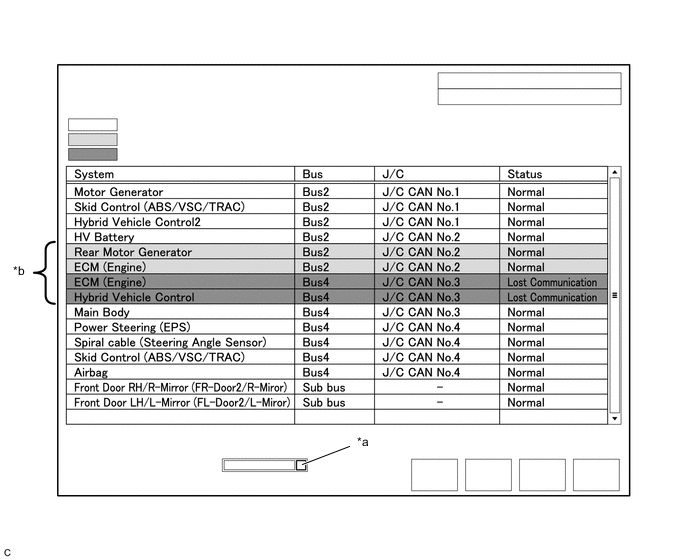
*a Combo box *b Background color is red or yellow Item Detail Combo box: ALL Displays all ECUs and sensors connected to the central bus and sub buses. Combo box: Bus Displays ECUs and sensors connected to the selected bus. Combo box: Sub bus Displays ECUs and sensors connected to the selected sub bus. Combo box: Central Gateway Displays all ECUs and sensors connected to the central bus. Note
-
When using the combo box, it may be possible to select a sub bus from the drop down list that does not have any connected ECUs or sensors. This is not a malfunction and occurs when there is no optional device connected to a sub bus which is monitored by a sub bus monitoring ECU (gateway function equipped ECU).
-
In the drop down list, all sub buses applicable to the model are displayed (e.g. LIN communication sub buses are also displayed). For information on sub buses necessary to diagnose the CAN communication system, refer to System Diagram.
Tech Tips
The background color of an ECU or sensor changes according to its connection status as indicated in the following table.
Description of "Communication Bus Check" Screen Bus Type Background Color Connection Status Bus White Communication has been normal. Yellow Communication stop occurred at least once since the start of the CAN bus check, but communication is currently occurring (unstable communication). Red Currently not communicating (either of the following):
-
Not communicating since the start of the CAN bus check
-
Communication occurred at least once since the start of the CAN bus check, but is currently not occurring.
Not displayed Either of the following:
-
The central gateway ECU (network gateway ECU) has an internal malfunction or cannot communicate with the GTS.*4
-
No ECUs or sensors are connected to the bus.*5
Sub bus with a gateway function equipped ECU that does not memorize connected ECUs or sensors*2 White Communication has been normal since the start of the CAN bus check. Yellow Communication stop occurred at least once since the start of the CAN bus check, but communication is currently occurring (unstable communication). Red Communication occurred at least once since the start of the CAN bus check, but is currently not occurring. Not displayed Communication stop has continued since the start of the CAN bus check.*1 Sub bus with a gateway function equipped ECU that memorizes connected ECUs and sensors*3 White Communication has been normal. Yellow Communication stop occurred at least once since the start of the CAN bus check, but communication is currently occurring (unstable communication). Red Currently not communicating (either of the following):
-
Not communicating since the start of the CAN bus check
-
Communication occurred at least once since the start of the CAN bus check, but is currently not occurring.
Not displayed Either of the following:
-
The gateway function equipped ECU cannot communicate with the central gateway ECU.*6
-
No ECUs or sensors are connected to the sub bus.*7
-
Gateway function equipped ECUs relay signals between ECUs and sensors connected to different buses.
-
*1: An ECU or sensor is installed to the vehicle but is not displayed on the "Communication Bus Check" screen.
-
*2: The gateway function equipped ECU does not memorize ECUs and sensors connected to its respective sub bus.
-
*3: The gateway function equipped ECU memorizes ECUs and sensors connected to its respective sub bus.
-
*4: When the central gateway ECU (network gateway ECU) has an internal malfunction or cannot communicate with the GTS, the name of buses, sub buses, ECUs and sensors will not be displayed.
-
*5: When no ECUs or sensors are connected to a bus, the message "There is no system found on the communication Bus." will be displayed.
-
*6: When a gateway function equipped ECU cannot communicate with the central gateway ECU (network gateway ECU), the name of sub buses and ECUs or sensors connected to the sub bus will not be displayed.
-
*7: When no ECUs or sensors are connected to the sub bus, the message "There is no system found on the communication Bus." will be displayed.
-
If there is no communication between the GTS and the vehicle, or no ECUs or sensors are displayed as connected, check the central gateway ECU (network gateway ECU) and diagnosis bus (the bus that connects the DLC3 to the central gateway ECU (network gateway ECU)) for malfunctions.
-
-
Monitor the screen for any ECU or sensor connection status changes for a period of 2 minutes.
Tech Tips
-
If an open occurs in one of the wires of a CAN branch line, it may interfere with the communication of other ECUs or sensors resulting in an incorrect state being displayed.
-
If the connection status changes intermittently during the inspection, repair the open in the branch line of the ECU or sensor that is not communicating, and then perform Communication Bus Check again.
-
-
-
Description of "Communication Bus Check (Detail)" Screen
Note
The following communication bus check screen is provided only as an example. This screen differs from the actual screen for this vehicle.
Tech Tips
The communication error history of ECUs or sensors which have communication error history can be displayed on the "Communication Bus Check (Detail)" screen.
-
Select "Communication Bus Check" on the menu screen of the GTS.
CAN Bus CheckTech Tips
If items are not selected correctly in the vehicle specification pop up screen, the name of the CAN junction connector to which the ECUs or sensors are connected may not be displayed on the "Communication Bus Check" screen.
-
Select "Detail" on the "Communication Bus Check" screen.
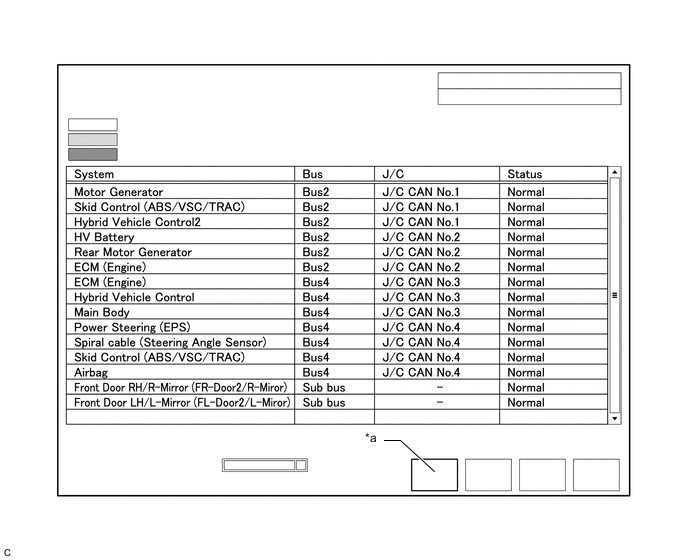
*a Communication Bus Check (Detail) - - -
Confirm that the "Communication Bus Check (Detail)" screen is displayed and the communication error history of the ECUs or sensors up to present is displayed.
Tech Tips
-
Lost Communication Time and Lost Communication Trip are only displayed for the central bus.
-
Lost Communication Time and Lost Communication Trip are not displayed for sub buses.
-
-
The default display setting selected on the combo box is ALL. When checking for ECUs or sensors for a specific bus, choose the bus from the drop down list. ALL, each bus, each sub bus and Central Gateway are listed in the drop down list.
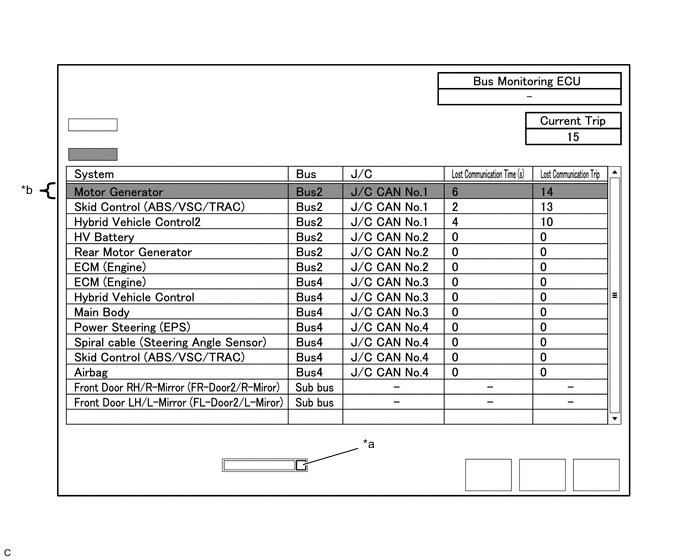
*a Combo box *b Background color is red Item Detail Combo box: ALL Displays all ECUs and sensors connected to the central bus and sub buses. Combo box: Bus Displays ECUs and sensors connected to the selected bus. Combo box: Sub bus Displays ECUs and sensors connected to the selected sub bus. Combo box: Central Gateway Displays all ECUs and sensors connected to the central bus. Bus Monitoring ECU Displays the gateway function equipped ECU which monitors the selected bus or sub bus. Current Trip Displays the total number of trips up to now* Lost Communication Time(s) Displays the longest period of time in seconds that the ECU or sensor connected to the central bus was not communicating. Lost Communication Trip Displays the trip in which the longest period of time that the ECU or sensor connected to the central bus was not communicating occurred.
-
*: If the component has been replaced with a new one, the total number of trips after the replacement is displayed.
Note
-
The Lost Communication Time column displays the longest period of time in seconds that the central gateway ECU (network gateway ECU) detected a communication stop in the respective ECU or sensor.
-
The Lost Communication Trip column displays the trip in which the central gateway ECU (network gateway ECU) detected the longest communication stop in the respective ECU or sensor.
-
When using the combo box, it may be possible to select a sub bus from the drop down list that does not have any connected ECUs or sensors. This is not a malfunction and occurs when there is no optional device connected to a sub bus which is monitored by a sub bus monitoring ECU (gateway function equipped ECU).
-
In the drop down list, all sub buses applicable to the model are displayed (e.g. LIN communication sub buses are also displayed). For information on sub buses necessary to diagnose CAN communication system, refer to the System Diagram.
Tech Tips
The background color of an ECU or sensor changes according to its connection status as indicated in the following table.
Description of "Communication Bus Check (Detail)" Screen Bus Type Background Color Connection Status Bus White Either of the following:
-
Communication has been normal.
-
Lost Communication Time is below 6 seconds.
Red Lost Communication Time is 6 seconds or more. Not displayed Either of the following:
-
The central gateway ECU (network gateway ECU) has an internal malfunction or cannot communicate with the GTS.*1
-
No ECUs or sensors are connected to the bus.*2
Sub bus White Lost Communication Time is displayed as "-". Not displayed Either of the following:
-
The gateway function equipped ECU cannot communicate with the central gateway ECU.*3
-
No ECUs or sensors are connected to the sub bus.*4
-
If there is no communication between the GTS and the vehicle, or no ECUs or sensors are displayed as connected, check the central gateway ECU (network gateway ECU) and diagnosis bus (the bus that connects the DLC3 to the central gateway ECU (network gateway ECU)) for malfunctions.
-
Lost Communication Time and Lost Communication Trip are not displayed for sub buses.
-
*1: When the central gateway ECU (network gateway ECU) has an internal malfunction or cannot communicate with the GTS, the name of buses, sub buses, ECUs and sensors will not be displayed.
-
*2: When no ECUs or sensors are connected to a bus, the message "There is no system found on the communication Bus." will be displayed.
-
*3: When a gateway function equipped ECU cannot communicate with the central gateway ECU (network gateway ECU), the name of sub buses and ECUs or sensors connected to the sub bus will not be displayed.
-
*4: When no ECUs or sensors are connected to the sub bus, the message "There is no system found on the communication Bus." will be displayed.
-
-
-
Communication Bus Check (Communication Malfunction Check)
Tech Tips
DTCs related to CAN communication are displayed for each ECU on the GTS.
-
Select "Communication Bus Check" on the menu screen of the GTS.
CAN Bus Check -
Select "Communication Malfunction Check" on the "Communication Bus Check" screen.
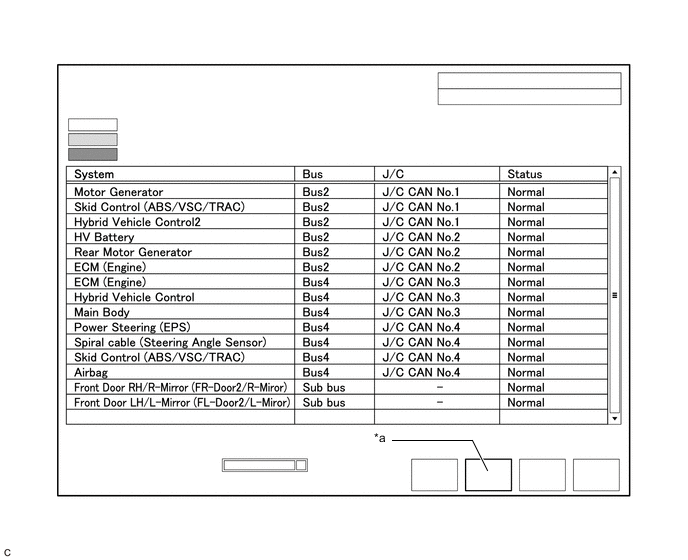
*a Communication Malfunction Check - - -
Confirm that the "Communication Malfunction Check" screen is displayed and CAN communication DTCs for each ECU are displayed.
Tech Tips
When there are no CAN communication DTCs stored, no DTCs will be displayed.
-
-
How to Use "Communication Bus Check" Screen in Inspection
Note
The following CAN bus wiring diagram or communication bus check screen is provided only as an example. This wiring diagram or screen differs from the actual one for this vehicle.
Tech Tips
-
If the CAN communication system is currently malfunctioning, it is recommended to use Communication Bus Check rather than Communication DTCs for determining the suspected area.
-
Turn the power switch on (IG), or perform the necessary operations to reproduce the problem symptom, select "Communication Bus Check" and wait approximately 2 minutes. Check the communication status of each ECU or sensor on the screen while performing this operation.
-
If the CAN communication system is currently malfunctioning, determine the suspected area through Communication Bus Check as follows:
Problem Symptoms Table Problem Symptom Pattern Display on Communication Bus Check Screen Suspected Area A Almost all of the ECUs and sensors connected to the malfunctioning CAN bus are displayed as not communicating on the "Communication Bus Check" screen.
-
Short between CAN bus lines (CANH and CANL)
-
Short to +B in a CAN bus line (CANH or CANL)
-
Short to ground in a CAN bus line (CANH or CANL)
B ECUs or sensors farther from the central gateway ECU (network gateway ECU) than the open in the wires are displayed as not communicating on the "Communication Bus Check" screen. Open in both wires of a main bus line in the central bus C One ECU or sensor is displayed as not communicating on the "Communication Bus Check" screen.
-
Open in both wires of a branch line connected to an ECU or sensor in the central bus
-
Internal malfunction of an ECU or sensor in the central bus
-
Malfunction in the power supplied to an ECU or sensor in the central bus
D No ECUs or sensors are displayed on the "Communication Bus Check" screen.
-
Internal malfunction of the central gateway ECU (network gateway ECU)
-
Malfunction in the power supplied to the central gateway ECU (network gateway ECU)
-
Open in both wires of the branch line in the diagnosis bus (DLC3 - Central gateway ECU (network gateway ECU))
-
Short between CAN bus lines (CANH and CANL) in the diagnosis bus (DLC3 - Central gateway ECU (network gateway ECU))
-
Short to +B in a CAN bus line (CANH or CANL) in the diagnosis bus (DLC3 - Central gateway ECU (network gateway ECU))
-
Short to ground in a CAN bus line (CANH or CANL) in the diagnosis bus (DLC3 - Central gateway ECU (network gateway ECU))
E One ECU or sensor is displayed as not communicating in multiple buses on the "Communication Bus Check" screen.
-
Internal malfunction of an ECU or sensor connected to multiple buses
-
Malfunction in the power supplied to an ECU or sensor connected to multiple buses
F Some ECUs or sensors are displayed as not communicating in the central bus and other ECUs or sensors are displayed as not communicating in a sub bus.
-
Open in a wire of a branch line connected to an ECU or sensor in the central bus
-
Internal malfunction of an ECU or sensor in the central bus
G A gateway function equipped ECU is displayed as not communicating in the central bus and ECUs and sensors connected to its respective sub bus are not displayed.
-
Open in both wires of a branch line connected to a gateway function equipped ECU
-
Internal malfunction of a gateway function equipped ECU
-
Malfunction in the power supplied to a gateway function equipped ECU
H One ECU or sensor is displayed as not communicating in a sub bus on the "Communication Bus Check" screen.
-
Open in both wires of a branch line connected to an ECU or sensor in a sub bus
-
Internal malfunction of an ECU or sensor in a sub bus
-
Malfunction in the power supplied to an ECU or sensor in a sub bus
I ECUs or sensors farther from the sub bus monitoring ECU (gateway function equipped ECU) than the open in the wires are displayed as not communicating on the "Communication Bus Check" screen. Open in both wires of a main bus line in a sub bus -
-
Problem Symptom Pattern A
Details of Malfunction
-
Short between CAN bus lines (CANH and CANL) in Bus 2
-
Short to +B in a CAN bus line (CANH or CANL) in Bus 2
-
Short to ground in a CAN bus line (CANH or CANL) in Bus 2
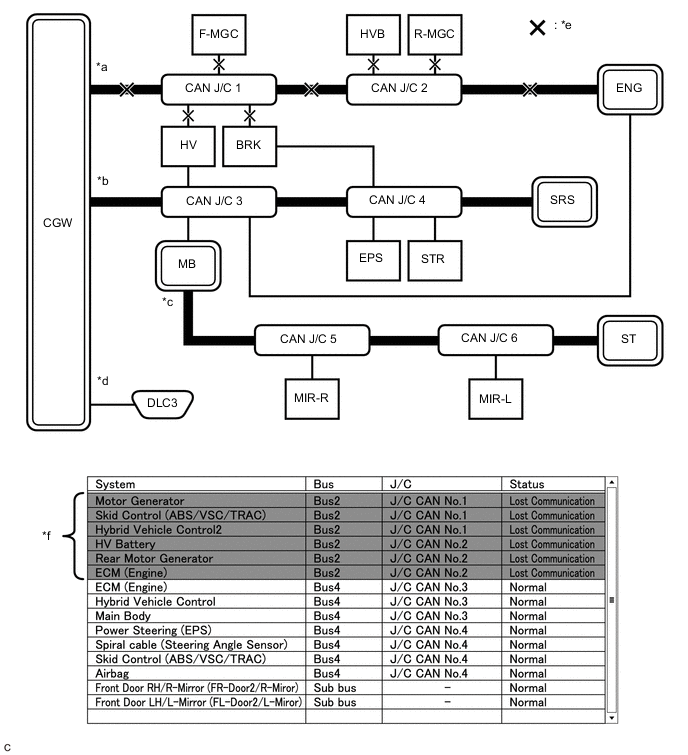
*a Bus 2 *b Bus 4 *c Sub bus *d Diagnosis bus *e Location of malfunction *f Background color is red Tech Tips
-
Due to the malfunction, almost all of the ECUs and sensors connected to Bus 2 will be displayed as not communicating and their background color will be red.
-
The malfunction in Bus 2 will not affect the other buses.
-
The malfunctioning part can be determined by inspecting for an open in the main bus line, a short between bus lines or a short to +B or ground.
-
Make sure to perform the inspection to measure resistances of buses to determine the cause of the malfunction.
Details of Malfunction
-
Short between CAN bus lines (CANH and CANL) in Bus 4
-
Short to +B in a CAN bus line (CANH or CANL) in Bus 4
-
Short to ground in a CAN bus line (CANH or CANL) in Bus 4
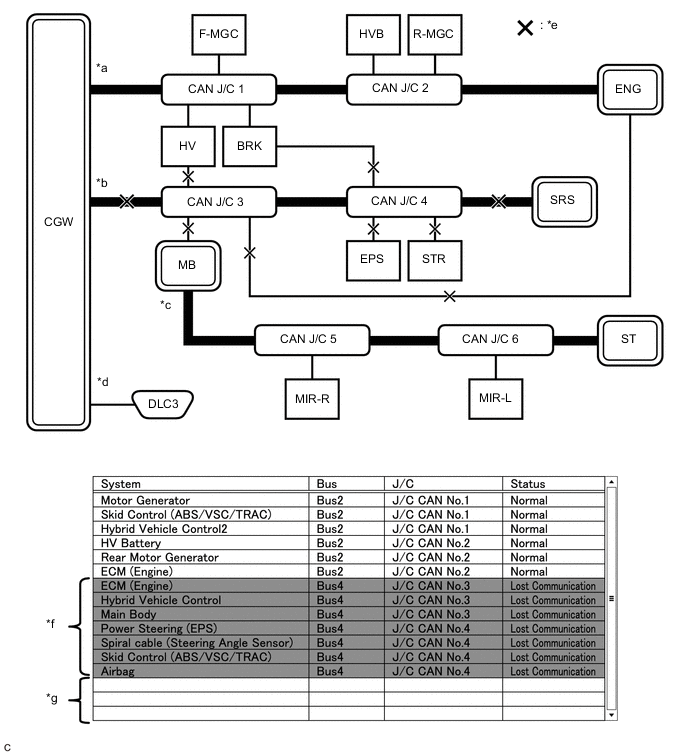
*a Bus 2 *b Bus 4 *c Sub bus *d Diagnosis bus *e Location of malfunction *f Background color is red *g Not displayed - - Tech Tips
-
Due to the malfunction, almost all of the ECUs and sensors connected to Bus 4 will be displayed as not communicating and their background color will be red.
-
The malfunction will not affect the other buses of the central bus. However, the sub bus connected to Bus 4 is likely to be affected. The gateway function equipped ECU connected to Bus 4 will not communicate and consequently the sub bus and its respective ECUs or sensors monitored by the gateway function equipped ECU (sub bus monitoring ECU) will not be displayed, indicating that the gateway function equipped ECU is not communicating with the central gateway ECU (network gateway ECU).
-
The malfunctioning part can be determined by inspecting for an open in the main bus line, a short between bus lines or a short to +B or ground.
-
Make sure to perform the inspection to measure resistances of buses to determine the cause of the malfunction.
-
-
Problem Symptom Pattern B
Details of Malfunction Open in both wires of the main bus line between the CGW and No. 1 CAN junction connector in Bus 2 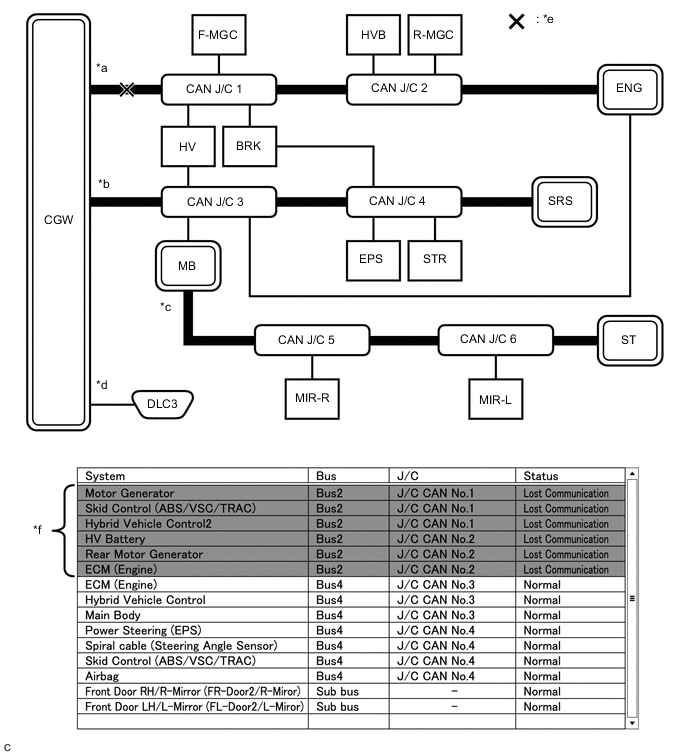
*a Bus 2 *b Bus 4 *c Sub bus *d Diagnosis bus *e Location of malfunction *f Background color is red Tech Tips
-
Due to the malfunction, almost all of the ECUs and sensors connected to Bus 2 will be displayed as not communicating and their background color will be red.
-
The malfunction in Bus 2 will not affect the other buses.
-
The malfunctioning part can be determined by inspecting for an open in the main bus line.
-
Make sure to perform the inspection to measure resistances of buses to determine the cause of the malfunction.
Details of Malfunction Open in both wires of the main bus line between the No. 1 CAN junction connector and No. 2 CAN junction connector in Bus 2 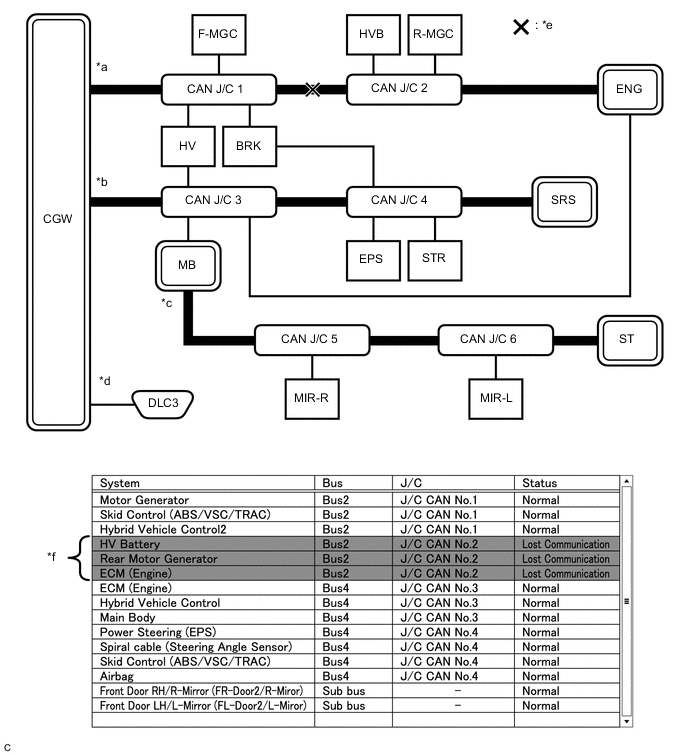
*a Bus 2 *b Bus 4 *c Sub bus *d Diagnosis bus *e Location of malfunction *f Background color is red Tech Tips
-
Due to the malfunction, ECUs or sensors farther from the CGW than the open in the wires will be displayed as not communicating and their background color will be red.
-
The malfunction in Bus 2 will not affect the other buses.
-
The malfunctioning part can be determined by inspecting for an open in the main bus line.
-
Make sure to perform the inspection to measure resistances of buses to determine the cause of the malfunction.
Details of Malfunction Open in both wires of the main bus line between the No. 2 CAN junction connector and ENG in Bus 2 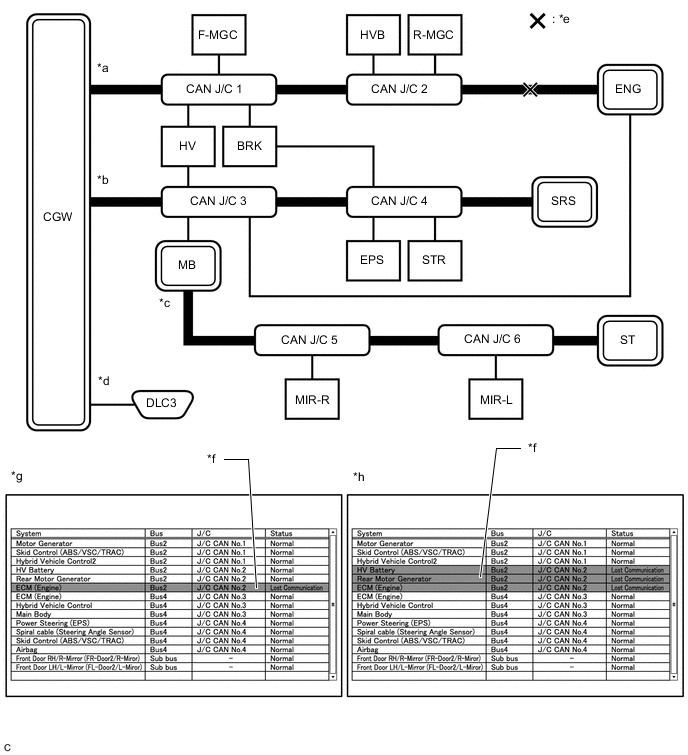
*a Bus 2 *b Bus 4 *c Sub bus *d Diagnosis bus *e Location of malfunction *f Background color is red *g Pattern 1 *h Pattern 2 Tech Tips
-
Even when the same part of the main bus line is open, depending on internal electrical noise which changes according to the position of the open in the line, the information displayed on the "Communication Bus Check" screen may differ.
-
In pattern 2, the information displayed may be the same as when there is an open in both wires in the main bus line between the No. 1 CAN junction connector and No. 2 CAN junction connector, which may make it difficult to determine the malfunctioning part.
-
The malfunction in Bus 2 will not affect the other buses.
-
Make sure to perform the inspection to measure resistances of buses to determine the cause of the malfunction.
-
-
Problem Symptom Pattern C
Details of Malfunction Open in both wires of the branch line connected to F-MGC in Bus 2 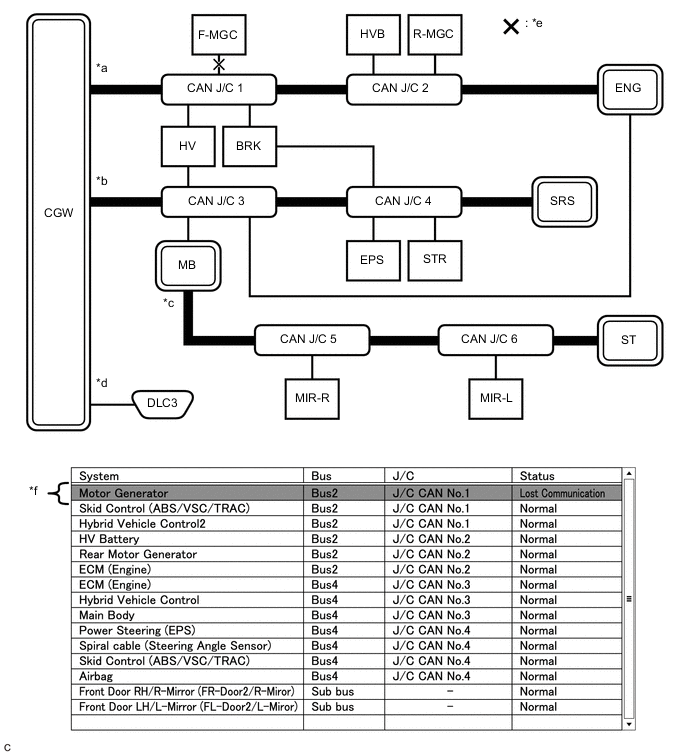
*a Bus 2 *b Bus 4 *c Sub bus *d Diagnosis bus *e Location of malfunction *f Background color is red Tech Tips
The information displayed on the "Communication Bus Check" screen will be the same for an open in both wires of a branch line, an internal malfunction of an ECU or sensor or a malfunction in the power supplied to an ECU or sensor. In this example, the background color of the malfunctioning ECU or sensor will be red.
Details of Malfunction
-
Internal malfunction of F-MGC in Bus 2
-
Malfunction in the power supplied to F-MGC in Bus 2
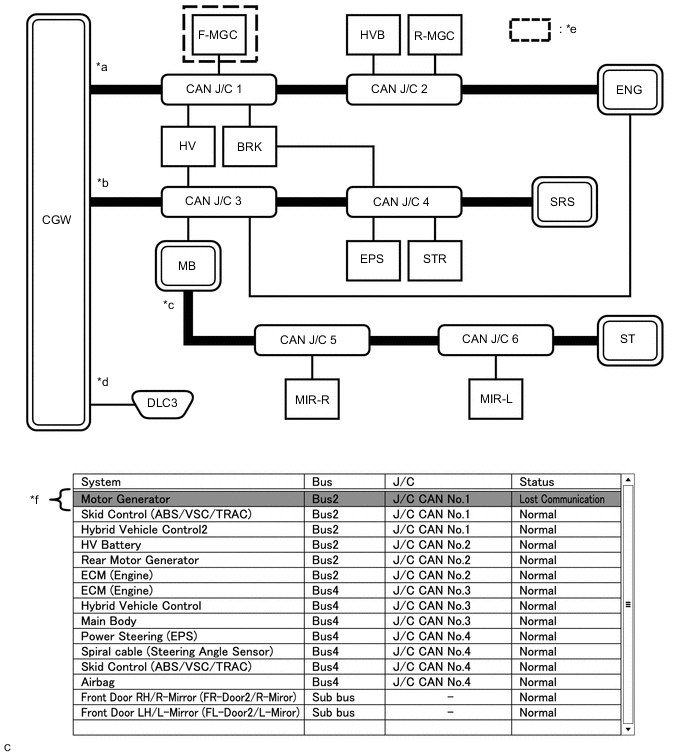
*a Bus 2 *b Bus 4 *c Sub bus *d Diagnosis bus *e Location of malfunction *f Background color is red Tech Tips
The information displayed on the "Communication Bus Check" screen will be the same for an open in both wires of a branch line, an internal malfunction of an ECU or sensor or a malfunction in the power supplied to an ECU or sensor. In this example, the background color of the malfunctioning ECU or sensor will be red.
Details of Malfunction Open in both wires of the branch line connected to ENG in Bus 4 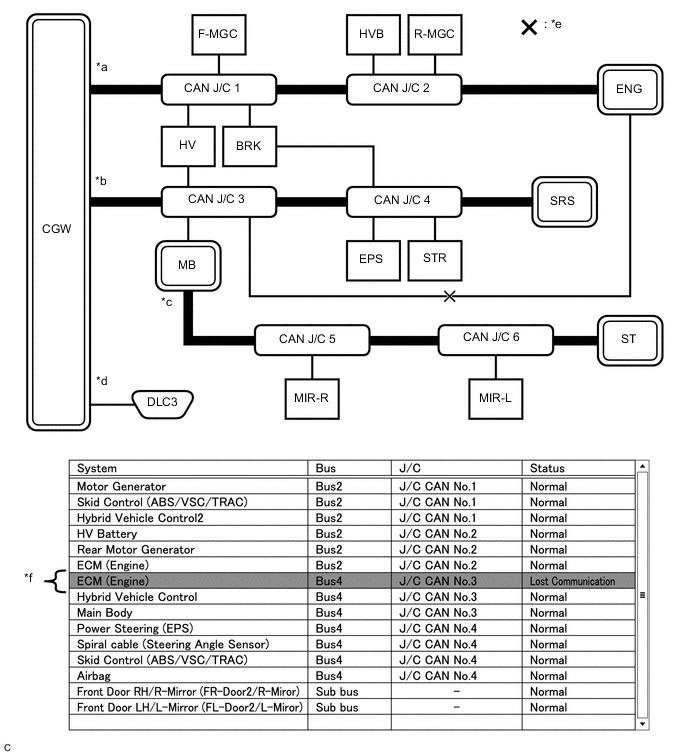
*a Bus 2 *b Bus 4 *c Sub bus *d Diagnosis bus *e Location of malfunction *f Background color is red Tech Tips
-
The malfunction in Bus 4 will not affect the other buses.
-
Due to the malfunction, although ENG is communicating normally with CGW via Bus 2, it is not communicating with CGW via Bus 4. Consequently, it will be displayed as not communicating in Bus 4.
-
-
Problem Symptom Pattern D
Details of Malfunction
-
Internal malfunction of the CGW
-
Malfunction in the power supplied to the CGW
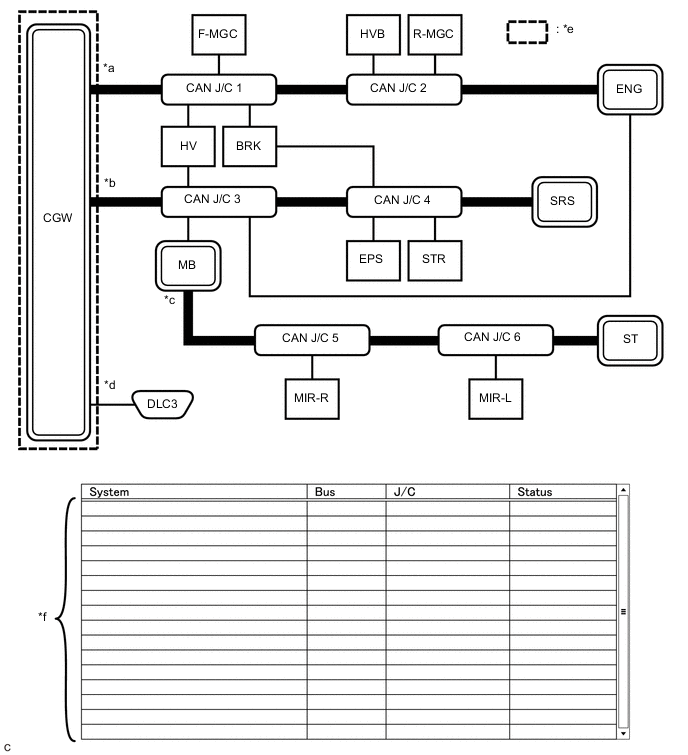
*a Bus 2 *b Bus 4 *c Sub bus *d Diagnosis bus *e Location of malfunction *f Not displayed Tech Tips
When there is no communication between the GTS and the vehicle, no ECUs or sensors will be displayed.
Details of Malfunction Open in both wires of the branch lines in the diagnosis bus 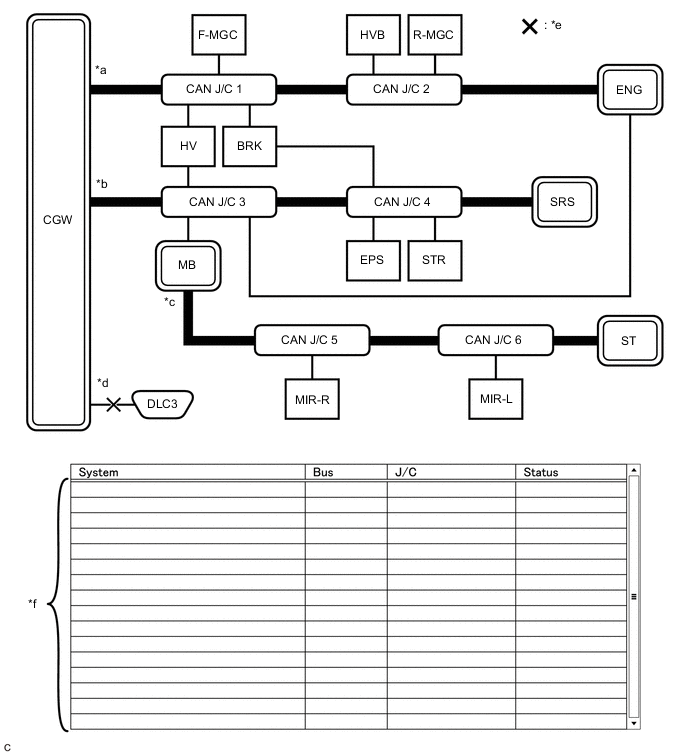
*a Bus 2 *b Bus 4 *c Sub bus *d Diagnosis bus *e Location of malfunction *f Not displayed Tech Tips
When there is no communication between the GTS and the vehicle, no ECUs or sensors will be displayed.
-
-
Problem Symptom Pattern E
Details of Malfunction
-
Internal malfunction of BRK
-
Malfunction in the power supplied to BRK
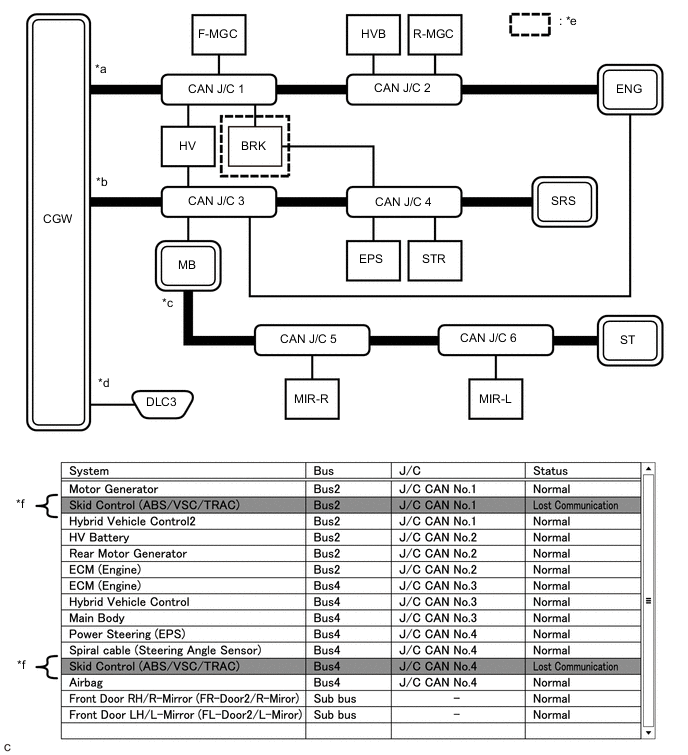
*a Bus 2 *b Bus 4 *c Sub bus *d Diagnosis bus *e Location of malfunction *f Background color is red Tech Tips
The information displayed on the "Communication Bus Check" screen will be the same for an internal malfunction of an ECU or sensor, or a malfunction in the power supplied to an ECU or sensor.
Due to the malfunction, BRK is not communicating with the CGW via both Bus 2 and Bus 4. Consequently, the background color of BRK will be red for both Bus 2 and Bus 4.
-
-
Problem Symptom Pattern F
Details of Malfunction
-
Open in a wire of the branch line connected to HV in Bus 4
-
Internal malfunction of HV in Bus 4
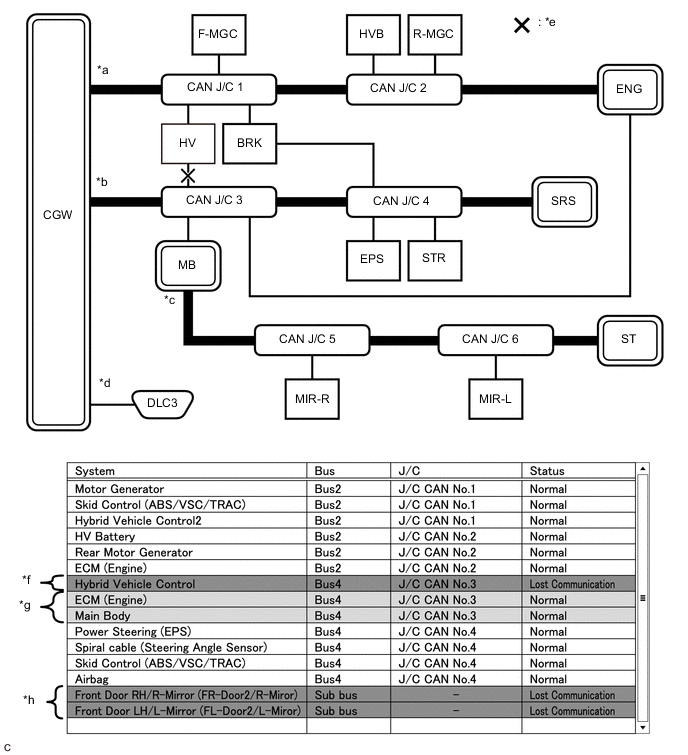
*a Bus 2 *b Bus 4 *c Sub bus *d Diagnosis bus *e Location of malfunction *f Background color is red *g Background color intermittently becomes yellow or red *h Not displayed or background color is yellow or red Tech Tips
-
In the "Communication Bus check" screen shown in the illustration, electrical noise in the CAN bus caused by an open in a wire in the branch line connected to HV interferes with the communication of MB causing unstable communication. Also, since MB is a gateway function equipped ECU, communication of ECUs connected to its respective sub bus will also be unstable.
-
In the "Communication Bus Check" screen shown in the illustration, because the background color of HV is red, it is suspected that HV is the most likely cause of the malfunction. Therefore, it is suspected that HV is not communicating.
-
-
Problem Symptom Pattern G
Details of Malfunction
-
Open in both wires of the branch line connected to MB in Bus 4
-
Internal malfunction of MB in Bus 4
-
Malfunction in the power supplied to MB in Bus 4
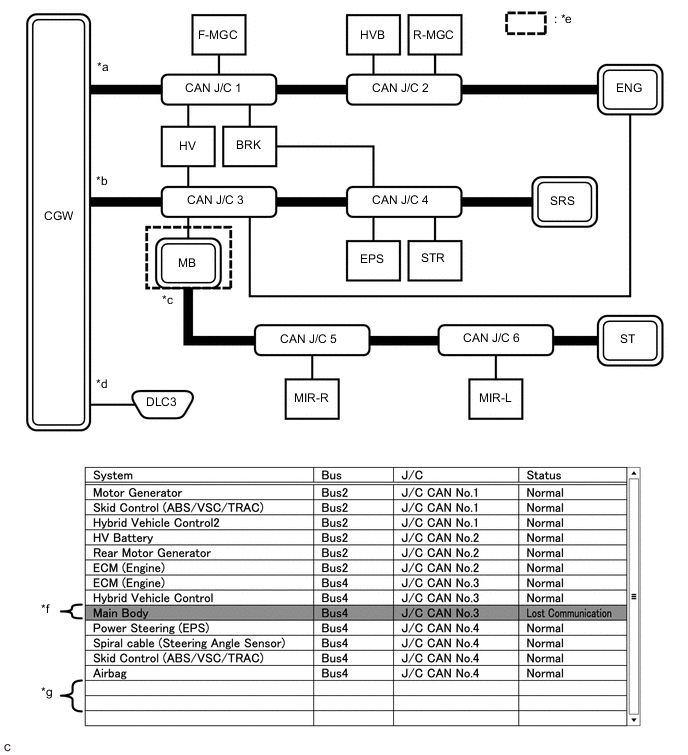
*a Bus 2 *b Bus 4 *c Sub bus *d Diagnosis bus *e Location of malfunction *f Background color is red *g Not displayed - - Tech Tips
-
If there is a communication malfunction in a gateway function equipped ECU, ECUs connected to its respective sub bus will also be affected and will not be displayed.
-
In the "Communication Bus Check" screen shown in the illustration, MB is a gateway function equipped ECU. Therefore, MB is suspected as not communicating.
-
-
Problem Symptoms Pattern H
Details of Malfunction
-
Internal malfunction of MIR-L in the sub bus
-
Malfunction in the power supplied to MIR-L in the sub bus
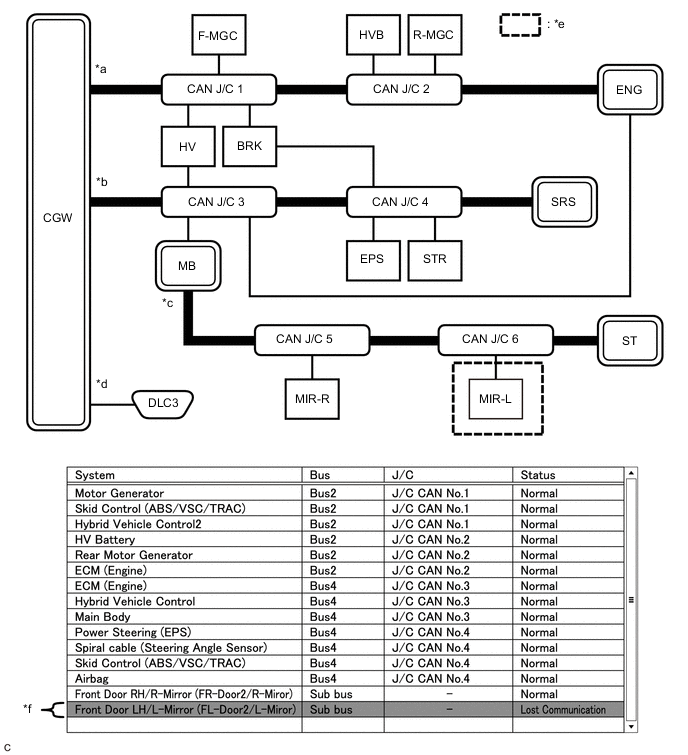
*a Bus 2 *b Bus 4 *c Sub bus *d Diagnosis bus *e Location of malfunction *f Background color is red Tech Tips
-
The malfunction in the sub bus will not affect the other buses.
-
When a gateway function equipped ECU memorizes ECUs and sensors connected to its respective sub bus and there is a communication malfunction in one of the ECUs or sensors, the background color of the ECU or sensor will change to red and the ECU or sensor will remain displayed.
-
The information displayed on the "Communication Bus Check" screen will be the same for an open in both wires of a branch line, an internal malfunction of an ECU or sensor or a malfunction in the power supplied to an ECU or sensor.
Details of Malfunction Open in both wires of the branch line connected to MIR-L in the sub bus 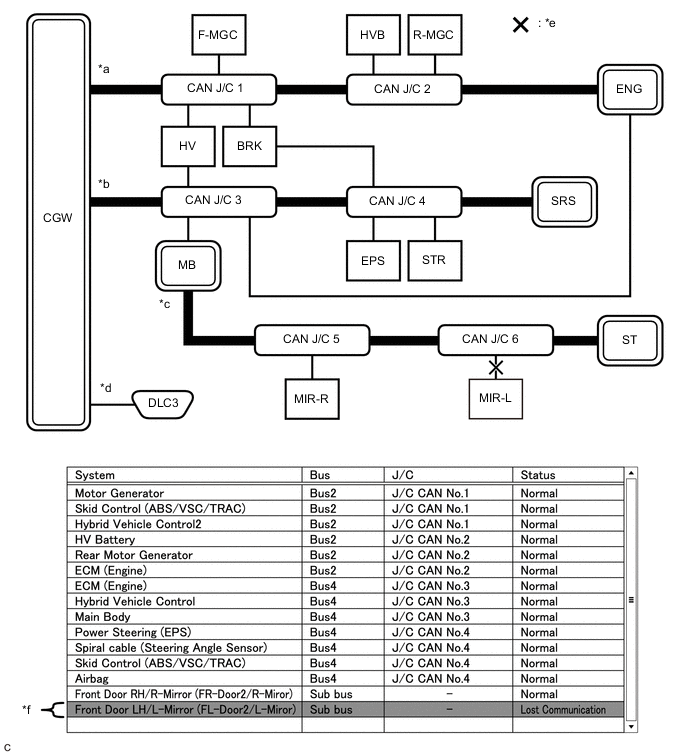
*a Bus 2 *b Bus 4 *c Sub bus *d Diagnosis bus *e Location of malfunction *f Background color is red Tech Tips
-
The malfunction in the sub bus will not affect the other buses.
-
When a gateway function equipped ECU memorizes ECUs and sensors connected to its respective sub bus and there is a communication malfunction in one of the ECUs or sensors, the background color of the ECU or sensor will change to red and the ECU or sensor will remain displayed.
-
The information displayed on the "Communication Bus Check" screen will be the same for an open in both wires of a branch line, an internal malfunction of an ECU or sensor or a malfunction in the power supplied to an ECU or sensor.
-
-
Problem Symptom Pattern I
Details of Malfunction Open in both wires of the main bus line in the sub bus 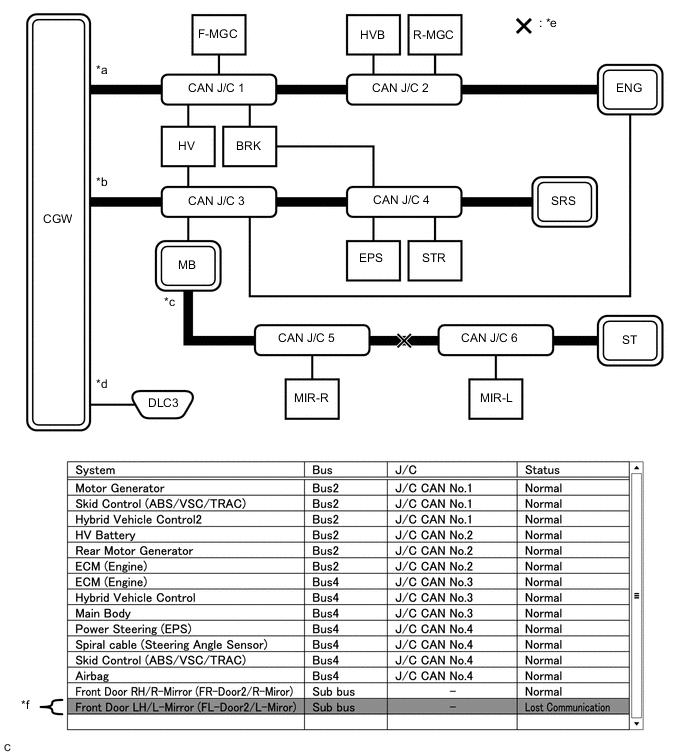
*a Bus 2 *b Bus 4 *c Sub bus *d Diagnosis bus *e Location of malfunction *f Background color is red Tech Tips
Due to the malfunction, ECUs or sensors farther from the sub bus monitoring ECU (gateway function equipped ECU) than the open in the wires will be displayed as not communicating and their background color will be red.
-
-
How to Use "Communication Bus check (Detail)" Screen in Inspection
-
If the CAN communication system is currently normal but has communication stop history, determine the malfunctioning part using Communication Bus Check (Detail) as follows:
Note
-
The following CAN bus wiring diagram or communication bus check screen is provided only as an example. This wiring diagram or screen differs from the actual one for this vehicle.
-
The Lost Communication Time column displays the longest period of time in seconds that the central gateway ECU (network gateway ECU) detected a communication stop in the respective ECU or sensor.
-
The Lost Communication Trip column displays the trip in which the central gateway ECU (network gateway ECU) detected the longest communication stop in the respective ECU or sensor.
-
When using the combo box, it may be possible to select a sub bus from the drop down list that does not have any connected ECUs or sensors. This is not a malfunction and occurs when there is no optional device connected to a sub bus which is monitored by a sub bus monitoring ECU (gateway function equipped ECU).
-
In the drop down list, all sub buses applicable to the model are displayed (e.g. LIN communication sub buses are also displayed). For information on sub buses necessary to diagnose CAN communication system, refer to the System Diagram.
Tech Tips
-
If the CAN communication system is currently malfunctioning, it is recommended to use Communication Bus Check rather than Communication Bus Check (Detail) for determining the suspected area.
-
The communication error history of ECUs or sensors which have communication error history can be displayed on the "Communication Bus Check (Detail)" screen.
-
Lost Communication Time and Lost Communication Trip are only displayed for the central bus.
-
Lost Communication Time and Lost Communication Trip are not displayed for sub buses.
-
-
If there is an ECU or sensor displayed with a red background on the "Communication Bus Check (Detail)" screen to indicate that it was not communicating, it is suspected that the ECU or sensor was not communicating.
Details of Malfunction Past malfunction in the wire harness or power supplied to F-MGC in Bus 2 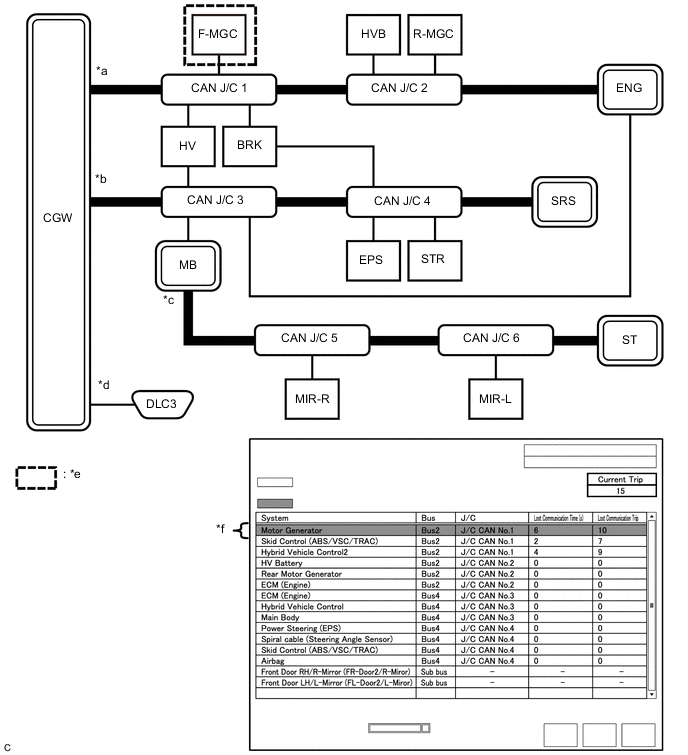
*a Bus 2 *b Bus 4 *c Sub bus *d Diagnosis bus *e Location of malfunction *f Background color is red Description of "Communication Bus Check (Detail)" Screen Bus Type Background Color Connection Status Bus White Either of the following:
-
Communication has been normal.
-
Lost Communication Time is below 6 seconds.
Red Lost Communication Time is 6 seconds or more. Not displayed Either of the following:
-
The central gateway ECU (network gateway ECU) has an internal malfunction or cannot communicate with the GTS.*1
-
No ECUs or sensors are connected to the bus.*2
Sub bus White Lost Communication Time is displayed as "-". Not displayed Either of the following:
-
The gateway function equipped ECU cannot communicate with the central gateway ECU.*3
-
No ECUs or sensors are connected to the sub bus.*4
Tech Tips
-
Check the values of Lost Communication Trip and Current Trip for the ECUs or sensors that have a red background color.
-
If the values of Lost Communication Trip and Current Trip are the same for an ECU or sensor, the ECU or sensor is currently not communicating. In this case, it is recommended to use Communication Bus Check rather than Communication Bus Check (Detail) for determining the suspected area.
-
In the "Communication Bus Check (Detail)" screen shown in the illustration, F-MGC had a communication malfunction in the 10th trip. Thus, it is suspected that F-MGC was not communicating.
-
*1: When the central gateway ECU (network gateway ECU) has an internal malfunction or cannot communicate with the GTS, the name of buses, sub buses, ECUs and sensors will not be displayed.
-
*2: When no ECUs or sensors are connected to a bus, the message "There is no system found on the communication Bus." will be displayed.
-
*3: When a gateway function equipped ECU cannot communicate with the central gateway ECU (network gateway ECU), the name of sub buses and ECUs or sensors connected to the sub bus will not be displayed.
-
*4: When no ECUs or sensors are connected to the sub bus, the message "There is no system found on the communication Bus." will be displayed.
-
-
-
DTC TABLE BY ECU
Tech Tips
-
In the CAN communication system, the CAN communication DTCs of each ECU can be displayed using the GTS.
-
If CAN communication system DTCs are output, the malfunction cannot be determined only by the DTCs. Perform troubleshooting according to How to Proceed with Troubleshooting.
-
If there is a malfunction currently, DTCs can be checked by performing steps in the DTC check procedure.
-
Hybrid Vehicle Control ECU / GTS Display "Hybrid Control"
Powertrain > Hybrid Control > Trouble CodesTech Tips
-
This ECU uses the CAN communication system for DTC communication.
-
*1: Refer to Hybrid Control System
-
*2: w/ Speed Limiter System
-
*3: Although it is displayed as a communication malfunction on the GTS, the DTC is stored when there is an internal malfunction of the air conditioning amplifier assembly.
Refer to Hybrid Control System:
DTC Detection Item DTC Detection Condition DTC Detection Pre-condition DTC Check Procedure Warning Displayed DTC Storage Method Indication in Meter Multi-information Display U010087 Lost Communication with ECM/PCM "A" Missing Message The hybrid vehicle control ECU does not receive data from the ECM for approximately 1 second or more. Both conditions are met:
-
The power switch is on (IG) for approximately 1 second or more.
-
The power source voltage of the hybrid vehicle control ECU is 9.5 V or more.
Turn the power switch on (IG) and wait for at least approximately 2 seconds. MIL illuminates. - DTC is stored until it is cleared using the GTS. U011087 Lost Communication with Drive Motor Control Module "A" Missing Message The hybrid vehicle control ECU does not receive data from the inverter with converter assembly for approximately 1 second or more. Both conditions are met:
-
The power switch is on (IG) for approximately 1 second or more.
-
The power source voltage of the hybrid vehicle control ECU is 9.5 V or more.
Turn the power switch on (IG) and wait for at least approximately 2 seconds. - - DTC is stored until it is cleared using the GTS. U012200*2 Lost Communication with Vehicle Dynamics Control Module The hybrid vehicle control ECU does not receive data from the brake booster with master cylinder assembly for approximately 2 seconds or more. All conditions are met:
-
The power switch is on (IG) for approximately 2 seconds or more.
-
The speed limiter switch is on.
-
The power source voltage of the hybrid vehicle control ECU is 10.5 V or more.
Turn the speed limiter switch on and wait at least approximately 4 seconds. Master warning light illuminates. Displays messages on the multi-information display. DTC is stored until it is cleared using the GTS. U012987 Lost Communication with Brake System Control Module Missing Message The hybrid vehicle control ECU does not receive data from the brake booster with master cylinder assembly for approximately 3 seconds or more. Both conditions are met:
-
The power switch is on (IG) for approximately 2 seconds or more.
-
The power source voltage of the hybrid vehicle control ECU is 9.5 V or more.
Turn the power switch on (IG) and wait for at least approximately 5 seconds. - - DTC is stored until it is cleared using the GTS. U014000 Lost Communication with Body Control Module (Sub) Missing Message The hybrid vehicle control ECU does not receive data from the main body ECU (multiplex network body ECU) for approximately 4 seconds or more. Both conditions are met:
-
The power switch is on (IG) for approximately 3 seconds or more.
-
The power source voltage of the hybrid vehicle control ECU is 10 V or more.
Turn the power switch on (IG) and wait for at least approximately 7 seconds. - - DTC is stored until it is cleared using the GTS. U014087 Lost Communication with Body Control Module Missing Message The hybrid vehicle control ECU does not receive data from the main body ECU (multiplex network body ECU) for approximately 4 seconds or more. Both conditions are met:
-
The power switch is on (IG) for approximately 3 seconds or more.
-
The power source voltage of the hybrid vehicle control ECU is 9.5 V or more.
Turn the power switch on (IG) and wait for at least approximately 7 seconds. - - DTC is stored until it is cleared using the GTS. U015187 Lost Communication with Restraints Control Module Missing Message The hybrid vehicle control ECU does not receive data from the airbag ECU assembly for approximately 1 second or more. Both conditions are met:
-
The power switch is on (IG) for approximately 1 second or more.
-
The power source voltage of the hybrid vehicle control ECU is 9.5 V or more.
Turn the power switch on (IG) and wait for at least approximately 2 seconds. - - DTC is stored until it is cleared using the GTS. U016487 Lost Communication with HVAC Control Module Missing Message The hybrid vehicle control ECU does not receive data from the air conditioning amplifier assembly for approximately 11 seconds or more. Both conditions are met:
-
The power switch is on (IG) for approximately 3 seconds or more.
-
The power source voltage of the hybrid vehicle control ECU is 9.5 V or more.
Turn the power switch on (IG) and wait for at least approximately 14 seconds. - - DTC is stored until it is cleared using the GTS. U029A87*1 Lost Communication with Hybrid/EV Battery Sensor Module Missing Message The hybrid vehicle control ECU does not receive data from the battery smart unit for approximately 1 second or more. Both conditions are met:
-
The power switch is on (IG) for approximately 1 second or more.
-
The power source voltage of the hybrid vehicle control ECU is 9.5 V or more.
Turn the power switch on (IG) and wait for at least approximately 2 seconds.
-
MIL illuminates.
-
Master warning light illuminates.
- DTC is stored until it is cleared using the GTS. U042481*3 HVAC Control Module to Hybrid Powertrain Control Module Invalid Serial Data Received The hybrid vehicle control ECU receives an abnormal operation value command from the air conditioning amplifier assembly for approximately 4 seconds or more. Both conditions are met:
-
The power switch is on (IG) for approximately 4 seconds or more.
-
The power source voltage of the hybrid vehicle control ECU is 9.5 V or more.
Turn the power switch on (IG) and wait for at least approximately 8 seconds. - - DTC is stored until it is cleared using the GTS. U110787 Lost Communication with Power Management Module Missing Message The hybrid vehicle control ECU does not receive data from the certification ECU (smart key ECU assembly) (power management CPU) for approximately 4 seconds or more. Both conditions are met:
-
The power switch is on (IG) for approximately 3 seconds or more.
-
The power source voltage of the hybrid vehicle control ECU is 9.5 V or more.
Turn the power switch on (IG) and wait for at least approximately 7 seconds. - - DTC is stored until it is cleared using the GTS. U117087 Lost Communication with Brake System Control Module (Secondary CAN Line) Missing Message The hybrid vehicle control ECU does not receive data from the brake booster with master cylinder assembly for approximately 3 seconds or more. Both conditions are met:
-
The power switch is on (IG) for approximately 2 seconds or more.
-
The power source voltage of the hybrid vehicle control ECU is 9.5 V or more.
Turn the power switch on (IG) and wait for at least approximately 5 seconds. - - DTC is stored until it is cleared using the GTS. -
-
Inverter with Converter Assembly / GTS Display "Motor Generator"
Powertrain > Motor Generator > Trouble CodesTech Tips
This ECU uses the CAN communication system for DTC communication.
DTC Detection Item DTC Detection Condition DTC Detection Pre-condition DTC Check Procedure Warning Displayed DTC Storage Method Indication in Meter Multi-information Display U010087 Lost Communication With ECM/PCM "A" Missing Message The inverter with converter assembly does not receive data from the ECM for approximately 1 second or more. Both conditions are met:
-
The power switch is on (IG) for approximately 1 second or more.
-
The power source voltage of the inverter with converter assembly is 9.5 V or more.
Turn the power switch on (IG) and wait for at least approximately 3 seconds.
-
MIL illuminates.
-
Master warning light illuminates.
- DTC is stored until it is cleared using the GTS. U029387 Lost Communication With Hybrid Powertrain Control Module Missing Message The inverter with converter assembly does not receive data from the hybrid vehicle control ECU for approximately 1 second or more. Both conditions are met:
-
The power switch is on (IG) for approximately 1 second or more.
-
The power source voltage of the inverter with converter assembly is 9.5 V or more.
Turn the power switch on (IG) and wait for at least approximately 3 seconds.
-
MIL illuminates.
-
Master warning light illuminates.
- DTC is stored until it is cleared using the GTS. U117087 Lost Communication With Brake System Control Module(ch2) Missing Message The inverter with converter assembly does not receive data from the brake booster with master cylinder assembly for approximately 3 seconds or more. Both conditions are met:
-
The power switch is on (IG) for approximately 2 seconds or more.
-
The power source voltage of the inverter with converter assembly is 9.5 V or more.
Turn the power switch on (IG) and wait for at least approximately 7 seconds. Master warning light illuminates. - DTC is stored until it is cleared using the GTS. -
-
ECM / GTS Display "Engine"
Powertrain > Engine > Trouble CodesTech Tips
-
This ECU uses the CAN communication system for DTC communication.
-
*1: The ECM stores DTCs for the grille shutter system.
-
*2: w/ Occupant Classification System
DTC Detection Item DTC Detection Condition DTC Detection Pre-condition DTC Check Procedure Warning Displayed DTC Storage Method Indication in Meter Multi-information Display U011087 Lost Communication with Drive Motor Control Module "A" Missing Message The ECM does not receive data from the inverter with converter assembly for approximately 6 seconds or more. Both conditions are met:
-
The power switch is on (IG) for approximately 2 seconds or more.
-
The power source voltage of the ECM is 9.5 V or more.
Turn the power switch on (IG) and wait for at least approximately 8 seconds. MIL illuminates. - DTC is stored until it is cleared using the GTS. U028487 Lost Communication with Active Grille Air Shutter Module "A" Missing Message The ECM does not receive data from the swing grille actuator assembly for approximately 11 seconds or more. Both conditions are met:
-
The power switch is on (IG) for approximately 3 seconds or more.
-
The power source voltage of the ECM is 10 V or more.
Turn the power switch on (IG) and wait for at least approximately 14 seconds. MIL illuminates. - DTC is stored until it is cleared using the GTS. U029387 Lost Communication with Hybrid Powertrain Control Module Missing Message The ECM does not receive data from the hybrid vehicle control ECU for approximately 1 second or more. Both conditions are met:
-
The power switch is on (IG) for approximately 1 second or more.
-
The power source voltage of the ECM is 10 V or more.
Turn the power switch on (IG) and wait for at least approximately 2 seconds. MIL illuminates. - DTC is stored until it is cleared using the GTS. U129387*1 Lost Communication between Hybrid Powertrain Control Module and Active Grille Air Shutter Missing Message The swing grille actuator assembly does not receive data from the hybrid vehicle control ECU for approximately 6 seconds or more. Both conditions are met:
-
The power switch is on (IG) for approximately 3 seconds or more.
-
The power source voltage of the swing grille actuator assembly is 9.5 V or more.
Turn the power switch on (IG) and wait for at least approximately 9 seconds. MIL illuminates.*2 - DTC is stored until it is cleared using the GTS. -
-
Brake Booster with Master Cylinder Assembly / GTS Display "ABS/VSC/TRC"
Chassis > ABS/VSC/TRC > Trouble CodesTech Tips
This ECU uses the CAN communication system for DTC communication.
DTC Detection Item DTC Detection Condition DTC Detection Pre-condition DTC Check Procedure Warning Displayed DTC Storage Method Indication in Meter Multi-information Display U0073 Control Module Communication Bus Off One of the following conditions is met:
-
A communication error (bus-off status) occurs consecutively.
-
Delayed reception of data from the steering sensor and airbag ECU assembly continues for 1 second or more.
-
The following condition occurs 10 times or more within 60 seconds:
-
Delayed reception of data from the steering sensor and airbag ECU assembly occurs once or more within 5 seconds.
Both conditions are met:
-
The power switch is on (IG) for approximately 1 second or more.
-
The power source voltage of the brake booster with master cylinder assembly is 10 to 17.4 V.
Turn the power switch on (IG) and wait for at least approximately 61 seconds.
-
ABS warning light illuminates.
-
Brake warning light / red (malfunction) illuminates.
-
Brake warning light / yellow (minor malfunction) illuminates.
-
Slip indicator light illuminates.
- DTC is stored until it is cleared using the GTS. U0110 Lost Communication With Drive Motor Control Module "A" The brake booster with master cylinder assembly does not receive data from the inverter with converter assembly for approximately 2 seconds or more. Both conditions are met:
-
The power switch is on (IG) for approximately 1 second or more.
-
The power source voltage of the brake booster with master cylinder assembly is 10 to 17.4 V.
Turn the power switch on (IG) and wait for at least approximately 3 seconds.
-
Brake warning light / yellow (minor malfunction) illuminates.
-
Slip indicator light illuminates.
- DTC is stored until it is cleared using the GTS. U0120 Lost Communication With Starter / Generator Control Module The brake booster with master cylinder assembly does not receive data from the certification ECU (smart key ECU assembly) for approximately 3 seconds or more. Both conditions are met:
-
The power switch is on (IG) for approximately 1 second or more.
-
The power source voltage of the brake booster with master cylinder assembly is 10 to 17.4 V.
Turn the power switch on (IG) and wait for at least approximately 4 seconds.
-
Brake warning light / yellow (minor malfunction) illuminates.
-
Slip indicator light illuminates.
- DTC is stored until it is cleared using the GTS. U0124 Lost Communication With Lateral Acceleration Sensor Module Either of the following conditions is met:
-
Delayed reception of data from the airbag ECU assembly continues for 1 second or more.
-
The following condition occurs 10 times or more within 60 seconds:
-
Delayed reception of data from the airbag ECU assembly occurs once or more within 5 seconds.
Both conditions are met:
-
The power switch is on (IG) for approximately 1 second or more.
-
The power source voltage of the brake booster with master cylinder assembly is 10 to 17.4 V.
Turn the power switch on (IG) and wait for at least approximately 61 seconds.
-
ABS warning light illuminates.
-
Brake warning light / yellow (minor malfunction) illuminates.
-
Slip indicator light illuminates.
- DTC is stored until it is cleared using the GTS. U0126 Lost Communication With Steering Angle Sensor Module Either of the following conditions is met:
-
Delayed reception of data from the steering sensor continues for 1 second or more.
-
The following condition occurs 10 times or more within 60 seconds:
-
Delayed reception of data from the steering sensor occurs once or more within 5 seconds.
Both conditions are met:
-
The power switch is on (IG) for approximately 1 second or more.
-
The power source voltage of the brake booster with master cylinder assembly is 10 to 17.4 V.
Turn the power switch on (IG) and wait for at least approximately 61 seconds. Slip indicator light illuminates. - DTC is stored until it is cleared using the GTS. U0293 Lost Communication With Hybrid Vehicle Control System The brake booster with master cylinder assembly does not receive data from the hybrid vehicle control ECU for approximately 2 seconds or more. Both conditions are met:
-
The power switch is on (IG) for approximately 1 second or more.
-
The power source voltage of the brake booster with master cylinder assembly is 10 to 17.4 V.
Turn the power switch on (IG) and wait for at least approximately 3 seconds.
-
Brake warning light / yellow (minor malfunction) illuminates.
-
Slip indicator light illuminates.
- DTC is stored until it is cleared using the GTS. -
-
Power Steering ECU Assembly / GTS Display "EMPS"
Chassis > EMPS > Trouble CodesTech Tips
-
This ECU uses the CAN communication system for DTC communication.
-
*1: w/ Toyota Safety Sense
-
*2: w/ Simple Intelligent Parking Assist System
DTC Detection Item DTC Detection Condition DTC Detection Pre-condition DTC Check Procedure Warning Displayed DTC Storage Method Indication in Meter Multi-information Display U0129 Lost Communication with Brake System Control Module The power steering ECU assembly does not receive data from the brake booster with master cylinder assembly for approximately 3 seconds or more. Both conditions are met:
-
The power switch is on (IG) for approximately 3 seconds or more.
-
The power source voltage of the power steering ECU assembly is 9 V or more.
Turn the power switch on (IG) and wait for at least approximately 6 seconds. EPS warning light illuminates. - DTC remains stored only while malfunction is occurring. U023A*1 Lost Communication with Front Camera Module The power steering ECU assembly does not receive data from the forward recognition camera for approximately 2 seconds or more. Both conditions are met:
-
The power switch is on (IG) for approximately 3 seconds or more.
-
The power source voltage of the power steering ECU assembly is 9 V or more.
Turn the power switch on (IG) and wait for at least approximately 5 seconds. - - DTC remains stored only while malfunction is occurring. U0293 Lost Communication with Hybrid Control Module The power steering ECU assembly does not receive data from the hybrid vehicle control ECU for approximately 5 minutes or more. All conditions are met:
-
The power switch is on (IG) for approximately 3 seconds or more.
-
Vehicle speed is 20 km/h (12 mph) or more.
-
The power source voltage of the power steering ECU assembly is 9 V or more.
Drive the vehicle at a speed of 20 km/h (12 mph) or more for approximately 5 minutes or more. - - DTC remains stored only while malfunction is occurring. U1110*2 Lost Communication with Clearance Sonar Module The power steering ECU assembly does not receive data from the clearance warning ECU assembly for approximately 2 seconds or more. Both conditions are met:
-
The power switch is on (IG) for approximately 3 seconds or more.
-
The power source voltage of the power steering ECU assembly is 9 V or more.
Turn the power switch on (IG) and wait for at least approximately 5 seconds. - - DTC remains stored only while malfunction is occurring. -
-
Airbag ECU Assembly / GTS Display "SRS Airbag"
Body Electrical > SRS Airbag > Trouble CodesTech Tips
This ECU uses the CAN communication system for DTC communication.
DTC Detection Item DTC Detection Condition DTC Detection Pre-condition DTC Check Procedure Warning Displayed DTC Storage Method Indication in Meter Multi-information Display U0154 Lost Communication with Restraints Occupant Classification System Module The airbag ECU assembly does not receive data from the occupant detection ECU for approximately 5 seconds or more. The power switch is on (IG) for approximately 3 seconds or more. Turn the power switch on (IG) and wait for at least approximately 8 seconds. SRS warning light illuminates. - DTC is stored until it is cleared using the GTS. -
Main Body ECU (Multiplex Network Body ECU) / GTS Display "Main Body"
Body Electrical > Main Body > Trouble CodesTech Tips
-
This ECU uses the CAN communication system for DTC communication.
-
*: w/ Toyota Safety Sense
DTC Detection Item DTC Detection Condition DTC Detection Pre-condition DTC Check Procedure Warning Displayed DTC Storage Method Indication in Meter Multi-information Display U0100 Lost Communication With ECM/PCM "A" The main body ECU (multiplex network body ECU) does not receive data from the ECM for approximately 10 seconds or more. Both conditions are met:
-
The power switch is on (IG) for approximately 10 seconds or more.
-
The power source voltage of the main body ECU (multiplex network body ECU) is 10 V or more.
Turn the power switch on (IG) and wait for at least approximately 20 seconds. - - DTC is stored until it is cleared using the GTS. U0101 Lost Communication with TCM The main body ECU (multiplex network body ECU) does not receive data from the hybrid vehicle control ECU for approximately 10 seconds or more. Both conditions are met:
-
The power switch is on (IG) for approximately 10 seconds or more.
-
The power source voltage of the main body ECU (multiplex network body ECU) is 10 V or more.
Turn the power switch on (IG) and wait for at least approximately 20 seconds. - - DTC is stored until it is cleared using the GTS. U0120 Lost Communication With Starter / Generator Control Module The main body ECU (multiplex network body ECU) does not receive data from the certification ECU (smart key ECU assembly) for approximately 10 seconds or more. Both conditions are met:
-
Power source status change (+B OFF → ON, ACC ON ←→ OFF, IG ON ←→ OFF) is detected and approximately 10 seconds or more elapse.
-
The power source voltage of the main body ECU (multiplex network body ECU) is 10 V or more.
Turn the power switch on (IG) and wait for at least approximately 20 seconds. - - DTC is stored until it is cleared using the GTS. U0129 Lost Communication with Brake System Control Module The main body ECU (multiplex network body ECU) does not receive data from the brake booster with master cylinder assembly for approximately 10 seconds or more. Both conditions are met:
-
The power switch is on (IG) for approximately 10 seconds or more.
-
The power source voltage of the main body ECU (multiplex network body ECU) is 10 V or more.
Turn the power switch on (IG) and wait for at least approximately 20 seconds. - - DTC is stored until it is cleared using the GTS. U0151 Lost Communication with Restraints Control Module The main body ECU (multiplex network body ECU) does not receive data from the airbag ECU assembly for approximately 10 seconds or more. Both conditions are met:
-
The power switch is on (IG) for approximately 10 seconds or more.
-
The power source voltage of the main body ECU (multiplex network body ECU) is 10 V or more.
Turn the power switch on (IG) and wait for at least approximately 20 seconds. - - DTC is stored until it is cleared using the GTS. U0155 Lost Communication with Instrument Panel Cluster (IPC) Control Module The main body ECU (multiplex network body ECU) does not receive data from the meter circuit plate for approximately 10 seconds or more. Both conditions are met:
-
Power source status change (+B OFF → ON, ACC ON ←→ OFF, IG ON ←→ OFF) is detected and approximately 10 seconds or more elapse.
-
The power source voltage of the main body ECU (multiplex network body ECU) is 10 V or more.
Turn the power switch on (IG) and wait for at least approximately 20 seconds. - - DTC is stored until it is cleared using the GTS. U0164 Lost Communication with HVAC Control Module The main body ECU (multiplex network body ECU) does not receive data from the air conditioning amplifier assembly for approximately 10 seconds or more. Both conditions are met:
-
Power source status change (+B OFF → ON, ACC ON ←→ OFF, IG ON ←→ OFF) is detected and approximately 10 seconds or more elapse.
-
The power source voltage of the main body ECU (multiplex network body ECU) is 10 V or more.
Turn the power switch on (IG) and wait for at least approximately 20 seconds. - - DTC is stored until it is cleared using the GTS. U0182 Lost Communication with AFS The main body ECU (multiplex network body ECU) does not receive data from the No. 1 headlight ECU sub-assembly LH for approximately 10 seconds or more. Both conditions are met:
-
The power switch is on (IG) for approximately 10 seconds or more.
-
The power source voltage of the main body ECU (multiplex network body ECU) is 10 V or more.
Turn the power switch on (IG) and wait for at least approximately 20 seconds. - Displays messages on the multi-information display. DTC is stored until it is cleared using the GTS. U023A* Lost Communication With Image Processing Module "A" The main body ECU (multiplex network body ECU) does not receive data from the forward recognition camera for approximately 5 seconds or more. Both conditions are met:
-
The power switch is on (IG) for approximately 10 seconds or more.
-
The power source voltage of the main body ECU (multiplex network body ECU) is 10 V or more.
Turn the power switch on (IG) and wait for at least approximately 15 seconds. Automatic high beam indicator light blinks. - DTC is stored until it is cleared using the GTS. U0293 Lost Communication with Hybrid Powertrain Control Module The main body ECU (multiplex network body ECU) does not receive data from the hybrid vehicle control ECU for approximately 10 seconds or more. Both conditions are met:
-
The power switch is on (IG) for approximately 10 seconds or more.
-
The power source voltage of the main body ECU (multiplex network body ECU) is 10 V or more.
Turn the power switch on (IG) and wait for at least approximately 20 seconds. - - DTC is stored until it is cleared using the GTS. U0327 Software Incompatibility with Vehicle Security Control Module The main body ECU (multiplex network body ECU) does not receive data from the certification ECU (smart key ECU assembly) for approximately 10 seconds or more. Both conditions are met:
-
Power source status change (+B OFF → ON, ACC ON ←→ OFF, IG ON ←→ OFF) is detected and approximately 10 seconds or more elapse.
-
The power source voltage of the main body ECU (multiplex network body ECU) is 10 V or more.
Turn the power switch on (IG) and wait for at least approximately 20 seconds. - - DTC is stored until it is cleared using the GTS. -
-
Certification ECU (Smart Key ECU Assembly) / GTS Display "Entry&Start"
Body Electrical > Entry&Start > Trouble CodesTech Tips
This ECU uses the CAN communication system for DTC communication.
DTC Detection Item DTC Detection Condition DTC Detection Pre-condition DTC Check Procedure Warning Displayed DTC Storage Method Indication in Meter Multi-information Display U0100 Lost Communication With ECM/PCM "A" The certification ECU (smart key ECU assembly) does not receive data from the ECM for approximately 10 seconds or more. Both conditions are met:
-
Power source status change (+B OFF → ON, ACC ON ←→ OFF, IG ON ←→ OFF) is detected and approximately 10 seconds or more elapse.
-
The power source voltage of the certification ECU (smart key ECU assembly) is 10 V or more.
Turn the power switch on (IG) and wait for at least approximately 20 seconds. - - DTC is stored until it is cleared using the GTS. U0142 Lost Communication with Body Control Module "B" The certification ECU (smart key ECU assembly) does not receive data from the main body ECU (multiplex network body ECU) for approximately 10 seconds or more. Both conditions are met:
-
Power source status change (+B OFF → ON, ACC ON ←→ OFF, IG ON ←→ OFF) is detected and approximately 10 seconds or more elapse.
-
The power source voltage of the certification ECU (smart key ECU assembly) is 10 V or more.
Turn the power switch on (IG) and wait for at least approximately 20 seconds. - - DTC is stored until it is cleared using the GTS. U0155 Lost Communication with Instrument Panel Cluster (IPC) Control Module The certification ECU (smart key ECU assembly) does not receive data from the meter circuit plate for approximately 10 seconds or more. Both conditions are met:
-
Power source status change (+B OFF → ON, ACC ON ←→ OFF, IG ON ←→ OFF) is detected and approximately 10 seconds or more elapse.
-
The power source voltage of the certification ECU (smart key ECU assembly) is 10 V or more.
Turn the power switch on (IG) and wait for at least approximately 20 seconds. - - DTC is stored until it is cleared using the GTS. U0293 Lost Communication With Hybrid Vehicle Control System The certification ECU (smart key ECU assembly) does not receive data from the hybrid vehicle control ECU for approximately 10 seconds or more. Both conditions are met:
-
Power source status change (+B OFF → ON, ACC ON ←→ OFF, IG ON ←→ OFF) is detected and approximately 10 seconds or more elapse.
-
The power source voltage of the certification ECU (smart key ECU assembly) is 10 V or more.
Turn the power switch on (IG) and wait for at least approximately 20 seconds. - - DTC is stored until it is cleared using the GTS. -
-
Certification ECU (Smart Key ECU Assembly) / GTS Display "Power Source Control"
Body Electrical > Power Source Control > Trouble CodesTech Tips
This ECU uses the CAN communication system for DTC communication.
DTC Detection Item DTC Detection Condition DTC Detection Pre-condition DTC Check Procedure Warning Displayed DTC Storage Method Indication in Meter Multi-information Display U0103 Lost Communication with Gear Shift Module "A" The certification ECU (smart key ECU assembly) does not receive data from the hybrid vehicle control ECU for approximately 5 seconds or more. Both conditions are met:
-
The power switch is on (IG).
-
The power source voltage of the certification ECU (smart key ECU assembly) is 10 V or more.
Turn the power switch on (IG) and wait for at least approximately 5 seconds. - - DTC is stored until it is cleared using the GTS. U0129 Vehicle Speed Signal Communication The certification ECU (smart key ECU assembly) does not receive data from the brake booster with master cylinder assembly for approximately 4 seconds or more. Both conditions are met:
-
The power switch is on (IG).
-
The power source voltage of the certification ECU (smart key ECU assembly) is 10 V or more.
Turn the power switch on (IG) and wait for at least approximately 4 seconds. - Displays messages on the multi-information display. DTC is stored until it is cleared using the GTS. U0140 Lost Communication with Body Control Module The certification ECU (smart key ECU assembly) does not receive data from the main body ECU (multiplex network body ECU) for approximately 3 seconds or more. Both conditions are met:
-
The power switch is on (IG).
-
The power source voltage of the certification ECU (smart key ECU assembly) is 10 V or more.
Turn the power switch on (IG) and wait for at least approximately 3 seconds. - - DTC is stored until it is cleared using the GTS. U0293 HV ECU Communication The certification ECU (smart key ECU assembly) does not receive data from the hybrid vehicle control ECU for approximately 4 seconds or more. Both conditions are met:
-
The power switch is on (IG).
-
The power source voltage of the certification ECU (smart key ECU assembly) is 10 V or more.
Turn the power switch on (IG) and wait for at least approximately 4 seconds. - - DTC is stored until it is cleared using the GTS. -
-
No. 1 Headlight ECU Sub-assembly LH / GTS Display "HL AutoLeveling"
Body Electrical > HL AutoLeveling > Trouble CodesTech Tips
-
This ECU uses the CAN communication system for DTC communication.
-
*1: Refer to Lighting System.
-
*2: Refer to Lighting System.
DTC Detection Item DTC Detection Condition DTC Detection Pre-condition DTC Check Procedure Warning Displayed DTC Storage Method Indication in Meter Multi-information Display U0073 Control Module Communication Bus Off The No. 1 headlight ECU sub-assembly LH does not send/receive data. Both conditions are met:
-
The power switch is on (IG) for approximately 3 seconds or more.
-
The power source voltage of the No. 1 headlight ECU sub-assembly LH is 10 V or more.
Turn the power switch on (IG) and wait for at least approximately 3 seconds. - - DTC is stored until it is cleared using the GTS. U0100 Lost Communication with ECM/PCM "A" The No. 1 headlight ECU sub-assembly LH does not receive data from the ECM for approximately 10 seconds or more. Both conditions are met:
-
The power switch is on (IG) for approximately 3 seconds or more.
-
The power source voltage of the No. 1 headlight ECU sub-assembly LH is 10 V or more.
Turn the power switch on (IG) and wait for at least approximately 13 seconds. - - DTC is stored until it is cleared using the GTS. U0101 Lost Communication with TCM The No. 1 headlight ECU sub-assembly LH does not receive data from the hybrid vehicle control ECU for approximately 10 seconds or more. Both conditions are met:
-
The power switch is on (IG) for approximately 3 seconds or more.
-
The power source voltage of the No. 1 headlight ECU sub-assembly LH is 10 V or more.
Turn the power switch on (IG) and wait for at least approximately 13 seconds. - - DTC is stored until it is cleared using the GTS. U0126 Lost Communication with Steering Angle Sensor Module The No. 1 headlight ECU sub-assembly LH does not receive data from the steering sensor for approximately 10 seconds or more. Both conditions are met:
-
The power switch is on (IG) for approximately 3 seconds or more.
-
The power source voltage of the No. 1 headlight ECU sub-assembly LH is 10 V or more.
Turn the power switch on (IG) and wait for at least approximately 13 seconds. - - DTC is stored until it is cleared using the GTS. U0129 Lost Communication with Brake System Control Module The No. 1 headlight ECU sub-assembly LH does not receive data from the brake booster with master cylinder assembly for approximately 10 seconds or more. Both conditions are met:
-
The power switch is on (IG) for approximately 3 seconds or more.
-
The power source voltage of the No. 1 headlight ECU sub-assembly LH is 10 V or more.
Turn the power switch on (IG) and wait for at least approximately 13 seconds. - Displays messages on the multi-information display. DTC is stored until it is cleared using the GTS. U0142 Lost Communication with Body Control Module "B" The No. 1 headlight ECU sub-assembly LH does not receive data from the main body ECU (multiplex network body ECU) for approximately 10 seconds or more. Both conditions are met:
-
The power switch is on (IG) for approximately 3 seconds or more.
-
The power source voltage of the No. 1 headlight ECU sub-assembly LH is 10 V or more.
Turn the power switch on (IG) and wait for at least approximately 13 seconds. - - DTC is stored until it is cleared using the GTS. U0155 Lost Communication with Instrument Panel Cluster (IPC) Control Module The No. 1 headlight ECU sub-assembly LH does not receive data from the meter circuit plate for approximately 30 seconds or more. Both conditions are met:
-
The power switch is on (IG) for approximately 3 seconds or more.
-
The power source voltage of the No. 1 headlight ECU sub-assembly LH is 10 V or more.
Turn the power switch on (IG) and wait for at least approximately 33 seconds. - - DTC is stored until it is cleared using the GTS. U0242*1 Lost Communication With Headlamp Control Module "B" The No. 1 headlight ECU sub-assembly LH does not receive data from the headlight ECU sub-assembly RH for approximately 10 seconds or more. Both conditions are met:
-
The power switch is on (IG) for approximately 3 seconds or more.
-
The power source voltage of the No. 1 headlight ECU sub-assembly LH is 10 V or more.
Turn the power switch on (IG) and wait for at least approximately 13 seconds. - Displays messages on the multi-information display. DTC is stored until it is cleared using the GTS. U0293 Lost Communication with Hybrid Vehicle Control System The No. 1 headlight ECU sub-assembly LH does not receive data from the hybrid vehicle control ECU for approximately 10 seconds or more. Both conditions are met:
-
The power switch is on (IG) for approximately 3 seconds or more.
-
The power source voltage of the No. 1 headlight ECU sub-assembly LH is 10 V or more.
Turn the power switch on (IG) and wait for at least approximately 13 seconds. - - DTC is stored until it is cleared using the GTS. U1000*2 CAN Communication Failure(Message Registry) CAN communication malfunction (message register) Both conditions are met:
-
The power switch is on (IG) for approximately 3 seconds or more.
-
The power source voltage of the No. 1 headlight ECU sub-assembly LH is 10 V or more.
Turn the power switch on (IG) and wait for at least approximately 3 seconds. - - DTC is stored until it is cleared using the GTS. -
-
Meter Circuit Plate / GTS Display "Combination Meter"
Body Electrical > Combination Meter > Trouble CodesTech Tips
-
This ECU uses the CAN communication system for DTC communication.
-
*1: for Navigation Receiver Type or Radio and Display Type
-
*2: w/ Toyota Safety Sense
DTC Detection Item DTC Detection Condition DTC Detection Pre-condition DTC Check Procedure Warning Displayed DTC Storage Method Indication in Meter Multi-information Display U0100 Lost Communication with ECM/PCM "A" Either of the following conditions is met:
-
The meter circuit plate does not receive data from the ECM for approximately 2 seconds or more.
-
The meter circuit plate does not receive data from the hybrid vehicle control ECU for approximately 3 seconds or more.
Both conditions are met:
-
The power switch is on (IG).
-
The power source voltage of the meter circuit plate is 9.5 V or more.
Turn the power switch on (IG) and wait for at least approximately 3 seconds. MIL illuminates. - DTC is stored until it is cleared using the GTS. U0129 Lost Communication with Brake System Control Module The meter circuit plate does not receive data from the brake booster with master cylinder assembly for approximately 3 seconds or more. Both conditions are met:
-
The power switch is on (IG).
-
The power source voltage of the meter circuit plate is 9.5 V or more.
Turn the power switch on (IG) and wait for at least approximately 3 seconds.
-
Brake warning light illuminates.
-
Slip indicator light illuminates.
-
ABS warning light illuminates.
- DTC is stored until it is cleared using the GTS. U0131 Lost Communication with Power Steering Control Module The meter circuit plate does not receive data from the power steering ECU assembly for approximately 3 seconds or more. Both conditions are met:
-
The power switch is on (IG).
-
The power source voltage of the meter circuit plate is 9.5 V or more.
Turn the power switch on (IG) and wait for at least approximately 3 seconds. EPS warning light illuminates. - DTC is stored until it is cleared using the GTS. U0142 Lost Communication with Body Control Module "B" The meter circuit plate does not receive data from the main body ECU (multiplex network body ECU) for approximately 10 seconds or more. Both conditions are met:
-
The power switch is on (IG).
-
The power source voltage of the meter circuit plate is 9.5 V or more.
Turn the power switch on (IG) and wait for at least approximately 10 seconds. Tire pressure warning light illuminates. - DTC is stored until it is cleared using the GTS. U0151 Lost Communication with Restraints Control Module The meter circuit plate does not receive data from the airbag ECU assembly for approximately 10 seconds or more. Both conditions are met:
-
The power switch is on (IG).
-
The power source voltage of the meter circuit plate is 9.5 V or more.
Turn the power switch on (IG) and wait for at least approximately 10 seconds. SRS warning light illuminates. - DTC is stored until it is cleared using the GTS. U0163*1 Lost Communication With Navigation Control Module The meter circuit plate does not receive data from the navigation receiver assembly or radio and display receiver assembly for approximately 10 seconds or more. Both conditions are met:
-
The power switch is on (IG).
-
The power source voltage of the meter circuit plate is 9.5 V or more.
Turn the power switch on (IG) and wait for at least approximately 10 seconds. - - DTC is stored until it is cleared using the GTS. U0182 Lost Communication with Lighting Control Module Front The meter circuit plate does not receive data from the No. 1 headlight ECU sub-assembly LH for approximately 10 seconds or more. Both conditions are met:
-
The power switch is on (IG).
-
The power source voltage of the meter circuit plate is 9.5 V or more.
Turn the power switch on (IG) and wait for at least approximately 10 seconds. - - DTC is stored until it is cleared using the GTS. U023A*2 Lost Communication with Front Camera Module The meter circuit plate does not receive data from the forward recognition camera for approximately 10 seconds or more. Both conditions are met:
-
The power switch is on (IG).
-
The power source voltage of the meter circuit plate is 9.5 V or more.
Turn the power switch on (IG) and wait for at least approximately 10 seconds. - Displays messages on the multi-information display. DTC is stored until it is cleared using the GTS. U0293 Lost Communication with Hybrid Vehicle Control System The meter circuit plate does not receive data from the hybrid vehicle control ECU for approximately 10 seconds or more. Both conditions are met:
-
The power switch is on (IG).
-
The power source voltage of the meter circuit plate is 9.5 V or more.
Turn the power switch on (IG) and wait for at least approximately 10 seconds. - Displays messages on the multi-information display. DTC is stored until it is cleared using the GTS. U1104*2 Lost Communication with Driving Support ECU The meter circuit plate does not receive data from the driving support ECU assembly for approximately 10 seconds or more. Both conditions are met:
-
The power switch is on (IG).
-
The power source voltage of the meter circuit plate is 9.5 V or more.
Turn the power switch on (IG) and wait for at least approximately 10 seconds. - Displays messages on the multi-information display. DTC is stored until it is cleared using the GTS. -
-
Air Conditioning Amplifier Assembly / GTS Display "Air Conditioner"
Body Electrical > Air Conditioner > Trouble CodesTech Tips
This ECU uses the CAN communication system for DTC communication.
DTC Detection Item DTC Detection Condition DTC Detection Pre-condition DTC Check Procedure Warning Displayed DTC Storage Method Indication in Meter Multi-information Display U0131 Lost Communication With Power Steering Control Module The air conditioning amplifier assembly does not receive data from the power steering ECU assembly for approximately 5 seconds or more. Both conditions are met:
-
The power switch is on (IG).
-
The power source voltage of the air conditioning amplifier assembly is 10 V or more.
Turn the power switch on (IG) and wait for at least approximately 10 seconds. - - DTC is stored until it is cleared using the GTS. U0142 Lost Communication With Body Control Module "B" The air conditioning amplifier assembly does not receive data from the main body ECU (multiplex network body ECU) for approximately 5 seconds or more. Both conditions are met:
-
The power switch is on (IG).
-
The power source voltage of the air conditioning amplifier assembly is 10 V or more.
Turn the power switch on (IG) and wait for at least approximately 10 seconds. - - DTC is stored until it is cleared using the GTS. U0151 Lost Communication With Restraints Control Module The air conditioning amplifier assembly does not receive data from the airbag ECU assembly for approximately 5 seconds or more. Both conditions are met:
-
The power switch is on (IG).
-
The power source voltage of the air conditioning amplifier assembly is 10 V or more.
Turn the power switch on (IG) and wait for at least approximately 10 seconds. - - DTC is stored until it is cleared using the GTS. U0155 Lost Communication With Instrument Panel Cluster (IPC) Control Module The air conditioning amplifier assembly does not receive data from the meter circuit plate for approximately 5 seconds or more. Both conditions are met:
-
The power switch is on (IG).
-
The power source voltage of the air conditioning amplifier assembly is 10 V or more.
Turn the power switch on (IG) and wait for at least approximately 10 seconds. - - DTC is stored until it is cleared using the GTS. U0293 Lost Communication With HV ECU The air conditioning amplifier assembly does not receive data from the hybrid vehicle control ECU for approximately 5 seconds or more. Both conditions are met:
-
The power switch is on (IG).
-
The power source voltage of the air conditioning amplifier assembly is 10 V or more.
Turn the power switch on (IG) and wait for at least approximately 10 seconds. - - DTC is stored until it is cleared using the GTS. -
-
Combination Meter Mirror ECU / GTS Display "Head Up Display"
Body Electrical > Head Up Display > Trouble CodesTech Tips
-
This ECU uses the CAN communication system for DTC communication.
-
*1: for Navigation Receiver Type or Radio and Display Type
-
*2: w/ Toyota Safety Sense
DTC Detection Item DTC Detection Condition DTC Detection Pre-condition DTC Check Procedure Warning Displayed DTC Storage Method Indication in Meter Multi-information Display U0100 Lost Communication with ECM/PCM The combination meter mirror ECU does not receive data from the ECM or hybrid vehicle control ECU for approximately 3 seconds or more. Both conditions are met:
-
The power switch is on (IG).
-
The power source voltage of the combination meter mirror ECU is 9.5 V or more.
Turn the power switch on (IG) and wait for at least approximately 3 seconds. - - DTC is stored until it is cleared using the GTS. U0142 Lost Communication with Body Control Module The combination meter mirror ECU does not receive data from the main body ECU (multiplex network body ECU) for approximately 10 seconds or more. Both conditions are met:
-
The power switch is on (IG).
-
The power source voltage of the combination meter mirror ECU is 9.5 V or more.
Turn the power switch on (IG) and wait for at least approximately 10 seconds. - - DTC is stored until it is cleared using the GTS. U0163*1 Lost Communication with Navigation Control Module The combination meter mirror ECU does not receive data from the navigation receiver assembly or radio and display receiver assembly for approximately 3 seconds or more. Both conditions are met:
-
The power switch is on (IG).
-
The power source voltage of the combination meter mirror ECU is 9.5 V or more.
Turn the power switch on (IG) and wait for at least approximately 3 seconds. - - DTC remains stored only while malfunctionis occurring. U023A*2 Lost Communication with Image Processing Module "A" The combination meter mirror ECU does not receive data from the forward recognition camera for approximately 10 seconds or more. Both conditions are met:
-
The power switch is on (IG) for approximately 3 seconds or more.
-
The power source voltage of the combination meter mirror ECU is 9.5 V or more.
Turn the power switch on (IG) and wait for at least approximately 13 seconds. - - DTC is stored until it is cleared using the GTS. U1104*2 Lost Communication with Driving Support ECU The combination meter mirror ECU does not receive data from the driving support ECU assembly for approximately 10 seconds or more. Both conditions are met:
-
The power switch is on (IG) for approximately 3 seconds or more.
-
The power source voltage of the combination meter mirror ECU is 10.5 V or more.
Turn the power switch on (IG) and wait for at least approximately 13 seconds. - - DTC is stored until it is cleared using the GTS. -
-
Hybrid Vehicle Control ECU / GTS Display "Cruise Control"
Powertrain > Cruise Control > Trouble CodesTech Tips
This ECU uses the CAN communication system for DTC communication.
DTC Detection Item DTC Detection Condition DTC Detection Pre-condition DTC Check Procedure Warning Displayed DTC Storage Method Indication in Meter Multi-information Display U012287 Lost Communication with Vehicle Dynamics Control Module Missing Message The hybrid vehicle control ECU does not receive data from the brake booster with master cylinder assembly for approximately 3 seconds or more. All conditions are met:
-
The power switch is on (IG) for approximately 1 second or more.
-
The cruise control main switch is on.
-
The power source voltage of the hybrid vehicle control ECU is 10.5 V or more.
Turn the cruise control main switch on and wait at least approximately 4 seconds. - Displays messages on the multi-information display. DTC is stored until it is cleared using the GTS. -
-
Hybrid Vehicle Control ECU / GTS Display "Radar Cruise1"
Powertrain > Cruise Control > Trouble CodesTech Tips
This ECU uses the CAN communication system for DTC communication.
DTC Detection Item DTC Detection Condition DTC Detection Pre-condition DTC Check Procedure Warning Displayed DTC Storage Method Indication in Meter Multi-information Display U010487 Lost Communication with Cruise Control Module Missing Message The hybrid vehicle control ECU does not receive data from the driving support ECU assembly for approximately 1 second or more. All conditions are met:
-
The power switch is on (IG) for approximately 1 second or more.
-
The cruise control main switch is on.
-
The power source voltage of the hybrid vehicle control ECU is 10.5 V or more.
Turn the cruise control main switch on and wait at least approximately 2 seconds. - Displays messages on the multi-information display. DTC is stored until it is cleared using the GTS. U012287 Lost Communication with Vehicle Dynamics Control Module Missing Message The hybrid vehicle control ECU does not receive data from the brake booster with master cylinder assembly for approximately 3 seconds or more. All conditions are met:
-
The power switch is on (IG) for approximately 1 second or more.
-
The cruise control main switch is on.
-
The power source voltage of the hybrid vehicle control ECU is 10.5 V or more.
Turn the cruise control main switch on and wait at least approximately 4 seconds. - Displays messages on the multi-information display. DTC is stored until it is cleared using the GTS. U029387 Lost Communication with Hybrid Powertrain Control Module Missing Message The hybrid vehicle control ECU does not receive data from the brake booster with master cylinder assembly for approximately 1 second or more. All conditions are met:
-
The power switch is on (IG) for approximately 1 second or more.
-
The cruise control main switch is on.
-
The power source voltage of the hybrid vehicle control ECU is 10.5 V or more.
Turn the cruise control main switch on and wait at least approximately 2 seconds. - Displays messages on the multi-information display. DTC is stored until it is cleared using the GTS. -
-
Driving Support ECU Assembly / GTS Display "Radar Cruise2"
Powertrain > Radar Cruise2 > Trouble CodesTech Tips
-
This ECU uses the CAN communication system for DTC communication.
-
*: Refer to Dynamic Radar Cruise Control System.
DTC Detection Item DTC Detection Condition DTC Detection Pre-condition DTC Check Procedure Warning Displayed DTC Storage Method Indication in Meter Multi-information Display U0125 Lost Communication with Yaw Rate Sensor Module The driving support ECU assembly does not receive data from the airbag ECU assembly for approximately 1 second or more. All conditions are met:
-
The power switch is on (IG) for approximately 3 seconds or more.
-
The cruise control main switch is on.
-
Vehicle speed is 5 km/h (3 mph) or more.
-
The power source voltage of the driving support ECU assembly is 10 V or more.
Turn the cruise control main switch on and drive the vehicle at a speed of 5 km/h (3 mph) or more for approximately 4 seconds or more. - Displays messages on the multi-information display. DTC is stored until it is cleared using the GTS. U0126 Lost Communication with Steering Angle Sensor Module The driving support ECU assembly does not receive data from the steering sensor for approximately 1 second or more. All conditions are met:
-
The power switch is on (IG) for approximately 1 second or more.
-
The cruise control main switch is on.
-
Vehicle speed is 5 km/h (3 mph) or more.
-
The power source voltage of the driving support ECU assembly is 10 V or more.
Turn the cruise control main switch on and drive the vehicle at a speed of 5 km/h (3 mph) or more for approximately 2 seconds or more. - Displays messages on the multi-information display. DTC is stored until it is cleared using the GTS. U0129 Lost Communication with Brake System Control Module The driving support ECU assembly does not receive data from the brake booster with master cylinder assembly for approximately 3 seconds or more. All conditions are met:
-
The power switch is on (IG) for approximately 2 seconds or more.
-
The cruise control main switch is on.
-
Vehicle speed is 5 km/h (3 mph) or more.
-
The power source voltage of the driving support ECU assembly is 10 V or more.
Turn the cruise control main switch on and drive the vehicle at a speed of 5 km/h (3 mph) or more for approximately 5 seconds or more. - Displays messages on the multi-information display. DTC is stored until it is cleared using the GTS. U0235* Lost Communication with Cruise Control Front Distance Range Sensor The driving support ECU assembly does not receive data from the millimeter wave radar sensor assembly for approximately 1 second or more. All conditions are met:
-
The power switch is on (IG) for approximately 1 second or more.
-
The cruise control main switch is on.
-
Vehicle speed is 5 km/h (3 mph) or more.
-
The power source voltage of the driving support ECU assembly is 10 V or more.
Turn the cruise control main switch on and drive the vehicle at a speed of 5 km/h (3 mph) or more for approximately 2 seconds or more. - Displays messages on the multi-information display. DTC is stored until it is cleared using the GTS. U0293 Lost Communication with Hybrid Vehicle Control System The driving support ECU assembly does not receive data from the hybrid vehicle control ECU for approximately 1 second or more. All conditions are met:
-
The power switch is on (IG) for approximately 1 second or more.
-
The cruise control main switch is on.
-
Vehicle speed is 5 km/h (3 mph) or more.
-
The power source voltage of the driving support ECU assembly is 10 V or more.
Turn the cruise control main switch on and drive the vehicle at a speed of 5 km/h (3 mph) or more for approximately 2 seconds or more. - Displays messages on the multi-information display. DTC is stored until it is cleared using the GTS. U1104* Lost Communication with Driving Support ECU A communication error between the driving support ECU assembly and the millimeter wave radar sensor assembly is detected for approximately 1 second. All conditions are met:
-
The power switch is on (IG) for approximately 1 second or more.
-
The cruise control main switch is on.
-
Vehicle speed is 5 km/h (3 mph) or more.
-
The power source voltage of the driving support ECU assembly is 10 V or more.
Turn the cruise control main switch on and drive the vehicle at a speed of 5 km/h (3 mph) or more for approximately 2 seconds or more. - Displays messages on the multi-information display. DTC is stored until it is cleared using the GTS. -
-
Driving Support ECU Assembly / GTS Display "Pre-Crash 2"
Body Electrical > Pre-Crash 2 > Trouble CodesTech Tips
-
This ECU uses the CAN communication system for DTC communication.
-
*: Refer to Pre-crash Safety System.
DTC Detection Item DTC Detection Condition DTC Detection Pre-condition DTC Check Procedure Warning Displayed DTC Storage Method Indication in Meter Multi-information Display U0125 Lost Communication with Yaw Rate Sensor Module The driving support ECU assembly does not receive data from the airbag ECU assembly for approximately 1 second or more. Both conditions are met:
-
The power switch is on (IG) for approximately 3 seconds or more.
-
The power source voltage of the driving support ECU assembly is 10 V or more.
Turn the power switch on (IG) and wait for at least approximately 4 seconds. PCS indicator light blinks. Displays messages on the multi-information display. DTC is stored until it is cleared using the GTS. U0126 Lost Communication with Steering Angle Sensor Module The driving support ECU assembly does not receive data from the steering sensor for approximately 6 seconds or more. Both conditions are met:
-
The power switch is on (IG) for approximately 3 seconds or more.
-
The power source voltage of the driving support ECU assembly is 10 V or more.
Turn the power switch on (IG) and wait for at least approximately 9 seconds. PCS indicator light blinks. Displays messages on the multi-information display. DTC is stored until it is cleared using the GTS. U0129 Lost Communication with Brake System Control Module The driving support ECU assembly does not receive data from the brake booster with master cylinder assembly for approximately 5 seconds or more. Both conditions are met:
-
The power switch is on (IG) for approximately 3 seconds or more.
-
The power source voltage of the driving support ECU assembly is 10 V or more.
Turn the power switch on (IG) and wait for at least approximately 8 seconds. PCS indicator light blinks. Displays messages on the multi-information display. DTC is stored until it is cleared using the GTS. U0235* Lost Communication with Cruise Control Front Distance Range Sensor The driving support ECU assembly does not receive data from the millimeter wave radar sensor assembly for approximately 2 seconds or more. Both conditions are met:
-
The power switch is on (IG) for approximately 3 seconds or more.
-
The power source voltage of the driving support ECU assembly is 10 V or more.
Turn the power switch on (IG) and wait for at least approximately 5 seconds. PCS indicator light blinks. Displays messages on the multi-information display. DTC is stored until it is cleared using the GTS. U023A* Lost Communication with Image Processing Module "A" The driving support ECU assembly does not receive data from the forward recognition camera for approximately 5 seconds or more. Both conditions are met:
-
The power switch is on (IG) for approximately 3 seconds or more.
-
The power source voltage of the driving support ECU assembly is 10 V or more.
Turn the power switch on (IG) and wait for at least approximately 8 seconds. PCS indicator light blinks. Displays messages on the multi-information display. DTC is stored until it is cleared using the GTS. U0293 Lost Communication with Hybrid Vehicle Control System The driving support ECU assembly does not receive data from the hybrid vehicle control ECU for approximately 5 seconds or more. All conditions are met:
-
The power switch is on (IG) for approximately 3 seconds or more.
-
Vehicle speed is 5 km/h (3 mph) or more.
-
The power source voltage of the driving support ECU assembly is 10 V or more.
Drive the vehicle at a speed of 5 km/h (3 mph) or more for approximately 8 seconds or more. PCS indicator light blinks. Displays messages on the multi-information display. DTC is stored until it is cleared using the GTS. U1002* Lost Communication with Gateway Module The driving support ECU assembly does not receive data from the millimeter wave radar sensor assembly and forward recognition camera for approximately 5 seconds or more. Both conditions are met:
-
The power switch is on (IG) for approximately 3 seconds or more.
-
The power source voltage of the driving support ECU assembly is 10 V or more.
Turn the power switch on (IG) and wait for at least approximately 8 seconds. - - DTC is stored until it is cleared using the GTS. U1104* Lost Communication with Driving Support ECU Either of the following conditions is met:
-
The millimeter wave radar sensor assembly or forward recognition camera does not receive data from the driving support ECU assembly for approximately 1 second or more.
-
The brake booster with master cylinder assembly does not receive data from the driving support ECU assembly for approximately 2 seconds or more.
Both conditions are met:
-
The power switch is on (IG) for approximately 2 seconds or more.
-
The power source voltage of the driving support ECU assembly is 10 V or more.
Turn the power switch on (IG) and wait for at least approximately 4 seconds. PCS indicator light blinks. Displays messages on the multi-information display. DTC is stored until it is cleared using the GTS. -
-
Forward Recognition Camera / GTS Display "LKA/LDA"
Chassis > LKA/LDA > Trouble CodesTech Tips
-
This ECU uses the CAN communication system for DTC communication.
-
*1: Refer to Lane Departure Alert System.
-
*2: Illuminates when the road sign assist system is malfunctioning.
-
*3: Blinks when the pre-crash safety system is malfunctioning.
DTC Detection Item DTC Detection Condition DTC Detection Pre-condition DTC Check Procedure Warning Displayed DTC Storage Method Indication in Meter Multi-information Display U0101 Lost Communication with TCM The forward recognition camera does not receive data from the hybrid vehicle control ECU for approximately 5 seconds or more. All conditions are met:
-
The power switch is on (IG) for approximately 2 seconds or more.
-
The LDA main switch is on.
-
Vehicle speed is 1 km/h (or 1 mph) or more.
-
The power source voltage of the forward recognition camera is 10 V or more.
Turn the LDA main switch on and then drive the vehicle at a speed of 1 km/h (or 1 mph) or more for approximately 7 seconds or more. Master warning light illuminates.*2 Displays messages on the multi-information display. DTC is stored until it is cleared using the GTS. U0123 Lost Communication with Yaw Rate Sensor Module The forward recognition camera does not receive data from the airbag ECU assembly for approximately 5 seconds or more. All conditions are met:
-
The power switch is on (IG) for approximately 2 seconds or more.
-
The LDA main switch is on.
-
Vehicle speed is 1 km/h (or 1 mph) or more.
-
The power source voltage of the forward recognition camera is 10 V or more.
Turn the LDA main switch on and then drive the vehicle at a speed of 1 km/h (or 1 mph) or more for approximately 7 seconds or more.
-
Master warning light illuminates.*2
-
PCS indicator light blinks.*3
Displays messages on the multi-information display. DTC is stored until it is cleared using the GTS. U0126 Lost Communication with Steering Angle Sensor Module The forward recognition camera does not receive data from the steering sensor for approximately 5 seconds or more. All conditions are met:
-
The power switch is on (IG) for approximately 2 seconds or more.
-
The LDA main switch is on.
-
Vehicle speed is 1 km/h (or 1 mph) or more.
-
The power source voltage of the forward recognition camera is 10 V or more.
Turn the LDA main switch on and then drive the vehicle at a speed of 1 km/h (or 1 mph) or more for approximately 7 seconds or more. Master warning light illuminates. Displays messages on the multi-information display. DTC is stored until it is cleared using the GTS. U0129 Lost Communication with Brake System Control Module The forward recognition camera does not receive data from the brake booster with master cylinder assembly for approximately 5 seconds or more. Both conditions are met:
-
The power switch is on (IG) for approximately 2 seconds or more.
-
The power source voltage of the forward recognition camera is 10 V or more.
Turn the power switch on (IG) and wait for at least approximately 7 seconds.
-
Master warning light illuminates.*2
-
PCS indicator light blinks.*3
Displays messages on the multi-information display. DTC is stored until it is cleared using the GTS. U0131 Lost Communication with Power Steering Control Module The forward recognition camera does not receive data from the power steering ECU assembly for approximately 5 seconds or more. All conditions are met:
-
The power switch is on (IG) for approximately 2 seconds or more.
-
The LDA main switch is on.
-
The power source voltage of the forward recognition camera is 10 V or more.
Turn the power switch on (IG), turn the LDA main switch on and wait for at least approximately 7 seconds. Master warning light illuminates. Displays messages on the multi-information display. DTC is stored until it is cleared using the GTS. U0142 Lost Communication with Body Control Module "B" The forward recognition camera does not receive data from the main body ECU (multiplex network body ECU) for approximately 5 seconds or more. All conditions are met:
-
The power switch is on (IG) for approximately 2 seconds or more.
-
The LDA main switch is on.
-
The power source voltage of the forward recognition camera is 10 V or more.
Turn the power switch on (IG), turn the LDA main switch on and wait for at least approximately 7 seconds.
-
Master warning light illuminates.*2
-
PCS indicator light blinks.*3
Displays messages on the multi-information display. DTC is stored until it is cleared using the GTS. U0155 Lost Communication with Instrument Panel Cluster (IPC) Control Module (Combination Meter) The forward recognition camera does not receive data from the meter circuit plate for approximately 50 seconds or more. All conditions are met:
-
The power switch is on (IG) for approximately 2 seconds or more.
-
The LDA main switch is on.
-
The power source voltage of the forward recognition camera is 10 V or more.
Turn the power switch on (IG), turn the LDA main switch on and wait for at least approximately 52 seconds. Master warning light illuminates.*2 Displays messages on the multi-information display. DTC is stored until it is cleared using the GTS. U0235*1 Lost Communication with Cruise Control Front Distance Range Sensor The forward recognition camera does not receive data from the millimeter wave radar sensor assembly for approximately 5 seconds or more. Both conditions are met:
-
The power switch is on (IG) for approximately 2 seconds or more.
-
The power source voltage of the forward recognition camera is 10 V or more.
Turn the power switch on (IG) and wait for at least approximately 7 seconds.
-
Master warning light illuminates.*2
-
PCS indicator light blinks.*3
Displays messages on the multi-information display. DTC is stored until it is cleared using the GTS. U023A*1 Lost Communication with Image Processing Module "A" The power steering ECU assembly does not receive data from the forward recognition camera for approximately 5 seconds or more. All conditions are met:
-
The power switch is on (IG) for approximately 2 seconds or more.
-
The LDA main switch is on.
-
The power source voltage of the forward recognition camera is 10 V or more.
Turn the power switch on (IG), turn the LDA main switch on and wait for at least approximately 7 seconds. Master warning light illuminates. Displays messages on the multi-information display. DTC is stored until it is cleared using the GTS. U0293 Lost Communication with Hybrid Vehicle Control System The forward recognition camera does not receive data from the hybrid vehicle control ECU for approximately 5 seconds or more. All conditions are met:
-
The power switch is on (IG) for approximately 2 seconds or more.
-
The LDA main switch is on.
-
Vehicle speed is 1 km/h (or 1 mph) or more.
-
The power source voltage of the forward recognition camera is 10 V or more.
Turn the LDA main switch on and then drive the vehicle at a speed of 1 km/h (or 1 mph) or more for approximately 7 seconds or more.
-
Master warning light illuminates.*2
-
PCS indicator light blinks.*3
Displays messages on the multi-information display. DTC is stored until it is cleared using the GTS. U1104*1 Lost Communication with Driving Support ECU The forward recognition camera does not receive data from the driving support ECU assembly for approximately 5 seconds or more. All conditions are met:
-
The power switch is on (IG) for approximately 2 seconds or more.
-
The LDA main switch is on.
-
The power source voltage of the forward recognition camera is 10 V or more.
Turn the power switch on (IG), turn the LDA main switch on and wait for at least approximately 7 seconds.
-
Master warning light illuminates.
-
PCS indicator light blinks.*3
Displays messages on the multi-information display. DTC is stored until it is cleared using the GTS. -
-
Forward Recognition Camera / GTS Display "Front Recognition Camera"
Chassis > Front Recognition Camera > Trouble CodesTech Tips
-
This ECU uses the CAN communication system for DTC communication.
-
*1: Refer to Front Recognition Camera System.
-
*2: Illuminates when the road sign assist system is malfunctioning.
-
*3: Blinks when the pre-crash safety system is malfunctioning.
DTC Detection Item DTC Detection Condition DTC Detection Pre-condition DTC Check Procedure Warning Displayed DTC Storage Method Indication in Meter Multi-information Display U0101 Lost Communication with TCM The forward recognition camera does not receive data from the hybrid vehicle control ECU for approximately 5 seconds or more. All conditions are met:
-
The power switch is on (IG) for approximately 2 seconds or more.
-
The LDA main switch is on.
-
Vehicle speed is 1 km/h (or 1 mph) or more.
-
The power source voltage of the forward recognition camera is 10 V or more.
Turn the LDA main switch on and then drive the vehicle at a speed of 1 km/h (or 1 mph) or more for approximately 7 seconds or more. Master warning light illuminates.*2 Displays messages on the multi-information display. DTC is stored until it is cleared using the GTS. U0123 Lost Communication with Yaw Rate Sensor Module The forward recognition camera does not receive data from the airbag ECU assembly for approximately 5 seconds or more. All conditions are met:
-
The power switch is on (IG) for approximately 2 seconds or more.
-
The LDA main switch is on.
-
Vehicle speed is 1 km/h (or 1 mph) or more.
-
The power source voltage of the forward recognition camera is 10 V or more.
Turn the LDA main switch on and then drive the vehicle at a speed of 1 km/h (or 1 mph) or more for approximately 7 seconds or more.
-
Master warning light illuminates.*2
-
PCS indicator light blinks.*3
Displays messages on the multi-information display. DTC is stored until it is cleared using the GTS. U0129 Lost Communication with Brake System Control Module The forward recognition camera does not receive data from the brake booster with master cylinder assembly for approximately 5 seconds or more. Both conditions are met:
-
The power switch is on (IG) for approximately 2 seconds or more.
-
The power source voltage of the forward recognition camera is 10 V or more.
Turn the power switch on (IG) and wait for at least approximately 7 seconds.
-
Master warning light illuminates.*2
-
PCS indicator light blinks.*3
Displays messages on the multi-information display. DTC is stored until it is cleared using the GTS. U0142 Lost Communication with Body Control Module "B" The forward recognition camera does not receive data from the main body ECU (multiplex network body ECU) for approximately 5 seconds or more. All conditions are met:
-
The power switch is on (IG) for approximately 2 seconds or more.
-
The LDA main switch is on.
-
The power source voltage of the forward recognition camera is 10 V or more.
Turn the power switch on (IG), turn the LDA main switch on and wait for at least approximately 7 seconds.
-
Master warning light illuminates.*2
-
PCS indicator light blinks.*3
Displays messages on the multi-information display. DTC is stored until it is cleared using the GTS. U0235*1 Lost Communication with Cruise Control Front Distance Range Sensor The forward recognition camera does not receive data from the millimeter wave radar sensor assembly for approximately 5 seconds or more. Both conditions are met:
-
The power switch is on (IG) for approximately 2 seconds or more.
-
The power source voltage of the forward recognition camera is 10 V or more.
Turn the power switch on (IG) and wait for at least approximately 7 seconds.
-
Master warning light illuminates.*2
-
PCS indicator light blinks.*3
Displays messages on the multi-information display. DTC is stored until it is cleared using the GTS. U0293 Lost Communication with Hybrid Vehicle Control System The forward recognition camera does not receive data from the hybrid vehicle control ECU for approximately 5 seconds or more. All conditions are met:
-
The power switch is on (IG) for approximately 2 seconds or more.
-
The LDA main switch is on.
-
Vehicle speed is 1 km/h (or 1 mph) or more.
-
The power source voltage of the forward recognition camera is 10 V or more.
Turn the LDA main switch on and then drive the vehicle at a speed of 1 km/h (or 1 mph) or more for approximately 7 seconds or more.
-
Master warning light illuminates.*2
-
PCS indicator light blinks.*3
Displays messages on the multi-information display. DTC is stored until it is cleared using the GTS. U1104*1 Lost Communication with Driving Support ECU The forward recognition camera does not receive data from the driving support ECU assembly for approximately 5 seconds or more. All conditions are met:
-
The power switch is on (IG) for approximately 2 seconds or more.
-
The LDA main switch is on.
-
The power source voltage of the forward recognition camera is 10 V or more.
Turn the power switch on (IG), turn the LDA main switch on and wait for at least approximately 7 seconds. PCS indicator light blinks.*3 Displays messages on the multi-information display. DTC is stored until it is cleared using the GTS. -
-
Forward recognition camera / GTS Display "Road Sign Assist"
Body Electrical > Road Sign Assist > Trouble CodesTech Tips
-
This ECU uses the CAN communication system for DTC communication.
-
*1: Illuminates when the road sign assist system is malfunctioning.
-
*2: Blinks when the pre-crash safety system is malfunctioning.
DTC Detection Item DTC Detection Condition DTC Detection Pre-condition DTC Check Procedure Warning Displayed DTC Storage Method Indication in Meter Multi-information Display U0101 Lost Communication with TCM The forward recognition camera does not receive data from the hybrid vehicle control ECU for approximately 5 seconds or more. All conditions are met:
-
The power switch is on (IG) for approximately 2 seconds or more.
-
LDA main switch is on.
-
Vehicle speed is 1 km/h (or 1 mph) or more.
-
The power source voltage of the forward recognition camera is 10 V or more.
Turn the power switch on (IG), turn the LDA main switch on and drive the vehicle at a speed of 1 km/h (or 1 mph) or more for approximately 7 seconds or more. Master warning light illuminates.*1 Displays messages on the multi-information display. DTC is stored until it is cleared using the GTS. U0123 Lost Communication with Yaw Rate Sensor Module The forward recognition camera does not receive data from the airbag ECU assembly for approximately 5 seconds or more. All conditions are met:
-
The power switch is on (IG) for approximately 2 seconds or more.
-
LDA main switch is on.
-
Vehicle speed is 1 km/h (or 1 mph) or more.
-
The power source voltage of the forward recognition camera is 10 V or more.
Turn the power switch on (IG), turn the LDA main switch on and drive the vehicle at a speed of 1 km/h (or 1 mph) or more for approximately 7 seconds or more.
-
Master warning light illuminates.*1
-
PCS warning light blinks.*2
Displays messages on the multi-information display. DTC is stored until it is cleared using the GTS. U0129 Lost Communication with Brake System Control Module The forward recognition camera does not receive data from the brake booster with master cylinder assembly for approximately 5 seconds or more. Both conditions are met:
-
The power switch is on (IG) for approximately 2 seconds or more.
-
The power source voltage of the forward recognition camera is 10 V or more.
Turn the power switch on (IG), and wait at least approximately 7 seconds or more.
-
Master warning light illuminates.*1
-
PCS warning light blinks.*2
Displays messages on the multi-information display. DTC is stored until it is cleared using the GTS. U0142 Lost Communication with Body Control Module "B" The forward recognition camera does not receive data from the main body ECU (multiplex network body ECU) for approximately 5 seconds or more. All conditions are met:
-
The power switch is on (IG) for approximately 2 seconds or more.
-
LDA main switch is on.
-
The power source voltage of the forward recognition camera is 10 V or more.
Turn the power switch on (IG), turn the LDA main switch on and wait at least approximately 7 seconds or more.
-
Master warning light illuminates.*1
-
PCS warning light blinks.*2
Displays messages on the multi-information display. DTC is stored until it is cleared using the GTS. U0155 Lost Communication with Instrument Panel Cluster (IPC) Control Module (Combination Meter) The forward recognition camera does not receive data from the meter circuit plate for approximately 50 seconds or more. All conditions are met:
-
The power switch is on (IG) for approximately 2 seconds or more.
-
LDA main switch is on.
-
The power source voltage of the forward recognition camera is 10 V or more.
Turn the power switch on (IG), turn the LDA main switch on and wait at least approximately 52 seconds or more. Master warning light illuminates.*1 Displays messages on the multi-information display. DTC is stored until it is cleared using the GTS. U0293 Lost Communication with Hybrid Vehicle Control System The forward recognition camera does not receive data from the hybrid vehicle control ECU for approximately 5 seconds or more. All conditions are met:
-
The power switch is on (IG) for approximately 2 seconds or more.
-
LDA main switch is on.
-
Vehicle speed is 1 km/h (or 1 mph) or more.
-
The power source voltage of the forward recognition camera is 10 V or more.
Turn the power switch on (IG), turn the LDA main switch on and drive the vehicle at a speed of 1 km/h (or 1 mph) or more for approximately 7 seconds or more.
-
Master warning light illuminates.*1
-
PCS warning light blinks.*2
Displays messages on the multi-information display. DTC is stored until it is cleared using the GTS. -
-
Clearance Warning ECU Assembly / GTS Display "IPA/ICS/Clearance Sonar"
Body Electrical > IPA/ICS/Clearance Sonar > Trouble CodesTech Tips
-
This ECU uses the CAN communication system for DTC communication.
-
*: Refer to Toyota Parking Assist-sensor System, Intelligent Clearance Sonar System and Simple Intelligent Parking Assist System.
for Toyota Parking Assist-sensor System:
for Intelligent Clearance Sonar System:
for Simple Intelligent Parking Assist System:
DTC Detection Item DTC Detection Condition DTC Detection Pre-condition DTC Check Procedure Warning Displayed DTC Storage Method Indication in Meter Multi-information Display U0073 Control Module Communication Bus "A" Off Either of the following conditions is met:
-
The clearance warning ECU assembly does not receive data from an ECU or sensor to which it sent data for approximately 2 seconds or more.
-
The clearance warning ECU assembly does not send/receive data consecutively 10 times or more within 5 seconds.
Both conditions are met:
-
The power switch is on (IG) for approximately 3 seconds or more.
-
The power source voltage of the clearance warning ECU assembly is 9.5 V or more.
Turn the power switch on (IG) and wait for at least approximately 8 seconds. ICS OFF indicator light blinks. Displays messages on the multi-information display. DTC is stored until it is cleared using the GTS. U0100 Lost Communication with ECM/PCM "A" The clearance warning ECU assembly does not receive data from the hybrid vehicle control ECU for approximately 6 seconds or more. Both conditions are met:
-
The power switch is on (IG) for approximately 3 seconds or more.
-
The power source voltage of the clearance warning ECU assembly is 9.5 V or more.
Turn the power switch on (IG) and wait for at least approximately 9 seconds. ICS OFF indicator light blinks. Displays messages on the multi-information display. DTC is stored until it is cleared using the GTS. U0124 Lost Communication with Lateral Acceleration Sensor Module The clearance warning ECU assembly does not receive data from the airbag ECU assembly for approximately 1 second or more. Both conditions are met:
-
The power switch is on (IG) for approximately 3 seconds or more.
-
The power source voltage of the clearance warning ECU assembly is 9.5 V or more.
Turn the power switch on (IG) and wait for at least approximately 4 seconds. ICS OFF indicator light blinks. Displays messages on the multi-information display. DTC is stored until it is cleared using the GTS. U0126 Lost Communication With Steering Angle Sensor Module The clearance warning ECU assembly does not receive data from the steering sensor for approximately 6 seconds or more. Both conditions are met:
-
The power switch is on (IG) for approximately 3 seconds or more.
-
The power source voltage of the clearance warning ECU assembly is 9.5 V or more.
Turn the power switch on (IG) and wait for at least approximately 9 seconds. ICS OFF indicator light blinks. Displays messages on the multi-information display. DTC is stored until it is cleared using the GTS. U0129 Lost Communication with Brake System Control Module The clearance warning ECU assembly does not receive data from the brake booster with master cylinder assembly for approximately 5 seconds or more. Both conditions are met:
-
The power switch is on (IG) for approximately 3 seconds or more.
-
The power source voltage of the clearance warning ECU assembly is 9.5 V or more.
Turn the power switch on (IG) and wait for at least approximately 8 seconds. ICS OFF indicator light blinks. Displays messages on the multi-information display. DTC is stored until it is cleared using the GTS. U0131 Lost Communication with Power Steering Control Module The clearance warning ECU assembly does not receive data from the power steering ECU assembly for approximately 1 second or more. Both conditions are met:
-
The power switch is on (IG) for approximately 3 seconds or more.
-
The power source voltage of the clearance warning ECU assembly is 9.5 V or more.
Turn the power switch on (IG) and wait for at least approximately 4 seconds. - - DTC is stored until it is cleared using the GTS. U0140 Lost Communication with Body Control Module The clearance warning ECU assembly does not receive data from the main body ECU (multiplex network body ECU) for approximately 5 seconds or more. Both conditions are met:
-
The power switch is on (IG) for approximately 3 seconds or more.
-
The power source voltage of the clearance warning ECU assembly is 9.5 V or more.
Turn the power switch on (IG) and wait for at least approximately 8 seconds. - - DTC is stored until it is cleared using the GTS. U0155 Lost Communication With Instrument Panel Cluster (IPC) Control Module The clearance warning ECU assembly does not receive data from the meter circuit plate for approximately 5 seconds or more. Both conditions are met:
-
The power switch is on (IG) for approximately 3 seconds or more.
-
The power source voltage of the clearance warning ECU assembly is 9.5 V or more.
Turn the power switch on (IG) and wait for at least approximately 8 seconds. - - DTC is stored until it is cleared using the GTS. U0164 Lost Communication with HVAC Control Module The clearance warning ECU assembly does not receive data from the air conditioning amplifier assembly for approximately 5 seconds or more. Both conditions are met:
-
The power switch is on (IG) for approximately 3 seconds or more.
-
The power source voltage of the clearance warning ECU assembly is 9.5 V or more.
Turn the power switch on (IG) and wait for at least approximately 8 seconds. - - DTC is stored until it is cleared using the GTS. U0293 Lost Communication with Hybrid Powertrain Control Module The clearance warning ECU assembly does not receive data from the hybrid vehicle control ECU for approximately 6 seconds or more. Both conditions are met:
-
The power switch is on (IG) for approximately 3 seconds or more.
-
The power source voltage of the clearance warning ECU assembly is 9.5 V or more.
Turn the power switch on (IG) and wait for at least approximately 9 seconds. ICS OFF indicator light blinks. Displays messages on the multi-information display. DTC is stored until it is cleared using the GTS. U1000* CAN Communication Failure(Message Registry) CAN communication malfunction (message register) Both conditions are met:
-
The power switch is on (IG) for approximately 3 seconds or more.
-
The power source voltage of the clearance warning ECU assembly is 9.5 V or more.
Turn the power switch on (IG) and wait for at least approximately 3 seconds. ICS OFF indicator light blinks. Displays messages on the multi-information display. DTC is stored until it is cleared using the GTS. -
-
Blind Spot Monitor Sensor LH / GTS Display "Blind Spot Monitor Master"
Body Electrical > Blind Spot Monitor Master > Trouble CodesTech Tips
-
This ECU uses the CAN communication system for DTC communication.
-
*1: Refer to Blind Spot Monitor System.
-
*2: Refer to Blind Spot Monitor System.
DTC Detection Item DTC Detection Condition DTC Detection Pre-condition DTC Check Procedure Warning Displayed DTC Storage Method Indication in Meter Multi-information Display U0126 Lost Communication with Steering Angle Sensor Module The blind spot monitor sensor LH does not receive data from the steering sensor for approximately 11 seconds or more. All conditions are met:
-
The power switch is on (IG) for approximately 1 second or more.
-
The blind spot monitor main switch is on.
-
The power source voltage of the blind spot monitor sensor LH is 10 V or more.
Turn the power switch on (IG), turn the blind spot monitor system on using the blind spot monitor main switch (ON/OFF switch) and wait for approximately 12 seconds or more. - Displays messages on the multi-information display. DTC is stored until it is cleared using the GTS. U0129 Lost Communication with Brake System Control Module The blind spot monitor sensor LH does not receive data from the brake booster with master cylinder assembly for approximately 3 seconds or more. All conditions are met:
-
The power switch is on (IG) for approximately 2 seconds or more.
-
The blind spot monitor main switch is on.
-
The power source voltage of the blind spot monitor sensor LH is 10 V or more.
Turn the power switch on (IG), turn the blind spot monitor system on using the blind spot monitor main switch (ON/OFF switch) and wait for approximately 5 seconds or more. - Displays messages on the multi-information display. DTC is stored until it is cleared using the GTS. U0142 Lost Communication with Body Control Module "B" The blind spot monitor sensor LH does not receive data from the main body ECU (multiplex network body ECU) for approximately 11 seconds or more. All conditions are met:
-
The power switch is on (IG) for approximately 1 second or more.
-
The blind spot monitor main switch is on.
-
The power source voltage of the blind spot monitor sensor LH is 10 V or more.
Turn the power switch on (IG), turn the blind spot monitor system on using the blind spot monitor main switch (ON/OFF switch) and wait for approximately 12 seconds or more. - Displays messages on the multi-information display. DTC is stored until it is cleared using the GTS. U0232*1 Lost Communication with Blind Spot Monitor Slave Module The blind spot monitor sensor LH does not receive data from the blind spot monitor sensor RH for approximately 11 seconds or more. All conditions are met:
-
The power switch is on (IG) for approximately 1 second or more.
-
The blind spot monitor main switch is on.
-
The power source voltage of the blind spot monitor sensor LH is 10 V or more.
Turn the power switch on (IG), turn the blind spot monitor system on using the blind spot monitor main switch (ON/OFF switch) and wait for approximately 12 seconds or more. - Displays messages on the multi-information display. DTC is stored until it is cleared using the GTS. U0293 Lost Communication with HV ECU The blind spot monitor sensor LH does not receive data from the hybrid vehicle control ECU for approximately 11 seconds or more. All conditions are met:
-
The power switch is on (IG) for approximately 1 second or more.
-
The blind spot monitor main switch is on.
-
The power source voltage of the blind spot monitor sensor LH is 10 V or more.
Turn the power switch on (IG), turn the blind spot monitor system on using the blind spot monitor main switch (ON/OFF switch) and wait for approximately 12 seconds or more. - Displays messages on the multi-information display. DTC is stored until it is cleared using the GTS. U1331*2 Software Incompatibility with Body Control Module "B" Destination information of the main body ECU (multiplex network body ECU) and blind spot monitor sensor LH do not match. All conditions are met:
-
The power switch is on (IG) for approximately 1 second or more.
-
The blind spot monitor main switch is on.
-
The power source voltage of the blind spot monitor sensor LH is 10 V or more.
Turn the power switch on (IG), turn the blind spot monitor system on using the blind spot monitor main switch (ON/OFF switch) and wait for approximately 1 second or more. - Displays messages on the multi-information display. DTC is stored until it is cleared using the GTS. -
-
Occupant Detection ECU / GTS Display "Occupant Detection"
Body Electrical > Occupant Detection > Trouble CodesTech Tips
This ECU uses the CAN communication system for DTC communication.
DTC Detection Item DTC Detection Condition DTC Detection Pre-condition DTC Check Procedure Warning Displayed DTC Storage Method Indication in Meter Multi-information Display U0125 Lost Communication With Multi-axis Acceleration Sensor Module The occupant detection ECU does not receive data from the airbag ECU assembly for approximately 5 seconds or more. Both conditions are met:
-
The power switch is on (IG) for approximately 3 seconds or more.
-
The power source voltage of the occupant detection ECU is 9.5 V or more.
Turn the power switch on (IG) and wait for at least approximately 8 seconds. SRS warning light illuminates. - DTC is stored until it is cleared using the GTS. U0129 Lost Communication With Brake System Control Module The occupant detection ECU does not receive data from the brake booster with master cylinder assembly for approximately 5 seconds or more. Both conditions are met:
-
The power switch is on (IG) for approximately 3 seconds or more.
-
The power source voltage of the occupant detection ECU is 9.5 V or more.
Turn the power switch on (IG) and wait for at least approximately 8 seconds. SRS warning light illuminates. - DTC is stored until it is cleared using the GTS. -
-
Navigation Receiver Assembly / GTS Display "Navigation System"
Body Electrical > Navigation System > Trouble CodesTech Tips
This ECU uses the CAN communication system for DTC communication.
DTC Detection Item DTC Detection Condition DTC Detection Pre-condition DTC Check Procedure Warning Displayed DTC Storage Method Indication in Meter Multi-information Display U0073 Sending Malfunction (Navigation to APGS) The navigation receiver assembly does not send/receive data for approximately 5 seconds or more. The power switch is on (IG). Turn the power switch on (IG) and wait for at least approximately 5 seconds. - - DTC is stored until it is cleared using the GTS. U0100 Engine ECU Communication The navigation receiver assembly does not receive data from the hybrid vehicle control ECU for approximately 10 seconds or more. The power switch is on (IG). Turn the power switch on (IG) and wait for at least approximately 10 seconds. - - DTC is stored until it is cleared using the GTS. U0129 VSC(ECB)ECU Communication The navigation receiver assembly does not receive data from the brake booster with master cylinder assembly for approximately 1 second or more. The power switch is on (IG). Turn the power switch on (IG) and wait for at least approximately 1 second. - - DTC is stored until it is cleared using the GTS. U0140 Lost Communication with Body Control Module The navigation receiver assembly does not receive data from the main body ECU (multiplex network body ECU) for approximately 3 seconds or more. The power switch is on (IG). Turn the power switch on (IG) and wait for at least approximately 3 seconds. - - DTC is stored until it is cleared using the GTS. U0155 Meter ECU Communication The navigation receiver assembly does not receive data from the meter circuit plate for approximately 30 seconds or more. The power switch is on (IG). Turn the power switch on (IG) and wait for at least approximately 30 seconds. - - DTC is stored until it is cleared using the GTS. U0164 Air Conditioner ECU Communication The navigation receiver assembly does not receive data from the air conditioning amplifier assembly for approximately 15 seconds or more. The power switch is on (IG). Turn the power switch on (IG) and wait for at least approximately 15 seconds. - - DTC is stored until it is cleared using the GTS. U0293 HV ECU Communication The navigation receiver assembly does not receive data from the hybrid vehicle control ECU for approximately 4 seconds or more. The power switch is on (IG). Turn the power switch on (IG) and wait for at least approximately 4 seconds. - - DTC is stored until it is cleared using the GTS. U1110 Clearance Sonar ECU Communication The navigation receiver assembly does not receive data from the clearance warning ECU assembly for approximately 10 seconds or more. The power switch is on (IG). Turn the power switch on (IG) and wait for at least approximately 10 seconds. - - DTC is stored until it is cleared using the GTS. -
Radio and Display Receiver Assembly / GTS Display "Navigation System"
Body Electrical > Navigation System > Trouble CodesTech Tips
This ECU uses the CAN communication system for DTC communication.
DTC Detection Item DTC Detection Condition DTC Detection Pre-condition DTC Check Procedure Warning Displayed DTC Storage Method Indication in Meter Multi-information Display U0073 Sending Malfunction (Navigation to APGS) The radio and display receiver assembly does not send/receive data for approximately 5 seconds or more. The power switch is on (IG). Turn the power switch on (IG) and wait for at least approximately 5 seconds. - - DTC is stored until it is cleared using the GTS. U0100 Engine ECU Communication The radio and display receiver assembly does not receive data from the hybrid vehicle control ECU for approximately 10 seconds or more. The power switch is on (IG). Turn the power switch on (IG) and wait for at least approximately 10 seconds. - - DTC is stored until it is cleared using the GTS. U0129 VSC(ECB)ECU Communication The radio and display receiver assembly does not receive data from the brake booster with master cylinder assembly for approximately 1 second or more. The power switch is on (IG). Turn the power switch on (IG) and wait for at least approximately 1 second. - - DTC is stored until it is cleared using the GTS. U0140 Lost Communication with Body Control Module The radio and display receiver assembly does not receive data from the main body ECU (multiplex network body ECU) for approximately 3 seconds or more. The power switch is on (IG). Turn the power switch on (IG) and wait for at least approximately 3 seconds. - - DTC is stored until it is cleared using the GTS. U0155 Meter ECU Communication The radio and display receiver assembly does not receive data from the meter circuit plate for approximately 30 seconds or more. The power switch is on (IG). Turn the power switch on (IG) and wait for at least approximately 30 seconds. - - DTC is stored until it is cleared using the GTS. U0164 Air Conditioner ECU Communication The radio and display receiver assembly does not receive data from the air conditioning amplifier assembly for approximately 15 seconds or more. The power switch is on (IG). Turn the power switch on (IG) and wait for at least approximately 15 seconds. - - DTC is stored until it is cleared using the GTS. U0293 HV ECU Communication The radio and display receiver assembly does not receive data from the hybrid vehicle control ECU for approximately 4 seconds or more. The power switch is on (IG). Turn the power switch on (IG) and wait for at least approximately 4 seconds. - - DTC is stored until it is cleared using the GTS. U1110 Clearance Sonar ECU Communication The radio and display receiver assembly does not receive data from the clearance warning ECU assembly for approximately 10 seconds or more. The power switch is on (IG). Turn the power switch on (IG) and wait for at least approximately 10 seconds. - - DTC is stored until it is cleared using the GTS. -
Rear Television Camera Assembly / GTS Display "Parking Assist Camera"
Chassis > Parking Assist Camera > Trouble CodesTech Tips
-
This ECU uses the CAN communication system for DTC communication.
-
*: The rear television camera assembly stores U1000 if an internal error related to the CAN communication system is detected.
DTC Detection Item DTC Detection Condition DTC Detection Pre-condition DTC Check Procedure Warning Displayed DTC Storage Method Indication in Meter Multi-information Display U0100 Lost Communication with ECM/PCM "A" The rear television camera assembly does not receive data from the hybrid vehicle control ECU for approximately 11 seconds or more. The power switch is on (IG) for approximately 3 seconds or more. Turn the power switch on (IG) and wait for at least approximately 14 seconds. - - DTC is stored until it is cleared using the GTS. U0126 Lost Communication with Steering Angle Sensor Module The rear television camera assembly does not receive data from the steering sensor for approximately 11 seconds or more. The power switch is on (IG) for approximately 3 seconds or more. Turn the power switch on (IG) and wait for at least approximately 14 seconds. - - DTC is stored until it is cleared using the GTS. U0129 Lost Communication with Brake System Control Module The rear television camera assembly does not receive data from the brake booster with master cylinder assembly for approximately 11 seconds or more. The power switch is on (IG) for approximately 3 seconds or more. Turn the power switch on (IG) and wait for at least approximately 14 seconds. - - DTC is stored until it is cleared using the GTS. U0140 Lost Communication with Body Control Module The rear television camera assembly does not receive data from the main body ECU (multiplex network body ECU) for approximately 11 seconds or more. The power switch is on (ACC) for approximately 3 seconds or more. Turn the power switch on (ACC) and wait for at least approximately 14 seconds. - - DTC is stored until it is cleared using the GTS. U0163 Lost Communication with Navigation Control Module The rear television camera assembly does not receive data from the navigation receiver assembly or radio and display receiver assembly for approximately 11 seconds or more. The power switch is on (ACC) for approximately 3 seconds or more. Turn the power switch on (ACC) and wait for at least approximately 14 seconds. - - DTC is stored until it is cleared using the GTS. U1000* CAN Communication Failure(Message Registry) When the power switch is turned on (IG), a CAN communication malfunction is detected. The power switch is on (IG). Turn the power switch on (IG). - - DTC is stored until it is cleared using the GTS. U1110 Lost Communication with Clearance Sonar Module The rear television camera assembly does not receive data from the clearance warning ECU assembly for approximately 11 seconds or more. The power switch is on (IG) for approximately 3 seconds or more. Turn the power switch on (IG) and wait for at least approximately 14 seconds. - - DTC is stored until it is cleared using the GTS. -
-
Telematics Transceiver / GTS Display "Telematics"
Body Electrical > Telematics > Trouble CodesTech Tips
This ECU uses the CAN communication system for DTC communication.
DTC Detection Item DTC Detection Condition DTC Detection Pre-condition DTC Check Procedure Warning Displayed DTC Storage Method Indication in Meter Multi-information Display U0100 Lost Communication with ECM/PCM "A" The telematics transceiver does not receive data from the ECM for approximately 15 seconds or more. The power switch is on (IG) for approximately 10 seconds or more. Turn the power switch on (IG) and wait for at least approximately 25 seconds. - - DTC is stored until it is cleared using the GTS. -
Central Gateway ECU (Network Gateway ECU) / GTS Display "Central Gateway"
Tech Tips
The central gateway ECU (network gateway ECU) is connected to the CAN communication system, but the central gateway ECU (network gateway ECU) does not store or output CAN communication DTCs.
-
Swing Grille Actuator Assembly / GTS Display "Grill Shutter"
Tech Tips
The swing grille actuator assembly is connected to the CAN communication system, but the swing grille actuator assembly does not store or output CAN communication DTCs.
-
Steering Sensor / GTS Display "-"
Tech Tips
The steering sensor is connected to the CAN communication system, but the steering sensor does not store or output CAN communication DTCs.
-
Millimeter Wave Radar Sensor Assembly / GTS Display "-"
Tech Tips
The millimeter wave radar sensor assembly is connected to the CAN communication system, but the millimeter wave radar sensor assembly does not store or output CAN communication DTCs.
-
-
CAN BUS WAVEFORMS
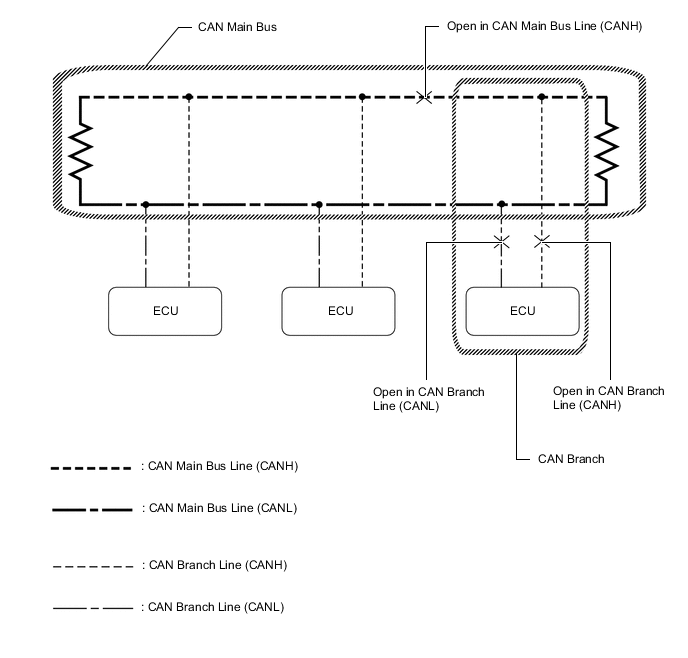
Tech Tips
-
This waveform is measured between terminals CANH and GND, and terminals CANL and GND of the central gateway ECU (network gateway ECU). (Use this as a reference for diagnosis of CAN communication lines.)
-
When malfunctions in multiple ECUs are suspected based on the CAN bus check and DTCs checked using the GTS, check the resistance of the CAN bus using an ohmmeter first. If no problems are found, check the following waveforms.
-
If a waveform is not similar to one of the following 3 patterns (Group 1), then an open in a CAN main bus line, an open in a CAN branch line, or a short between a CAN line (CANH or CANL) and ground is suspected (Group 2).
-
Wiggle the connector and wire harness to check if the waveform changes.
-
CAN bus waveforms (Group 1)
-
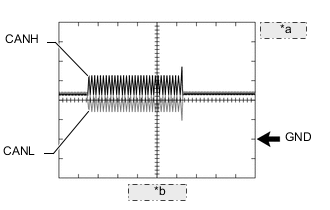
*a 1 V/DIV. *b 50 μs/DIV. Normal waveform
-
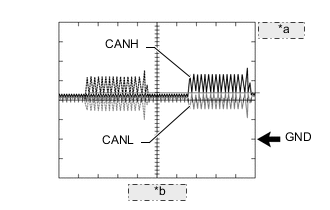
*a 1 V/DIV. *b 50 μs/DIV. Open in both of the lines (CANH and CANL) of a CAN branch
Tech Tips
-
Waveforms (waveforms shown using dotted lines) are not present from an ECU or sensor connected to a CAN branch with an open circuit in both lines. (Waveforms from other ECUs or sensors are normal.)
-
Because this waveform is similar to a normal waveform, instead of using the waveform, the malfunctioning part can be narrowed down by performing a CAN bus check.
-
-
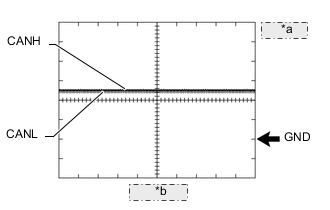
*a 1 V/DIV. *b 50 μs/DIV. Short between the CAN bus lines (CANH and CANL)
Tech Tips
-
Waveforms disappear.
-
If the malfunction is in an ECU, disconnecting the ECU will change the waveform. If the waveform does not change, a malfunction in the wire harness is suspected.
-
-
-
CAN bus waveforms (reference) (Group 2)
Note
The following CAN bus waveforms can be used only as reference. The actual measured waveform may differ significantly depending on the location of the open or short circuit.
-
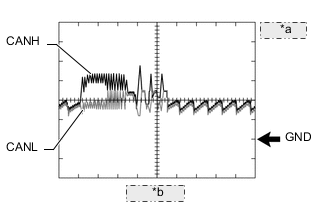
*a 1 V/DIV. *b 50 μs/DIV. Open in a CAN branch line (CANH)
Tech Tips
-
An abnormal waveform is output from an ECU with an open in one of its CAN branch lines. Because this abnormal output interferes with the signals from other ECUs, the output of other ECUs will also appear abnormal.
-
Narrow down the malfunctioning part by checking DTCs or performing a CAN bus check, or by checking waveform changes when ECUs or sensors are disconnected. The waveform will change to one for an open in both sides of a CAN branch when the ECU or sensor with an open CAN branch line is disconnected.
-
-
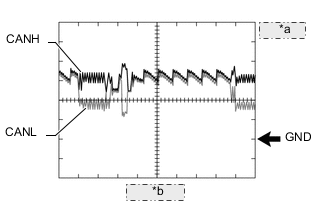
*a 1 V/DIV. *b 50 μs/DIV. Open in a CAN branch line (CANL)
Tech Tips
-
An abnormal waveform is output from an ECU with an open in one of its CAN branch lines. Because this abnormal output interferes with the signals from other ECUs, the output of other ECUs will also appear abnormal.
-
Narrow down the malfunctioning part by checking DTCs or performing a CAN bus check, or by checking waveform changes when ECUs or sensors are disconnected. The waveform will change to one for an open in both sides of a CAN branch when the ECU or sensor with an open CAN branch line is disconnected.
-
-
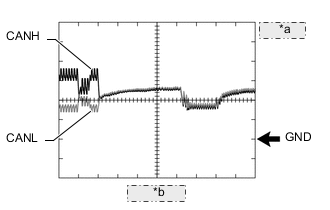
*a 1 V/DIV. *b 50 μs/DIV. Open in a CAN main bus line (CANH)
Tech Tips
-
Waveforms of ECUs or sensors that are closer to the central gateway ECU (network gateway ECU) than the open part are almost normal.
-
Waveforms of ECUs or sensors that are on the opposite side of the central gateway ECU (network gateway ECU) from the open part are abnormal.
-
An open in a CAN main bus line can be confirmed by measuring the resistance between the CANH and CANL terminals of any CAN branch.
-
-
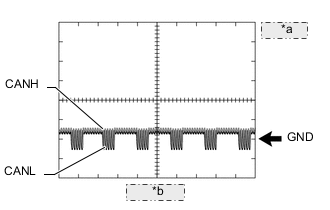
*a 1 V/DIV. *b 50 μs/DIV. Short between a CAN bus line (CANH) and ground
Tech Tips
-
Narrow down the shorted part by checking for waveform changes when disconnecting connectors from the CAN junction connectors or when disconnecting ECUs or sensors.
-
A short to ground in the CANH line can be confirmed by measuring the resistance between CANH and ground using an ohmmeter.
-
-
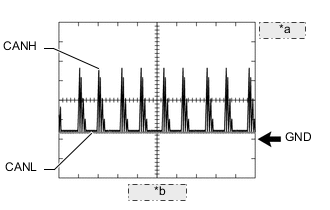
*a 1 V/DIV. *b 50 μs/DIV. Short between a CAN bus line (CANL) and ground
Tech Tips
-
Narrow down the shorted part by checking for waveform changes when disconnecting connectors from the CAN junction connectors or when disconnecting ECUs or sensors.
-
A short to ground in the CANL line can be confirmed by measuring the resistance between CANL and ground using an ohmmeter.
-
-
-
-
DATA SENDING/RECEIVING TABLE
-
Data sending/receiving table
Tech Tips
If Data List items related to sent/received data are not displayed properly, the part for which communication is interrupted can be determined using the table below.
Data Content Data Detected and Sent by Data Received by Relevant Data List Item Can be Checked in the Data List Cannot be Checked in the Data List Selected System Data List Items Link Accelerator position Hybrid vehicle control ECU
-
Brake booster with master cylinder assembly
-
Inverter with converter assembly
-
Swing grille actuator assembly
-
Forward recognition camera
-
Driving support ECU assembly
-
Clearance warning ECU assembly
-
Navigation receiver assembly
-
Radio and display receiver assembly
Hybrid Control Accelerator Position ABS/VSC/TRC Accelerator Opening Angle % Motor Generator Accelerator Position Engine speed ECM
-
Inverter with converter assembly
-
Hybrid vehicle control ECU
-
Power steering ECU assembly
-
Brake booster with master cylinder assembly
-
Clearance warning ECU assembly
-
Airbag ECU assembly
-
Meter circuit plate
-
Certification ECU (smart key ECU assembly)
-
Main body ECU (multiplex network body ECU)
-
Air conditioning amplifier assembly
-
Navigation receiver assembly
-
Radio and display receiver assembly
Engine Engine Speed w/ Canister Pump Module
w/o Canister Pump Module
Motor Generator Engine Speed Hybrid Control Engine Speed EMPS Engine Revolution Engine coolant temperature ECM
-
Swing grille actuator assembly
-
Meter circuit plate
-
Air conditioning amplifier assembly
- Engine Coolant Temperature w/ Canister Pump Module
w/o Canister Pump Module
Grill Shutter Engine Coolant Temperature Combination Meter Coolant Temperature Air Conditioner Engine Coolant Temp Vehicle speed Brake booster with master cylinder assembly
-
Power steering ECU assembly
-
Hybrid vehicle control ECU
-
Meter circuit plate
-
Combination meter mirror ECU
-
Driving support ECU assembly
-
Occupant detection ECU
-
Rear television camera assembly
-
Navigation receiver assembly
-
Radio and display receiver assembly
-
Forward recognition camera
-
Clearance warning ECU assembly
-
Airbag ECU assembly
-
Certification ECU (smart key ECU assembly) (Power management CPU)
-
Main body ECU (multiplex network body ECU)
-
Telematics transceiver
ABS/VSC/TRC Vehicle Speed EMPS Meter Vehicle Velocity Hybrid Control Vehicle Speed Combination Meter Vehicle Speed Meter Head Up Display Vehicle Speed Meter Radar Cruise2 Vhcl Spd-Brake ECU Occupant Detection VSC Vehicle Speed Parking Assist Camera Wheel Speed Sensor (4wheel) Navigation System Vehicle Speed for Radio and Display Type with Navigation System
for Navigation Receiver Type
for Radio and Display Type
Vehicle speed Meter circuit plate*3 -
-
Clearance warning ECU assembly
-
Certification ECU (smart key ECU assembly)
-
Main body ECU (multiplex network body ECU)
-
Air conditioning amplifier assembly
Combination Meter Vehicle Speed Meter Wheel speed Brake booster with master cylinder assembly
-
Hybrid vehicle control ECU
-
No. 1 headlight ECU sub-assembly LH
-
Power steering ECU assembly
-
Forward recognition camera
-
Driving support ECU assembly
-
Clearance warning ECU assembly
-
Blind spot monitor sensor LH
-
Airbag ECU assembly
ABS/VSC/TRC
-
FR Wheel Speed
-
FL Wheel Speed
-
RR Wheel Speed
-
RL Wheel Speed
Hybrid Control
-
FR Wheel Speed
-
FL Wheel Speed
-
RR Wheel Speed
-
RL Wheel Speed
HL AutoLeveling
-
Front Right Wheel Speed Value
-
Front Left Wheel Speed Value
EMPS
-
Wheel Speed Right
-
Wheel Speed Left
Shift position Hybrid vehicle control ECU
-
Clearance warning ECU assembly
-
Blind spot monitor sensor LH
-
Certification ECU (smart key ECU assembly)
-
Navigation receiver assembly
-
Radio and display receiver assembly
-
Forward recognition camera
-
Driving support ECU assembly
-
Airbag ECU assembly
-
Meter circuit plate*2
-
Main body ECU (multiplex network body ECU)
-
No. 1 headlight ECU sub-assembly LH
-
Air conditioning amplifier assembly
-
Rear television camera assembly
Hybrid Control Shift Position IPA/ICS/Clearance Sonar
-
Parking Signal
-
Reverse Signal
Blind Spot Monitor Master Reverse (Only for AT/CVT) Power Source Control Shift P Signal Pulse Navigation System Reverse Signal for Radio and Display Type with Navigation System
for Navigation Receiver Type
for Radio and Display Type
Ambient temperature Air conditioning amplifier assembly
-
Inverter with converter assembly
-
Hybrid vehicle control ECU
-
Meter circuit plate
-
ECM
-
Forward recognition camera
-
Driving support ECU assembly
-
Clearance warning ECU assembly
-
Navigation receiver assembly
-
Radio and display receiver assembly
Air Conditioner Ambient Temp Sensor Motor Generator Ambient Temperature Hybrid Control Ambient Temperature Combination Meter Ambient Temperature Driver door courtesy switch Main body ECU (multiplex network body ECU) -
-
Forward recognition camera
-
Clearance warning ECU assembly
-
Hybrid vehicle control ECU
-
Meter circuit plate*2
-
Certification ECU (smart key ECU assembly)
-
Air conditioning amplifier assembly
-
Navigation receiver assembly
-
Radio and display receiver assembly
Main Body FL Door Courtesy SW Steering angle Steering sensor
-
Blind spot monitor sensor LH
-
Power steering ECU assembly
-
Brake booster with master cylinder assembly
-
No. 1 headlight ECU sub-assembly LH
-
Hybrid vehicle control ECU
-
Forward recognition camera
-
Clearance warning ECU assembly
-
Airbag ECU assembly
-
Rear television camera assembly
-
Navigation receiver assembly
-
Radio and display receiver assembly
-
Driving support ECU assembly
Blind Spot Monitor Master Steering Angle EMPS Steering Angle Velocity ABS/VSC/TRC Steering Angle Sensor HL AutoLeveling Steering Sensor Signal Yaw rate Airbag ECU assembly
-
Brake booster with master cylinder assembly
-
Driving support ECU assembly
-
Forward recognition camera
-
Clearance warning ECU assembly
-
Power steering ECU assembly
-
Hybrid vehicle control ECU
ABS/VSC/TRC
-
Yaw Rate Sensor
-
Yaw Rate Sensor2
Radar Cruise2 Yaw Rate Sensor Acceleration Airbag ECU assembly
-
Brake booster with master cylinder assembly
-
Occupant detection ECU
-
Forward recognition camera
-
Driving support ECU assembly
-
Clearance warning ECU assembly
-
Power steering ECU assembly
-
Hybrid vehicle control ECU
ABS/VSC/TRC
-
Deceleration Sensor
-
Deceleration Sensor2
Occupant Detection
-
Yaw Rate/G Sensor Invalid Flag1
-
Yaw Rate/G Sensor Invalid Flag2
Ignition switch condition Main body ECU (multiplex network body ECU)
-
Swing grille actuator assembly
-
Hybrid vehicle control ECU
-
No. 1 headlight ECU sub-assembly LH
-
Certification ECU (smart key ECU assembly)
-
Combination meter mirror ECU
-
Rear television camera assembly
Main Body IG SW Grill Shutter IG SW Hybrid Control IG SW (CAN) HL AutoLeveling +B Stop light switch signal Hybrid vehicle control ECU -
-
Airbag ECU assembly
-
Meter circuit plate
-
Navigation receiver assembly
-
Radio and display receiver assembly
Hybrid Control Stop Light SW Headlight switch signal
(high beam)
Main body ECU (multiplex network body ECU) No. 1 headlight ECU sub-assembly LH
-
Forward recognition camera
-
Driving support ECU assembly
-
Meter circuit plate*2
Main Body Head Light SW (Head) HL AutoLeveling HeadLight High Beam State Side turn signal Meter circuit plate*2
-
Blind spot monitor sensor LH
-
Driving support ECU assembly
-
Forward recognition camera
-
Clearance warning ECU assembly
-
No. 1 headlight ECU sub-assembly LH
Combination Meter
-
Turn Signal Switch (Right)
-
Turn Signal Switch (Left)
Blind Spot Monitor Master Turn Switch State Pre-Crash 2
-
Turn Light RH
-
Turn Light LH
LKA/LDA
-
Turn Signal Switch (Right)
-
Turn Signal Switch (Left)
Taillight signal Main body ECU (multiplex network body ECU) No. 1 headlight ECU sub-assembly LH
-
Driving support ECU assembly
-
Clearance warning ECU assembly
-
Blind spot monitor sensor LH
-
Hybrid vehicle control ECU
-
Meter circuit plate
Main Body Head Light SW (Tail) HL AutoLeveling Clearance Light State ECM power source voltage*1 ECM - - Engine BATT Voltage w/ Canister Pump Module
w/o Canister Pump Module
Hybrid vehicle control ECU power source voltage*1 Hybrid vehicle control ECU - - Hybrid Control Auxiliary Battery Voltage Combination meter assembly power source voltage*1 Meter circuit plate - - Combination Meter +B Voltage Value Power steering ECU assembly power source voltage*1 Power steering ECU assembly - - EMPS IG Power Supply Brake pedal stroke sensor*1 Brake booster with master cylinder assembly - - ABS/VSC/TRC Stroke Sensor Headlight ECU sub-assembly LH power source voltage*1 No. 1 headlight ECU sub-assembly LH - - HL AutoLeveling +B Voltage Value Driver door touch sensor*1 Certification ECU (smart key ECU assembly) - - Entry&Start D-Door Touch Sensor Clearance sonar main switch condition*1 Clearance warning ECU assembly - - IPA/ICS/Clearance Sonar IPA Switch Blind spot monitor main switch condition*1 Blind spot monitor sensor LH - - Blind Spot Monitor Master Main Switch Solar sensor*1 Air conditioning amplifier assembly - - Air Conditioner Solar Sensor (D Side) Combination meter mirror ECU power source voltage*1 Combination meter mirror ECU - - Head Up Display +B Voltage Value Inverter with converter assembly power source voltage*1 Inverter with converter assembly - - Motor Generator Battery Voltage Swing grille actuator assembly power source voltage*1 Swing grille actuator assembly - - Grill Shutter +B Power Voltage Navigation receiver assembly power source voltage*1 Navigation receiver assembly - - Navigation System Battery Voltage for Radio and Display Type with Navigation System
for Navigation Receiver Type
Radio and display receiver assembly power source voltage*1 Radio and display receiver assembly - - Navigation System Battery Voltage for Radio and Display Type
*1: Whether the ECU that sends data is functioning or not can be judged by using the GTS to check items such as switches or sensors that send signals to the ECU via direct lines.
*2: Although the received contents cannot be checked in the Data List, whether or not the data is received normally can be checked by observing the combination meter assembly.
*3: The combination meter assembly receives a vehicle speed signal from the skid control ECU assembly and sends the signal to other ECUs.
-
-