REAR BUMPER REASSEMBLY
PROCEDURE
-
INSTALL REAR BUMPER REINFORCEMENT SUB-ASSEMBLY
for Reinforcement Type A:
-
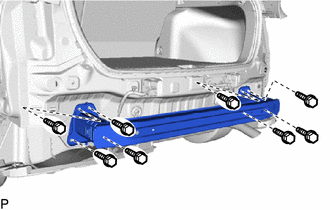
Install the rear bumper reinforcement sub-assembly with the 8 bolts.
- Torque:
- 18 N*m { 184 kgf*cm, 13 ft.*lbf }
-
-
INSTALL REAR BUMPER ARM SUB-ASSEMBLY LH
for Reinforcement Type B:
-
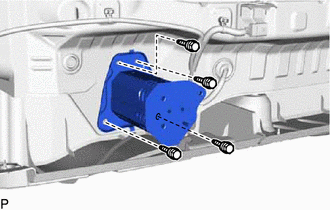
Install the rear bumper arm sub-assembly LH with the 4 bolts.
- Torque:
- 18 N*m { 184 kgf*cm, 13 ft.*lbf }
-
-
INSTALL REAR BUMPER ARM SUB-ASSEMBLY RH
for Reinforcement Type B:
Tech Tips
Use the same procedure as for the LH side.
-
INSTALL NO. 1 REAR BUMPER REINFORCEMENT
for Reinforcement Type B:
-
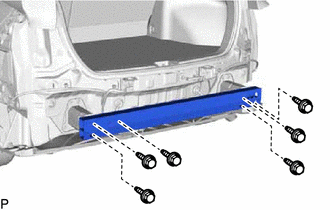
Install the No. 1 rear bumper reinforcement with the 6 bolts.
- Torque:
- 34 N*m { 347 kgf*cm, 25 ft.*lbf }
-
-
INSTALL REAR BUMPER SIDE SEAL LH
-
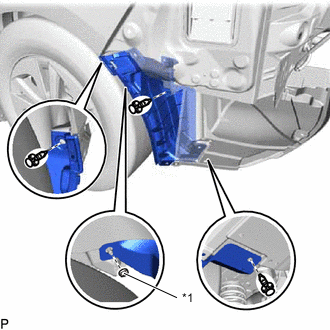
*1 Rear Bumper Side Clip Install the 3 clips.
-
Install the rear bumper side seal LH with the rear bumper side clip.
-
-
INSTALL REAR BUMPER SIDE SEAL RH
Tech Tips
Use the same procedure as for the LH side.
-
INSTALL REAR BUMPER SIDE RETAINER LH
-
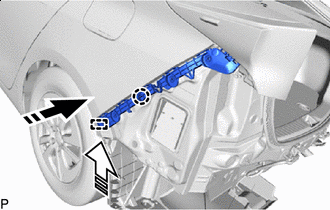

Install in this Direction (1) 
Install in this Direction (2) Engage the claw as shown in the illustration.
-
Engage the guide as shown in the illustration.
-
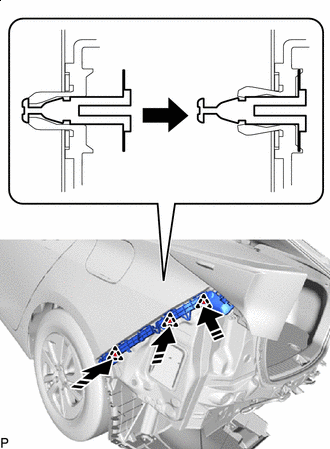
Install in this Direction Engage the 3 clips as shown in the illustration to install the rear bumper side retainer LH.
-
-
INSTALL REAR BUMPER SIDE RETAINER RH
Tech Tips
Use the same procedure as for the LH side.
-
INSTALL NO. 3 REAR BUMPER PAD
Tech Tips
When installing the No. 3 rear bumper pad, heat the rear bumper assembly using a heat light.
Heating Temperature Item Temperature Rear Bumper Assembly 40 to 60°C (104 to 140°F) Note
Do not heat the rear bumper assembly excessively.
-
Clean the rear bumper assembly surface.
-
Using a heat light, heat the rear bumper assembly surface.
-
Remove the double-sided tape from the rear bumper assembly.
-
Wipe off any tape adhesive residue with cleaner.
-
-
Remove the release paper from a new No. 3 rear bumper pad.
Tech Tips
After removing the release paper, keep the exposed adhesive free from foreign matter.
-
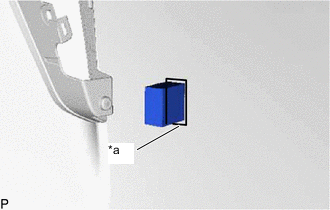
*a Line Install the No. 3 rear bumper pad as shown in the illustration.
Tech Tips
-
Install the No. 3 rear bumper pad along the line on the rear bumper cover.
-
Use the same procedure for the RH side and LH side.
-
-
-
INSTALL REAR BUMPER ARM SEAL
Tech Tips
When installing the rear bumper arm seal, heat the rear bumper assembly using a heat light.
Heating Temperature Item Temperature Rear Bumper Assembly 40 to 60°C (104 to 140°F) Note
Do not heat the rear bumper assembly excessively.
-
Clean the rear bumper assembly surface.
-
Using a heat light, heat the rear bumper assembly surface.
-
Remove the double-sided tape from the rear bumper assembly.
-
Wipe off any tape adhesive residue with cleaner.
-
-
Remove the release paper from a new rear bumper arm seal.
Tech Tips
After removing the release paper, keep the exposed adhesive free from foreign matter.
-
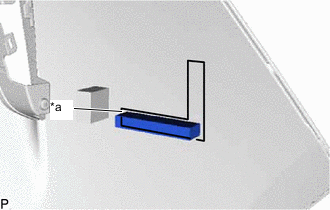
*a Line Install the rear bumper arm seal as shown in the illustration.
Tech Tips
-
Install the rear bumper arm seal along the line on the rear bumper cover.
-
Use the same procedure for the RH side and LH side.
-
-
-
INSTALL NO. 2 REAR BUMPER PAD
Tech Tips
When installing the No. 2 rear bumper pad, heat the rear bumper assembly using a heat light.
Heating Temperature Item Temperature Rear Bumper Assembly 40 to 60°C (104 to 140°F) Note
Do not heat the rear bumper assembly excessively.
-
Clean the rear bumper assembly surface.
-
Using a heat light, heat the rear bumper assembly surface.
-
Remove the double-sided tape from the rear bumper assembly.
-
Wipe off any tape adhesive residue with cleaner.
-
-
Remove the release paper from a new No. 2 rear bumper pad.
Tech Tips
After removing the release paper, keep the exposed adhesive free from foreign matter.
-
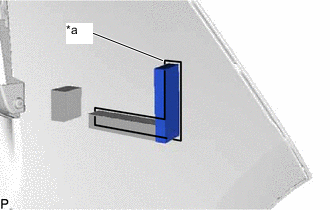
*a Line Install the No. 2 rear bumper pad as shown in the illustration.
Tech Tips
-
Install the No. 2 rear bumper pad along the line on the rear bumper cover.
-
Use the same procedure for the RH side and LH side.
-
-
-
INSTALL NO. 1 REAR BUMPER PAD
Tech Tips
When installing the No. 1 rear bumper pad, heat the rear bumper assembly using a heat light.
Heating Temperature Item Temperature Rear Bumper Assembly 40 to 60°C (104 to 140°F) Note
Do not heat the rear bumper assembly excessively.
-
Clean the rear bumper assembly surface.
-
Using a heat light, heat the rear bumper assembly surface.
-
Remove the double-sided tape from the rear bumper assembly.
-
Wipe off any tape adhesive residue with cleaner.
-
-
Remove the release paper from a new No. 1 rear bumper pad.
Tech Tips
After removing the release paper, keep the exposed adhesive free from foreign matter.
-
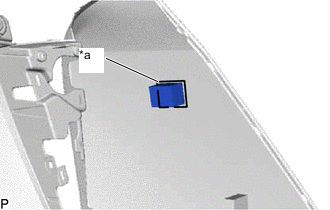
*a Line Install the No. 1 rear bumper pad as shown in the illustration.
Tech Tips
-
Install the No. 1 rear bumper pad along the line on the rear bumper cover.
-
Use the same procedure for the RH side and LH side.
-
-
-
INSTALL REAR BUMPER EXTENSION FILLER LH (for Type A)
-
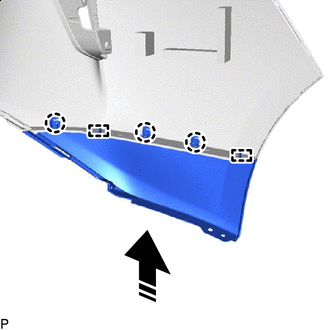
Install in this Direction Engage the 2 guides and 3 claws as shown in the illustration.
-
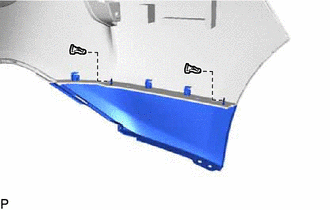
Install the rear bumper extension filler LH with the 2 clips.
-
-
INSTALL REAR BUMPER EXTENSION FILLER LH (for Type B)
-
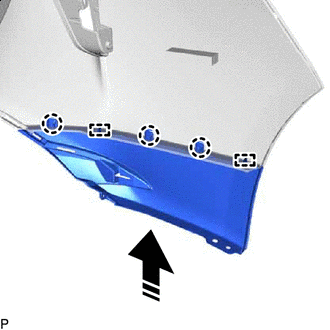
Install in this Direction Engage the 2 guides and 3 claws as shown in the illustration.
-
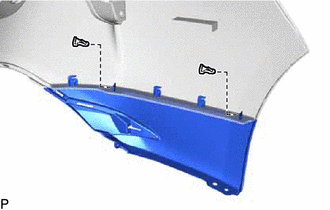
Install the rear bumper extension filler LH with the 2 clips.
-
-
INSTALL REAR BUMPER EXTENSION FILLER RH
Tech Tips
Use the same procedure as for the LH side.
-
INSTALL CENTER REAR BUMPER GUARD (for Type A)
-
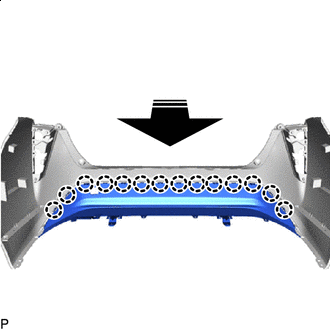
Install in this Direction Engage the 14 claws as shown in the illustration.
-
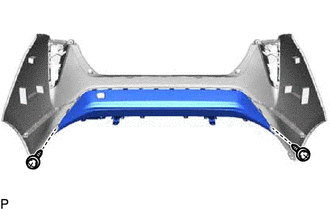
Install the center rear bumper guard with the 2 screws.
-
-
INSTALL CENTER REAR BUMPER GUARD (for Type B)
-
Engage the 16 claws as shown in the illustration.
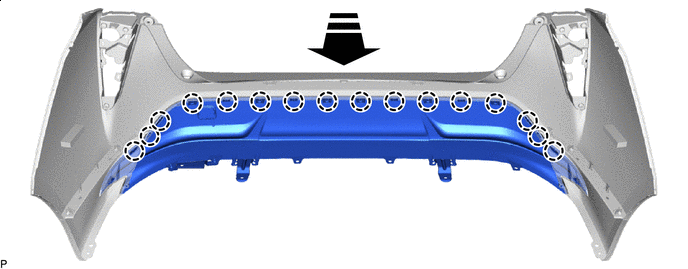
Install in this Direction - - -
Install the 2 clips.
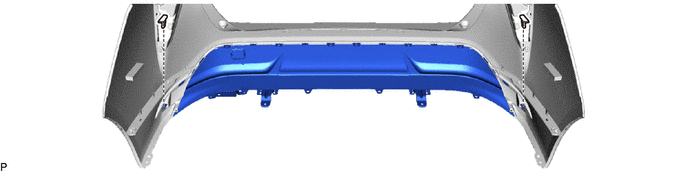
-
Install the center rear bumper guard with the 2 screws.
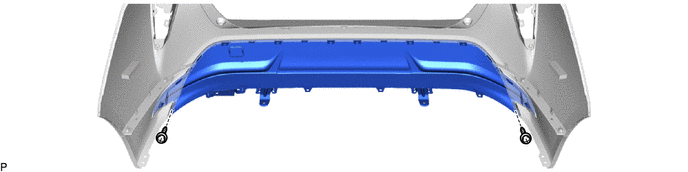
-
-
INSTALL LOWER REAR BUMPER COVER
-
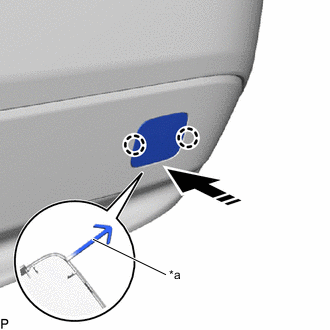
*a Hook Install in this Direction Engage the hook.
-
Engage the 2 claws as shown in the illustration to install the lower rear bumper cover.
-
-
INSTALL NO. 3 LUGGAGE ROOM WIRE
-
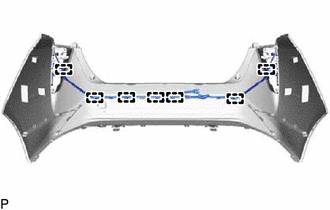
w/o TOYOTA Parking Assist-sensor System:
-
Engage the 7 clamps to install the No. 3 luggage room wire.
-
-
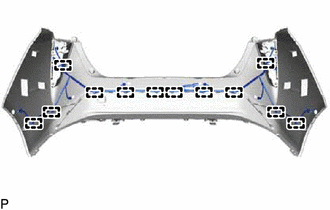
w/ TOYOTA Parking Assist-sensor System:
-
Engage the 12 clamps to install the No. 3 luggage room wire.
-
-
-
INSTALL REAR LIGHT ASSEMBLY LH
-
INSTALL REAR LIGHT ASSEMBLY RH
Tech Tips
Use the same procedure as for the LH side.
-
INSTALL REAR CENTER ULTRASONIC SENSOR RETAINER (w/ TOYOTA Parking Assist-sensor System)
-
INSTALL REAR CORNER ULTRASONIC SENSOR RETAINER (w/ TOYOTA Parking Assist-sensor System)
-
INSTALL REAR SIDE ULTRASONIC SENSOR RETAINER (w/ TOYOTA Parking Assist-sensor System)
-
INSTALL REAR CENTER ULTRASONIC SENSOR (w/ TOYOTA Parking Assist-sensor System)
-
INSTALL REAR CORNER ULTRASONIC SENSOR (w/ TOYOTA Parking Assist-sensor System)
-
INSTALL REAR SIDE ULTRASONIC SENSOR (w/ TOYOTA Parking Assist-sensor System)