ELECTRONICALLY CONTROLLED BRAKE SYSTEM, Diagnostic DTC:C1413, C1414
| DTC Code | DTC Name |
|---|---|
| C1413 | Front Speed Sensor RH Circuit Output |
| C1414 | Front Speed Sensor LH Circuit Output |
DESCRIPTION
Each speed sensor detects the wheel speed and sends the signals to the skid control ECU (brake booster with master cylinder assembly). These signals are used for ABS control.
Tech Tips
The output voltage values shown below are for when the vehicle wire harnesses are connected to the skid control ECU (brake booster with master cylinder assembly) and the speed sensors.
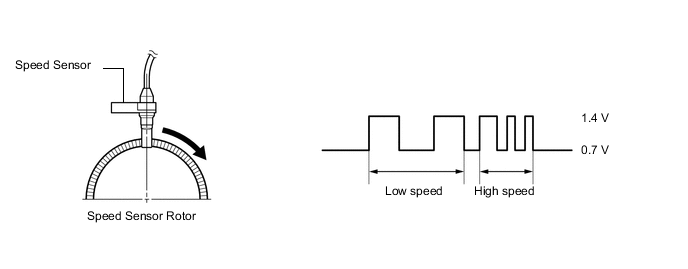
| DTC No. | Detection Item | INF Code | DTC Detection Condition | Trouble Area | Note |
|---|---|---|---|---|---|
| C1413 | Front Speed Sensor RH Circuit Output | 504 541 |
|
|
ABS DTC |
| C1414 | Front Speed Sensor LH Circuit Output | 514 542 |
|
|
ABS DTC |
| Vehicle Condition | |||
|---|---|---|---|
| Pattern 1 | Pattern 2 | ||
| Diagnosis Condition | At a vehicle speed of 20 km/h (12 mph) or more. | ○ | - |
| At a vehicle speed of 10 km/h (6 mph) or more. | - | ○ | |
| Malfunction Status | Noise occurs in the sensor signals of a malfunctioning wheel. | ○ | - |
| Noise occurs once per rotor rotation. | - | ○ | |
| Detection Time | Detected 75 times or more within 5 seconds | 15 seconds or more | |
| Number of Trips | 1 trip | 1 trip | |
Tech Tips
DTC will be output when conditions for either of the patterns in the table above are met.
| Vehicle Condition | |||
|---|---|---|---|
| Pattern 1 | Pattern 2 | ||
| Diagnosis Condition | At a vehicle speed of 20 km/h (12 mph) or more. | ○ | - |
| At a vehicle speed of 10 km/h (6 mph) or more. | - | ○ | |
| Malfunction Status | Noise occurs in the sensor signals of a malfunctioning wheel. | ○ | - |
| Noise occurs once per rotor rotation. | - | ○ | |
| Detection Time | Detected 75 times or more within 5 seconds | 15 seconds or more | |
| Number of Trips | 1 trip | 1 trip | |
Tech Tips
DTC will be output when conditions for either of the patterns in the table above are met.
WIRING DIAGRAM
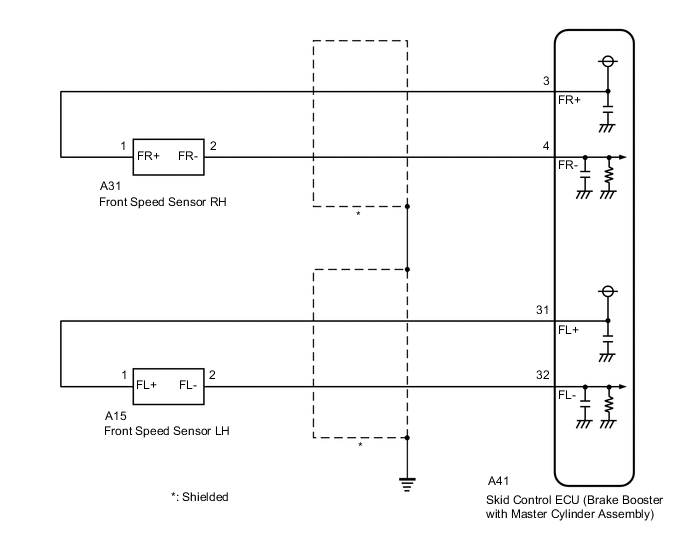
CAUTION / NOTICE / HINT
Note
After replacing the skid control ECU (brake booster with master cylinder assembly), perform linear solenoid valve offset learning, ABS holding solenoid valve learning, yaw rate and acceleration sensor zero point calibration and system information memorization after performing "Reset Memory".
PROCEDURE
-
CLEAR DTC
-
Clear the DTCs.
Chassis > ABS/VSC/TRC > Clear DTCsResult Proceed to NEXT
NEXT 
-
-
CHECK DTC
-
Turn the power switch off.
-
Turn the power switch on (IG).
-
Check if the same DTC is output.
Chassis > ABS/VSC/TRC > Trouble CodesResult Result Proceed to C1413 is output A C1414 is output B
B 
READ VALUE USING GTS (MOMENTARY INTERRUPTION) Click here
A
-
-
READ VALUE USING GTS (MOMENTARY INTERRUPTION)
-
Using the GTS, check for any momentary interruptions in the wire harness and connector corresponding to a DTC.
Chassis > ABS/VSC/TRC > Data ListTester Display Measurement Item Range Normal Condition Diagnostic Note FR Speed Sensor Voltage Open Front speed sensor RH voltage open detection Error or Normal Error: Momentary interruption
Normal: Normal
-
Chassis > ABS/VSC/TRC > Data ListTester Display FR Speed Sensor Voltage Open -
Check for any momentary interruptions in the wire harness and connectors.
Note
Perform the above inspection before removing the sensor and connector.
Result Result Proceed to The value of FR Speed Sensor Voltage Open is always Normal A The value of FR Speed Sensor Voltage Open outputs Error one or more times B
B
CHECK FRONT SPEED SENSOR RH INSTALLATION Click here
A
-
-
READ VALUE USING GTS (FRONT SPEED SENSOR RH)
-
Select the Data List on the GTS.
Chassis > ABS/VSC/TRC > Data ListTester Display Measurement Item Range Normal Condition Diagnostic Note FR Wheel Speed Front speed sensor RH Min.: 0 km/h (0 mph), Max.: 326.4 km/h (203 mph) Vehicle stopped: 0 km/h (0 mph) When driving at constant speed: No large fluctuations
Chassis > ABS/VSC/TRC > Data ListTester Display FR Wheel Speed -
Check the front speed sensor RH output value.
Result Result Proceed to The value of FR Wheel Speed changes in accordance with the vehicle speed A Other than above B
B
GO TO STEP 7 Click here
A
-
-
CLEAR DTC
-
Clear the DTCs.
Chassis > ABS/VSC/TRC > Clear DTCsResult Proceed to NEXT
NEXT
-
-
RECONFIRM DTC
-
Turn the power switch off.
-
Turn the power switch on (READY).
-
Perform a road test.
-
Check if the same DTC is output.
Chassis > ABS/VSC/TRC > Trouble CodesResult Result Proceed to C1413 is not output A C1413 is output B
A 
USE SIMULATION METHOD TO CHECK Click here
B
REPLACE BRAKE BOOSTER WITH MASTER CYLINDER ASSEMBLY for LHD: Click here
REPLACE BRAKE BOOSTER WITH MASTER CYLINDER ASSEMBLY for RHD: Click here -
-
CHECK FRONT SPEED SENSOR RH INSTALLATION
-
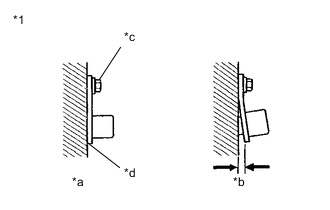
*1 Front Speed Sensor RH *a OK *b NG *c 8.5 N*m *d No Clearance Turn the power switch off.
-
Check the front speed sensor RH installation.
OK There is no clearance between the sensor and the front steering knuckle. The installation bolt is tightened properly. Torque 8.5 N*m (87 kgf*cm, 75 in.*lbf) Result Proceed to OK NG
NG
REINSTALL OR REPLACE FRONT SPEED SENSOR RH Click here
OK
-
-
CHECK FRONT SPEED SENSOR RH AND FRONT SPEED SENSOR ROTOR RH (CHECK FOR FOREIGN MATTER)
-
Remove the front speed sensor RH and the component with the front speed sensor rotor RH.
-
Check the front speed sensor tip RH and front speed sensor rotor RH.
OK The front speed sensor tip RH and front speed sensor rotor RH are free of scratches, oil, and foreign matter. Note
-
If there is oil or foreign matter on the front speed sensor RH, clean the front speed sensor RH and then check the front speed sensor rotor RH.
-
If the front speed sensor RH is damaged, replace the front speed sensor RH with a new one.
-
Check the front speed sensor RH signal after cleaning or replacement.
Result Proceed to OK NG -
NG
CLEAN OR REPLACE FRONT SPEED SENSOR RH AND FRONT SPEED SENSOR ROTOR RH
OK
-
-
CHECK HARNESS AND CONNECTOR (BRAKE BOOSTER WITH MASTER CYLINDER ASSEMBLY - FRONT SPEED SENSOR RH)
-
Make sure that there is no looseness at the locking part and the connecting part of the connectors.
OK The connector is securely connected. -
Disconnect the A41 skid control ECU (brake booster with master cylinder assembly) connector.
-
Disconnect the A31 front speed sensor RH connector.
-
Check both the connector case and the terminals for deformation and corrosion.
OK No deformation or corrosion. -
Measure the resistance according to the value(s) in the table below.
Standard Resistance Tester Connection Condition Specified Condition A41-3 (FR+) - A31-1 (FR+) Always Below 1 Ω A41-3 (FR+) or A31-1 (FR+) - Body ground Always 10 kΩ or higher A41-4 (FR-) - A31-2 (FR-) Always Below 1 Ω A41-4 (FR-) or A31-2 (FR-) - Body ground Always 10 kΩ or higher Result Proceed to OK NG
NG
REPAIR OR REPLACE HARNESS OR CONNECTOR
OK
-
-
INSPECT BRAKE BOOSTER WITH MASTER CYLINDER ASSEMBLY (SENSOR OUTPUT)
-
Reconnect the A41 skid control ECU (brake booster with master cylinder assembly) connector.
-
Turn the power switch on (IG).
-
Measure the voltage according to the value(s) in the table below.
Standard Voltage Tester Connection Condition Specified Condition A31-1 (FR+) - Body ground Power switch on (IG) 8 to 14 V Result Proceed to OK NG
OK
REPLACE FRONT SPEED SENSOR RH Click here
NG
REPLACE BRAKE BOOSTER WITH MASTER CYLINDER ASSEMBLY for LHD: Click here
REPLACE BRAKE BOOSTER WITH MASTER CYLINDER ASSEMBLY for RHD: Click here -
-
READ VALUE USING GTS (MOMENTARY INTERRUPTION)
-
Using the GTS, check for any momentary interruptions in the wire harness and connector corresponding to a DTC.
Chassis > ABS/VSC/TRC > Data ListTester Display Measurement Item Range Normal Condition Diagnostic Note FL Speed Sensor Voltage Open Front speed sensor LH voltage open detection Error or Normal Error: Momentary interruption
Normal: Normal
-
Chassis > ABS/VSC/TRC > Data ListTester Display FL Speed Sensor Voltage Open -
Check for any momentary interruptions in the wire harness and connectors.
Note
Perform the above inspection before removing the sensor and connector.
Result Result Proceed to The value of FL Speed Sensor Voltage Open is always Normal A The value of FL Speed Sensor Voltage Open outputs Error one or more times B
B
CHECK FRONT SPEED SENSOR LH INSTALLATION Click here
A
-
-
READ VALUE USING GTS (FRONT SPEED SENSOR LH)
-
Select the Data List on the GTS.
Chassis > ABS/VSC/TRC > Data ListTester Display Measurement Item Range Normal Condition Diagnostic Note FL Wheel Speed Front speed sensor LH Min.: 0 km/h (0 mph), Max.: 326.4 km/h (203 mph) Vehicle stopped: 0 km/h (0 mph) When driving at constant speed: No large fluctuations
Chassis > ABS/VSC/TRC > Data ListTester Display FL Wheel Speed -
Check the front speed sensor LH output value.
Result Result Proceed to The value of FL Wheel Speed changes in accordance with the vehicle speed A Other than above B
B
GO TO STEP 15 Click here
A
-
-
CLEAR DTC
-
Clear the DTCs.
Chassis > ABS/VSC/TRC > Clear DTCsResult Proceed to NEXT
NEXT
-
-
RECONFIRM DTC
-
Turn the power switch off.
-
Turn the power switch on (READY).
-
Perform a road test.
-
Check if the same DTC is output.
Chassis > ABS/VSC/TRC > Trouble CodesResult Result Proceed to C1414 is not output A C1414 is output B
A
USE SIMULATION METHOD TO CHECK Click here
B
REPLACE BRAKE BOOSTER WITH MASTER CYLINDER ASSEMBLY for LHD: Click here
REPLACE BRAKE BOOSTER WITH MASTER CYLINDER ASSEMBLY for RHD: Click here -
-
CHECK FRONT SPEED SENSOR LH INSTALLATION
-
*1 Front Speed Sensor LH *a OK *b NG *c 8.5 N*m *d No Clearance Turn the power switch off.
-
Check the front speed sensor LH installation.
OK There is no clearance between the sensor and the front steering knuckle. The installation bolt is tightened properly. Torque 8.5 N*m (87 kgf*cm, 75 in.*lbf) Result Proceed to OK NG
NG
REINSTALL OR REPLACE FRONT SPEED SENSOR LH Click here
OK
-
-
CHECK FRONT SPEED SENSOR LH AND FRONT SPEED SENSOR ROTOR LH (CHECK FOR FOREIGN MATTER)
-
Remove the front speed sensor LH and the component with the front speed sensor rotor LH.
-
Check the front speed sensor tip LH and front speed sensor rotor LH.
OK The front speed sensor tip LH and front speed sensor rotor LH are free of scratches, oil, and foreign matter. Note
-
If there is oil or foreign matter on the front speed sensor LH, clean the front speed sensor LH and then check the front speed sensor rotor LH.
-
If the front speed sensor LH is damaged, replace the front speed sensor LH with a new one.
-
Check the front speed sensor LH signal after cleaning or replacement.
Result Proceed to OK NG -
NG
CLEAN OR REPLACE FRONT SPEED SENSOR LH AND FRONT SPEED SENSOR ROTOR LH
OK
-
-
CHECK HARNESS AND CONNECTOR (BRAKE BOOSTER WITH MASTER CYLINDER ASSEMBLY - FRONT SPEED SENSOR LH)
-
Make sure that there is no looseness at the locking part and the connecting part of the connectors.
OK The connector is securely connected. -
Disconnect the A41 skid control ECU (brake booster with master cylinder assembly) connector.
-
Disconnect the A15 front speed sensor LH connector.
-
Check both the connector case and the terminals for deformation and corrosion.
OK No deformation or corrosion. -
Measure the resistance according to the value(s) in the table below.
Standard Resistance Tester Connection Condition Specified Condition A41-31 (FL+) - A15-1 (FL+) Always Below 1 Ω A41-31 (FL+) or A15-1 (FL+) - Body ground Always 10 kΩ or higher A41-32 (FL-) - A15-2 (FL-) Always Below 1 Ω A41-32 (FL-) or A15-2 (FL-) - Body ground Always 10 kΩ or higher Result Proceed to OK NG
NG
REPAIR OR REPLACE HARNESS OR CONNECTOR
OK
-
-
INSPECT BRAKE BOOSTER WITH MASTER CYLINDER ASSEMBLY (SENSOR OUTPUT)
-
Reconnect the A41 skid control ECU (brake booster with master cylinder assembly) connector.
-
Turn the power switch on (IG).
-
Measure the voltage according to the value(s) in the table below.
Standard Voltage Tester Connection Condition Specified Condition A15-1 (FL+) - Body ground Power switch on (IG) 8 to 14 V Result Proceed to OK NG
OK
REPLACE FRONT SPEED SENSOR LH Click here
NG
REPLACE BRAKE BOOSTER WITH MASTER CYLINDER ASSEMBLY for LHD: Click here
REPLACE BRAKE BOOSTER WITH MASTER CYLINDER ASSEMBLY for RHD: Click here -