FRAME WIRE REMOVAL
CAUTION / NOTICE / HINT
The necessary procedures (adjustment, calibration, initialization, or registration) that must be performed after parts are removed and installed, or replaced during HV floor under wire removal/installation are shown below.
| Replaced Part or Performed Procedure | Necessary Procedures | Effect/Inoperative Function when Necessary Procedure not Performed | Link |
|---|---|---|---|
| Auxiliary battery terminal is disconnected/reconnected | Memorize steering angle neutral point | Lane departure alert system (w/ Steering Control) | |
| Intelligent clearance sonar system*1 | |||
| Simple intelligent parking assist system*1 | |||
| Pre-crash safety system | |||
| Parking assist monitor system | |||
| Initialize back door lock | Power door lock control system | ||
| Front wheel alignment adjustment |
|
|
|
| Suspension, tires, etc. (The vehicle height changes because of suspension or tire replacement) |
|
|
|
| Rear television camera assembly optical axis (Back camera position setting) | Parking assist monitor system | ||
| Initialize No. 1 headlight ECU sub-assembly LH | Automatic headlight beam level control system |
Click here Click here
CAUTION:
-
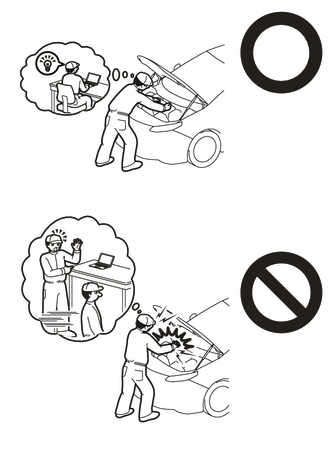
Orange wire harnesses and connectors indicate high-voltage circuits. To prevent electric shock, always follow the procedure described in the repair manual.
-
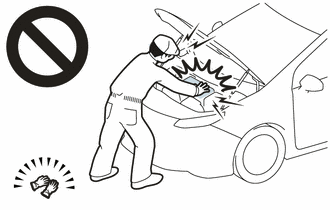
To prevent electric shock, wear insulated gloves when working on wire harnesses and components of the high voltage system.
PROCEDURE
-
PRECAUTION
Note
After turning the power switch off, waiting time may be required before disconnecting the cable from the negative (-) auxiliary battery terminal. Therefore, make sure to read the disconnecting the cable from the negative (-) auxiliary battery terminal notices before proceeding with work.
-
REMOVE SERVICE PLUG GRIP
-
REMOVE WINDSHIELD WIPER MOTOR AND LINK ASSEMBLY
-
REMOVE NO. 1 HEATER AIR DUCT SPLASH SHIELD SEAL (for LHD)
-
REMOVE NO. 2 HEATER AIR DUCT SPLASH SHIELD SEAL (for RHD)
-
REMOVE WATER GUARD PLATE LH
-
REMOVE COWL BODY MOUNTING REINFORCEMENT LH
-
REMOVE OUTER COWL TOP PANEL SUB-ASSEMBLY
-
REMOVE NO. 1 ENGINE COVER SUB-ASSEMBLY
-
DISCONNECT ENGINE WIRE
CAUTION:
Wear insulated gloves.
Note
Do not allow any foreign matter or water to enter the inverter with converter assembly.
-
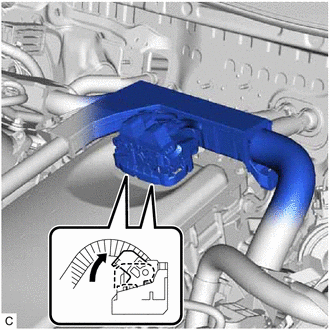
Move each lock lever as shown in the illustration and disconnect the 2 inverter with converter assembly connectors.
Note
-
Do not damage the terminals, connector housing or inverter with converter assembly during disconnection.
-
Cover the hole where the cable was connected with tape (non-residue type) or equivalent to prevent entry of foreign matter.
-
Insulate the disconnected terminals with insulating tape.
-
Do not touch the waterproof seal or terminals of the connector.
-
-
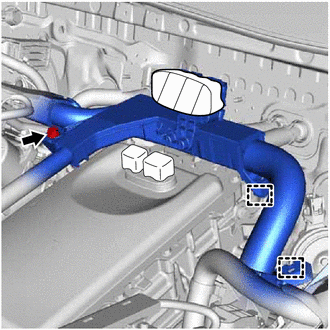
Remove the bolt.
-
Disengage the 2 clamps and disconnect the engine wire.
-
-
REMOVE CONNECTOR COVER ASSEMBLY
-
CHECK TERMINAL VOLTAGE
-
TEMPORARILY INSTALL CONNECTOR COVER ASSEMBLY
-
DISCONNECT HV FLOOR UNDER WIRE
-
REMOVE REAR SEAT CUSHION ASSEMBLY
-
REMOVE REAR SEAT CUSHION LOCK HOOK
-
REMOVE REAR DOOR SCUFF PLATE LH
-
REMOVE REAR UNDER SIDE COVER LH
-
REMOVE REAR DOOR SCUFF PLATE RH
-
REMOVE REAR UNDER SIDE COVER RH
-
REMOVE REAR UNDER COVER
-
REMOVE REAR SEAT CUSHION LEG SUB-ASSEMBLY
-
REMOVE NO. 1 HV BATTERY COVER PANEL RH
-
DISCONNECT HV FLOOR UNDER WIRE
CAUTION:
Wear insulated gloves.
Note
Insulate the disconnected connectors with insulating tape.
-
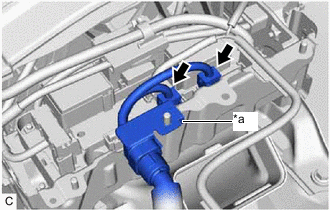
*a Shield Ground Disconnect the 2 HV battery junction block assembly connectors.
-
Disconnect the shield ground from the HV battery.
-
-
REMOVE NO. 1 FLOOR UNDER COVER ASSEMBLY
-
REMOVE FRONT FLOOR COVER RH
-
REMOVE FRONT SUSPENSION CROSSMEMBER SUB-ASSEMBLY
-
DISCONNECT NO. 2 PARKING BRAKE CABLE ASSEMBLY
-
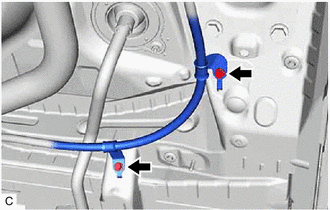
Remove the 2 bolts and disconnect the No. 2 parking brake cable assembly.
-
-
REMOVE HV FLOOR UNDER WIRE
CAUTION:
Wear insulated gloves.
Note
Insulate the disconnected connectors with insulating tape.
-
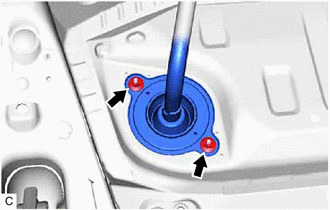
Remove the 2 nuts.
-
Remove the 3 clamps.
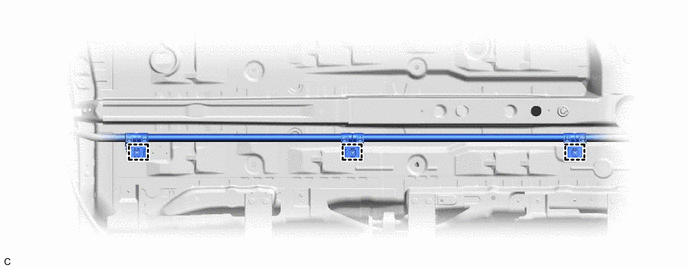
Note
If the clamps are removed forcibly, the stud bolts may be damaged.
-
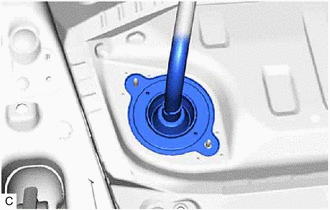
Disengage the grommet and pull out the HV floor under wire from the floor panel hole.
-
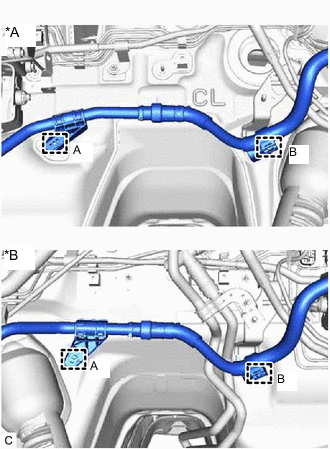
*A for LHD *B for RHD Remove the clamp (A).
-
Disengage the clamp (B) to remove the HV floor under wire.
-