HYBRID CONTROL SYSTEM, Diagnostic DTC:P30004B
| DTC Code | DTC Name |
|---|---|
| P30004B | Hybrid/EV Battery Control System Over Temperature |
DESCRIPTION
The hybrid vehicle control ECU monitors its internal operation and detects the following malfunction.
| DTC No. | Detection Item | DTC Detection Condition | Trouble Area | MIL | Warning Indicate |
|---|---|---|---|---|---|
| P30004B | Hybrid/EV Battery Control System Over Temperature | The HV battery temperature becomes too high due to a malfunction in the HV system. (1 trip detection logic) |
|
Does not come on | Master Warning Light: Comes on |
| DTC No. | Data List |
|---|---|
| P30004B |
|
CONFIRMATION DRIVING PATTERN
Tech Tips
After repairs have been completed, clear the DTCs and then check that the vehicle has returned to normal by performing the following All Readiness check procedure.
-
Connect the GTS to the DLC3.
-
Turn the power switch on (IG) and turn the GTS on.
-
Clear the DTCs (even if no DTCs are stored, perform the clear DTC procedure).
-
Turn the power switch off and wait for 2 minutes or more.
-
Turn the power switch on (IG) and turn the GTS on.
-
Drive the vehicle for approximately 10 minutes according to the freeze frame data items "Vehicle Speed", "Hybrid Battery Temperature 1 to 3", "Hybrid Battery Cooling Fan Inhaling Air Temperature", "Ambient Temperature" and "Hybrid Battery Current".
-
Enter the following menus: Powertrain / Hybrid Control / Utility / All Readiness.
-
Check the DTC judgment result.
Tech Tips
-
If the judgment result shows NORMAL, the system is normal.
-
If the judgment result shows ABNORMAL, the system has a malfunction.
-
If the judgment result shows INCOMPLETE or N/A, perform driving pattern again.
-
CAUTION / NOTICE / HINT
CAUTION:
When disposing of an HV battery, make sure to return it through an authorized collection agent who is capable of handling it safely. If the HV battery is returned via the manufacturer specified route, it will be returned properly and in a safe manner by an authorized collection agent.
PROCEDURE
-
CHECK DTC OUTPUT (HYBRID CONTROL)
-
Connect the GTS to the DLC3.
-
Turn the power switch on (IG).
-
Enter the following menus: Powertrain / Hybrid Control / Trouble Codes.
-
Check for DTCs.
Powertrain > Hybrid Control > Trouble CodesResult Result Proceed to Only P30004B is output A Other than above B -
Turn the power switch off.
B 
GO TO DTC CHART (HYBRID CONTROL SYSTEM) Click here
A 
-
-
CLEAN NO. 1 HV BATTERY INTAKE FILTER
-
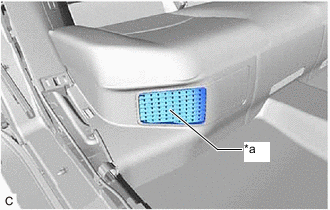
*a Intake Port Check the HV battery cooling system intake port for blockage.
Tech Tips
If anything is blocking the HV battery cooling system intake port, remove it.
-
Clean the No. 1 HV battery intake filter.
Result Proceed to NEXT
NEXT
-
-
CHECK FREEZE FRAME DATA (HYBRID CONTROL)
-
Connect the GTS to the DLC3.
-
Turn the power switch on (IG).
-
Enter the following menus: Powertrain / Hybrid Control / Trouble Codes.
-
Read the freeze frame data of DTC P30004B.
Powertrain > Hybrid Control > Trouble CodesNote
Although freeze frame data is recorded before and after a DTC is stored, for this step it is only necessary to read the freeze frame data recorded before "0s" (when the DTC was stored).
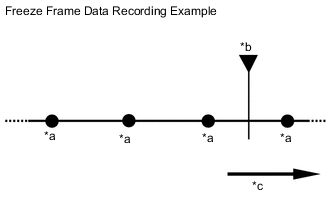
*a Freeze Frame Data Recorded *b DTC Stored *c Time Result Result Proceed to Other than below A The sum of the value of each hybrid battery block voltage ("Hybrid Battery Block 1 to 11 Voltage") is less than the value of "VL-Voltage before Boosting" by 10 V or more. B -
Turn the power switch off.
B 
REPLACE BATTERY VOLTAGE SENSOR Click here
A
-
-
CHECK FREEZE FRAME DATA (HYBRID CONTROL)
-
Connect the GTS to the DLC3.
-
Turn the power switch on (IG).
-
Enter the following menus: Powertrain / Hybrid Control / Trouble Codes.
-
Read the freeze frame data of DTC P30004B.
Powertrain > Hybrid Control > Trouble CodesNote
Although freeze frame data is recorded before and after a DTC is stored, for this step it is only necessary to read the freeze frame data recorded at "0s" (when the DTC was stored).
Result Result Proceed to Other than below A The value of any of "Hybrid Battery Temperature 1 to 3" is 80°C or more. B -
Turn the power switch off.
B
GO TO STEP 8 Click here
A
-
-
READ VALUE USING TECHSTREAM (DATA LIST)
-
Apply the parking brake and secure the wheels using chocks.
-
Connect the GTS to the DLC3.
-
Turn the power switch on (READY).
-
Enter the following menus: Powertrain / Hybrid Control / Data List.
Powertrain > Hybrid Control > Data ListTester Display Hybrid Battery Temperature 1 Hybrid Battery Temperature 2 Hybrid Battery Temperature 3 -
According to the display on the GTS, read the Data List and check that the value of each "Hybrid Battery Temperature 1 to 3" is 40°C or less.
Tech Tips
If the value of any of "Hybrid Battery Temperature 1 to 3" is more than 40°C, turn the power switch off and wait until the values to decrease to 40°C or less before continuing this procedure.
-
Enter the following menus: Powertrain / Hybrid Control / Data List.
Powertrain > Hybrid Control > Data ListTester Display Hybrid Battery Block 1 Voltage Hybrid Battery Block 2 Voltage Hybrid Battery Block 8 Voltage Hybrid Battery Block 9 Voltage -
According to the display on the GTS, read the Data List and check the value of each "Hybrid Battery Block 1, 2, 8 and 9 Voltage" with the power switch on (IG).
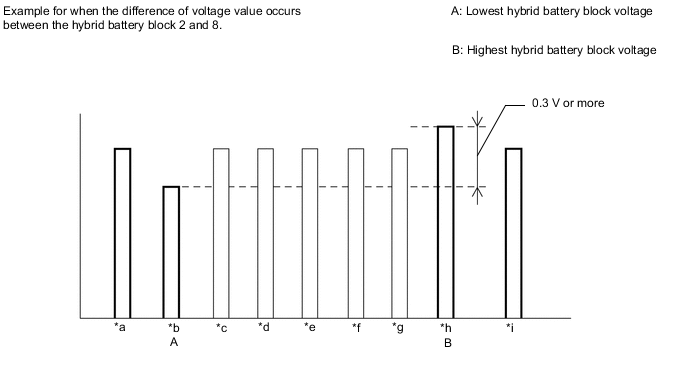
*a Hybrid Battery Block 1 Voltage *b Hybrid Battery Block 2 Voltage *c Hybrid Battery Block 3 Voltage *d Hybrid Battery Block 4 Voltage *e Hybrid Battery Block 5 Voltage *f Hybrid Battery Block 6 Voltage *g Hybrid Battery Block 7 Voltage *h Hybrid Battery Block 8 Voltage *i Hybrid Battery Block 9 Voltage - - Result Result Proceed to Other than below A The difference between the lowest and highest HV battery block voltage is 0.3 V or more. B -
Turn the power switch off.
B
GO TO STEP 8 Click here
A
-
-
READ VALUE USING TECHSTREAM (DATA LIST)
-
Apply the parking brake and secure the wheels using chocks.
-
Connect the GTS to the DLC3.
-
Turn the power switch on (READY).
-
Enter the following menus: Powertrain / Hybrid Control / Data List.
Powertrain > Hybrid Control > Data ListTester Display Hybrid Battery Temperature 1 Hybrid Battery Temperature 2 Hybrid Battery Temperature 3 -
According to the display on the GTS, read the Data List and check that the value of each "Hybrid Battery Temperature 1 to 3" is 40°C or less.
Tech Tips
If the value of any of "Hybrid Battery Temperature 1 to 3" is more than 40°C, turn the power switch off and wait until the values to decrease to 40°C or less before continuing this procedure.
-
Enter the following menus: Powertrain / Hybrid Control / Data List.
Powertrain > Hybrid Control > Data ListTester Display Hybrid Battery Block 3 Voltage Hybrid Battery Block 4 Voltage Hybrid Battery Block 5 Voltage Hybrid Battery Block 6 Voltage Hybrid Battery Block 7 Voltage -
According to the display on the GTS, read the Data List and check the value of each "Hybrid Battery Block 3 to 8 Voltage" with the power switch on (IG).
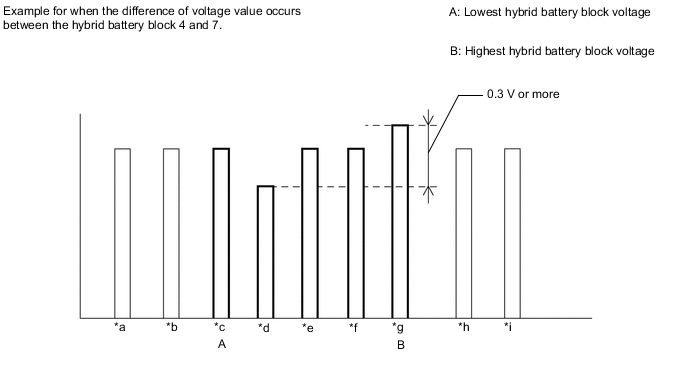
*a Hybrid Battery Block 1 Voltage *b Hybrid Battery Block 2 Voltage *c Hybrid Battery Block 3 Voltage *d Hybrid Battery Block 4 Voltage *e Hybrid Battery Block 5 Voltage *f Hybrid Battery Block 6 Voltage *g Hybrid Battery Block 7 Voltage *h Hybrid Battery Block 8 Voltage *i Hybrid Battery Block 9 Voltage - - Result Result Proceed to Other than below A The difference between the lowest and highest HV battery block voltage is 0.3 V or more. B -
Turn the power switch off.
A
END
B
REPLACE HYBRID VEHICLE CONTROL ECU Click here
-
-
REPLACE BATTERY VOLTAGE SENSOR
Tech Tips
Result Proceed to NEXT
NEXT
REPLACE HV BATTERY Click here
-
REPLACE HYBRID VEHICLE CONTROL ECU
Tech Tips
Result Proceed to NEXT
NEXT
REPLACE HV BATTERY Click here