SFI SYSTEM(w/o Canister Pump Module), Diagnostic DTC:P268172, P268173
| DTC Code | DTC Name |
|---|---|
| P268172 | Engine Coolant Bypass Valve Actuator Stuck Open |
| P268173 | Engine Coolant Bypass Valve Actuator Stuck Closed |
DESCRIPTION
Tech Tips
These DTCs are applicable to models w/ Flow Shutting Valve only.
Refer to DTC P268111.
| DTC No. | Detection Item | DTC Detection Condition | Trouble Area | MIL | Memory | Note |
|---|---|---|---|---|---|---|
| P268172 | Engine Coolant Bypass Valve Actuator Stuck Open | The difference between the value of the engine coolant temperature sensor and No. 2 engine coolant temperature sensor is 3°C (5°F) or less for 3 seconds or more (2 trip detection logic). |
|
Does not come on | DTC stored | SAE Code: P26AB |
| P268173 | Engine Coolant Bypass Valve Actuator Stuck Closed | Either of the following conditions is met for 3 seconds or more (2 trip detection logic):
|
|
Does not come on | DTC stored | SAE Code: P26B1 |
MONITOR DESCRIPTION
-
If the difference between the value of the engine coolant temperature sensor and No. 2 engine coolant temperature sensor is less than 3°C (5°F) but the target operating state of the flow shutting valve (water valve) is closed, the ECM will determine that the flow shutting valve (water valve) is stuck open and store a DTC.
P268172:
-
If the difference between the value of the engine coolant temperature sensor and No. 2 engine coolant temperature sensor is more than the threshold but the target operating state of the flow shutting valve (water valve) is open, the ECM will determine that the flow shutting valve (water valve) is stuck closed and store a DTC.
P268173:
CONFIRMATION DRIVING PATTERN
- P268172
Tech Tips
Make sure to perform this procedure when the ambient temperature is 5°C (41°F) or more, the engine coolant temperature between 5 and 40°C (41 and 104°F), and the difference between the engine coolant temperature and ambient temperature is within 10°C (18°F).
-
Connect the GTS to the DLC3.
-
Turn the power switch on (IG).
-
Turn the GTS on.
-
Clear the DTCs (even if no DTCs are stored, perform the clear DTC procedure).
-
Turn the power switch off and wait for at least 30 seconds.
-
Turn the power switch on (IG).
-
Turn the GTS on.
-
Put the engine in Inspection Mode (Maintenance Mode).
-
Enter the following menus: Powertrain / Engine / Data List / Coolant Water Route Switching Valve.
-
Start the engine and check that the value of the Data List item Coolant Water Route Switching Valve is "Close".
-
Warm up the engine until the value of the Data List item Coolant Water Route Switching Valve is "Open".
-
Enter the following menus: Powertrain / Engine / Trouble Codes.
-
Read the pending DTCs.
Tech Tips
-
If a pending DTC is output, the system is malfunctioning.
-
If a pending DTC is not output, perform the following procedure.
-
-
Enter the following menus: Powertrain / Engine / Utility / All Readiness.
-
Input the DTC: P268172.
-
Check the DTC judgment result.
GTS Display Description NORMAL
-
DTC judgment completed
-
System normal
ABNORMAL
-
DTC judgment completed
-
System abnormal
INCOMPLETE
-
DTC judgment not completed
-
Perform driving pattern after confirming DTC enabling conditions
N/A
-
Unable to perform DTC judgment
-
Number of DTCs which do not fulfill DTC preconditions has reached ECU memory limit
Tech Tips
-
If the judgment result is NORMAL, the system is normal.
-
If the judgment result is ABNORMAL, the system is malfunctioning.
-
If the judgment result is INCOMPLETE or N/A, perform the Confirmation Driving Pattern and check the DTC judgment result again.
-
-
- P268173
Tech Tips
When performing this procedure, start the engine when the coolant temperature is less than 40°C (104°F).
-
Connect the GTS to the DLC3.
-
Turn the power switch on (IG).
-
Turn the GTS on.
-
Clear the DTCs (even if no DTCs are stored, perform the clear DTC procedure).
-
Turn the power switch off and wait for at least 30 seconds.
-
Turn the power switch on (IG).
-
Turn the GTS on.
-
Put the engine in Inspection Mode (Maintenance Mode).
-
Enter the following menus: Powertrain / Engine / Data List / Coolant Temperature.
-
Start the engine.
-
Start the engine and warm it up until the engine coolant temperature reaches 80°C (176°F).
-
Enter the following menus: Powertrain / Engine / Trouble Codes.
-
Read the pending DTCs.
Tech Tips
-
If a pending DTC is output, the system is malfunctioning.
-
If a pending DTC is not output, perform the following procedure.
-
-
Enter the following menus: Powertrain / Engine / Utility / All Readiness.
-
Input the DTC: P268173.
-
Check the DTC judgment result.
GTS Display Description NORMAL
-
DTC judgment completed
-
System normal
ABNORMAL
-
DTC judgment completed
-
System abnormal
INCOMPLETE
-
DTC judgment not completed
-
Perform driving pattern after confirming DTC enabling conditions
N/A
-
Unable to perform DTC judgment
-
Number of DTCs which do not fulfill DTC preconditions has reached ECU memory limit
Tech Tips
-
If the judgment result is NORMAL, the system is normal.
-
If the judgment result is ABNORMAL, the system is malfunctioning.
-
If the judgment result is INCOMPLETE or N/A, perform the Confirmation Driving Pattern and check the DTC judgment result again.
-
-
CAUTION / NOTICE / HINT
Note
-
Vehicle Control History may be stored in the hybrid vehicle control ECU if the engine is malfunctioning. Certain vehicle condition information is recorded when Vehicle Control History is stored. Reading the vehicle conditions recorded in both the freeze frame data and Vehicle Control History can be useful for troubleshooting.
(Select Powertrain in Health Check and then check the time stamp data.)
-
If any "Engine Malfunction" Vehicle Control History item has been stored in the hybrid vehicle control ECU, make sure to clear it. However, as all Vehicle Control History items are cleared simultaneously, if any Vehicle Control History items other than "Engine Malfunction" are stored, make sure to perform any troubleshooting for them before clearing Vehicle Control History.
Tech Tips
-
When replacing any cooling system (for Engine) parts, if excessive deposits of rust or scale exist or the concentration of the engine coolant is abnormal, replace the engine coolant.
-
Read freeze frame data using the GTS. The ECM records vehicle and driving condition information as freeze frame data the moment a DTC is stored. When troubleshooting, freeze frame data can help determine if the vehicle was moving or stationary, if the engine was warmed up or not, if the air fuel ratio was lean or rich, and other data from the time the malfunction occurred.
PROCEDURE
-
CHECK ANY OTHER DTCS OUTPUT (IN ADDITION TO DTC P268172 OR P268173)
-
Connect the GTS to the DLC3.
-
Turn the power switch on (IG).
-
Turn the GTS on.
-
Enter the following menus: Powertrain / Engine / Trouble Codes.
-
Read the DTCs.
Powertrain > Engine > Trouble CodesResult Result Proceed to DTC P268172 or P268173 is output A DTC P268172 or P268173 and other DTCs are output B Tech Tips
-
If DTC P268173 and P26819C are output simultaneously, perform troubleshooting for DTC P268173 first.
-
If DTC P268172 and P26819C are output simultaneously, perform troubleshooting for DTC P26819C first.
-
If any DTCs other than DTC P268172, P268173 or P26819C are output, perform troubleshooting for those DTCs first.
-
B 
GO TO DTC CHART Click here
A 
-
-
CHECK RESERVE SEALED TANK WITHOUT CAP (ENGINE COOLANT LEVEL)
-
Check that the engine coolant level is between the FULL and LOW lines.
OK The engine coolant is not excessively low. Tech Tips
Make sure that there are no signs of the engine overheating.
Result Proceed to OK NG
OK 
GO TO STEP 6 Click here
NG
-
-
REPAIR OR REPLACE MALFUNCTIONING PARTS, COMPONENT AND AREA
-
Repair any engine coolant leaks.
Result Proceed to NEXT
NEXT
-
-
CLEAR DTC
-
Connect the GTS to the DLC3.
-
Turn the power switch on (IG).
-
Turn the GTS on.
-
Clear the DTCs.
Powertrain > Engine > Clear DTCs -
Turn the power switch off and wait for at least 30 seconds.
Result Proceed to NEXT
NEXT
-
-
CHECK WHETHER DTC OUTPUT RECURS (DTC P268172 OR P268173)
-
Drive the vehicle in accordance with the driving pattern described in Confirmation Driving Pattern.
-
Enter the following menus: Powertrain / Engine / Trouble Codes.
-
Read the DTCs.
Powertrain > Engine > Trouble CodesResult Result Proceed to DTCs are not output A P268172 or P268173 is output B
A
END
B
-
-
PERFORM ACTIVE TEST USING GTS (ACTIVATE THE ELECTRIC WATER PUMP)
-
Connect the GTS to the DLC3.
-
Turn the power switch on (IG).
-
Turn the GTS on.
-
Enter the following menus: Powertrain / Engine / Active Test / Activate the Electric Water Pump / Data List / Electric Water Pump.
Powertrain > Engine > Active TestActive Test Display Activate the Electric Water Pump Data List Display Electric Water Pump -
Perform the Active Test according to the display on the GTS and lightly squeeze a radiator hose by hand to check for a pulsing feeling.
OK Pulsing can be felt in a radiator hose. Tech Tips
If pulsing cannot be felt in a radiator hose, inspect the engine water pump assembly. If the impeller is damaged, replace the engine water pump assembly.
Result Proceed to OK NG
NG
INSPECT ENGINE WATER PUMP ASSEMBLY (VISUAL INSPECTION OF IMPELLER) Click here
OK
-
-
READ VALUE USING GTS (COOLANT TEMPERATURE AND HEATER COOLANT TEMPERATURE SENSOR)
-
Connect the GTS to the DLC3.
-
Turn the power switch on (IG).
-
Turn the GTS on.
-
Enter the following menus: Powertrain / Engine / Data List / Coolant Temperature and Heater Coolant Temperature Sensor.
Powertrain > Engine > Data ListTester Display Coolant Temperature Heater Coolant Temperature Sensor -
Start the engine.
-
Read the value displayed on the GTS.
OK The values of Data List items Coolant Temperature and Heater Coolant Temperature Sensor change over time and do not get stuck on a certain value. Result Result Proceed to The value of Coolant Temperature does not change A The value of Heater Coolant Temperature Sensor does not change B Other than above C
A
REPLACE ENGINE COOLANT TEMPERATURE SENSOR Click here Perform "Inspection After Repair" after replacing the engine coolant temperature sensor. Click here
B
REPLACE NO. 2 ENGINE COOLANT TEMPERATURE SENSOR Click here
C
-
-
PERFORM ACTIVE TEST USING GTS (CONTROL THE ENGINE COOLING FAN)
-
Connect the GTS to the DLC3.
-
Turn the power switch on (IG).
-
Turn the GTS on.
-
Put the engine in Inspection Mode (Maintenance Mode).
Powertrain > Hybrid Control > UtilityTester Display Inspection Mode -
Start the engine and warm it up with the A/C switch and all other accessories off until the engine coolant temperature reaches 85°C (185°F).
Tech Tips
Warm up the engine until the engine coolant temperature reaches the water inlet with thermostat sub-assembly opening temperature.
-
Enter the following menus: Powertrain / Engine / Active Test / Control the Engine Cooling Fan / Data List / Coolant Temperature, Engine Cooling Fan.
Powertrain > Engine > Active TestActive Test Display Control the Engine Cooling Fan Data List Display Coolant Temperature Engine Cooling Fan -
Read the Data List while performing the Active Test with the engine idling.
OK The engine coolant temperature does not decrease to 70°C (158°F) or less. Tech Tips
While performing the Active Test, if the engine coolant temperature decreases to 70°C (158°F) or less, the water inlet with thermostat sub-assembly may be stuck open.
Result Control the Engine Cooling Fan
(Active Test)
Coolant Temperature
(Data List)
Water Inlet with Thermostat Sub-assembly Operation Proceed to High Higher than 70°C (158°F) Normal A 70°C (158°F) or less Stuck open B
B
CHECK AND REPLACE WATER INLET WITH THERMOSTAT SUB-ASSEMBLY Click here
A
-
-
INSPECT ENGINE COOLANT TEMPERATURE SENSOR
-
Inspect the engine coolant temperature sensor.
Tech Tips
If the result of the engine coolant temperature sensor inspection differs greatly from the specified value, inspect the water inlet with thermostat sub-assembly.
Result Proceed to OK NG
NG
REPLACE ENGINE COOLANT TEMPERATURE SENSOR Click here Perform "Inspection After Repair" after replacing the engine coolant temperature sensor. Click here
OK
-
-
INSPECT NO. 2 ENGINE COOLANT TEMPERATURE SENSOR
-
Inspect the No. 2 engine coolant temperature sensor.
Result Proceed to OK NG
NG
REPLACE NO. 2 ENGINE COOLANT TEMPERATURE SENSOR Click here
OK
-
-
REPLACE FLOW SHUTTING VALVE (WATER VALVE)
-
Replace the flow shutting valve (water valve).
Tech Tips
-
When replacing any cooling system (for Engine) parts, if excessive deposits of rust or scale exist or the concentration of the engine coolant is abnormal, replace the engine coolant.
Result Proceed to NEXT
NEXT
-
-
CLEAR DTC
-
Connect the GTS to the DLC3.
-
Turn the power switch on (IG).
-
Turn the GTS on.
-
Clear the DTCs.
Powertrain > Engine > Clear DTCs -
Turn the power switch off and wait for at least 30 seconds.
Result Proceed to NEXT
NEXT
-
-
CHECK WHETHER DTC OUTPUT RECURS (DTC P268172 OR P268173)
-
Drive the vehicle in accordance with the driving pattern described in Confirmation Driving Pattern.
-
Enter the following menus: Powertrain / Engine / Trouble Codes.
-
Read the DTCs.
Powertrain > Engine > Trouble CodesOK DTCs are not output. Result Proceed to NEXT
NEXT
END
-
-
INSPECT ENGINE WATER PUMP ASSEMBLY (VISUAL INSPECTION OF IMPELLER)
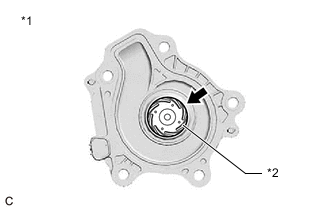
*1 Engine Water Pump Assembly *2 Impeller
-
Visually inspect the impeller for damage.
OK The impeller is not damaged. Result Proceed to NEXT
NEXT
END
-