SFI SYSTEM(w/ Canister Pump Module), Diagnostic DTC:P006900
| DTC Code | DTC Name |
|---|---|
| P006900 | Manifold Absolute Pressure - Barometric Pressure Correlation |
DESCRIPTION
The manifold absolute pressure sensor installed to the intake manifold detects the intake manifold pressure using a built-in sensor.
An atmospheric pressure sensor is built in the ECM. When the engine is stopped, the value of the manifold absolute pressure sensor and atmospheric pressure sensor will be approximately the same as the atmospheric pressure.
| DTC No. | Detection Item | DTC Detection Condition | Trouble Area | MIL | Memory | Note |
|---|---|---|---|---|---|---|
| P006900 | Manifold Absolute Pressure - Barometric Pressure Correlation | Difference between atmospheric pressure value of the absolute pressure sensor and atmospheric pressure sensor is higher than threshold value (2 trip detection logic). |
|
Comes on | DTC stored | SAE Code: P0069 |
MONITOR DESCRIPTION
Approximately 50 minutes after the power switch is turned off, the soak timer is activated and the values of the manifold absolute pressure sensor and atmospheric pressure sensor are compared. If the difference between the values of the manifold absolute pressure sensor and atmospheric pressure sensor is higher than a threshold value in consecutive driving cycles, the ECM will store this DTC.
MONITOR STRATEGY
| Required Sensors/Components (Main) | Manifold absolute pressure sensor ECM |
| Required Sensors/Components (Related) | Mass air flow meter sub-assembly Engine coolant temperature sensor |
| Frequency of Operation | Once per driving cycle |
CONFIRMATION DRIVING PATTERN
-
Connect the GTS to the DLC3.
-
Turn the power switch on (IG).
-
Turn the GTS on.
-
Clear the DTCs (even if no DTCs are stored, perform the clear DTC procedure).
-
Turn the power switch off and wait for at least 55 minutes.
-
Turn the power switch on (IG).
-
Turn the GTS on.
-
Enter the following menus: Powertrain / Engine / Trouble Codes.
-
Read the pending DTCs.
Tech Tips
-
If a pending DTC is output, the system is malfunctioning.
-
If a pending DTC is not output, perform the following procedure.
-
-
Enter the following menus: Powertrain / Engine / Utility / All Readiness.
-
Input the DTC: P006900.
-
Check the DTC judgment result.
GTS Display Description NORMAL
-
DTC judgment completed
-
System normal
ABNORMAL
-
DTC judgment completed
-
System abnormal
INCOMPLETE
-
DTC judgment not completed
-
Perform driving pattern after confirming DTC enabling conditions
N/A
-
Unable to perform DTC judgment
-
Number of DTCs which do not fulfill DTC preconditions has reached ECU memory limit
Tech Tips
-
If the judgment result is NORMAL, the system is normal.
-
If the judgment result is ABNORMAL, the system is malfunctioning.
-
CAUTION / NOTICE / HINT
Tech Tips
Read freeze frame data using the GTS. The ECM records vehicle and driving condition information as freeze frame data the moment a DTC is stored. When troubleshooting, freeze frame data can help determine if the vehicle was moving or stationary, if the engine was warmed up or not, if the air fuel ratio was lean or rich, and other data from the time the malfunction occurred.
PROCEDURE
-
CHECK ANY OTHER DTCS OUTPUT (IN ADDITION TO DTC P006900)
-
Connect the GTS to the DLC3.
-
Turn the power switch on (IG).
-
Turn the GTS on.
-
Enter the following menus: Powertrain / Engine / Trouble Codes.
-
Read the DTCs.
Powertrain > Engine > Trouble CodesResult Result Proceed to DTC P006900 is output A DTC P006900 and other DTCs are output B Tech Tips
If any DTCs other than P006900 are output, troubleshoot those DTCs first.
B 
GO TO DTC CHART Click here
A 
-
-
READ VALUE USING GTS (INTAKE MANIFOLD ABSOLUTE PRESSURE)
-
Turn the power switch off and wait for at least 50 minutes.
-
Connect the GTS to the DLC3.
-
Turn the power switch on (IG).
-
Turn the GTS on.
-
Enter the following menus: Powertrain / Engine / Data List / Intake Manifold Absolute Pressure.
Powertrain > Engine > Data ListTester Display Intake Manifold Absolute Pressure -
Using the following table, determine the normal atmospheric pressure for the current altitude and temperature.
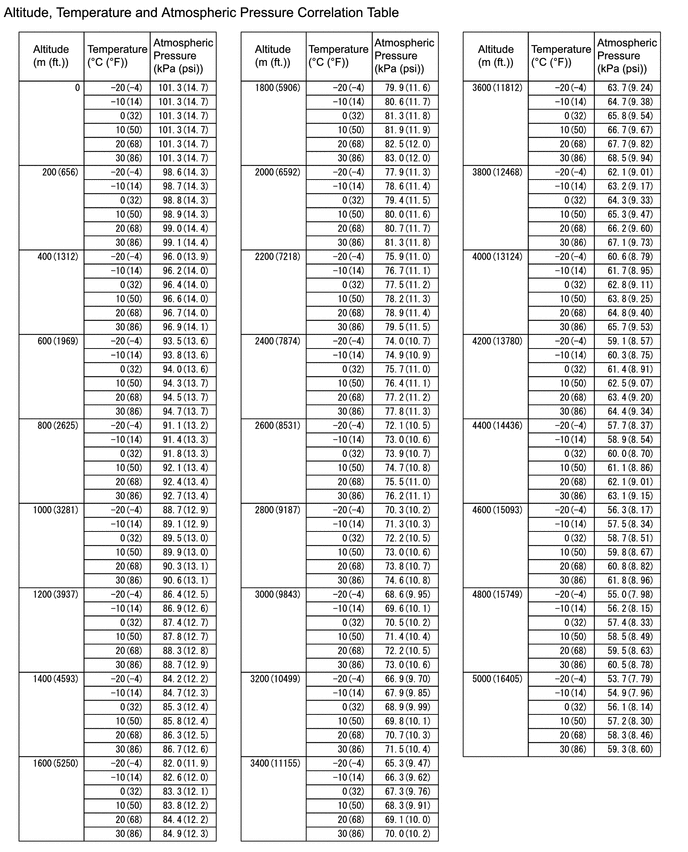
Tech Tips
-
Standard atmospheric pressure is approximately 101 kPa(abs) [15 psi(abs)].
-
For every 100 m (328 ft.) increase in altitude, atmospheric pressure drops by approximately 1 kPa (0.1 psi). This varies depending on the weather.
-
-
Compare the value of the Data List item Intake Manifold Absolute Pressure with the actual atmospheric pressure.
Result Result Proceed to Approximately the same as the actual atmospheric pressure A Not approximately the same as the actual atmospheric pressure B
B
REPLACE MANIFOLD ABSOLUTE PRESSURE SENSOR Click here
A
-
-
READ VALUE USING GTS (ATMOSPHERIC PRESSURE)
-
Connect the GTS to the DLC3.
-
Turn the power switch on (IG).
-
Turn the GTS on.
-
Enter the following menus: Powertrain / Engine / Data List / Atmospheric Pressure.
Powertrain > Engine > Data ListTester Display Atmospheric Pressure -
Using the following table, determine the normal atmospheric pressure for the current altitude and temperature.
Tech Tips
-
Standard atmospheric pressure is approximately 101 kPa(abs) [15 psi(abs)].
-
For every 100 m (328 ft.) increase in altitude, atmospheric pressure drops by approximately 1 kPa (0.1 psi). This varies depending on the weather.
-
-
Compare the value of the Data List item Atmospheric Pressure with the actual atmospheric pressure.
Result Result Proceed to Approximately the same as the actual atmospheric pressure A Not approximately the same as the actual atmospheric pressure B
A
CHECK FOR INTERMITTENT PROBLEMS Click here
B
REPLACE ECM Click here
-