FRONT POWER SEAT CONTROL SYSTEM(w/ Memory) Power Seat Power Easy Access System Function does not Operate
DESCRIPTION
-
The seat slides backward when either of the following conditions is met:
-
The driver seat belt is unfastened with the power switch off and the shift lever in P.
-
The power switch is turned from on (IG) or on (ACC) to off with the shift lever in P or N and the driver seat belt unfastened.
-
The seat slides forward when either of the following conditions is met:
-
The driver seat belt is fastened with the power switch on (IG) or on (ACC) and the shift lever in P or N.
-
The power switch is turned from off to on (IG) or on (ACC) with the shift lever in P or N and the driver seat belt unfastened.
WIRING DIAGRAM
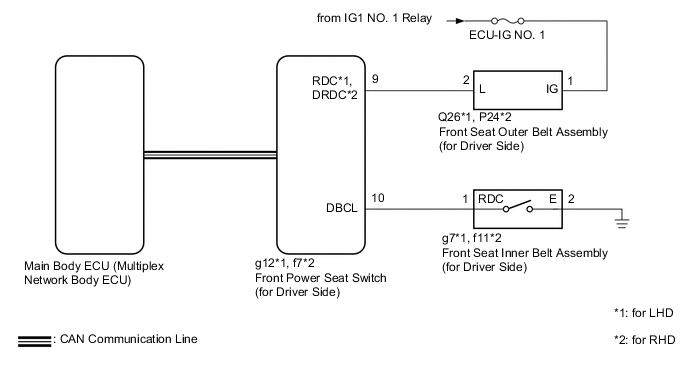
CAUTION / NOTICE / HINT
Note
-
The front power seat control system (w/ Memory) uses the CAN communication system. First, confirm that there is no malfunction in the CAN communication system. Refer to the How to Proceed with Troubleshooting procedure.
-
Before replacing the main body ECU (multiplex network body ECU), refer to Service Bulletin.
-
Inspect the fuses for circuits related to this system before performing the following procedure.
Tech Tips
When troubleshooting a function, first make sure that the function is set to the default setting.
PROCEDURE
-
CHECK FRONT POWER SEAT OPERATION
-
Check that each function of the power seat operates normally by using the front power seat switch (for Driver Side).
Result Proceed to OK NG
NG 
GO TO OTHER DIAGNOSTIC PROCEDURE (Front Power Seat does not Operate with Front Power Seat Switch) Click here
OK 
-
-
CHECK SEAT POSITION MEMORY FUNCTION
-
Check that the seat position memory function.
OK Seat position memory function is normal. Result Proceed to OK NG
NG
GO TO OTHER DIAGNOSTIC PROCEDURE (Power Seat does not Return to Memorized Position) Click here
OK
-
-
READ VALUE USING GTS
-
Connect the GTS to the DLC3.
-
Turn the power switch on (IG).
-
Turn the GTS on.
-
Enter the following menus: Body Electrical / Driver Seat / Data List.
-
Read the Data List according to the display on the GTS.
Body Electrical > Driver Seat > Data ListTester Display Measurement Item Range Normal Condition Diagnostic Note Driver Seat Buckle SW Driver seat belt buckle switch ON or OFF ON: Driver seat belt fastened
OFF: Driver seat belt unfastened
-
Body Electrical > Driver Seat > Data ListTester Display Driver Seat Buckle SW OK On the GTS screen, the item changes between ON and OFF according to the above. Result Proceed to OK NG
NG 
INSPECT FRONT SEAT INNER BELT ASSEMBLY (for Driver Side) Click here
OK
-
-
INSPECT FRONT SEAT OUTER BELT ASSEMBLY (for Driver Side)
-
Remove the front seat outer belt assembly (for Driver Side).
-
Inspect the front seat outer belt assembly (for Driver Side).
Result Proceed to OK NG
NG
REPLACE FRONT SEAT OUTER BELT ASSEMBLY (for Driver Side) Click here
OK
-
-
CHECK HARNESS AND CONNECTOR (FRONT SEAT OUTER BELT ASSEMBLY [for Driver Side] - FRONT POWER SEAT SWITCH [for Driver Side] AND BATTERY)
-
*1: for LHD
-
*2: for RHD
-
Disconnect the Q26*1, P24*2 front seat outer belt assembly (for driver side) connector.
-
Disconnect the g12*1 or f7*2 front power seat switch (for Driver Side) connector.
-
Measure the resistance according to the value(s) in the table below.
Standard Resistance for LHD Tester Connection Condition Specified Condition Q26-2 (L) - g12-9 (RDC) Always Below 1 Ω Q26-2 (L) or g12-9 (RDC) - Body ground Always 10 kΩ or higher for RHD Tester Connection Condition Specified Condition P24-2 (L) - f7-9 (DRDC) Always Below 1 Ω P24-2 (L) or f7-9 (DRDC) - Body ground Always 10 kΩ or higher -
Measure the voltage according to the value(s) in the table below.
Standard Voltage for LHD Tester Connection Switch Condition Specified Condition Q26-1 (IG) - Body ground Power switch on (IG) 11 to 14 V Q26-1 (IG) - Body ground Power switch off Below 1 V for RHD Tester Connection Switch Condition Specified Condition P24-1 (IG) - Body ground Power switch on (IG) 11 to 14 V P24-1 (IG) - Body ground Power switch off Below 1 V Result Proceed to OK NG
OK
REPLACE FRONT POWER SEAT SWITCH (for Driver Side) Click here
NG
REPAIR OR REPLACE HARNESS OR CONNECTOR
-
-
INSPECT FRONT SEAT INNER BELT ASSEMBLY (for Driver Side)
-
Remove the front seat inner belt assembly (for Driver Side).
-
Inspect the front seat inner belt assembly (for Driver Side).
Result Proceed to OK NG
NG
REPLACE FRONT SEAT INNER BELT ASSEMBLY (for Driver Side) Click here
OK
-
-
CHECK HARNESS AND CONNECTOR (FRONT POWER SEAT SWITCH [for Driver Side] - FRONT SEAT INNER BELT ASSEMBLY [for Driver Side] AND BODY GROUND)
-
*1: for LHD
-
*2: for RHD
-
Disconnect the g12*1 or f7*2 front power seat switch (for Driver Side) connector.
-
Disconnect the g7*1 or f11*2 front seat inner belt assembly (for Driver Side) connector.
-
Measure the resistance according to the value(s) in the table below.
Standard Resistance for LHD Tester Connection Condition Specified Condition g12-10 (DBCL) - g7-1 (RDC) Always Below 1 Ω g12-10 (DBCL) or g7-1 (RDC) - Body ground Always 10 kΩ or higher for RHD Tester Connection Condition Specified Condition f7-10 (DBCL) - f11-1 (RDC) Always Below 1 Ω f7-10 (DBCL) or f11-1 (RDC) - Body ground Always 10 kΩ or higher Result Proceed to OK NG
OK
REPLACE FRONT POWER SEAT SWITCH (for Driver Side) Click here
NG
REPAIR OR REPLACE HARNESS OR CONNECTOR
-