FRONT POWER SEAT CONTROL SYSTEM(w/ Memory) One or more Power Seat Motors do not Operate
DESCRIPTION
Signals are input into the front power seat switch (for Driver Side). The built-in ECU manages the signals received from the front power seat switch (for Driver Side), and operates each motor. If the front power seat switch (for Driver Side) receives more than 2 motor operation signals, the motor is stopped. Manual operation is restarted after the front power seat switch (for Driver Side) receives 1 signal only.
WIRING DIAGRAM
-
for LHD
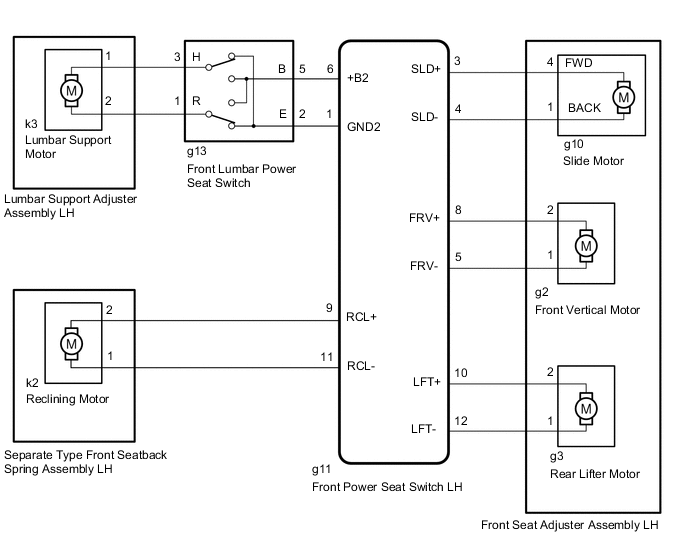
-
for RHD
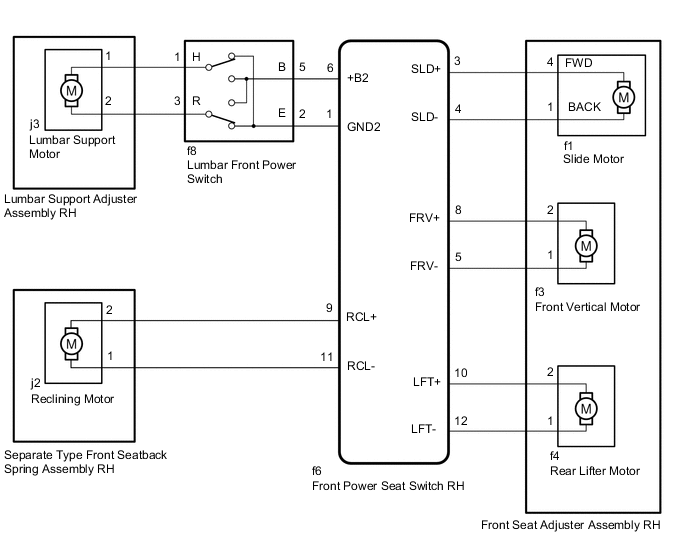
CAUTION / NOTICE / HINT
Tech Tips
If DTC B2650 or B2658 is output, first perform troubleshooting these DTCs.
PROCEDURE
-
CHECK FRONT POWER SEAT OPERATION
-
Check that each function of the power seat operates normally by using the front power seat switch (for Driver Side).
Result Result Proceed to All power seat functions do not operate A Only slide function does not operate B Only front vertical function does not operate C Only rear lifter function does not operate D Only reclining function does not operate E Only lumbar support adjustment function does not operate F
A 
GO TO OTHER DIAGNOSIS PROCEDURE (Front Power Seat does not Operate with Front Power Seat Switch) Click here
C 
READ VALUE USING GTS (FRONT VERTICAL DOWN, FRONT VERTICAL UP) Click here
D
READ VALUE USING GTS (LIFTER SWITCH DOWN, LIFTER SWITCH UP) Click here
E
READ VALUE USING GTS (RECLINING REAR, RECLINING FRONT) Click here
F
INSPECT FRONT LUMBAR POWER SEAT SWITCH Click here
B 
-
-
READ VALUE USING GTS (SLIDE REAR, SLIDE FRONT)
-
Connect the GTS to the DLC3.
-
Turn the power switch on (IG).
-
Turn the GTS on.
-
Enter the following menus: Body Electrical / Driver Seat / Data List.
-
Read the Data List according to the display on the GTS.
Body Electrical > Driver Seat > Data ListTester Display Measurement Item Range Normal Condition Diagnostic Note Slide Rear Slide switch signal (Rearward) ON or OFF ON: Slide switch (Rearward) on
OFF: Slide switch (Rearward) off
- Slide Front Slide switch signal (Forward) ON or OFF ON: Slide switch (Forward) on
OFF: Slide switch (Forward) off
-
Body Electrical > Driver Seat > Data ListTester Display Slide Rear Slide Front OK The GTS display changes correctly in response to the switch operation. Result Proceed to OK NG
NG
REPLACE FRONT POWER SEAT SWITCH (for Driver Side) (for Driver Side) Click here
OK
-
-
PERFORM ACTIVE TEST USING GTS (SEAT SLIDE OPERATION)
-
Enter the following menus: Body Electrical / Driver Seat / Active Test.
-
Perform the Active Test according to the display on the GTS.
Body Electrical > Driver Seat > Active TestTester Display Measurement Item Control Range Diagnostic Note Seat Slide Operation Seat slide operation OFF/Rear/Front -
Body Electrical > Driver Seat > Active TestTester Display Seat Slide Operation OK Front seat assembly is moved normally using the GTS operation. Result Proceed to OK NG
OK
REPLACE FRONT POWER SEAT SWITCH (for Driver Side) Click here
NG
-
-
INSPECT FRONT SEAT ADJUSTER ASSEMBLY (for Driver Side) (SLIDE MOTOR)
-
Remove the front seat adjuster assembly (for Driver Side).
-
Inspect the front seat adjuster assembly (for Driver Side).
Result Proceed to OK NG
NG
REPLACE FRONT SEAT ADJUSTER ASSEMBLY (for Driver Side) Click here
OK
-
-
CHECK HARNESS AND CONNECTOR (FRONT POWER SEAT SWITCH [for Driver Side] - FRONT SEAT ADJUSTER ASSEMBLY [for Driver Side] [SLIDE MOTOR])
-
*1: for LHD
-
*2: for RHD
-
Disconnect the g11*1 or f6*2 front power seat switch (for Driver Side) connector.
-
Disconnect the g10*1 or f1*2 front seat adjuster assembly (for Driver Side) connector.
-
Measure the resistance according to the value(s) in the table below.
Standard Resistance for LHD Tester Connection Condition Specified Condition g11-3 (SLD+) - g10-4 (FWD) Always Below 1 Ω g11-3 (SLD+) or g10-4 (FWD) - Body ground Always 10 kΩ or higher g11-4 (SLD-) - g10-1 (BACK) Always Below 1 Ω g11-4 (SLD-) or g10-1 (BACK) - Body ground Always 10 kΩ or higher for RHD Tester Connection Condition Specified Condition f6-3 (SLD+) - f1-4 (FWD) Always Below 1 Ω f6-3 (SLD+) or f1-4 (FWD) - Body ground Always 10 kΩ or higher f6-4 (SLD-) - f1-1 (BACK) Always Below 1 Ω f6-4 (SLD-) or f1-1 (BACK) - Body ground Always 10 kΩ or higher Result Proceed to OK NG
OK
REPLACE FRONT POWER SEAT SWITCH (for Driver Side) Click here
NG
REPAIR OR REPLACE HARNESS OR CONNECTOR
-
-
READ VALUE USING GTS (FRONT VERTICAL DOWN, FRONT VERTICAL UP)
-
Connect the GTS to the DLC3.
-
Turn the power switch on (IG).
-
Turn the GTS on.
-
Enter the following menus: Body Electrical / Driver Seat / Data List.
-
Read the Data List according to the display on the GTS.
Body Electrical > Driver Seat > Data ListTester Display Measurement Item Range Normal Condition Diagnostic Note Front Vertical Down Front vertical switch signal (Downward) ON or OFF ON: Front vertical switch (Downward) on
OFF: Front vertical switch (Downward) off
- Front Vertical Up Front vertical switch signal (Upward) ON or OFF ON: Front vertical switch (Upward) on
OFF: Front vertical switch (Upward) off
-
Body Electrical > Driver Seat > Data ListTester Display Front Vertical Down Front Vertical Up OK The GTS display changes correctly in response to the switch operation. Result Proceed to OK NG
NG
REPLACE FRONT POWER SEAT SWITCH (for Driver Side) Click here
OK
-
-
PERFORM ACTIVE TEST USING GTS (FRONT VERTICAL OPERATION)
-
Enter the following menus: Body Electrical / Driver Seat / Active Test.
-
Perform the Active Test according to the display on the GTS.
Body Electrical > Driver Seat > Active TestTester Display Measurement Item Control Range Diagnostic Note Front Vertical Operation Seat front vertical operation OFF/Down/Up -
Body Electrical > Driver Seat > Active TestTester Display Front Vertical Operation OK Front seat assembly is moved normally using the GTS operation. Result Proceed to OK NG
OK
REPLACE FRONT POWER SEAT SWITCH (for Driver Side) Click here
NG
-
-
INSPECT FRONT SEAT ADJUSTER ASSEMBLY (for Driver Side) (FRONT VERTICAL MOTOR)
-
Remove the front seat adjuster assembly (for Driver Side).
-
Inspect the front seat adjuster assembly (for Driver Side).
Result Proceed to OK NG
NG
REPLACE FRONT SEAT ADJUSTER ASSEMBLY (for Driver Side) Click here
OK
-
-
CHECK HARNESS AND CONNECTOR (FRONT POWER SEAT SWITCH [for Driver Side] - FRONT SEAT ADJUSTER ASSEMBLY [for Driver Side] [FRONT VERTICAL MOTOR])
-
*1: for LHD
-
*2: for RHD
-
Disconnect the g11*1 or f6*2 front power seat switch (for Driver Side) connector.
-
Disconnect the g2*1 or f3*2 front seat adjuster assembly (for Driver Side) connector.
-
Measure the resistance according to the value(s) in the table below.
Standard Resistance for LHD Tester Connection Condition Specified Condition g11-5 (FRV-) - g2-1 Always Below 1 Ω g11-5 (FRV-) or g2-1 - Body ground Always 10 kΩ or higher g11-8 (FRV+) - g2-2 Always Below 1 Ω g11-8 (FRV+) or g2-2 - Body ground Always 10 kΩ or higher for RHD Tester Connection Condition Specified Condition f6-5 (FRV-) - f3-1 Always Below 1 Ω f6-5 (FRV-) or f3-1 - Body ground Always 10 kΩ or higher f6-8 (FRV+) - f3-2 Always Below 1 Ω f6-8 (FRV+) or f3-2 - Body ground Always 10 kΩ or higher Result Proceed to OK NG
OK
REPLACE FRONT POWER SEAT SWITCH (for Driver Side) Click here
NG
REPAIR OR REPLACE HARNESS OR CONNECTOR
-
-
READ VALUE USING GTS (LIFTER SWITCH DOWN, LIFTER SWITCH UP)
-
Connect the GTS to the DLC3.
-
Turn the power switch on (IG).
-
Turn the GTS on.
-
Enter the following menus: Body Electrical / Driver Seat / Data List.
-
Read the Data List according to the display on the GTS.
Body Electrical > Driver Seat > Data ListTester Display Measurement Item Range Normal Condition Diagnostic Note Lifter Switch Down Lifter switch signal (Downward) ON or OFF ON: Lifter switch (Downward) on
OFF: Lifter switch (Downward) off
- Lifter Switch Up Lifter switch signal (Upward) ON or OFF ON: Lifter switch (Upward) on
OFF: Lifter switch (Upward) off
-
Body Electrical > Driver Seat > Data ListTester Display Lifter Switch Down Lifter Switch Up OK The GTS display changes correctly in response to the switch operation. Result Proceed to OK NG
NG
REPLACE FRONT POWER SEAT SWITCH (for Driver Side) Click here
OK
-
-
PERFORM ACTIVE TEST USING GTS (LIFTER OPERATION)
-
Enter the following menus: Body Electrical / Driver Seat / Active Test.
-
Perform the Active Test according to the display on the GTS.
Body Electrical > Driver Seat > Active TestTester Display Measurement Item Control Range Diagnostic Note Lifter Operation Seat lifter operation OFF/Down/Up -
Body Electrical > Driver Seat > Active TestTester Display Lifter Operation OK Front seat assembly is moved normally using the GTS operation. Result Proceed to OK NG
OK
REPLACE FRONT POWER SEAT SWITCH (for Driver Side) Click here
NG
-
-
INSPECT FRONT SEAT ADJUSTER ASSEMBLY (for Driver Side) (REAR LIFTER MOTOR)
-
Remove the front seat adjuster assembly (for Driver Side).
-
Inspect the front seat adjuster assembly (for Driver Side).
Result Proceed to OK NG
NG
REPLACE FRONT SEAT ADJUSTER ASSEMBLY (for Driver Side) Click here
OK
-
-
CHECK HARNESS AND CONNECTOR (FRONT POWER SEAT SWITCH [for Driver Side] - FRONT SEAT ADJUSTER ASSEMBLY [for Driver Side] [REAR LIFTER MOTOR])
-
*1: for LHD
-
*2: for RHD
-
Disconnect the g11*1 or f6*2 front power seat switch (for Driver Side) connector.
-
Disconnect the g3*1 or f4*2 front seat adjuster assembly (for Driver Side) connector.
-
Measure the resistance according to the value(s) in the table below.
Standard Resistance for LHD Tester Connection Condition Specified Condition g11-10 (LFT+) - g3-2 Always Below 1 Ω g11-10 (LFT+) or g3-2 - Body ground Always 10 kΩ or higher g11-12 (LFT-) - g3-1 Always Below 1 Ω g11-12 (LFT-) or g3-1 - Body ground Always 10 kΩ or higher for RHD Tester Connection Condition Specified Condition f6-10 (LFT+) - f4-2 Always Below 1 Ω f6-10 (LFT+) or f4-2 - Body ground Always 10 kΩ or higher f6-12 (LFT-) - f4-1 Always Below 1 Ω f6-12 (LFT-) or f4-1 - Body ground Always 10 kΩ or higher Result Proceed to OK NG
OK
REPLACE FRONT POWER SEAT SWITCH (for Driver Side) Click here
NG
REPAIR OR REPLACE HARNESS OR CONNECTOR
-
-
READ VALUE USING GTS (RECLINING REAR, RECLINING FRONT)
-
Connect the GTS to the DLC3.
-
Turn the power switch on (IG).
-
Turn the GTS on.
-
Enter the following menus: Body Electrical / Driver Seat / Data List.
-
Read the Data List according to the display on the GTS.
Body Electrical > Driver Seat > Data ListTester Display Measurement Item Range Normal Condition Diagnostic Note Reclining Rear Reclining switch signal (Rearward) ON or OFF ON: Reclining switch (Rearward) on
OFF: Reclining switch (Rearward) off
- Reclining Front Reclining switch signal (Forward) ON or OFF ON: Reclining switch (Forward) on
OFF: Reclining switch (Forward) off
-
Body Electrical > Driver Seat > Data ListTester Display Reclining Rear Reclining Front OK The GTS display changes correctly in response to the switch operation. Result Proceed to OK NG
NG
REPLACE FRONT POWER SEAT SWITCH (for Driver Side) Click here
OK
-
-
PERFORM ACTIVE TEST USING GTS (SEAT RECLINING)
-
Enter the following menus: Body Electrical / Driver Seat / Active Test.
-
Perform the Active Test according to the display on the GTS.
Body Electrical > Driver Seat > Active TestTester Display Measurement Item Control Range Diagnostic Note Seat Reclining Seat reclining operation OFF/Rear/Front -
Body Electrical > Driver Seat > Active TestTester Display Seat Reclining OK Front seat assembly is moved normally using the GTS operation. Result Proceed to OK NG
OK
REPLACE FRONT POWER SEAT SWITCH (for Driver Side) Click here
NG
-
-
INSPECT SEPARATE TYPE FRONT SEATBACK SPRING ASSEMBLY (for Driver Side) (RECLINING MOTOR)
-
Remove the separate type front seatback spring assembly (for Driver Side).
-
Inspect the separate type front seatback spring assembly (for Driver Side).
Result Proceed to OK NG
NG
REPLACE SEPARATE TYPE FRONT SEATBACK SPRING ASSEMBLY (for Driver Side) Click here
OK
-
-
CHECK HARNESS AND CONNECTOR (FRONT POWER SEAT SWITCH - SEPARATE TYPE FRONT SEATBACK SPRING ASSEMBLY [RECLINING MOTOR])
-
*1: for LHD
-
*2: for RHD
-
Disconnect the g11*1 or f6*2 front power seat switch (for Driver Side) connector.
-
Disconnect the k2*1 or j2*2 separate type front seatback spring assembly (for Driver Side) connector.
-
Measure the resistance according to the value(s) in the table below.
Standard Resistance for LHD Tester Connection Condition Specified Condition g11-9 (RCL+) - k2-2 Always Below 1 Ω g11-9 (RCL+) or k2-2 - Body ground Always 10 kΩ or higher g11-11 (RCL-) - k2-1 Always Below 1 Ω g11-11 (RCL-) or k2-1 - Body ground Always 10 kΩ or higher for RHD Tester Connection Condition Specified Condition f6-9 (RCL+) - j2-2 Always Below 1 Ω f6-9 (RCL+) or j2-2 - Body ground Always 10 kΩ or higher f6-11 (RCL-) - j2-1 Always Below 1 Ω f6-11 (RCL-) or j2-1 - Body ground Always 10 kΩ or higher Result Proceed to OK NG
OK
REPLACE FRONT POWER SEAT SWITCH (for Driver Side) Click here
NG
REPAIR OR REPLACE HARNESS OR CONNECTOR
-
-
INSPECT FRONT LUMBAR POWER SEAT SWITCH
-
Remove the front lumbar power seat switch.
-
Inspect the front lumbar power seat switch.
Result Proceed to OK NG
NG
REPLACE FRONT LUMBAR POWER SEAT SWITCH Click here
OK
-
-
INSPECT LUMBAR SUPPORT ADJUSTER ASSEMBLY (for Driver Side) (LUMBAR SUPPORT MOTOR)
-
Remove the lumbar support adjuster assembly (for Driver Side).
-
Inspect the lumbar support adjuster assembly (for Driver Side).
Result Proceed to OK NG
NG
REPLACE LUMBAR SUPPORT ADJUSTER ASSEMBLY (for Driver Side) Click here
OK
-
-
CHECK HARNESS AND CONNECTOR (FRONT POWER SEAT SWITCH [for Driver Side] - FRONT LUMBAR POWER SEAT SWITCH)
-
*1: for LHD
-
*2: for RHD
-
Disconnect the g11*1 or f6*2 front power seat switch (for Driver Side) connector.
-
Disconnect the g13*1 or f8*2 front lumbar power seat switch connector.
-
Measure the resistance according to the value(s) in the table below.
Standard Resistance for LHD Tester Connection Condition Specified Condition g11-6 (+B2) - g13-5 (B) Always Below 1 Ω g11-6 (+B2) or g13-5 (B) - Body ground Always 10 kΩ or higher g11-1 (GND2) - g13-2 (E) Always Below 1 Ω g11-1 (GND2) or g13-2 (E) - Body ground Always 10 kΩ or higher for RHD Tester Connection Condition Specified Condition f6-6 (+B2) - f8-5 (B) Always Below 1 Ω f6-6 (+B2) or f8-5 (B) - Body ground Always 10 kΩ or higher f6-1 (GND2) - f8-2 (E) Always Below 1 Ω f6-1 (GND2) or f8-2 (E) - Body ground Always 10 kΩ or higher Result Proceed to OK NG
NG
REPAIR OR REPLACE HARNESS OR CONNECTOR
OK
-
-
CHECK HARNESS AND CONNECTOR (FRONT LUMBAR POWER SEAT SWITCH - LUMBAR SUPPORT ADJUSTER ASSEMBLY [for Driver Side] [LUMBAR SUPPORT MOTOR])
-
*1: for LHD
-
*2: for RHD
-
Disconnect the g13*1 or f8*2 front lumbar power seat switch connector.
-
Disconnect the k3*1 or j3*2 lumbar support adjuster assembly (for Driver Side) connector.
-
Measure the resistance according to the value(s) in the table below.
Standard Resistance for LHD Tester Connection Condition Specified Condition g13-1 (R) - k3-2 Always Below 1 Ω g13-1 (R) or k3-2 - Body ground Always 10 kΩ or higher g13-3 (H) - k3-1 Always Below 1 Ω g13-3 (H) or k3-1 - Body ground Always 10 kΩ or higher for RHD Tester Connection Condition Specified Condition f8-1 (H) - j3-1 Always Below 1 Ω f8-1 (H) or j3-1 - Body ground Always 10 kΩ or higher f8-3 (R) - j3-2 Always Below 1 Ω f8-3 (R) or j3-2 - Body ground Always 10 kΩ or higher Result Proceed to OK NG
OK
REPLACE FRONT POWER SEAT SWITCH (for Driver Side) Click here
NG
REPAIR OR REPLACE HARNESS OR CONNECTOR
-