FRONT POWER SEAT CONTROL SYSTEM(w/ Memory), Diagnostic DTC:B2650
| DTC Code | DTC Name |
|---|---|
| B2650 | Slide Sensor Malfunction |
DESCRIPTION
When the front power seat switch (for Driver Side) does not receive a sensor signal despite forward or backward movement of the seat by power seat motor operation, this DTC is stored.
| DTC No. | Detection Item | DTC Detection Condition | Trouble Area |
|---|---|---|---|
| B2650 | Slide Sensor Malfunction | The forward and backward lock detection position of the sensor is the same. |
|
WIRING DIAGRAM
-
for LHD
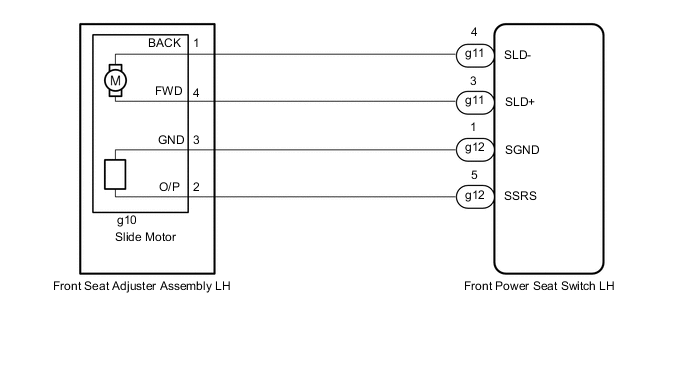
-
for RHD
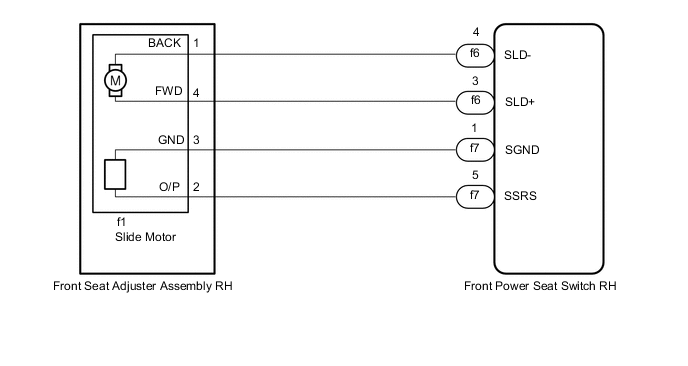
PROCEDURE
-
CLEAR DTC
-
Clear the DTCs.
Body Electrical > Driver Seat > Clear DTCsResult Proceed to NEXT
NEXT 
-
-
CHECK FOR DTC
-
Check for DTCs.
Body Electrical > Driver Seat > Trouble CodesOK DTC B2650 is not output. Result Proceed to OK NG
OK 
USE SIMULATION METHOD TO CHECK Click here
NG
-
-
PERFORM ACTIVE TEST USING GTS (SEAT SLIDE OPERATION)
-
Connect the GTS to the DLC3.
-
Turn the power switch on (IG).
-
Turn the GTS on.
-
Enter the following menus: Body Electrical / Driver Seat / Active Test.
-
Perform the Active Test according to the display on the GTS.
Body Electrical > Driver Seat > Active TestTester Display Measurement Item Control Range Diagnostic Note Seat Slide Operation Seat slide operation OFF/Rear/Front -
Body Electrical > Driver Seat > Active TestTester Display Seat Slide Operation OK Motor operates normally. Result Proceed to OK NG
NG 
INSPECT FRONT SEAT ADJUSTER ASSEMBLY (for Driver Side) (SLIDE MOTOR) Click here
OK
-
-
CHECK FRONT POWER SEAT SWITCH (for Driver Side) (SLIDE MOTOR CIRCUIT)
-
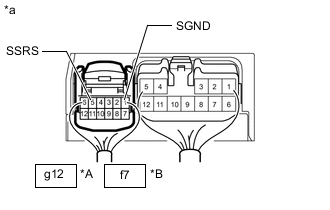
*A for LHD *B for RHD *a Component with harness connected
(Front Power Seat Switch [for Driver Side])
Measure the voltage according to the value(s) in the table below.
Standard Voltage for LHD Tester Connection Condition Specified Condition g12-1 (SGND) - g12-5 (SSRS) Slide function operating 4.8 to 5.1 V for RHD Tester Connection Condition Specified Condition f7-1 (SGND) - f7-5 (SSRS) Slide function operating 4.8 to 5.1 V Result Proceed to OK NG
NG
CHECK HARNESS AND CONNECTOR (FRONT POWER SEAT SWITCH [for Driver Side] - FRONT SEAT ADJUSTER ASSEMBLY [for Driver Side] [SLIDE MOTOR]) Click here
OK
-
-
CLEAR DTC
-
Clear the DTCs.
Body Electrical > Driver Seat > Clear DTCsResult Proceed to NEXT
NEXT
-
-
CHECK FOR DTC
-
Check for DTCs.
Body Electrical > Driver Seat > Trouble CodesOK DTC B2650 is not output. Result Proceed to OK NG
OK
USE SIMULATION METHOD TO CHECK Click here
NG
REPLACE FRONT POWER SEAT SWITCH (for Driver Side) Click here
-
-
CHECK HARNESS AND CONNECTOR (FRONT POWER SEAT SWITCH [for Driver Side] - FRONT SEAT ADJUSTER ASSEMBLY [for Driver Side] [SLIDE MOTOR])
-
*1: for LHD
-
*2: for RHD
-
Disconnect the g12*1 or f7*2 front power seat switch (for Driver Side) connector.
-
Disconnect the g10*1 or f1*2 front seat adjuster assembly (for Driver Side) connector.
-
Measure the resistance according to the value(s) in the table below.
Standard Resistance for LHD Tester Connection Condition Specified Condition g12-5 (SSRS) - g10-2 (O/P) Always Below 1 Ω g12-5 (SSRS) or g10-2 (O/P) - Body ground Always 10 kΩ or higher g12-1 (SGND) - g10-3 (GND) Always Below 1 Ω g12-1 (SGND) or g10-3 (GND) - Body ground Always 10 kΩ or higher for RHD Tester Connection Condition Specified Condition f7-5 (SSRS) - f1-2 (O/P) Always Below 1 Ω f7-5 (SSRS) or f1-2 (O/P) - Body ground Always 10 kΩ or higher f7-1 (SGND) - f1-3 (GND) Always Below 1 Ω f7-1 (SGND) or f1-3 (GND) - Body ground Always 10 kΩ or higher Result Proceed to OK NG
NG
REPAIR OR REPLACE HARNESS OR CONNECTOR
OK
-
-
REPLACE FRONT POWER SEAT SWITCH (for Driver Side) (for Driver Side)
-
Replace the front seat switch (for Driver Side) with new or known good one.
Result Proceed to NEXT
NEXT
-
-
CLEAR DTC
-
Clear the DTCs.
Body Electrical > Driver Seat > Clear DTCsResult Proceed to NEXT
NEXT
-
-
CHECK FOR DTC
-
Check for DTCs.
Body Electrical > Driver Seat > Trouble CodesOK DTC B2650 is not output. Result Proceed to OK NG
OK
END (FRONT POWER SEAT SWITCH [for Driver Side] WAS DEFECTIVE)
NG
REPLACE FRONT SEAT ADJUSTER ASSEMBLY (for Driver Side) Click here
-
-
INSPECT FRONT SEAT ADJUSTER ASSEMBLY (for Driver Side) (SLIDE MOTOR)
-
Remove the front seat adjuster assembly (for Driver Side).
-
Inspect the front seat adjuster assembly (for Driver Side).
Result Proceed to OK NG
NG
REPLACE FRONT SEAT ADJUSTER ASSEMBLY (for Driver Side) Click here
OK
-
-
CHECK HARNESS AND CONNECTOR (FRONT POWER SEAT SWITCH [for Driver Side] - FRONT SEAT ADJUSTER ASSEMBLY [for Driver Side] [SLIDE MOTOR])
-
*1: for LHD
-
*2: for RHD
-
Disconnect the g11*1 or f6*2 front power seat switch (for Driver Side) connector.
-
Disconnect the g10*1 or f1*2 front seat adjuster assembly (for Driver Side) connector.
-
Measure the resistance according to the value(s) in the table below.
Standard Resistance for LHD Tester Connection Condition Specified Condition g11-3 (SLD+) - g10-4 (FWD) Always Below 1 Ω g11-3 (SLD+) or g10-4 (FWD) - Body ground Always 10 kΩ or higher g11-4 (SLD-) - g10-1 (BACK) Always Below 1 Ω g11-4 (SLD-) or g10-1 (BACK) - Body ground Always 10 kΩ or higher for RHD Tester Connection Condition Specified Condition f6-3 (SLD+) - f1-4 (BACK) Always Below 1 Ω f6-3 (SLD+) or f1-4 (BACK) - Body ground Always 10 kΩ or higher f6-4 (SLD-) - f1-1 (BACK) Always Below 1 Ω f6-4 (SLD-) or f1-1 (BACK) - Body ground Always 10 kΩ or higher Result Proceed to OK NG
OK
REPLACE FRONT POWER SEAT SWITCH (for Driver Side) (for Driver Side) Click here
NG
REPAIR OR REPLACE HARNESS OR CONNECTOR
-