HEADUP DISPLAY SYSTEM CUSTOMIZE PARAMETERS
-
CUSTOMIZE HEADUP DISPLAY SYSTEM
-
Customizing with the GTS
-
Connect the GTS to the DLC3.
-
Turn the power switch on (IG).
-
Turn the GTS on.
-
Enter the following menus: Customize Setting / Display.
-
Select the setting by referring to the table below.
Note
Be sure to record the current value before customizing.
DisplayTester Display Description Default Setting ECU Projection Adjustment (Tilt) Headup display image calibration (Tilt calibration) Default 1000000:Clockwise (Hi),0100000:Clockwise (Mid),0010000:Clockwise (Lo),0001000:Default,0000100:Anti-Clockwise (Lo),0000010:Anti-Clockwise (Mid),0000001:Anti-Cloc**cut** Meter mirror sub-assembly
-
-
Customize
-
Operate the headup display switch assembly to set the display function to ON or OFF.
Tech Tips
The audio display function can be customized when vehicle speed is below 8 km/h (5 mph) (the audio display function switches to normal control when the vehicle speed is 8 km/h [5 mph] or more).
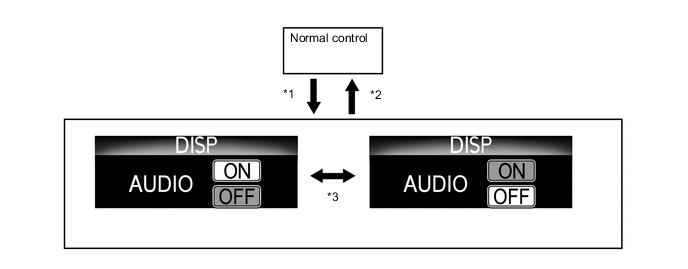
*1 Switch is pressed and held *2 Switch is pressed and held, or is not operated for 3 seconds *3 Switch is pressed briefly - -
-
-