METER / GAUGE SYSTEM, Diagnostic DTC:B150A
| DTC Code | DTC Name |
|---|---|
| B150A | Lost Communication with HMI-LAN |
DESCRIPTION
The combination meter assembly receives a text data signal from the radio receiver assembly via local bus communication.
Based on this signal, audio and visual system or navigation system information is displayed on the multi-information display.
This DTC is stored when the combination meter assembly cannot receive the signal.
| DTC No. | Detection Item | DTC Detection Condition | Trouble Area |
|---|---|---|---|
| B150A | Lost Communication with HMI-LAN | After the combination meter assembly receives a registration information signal, which is sent by the radio receiver assembly when the power switch is on (ACC), 1 or more times, the combination meter assembly cannot receive the signal for 30 seconds or more. |
|
WIRING DIAGRAM
-
w/ Navigation System or Audio and Visual System (except 8 Speakers)
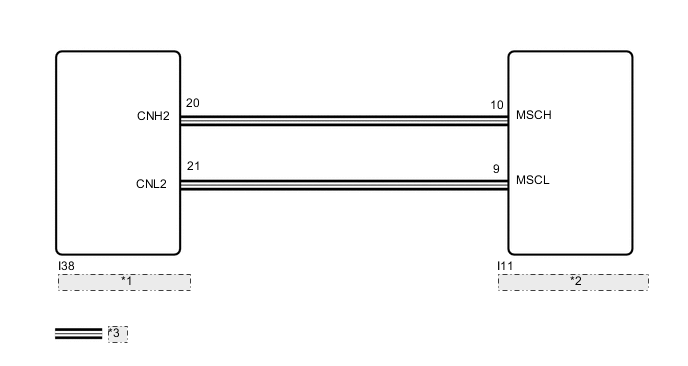
*1 Radio Receiver Assembly *2 Combination Meter Assembly *3 CAN Communication Line -
w/ Audio and Visual System (for 8 Speakers)
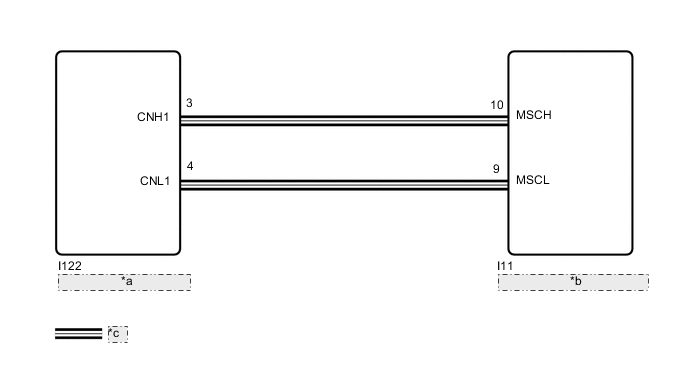
*a Radio Receiver Assembly *b Combination Meter Assembly *c CAN Communication Line
CAUTION / NOTICE / HINT
-
*1: w/ Navigation System
*2: w/ Audio and Visual System (except 8 Speakers)
Note
-
When replacing the combination meter assembly, make sure to replace it with a new one.
-
Depending on the parts that are replaced during vehicle inspection or maintenance, performing initialization, registration or calibration may be needed. Refer to Precaution for navigation system*1 or audio and visual system*2.
w/ Navigation System: Click here
w/ Audio and Visual System (except 8 Speakers): Click here
PROCEDURE
-
CONFIRM MODEL
-
Choose the model to be inspected.
Result Result Proceed to w/ Navigation System or Audio and Visual System (except 8 Speakers) A w/ Audio and Visual System (for 8 Speakers) B
B 
CHECK FOR DTC (AUDIO AND VISUAL SYSTEM) Click here
A 
-
-
CHECK FOR DTC (NAVIGATION SYSTEM, AUDIO AND VISUAL SYSTEM)
-
Check for DTCs.
w/ Navigation System: Click here
w/ Audio and Visual System (except 8 Speakers): Click here
Body Electrical > Navigation System > Trouble CodesOK DTCs are not output. Result Result Proceed to OK A NG (w/ Navigation System) B NG (w/ Audio and Visual System [except 8 Speakers]) C
B 
GO TO NAVIGATION SYSTEM Click here
C
GO TO AUDIO AND VISUAL SYSTEM Click here
A
-
-
CHECK HARNESS AND CONNECTOR (COMBINATION METER ASSEMBLY - RADIO RECEIVER ASSEMBLY)
-
Disconnect the I11 combination meter assembly connector.
-
Disconnect the I38 radio receiver assembly connector.
-
Measure the resistance according to the value(s) in the table below.
Standard Resistance Tester Connection Condition Specified Condition I11-10 (MSCH) - I38-20 (CNH2) Always Below 1 Ω I11-9 (MSCL) - I38-21 (CNL2) Always Below 1 Ω I11-10 (MSCH) or I38-20 (CNH2) - Body ground Always 10 kΩ or higher I11-9 (MSCL) or I38-21 (CNL2) - Body ground Always 10 kΩ or higher Result Proceed to OK NG
NG
REPAIR OR REPLACE HARNESS OR CONNECTOR
OK
-
-
CHECK COMBINATION METER ASSEMBLY
-
Replace the combination meter assembly.
-
Turn the power switch on (IG) and wait 30 seconds.
Note
A maximum of 30 seconds is required to send/receive the registration information between the combination meter assembly and radio receiver assembly.
-
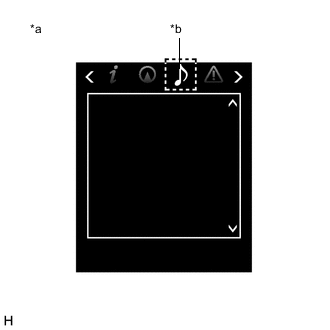
*a Multi-information Display *b Audio Tab Operate the steering pad switch assembly and check that the audio tab illuminates.
-
Check for DTCs.
Body Electrical > Combination Meter > Trouble CodesOK The audio tab illuminates and DTC B150A is not output. Result Proceed to OK NG
OK
END (COMBINATION METER ASSEMBLY IS DEFECTIVE)
NG
REPLACE RADIO RECEIVER ASSEMBLY Click here
-
-
CHECK FOR DTC (AUDIO AND VISUAL SYSTEM)
-
Check for DTCs.
Body Electrical > Navigation System > Trouble CodesOK DTCs are not output. Result Proceed to OK NG
NG
GO TO AUDIO AND VISUAL SYSTEM Click here
OK
-
-
CHECK HARNESS AND CONNECTOR (COMBINATION METER ASSEMBLY - RADIO RECEIVER ASSEMBLY)
-
Disconnect the I11 combination meter assembly connector.
-
Disconnect the I122 radio receiver assembly connector.
-
Measure the resistance according to the value(s) in the table below.
Standard Resistance Tester Connection Condition Specified Condition I11-10 (MSCH) - I122-3 (CNH1) Always Below 1 Ω I11-9 (MSCL) - I122-4 (CNL1) Always Below 1 Ω I11-10 (MSCH) or I122-3 (CNH1) - Body ground Always 10 kΩ or higher I11-9 (MSCL) or I122-4 (CNL1) - Body ground Always 10 kΩ or higher Result Proceed to OK NG
OK
GO TO STEP 4 Click here
NG
REPAIR OR REPLACE HARNESS OR CONNECTOR
-