WIRELESS DOOR LOCK CONTROL SYSTEM Only Wireless Control Function is Inoperative
DESCRIPTION
When the wireless operation of the door lock functions do not operate, a malfunction or wave interference may be occurring in either of the following: 1) the signal communication line between the door control receiver and certification ECU (smart key ECU assembly) (the line used for wireless operations): or 2) the electrical key transmitter sub-assembly. If the wireless lock operations cannot be performed, there may be electrical key transmitter sub-assembly malfunctions, wave interference or problems in the communication which is used for the wireless function between the door control receiver and certification ECU (smart key ECU assembly).
WIRING DIAGRAM
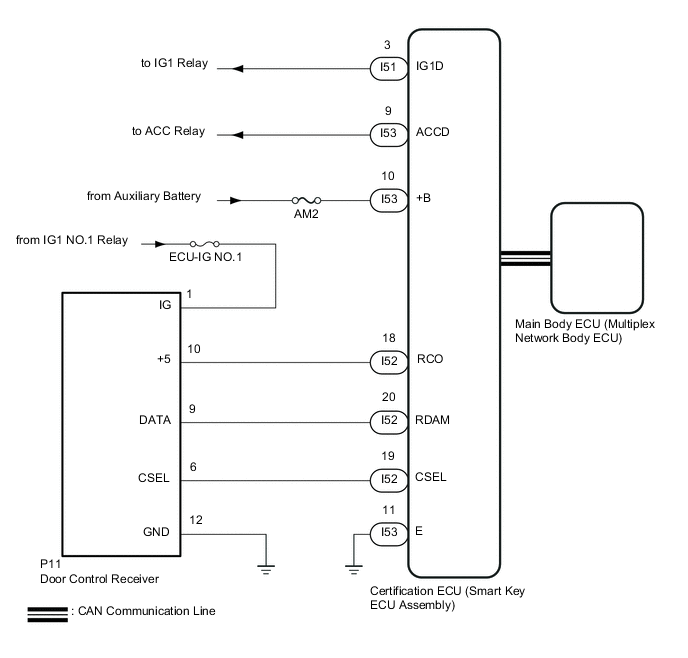
CAUTION / NOTICE / HINT
Note
-
When using the GTS with the vehicle power switch off, connect the GTS to the vehicle and turn a courtesy light switch on and off at intervals of 1.5 seconds or less until communication between the GTS and the vehicle begins. Then select the Model Code "KEY REGIST" under manual mode and enter the following menus: Body Electrical / Entry&Start(CAN). While using the GTS, periodically turn a courtesy light switch on and off at intervals of 1.5 seconds or less to maintain communication between the GTS and the vehicle.
-
The wireless door lock control system uses the CAN communication system. Inspect the communication function by following How to Proceed with Troubleshooting. Troubleshoot the wireless door lock control system after confirming that the communication systems are functioning properly.
-
Before replacing the certification ECU (smart key ECU assembly), main body ECU (multiplex network body eCU) or electrical key transmitter sub-assembly, refer to Service Bulletin.
-
Check that there are no electrical key transmitter sub-assemblies in the vehicle.
-
Before performing the inspection, check that DTC B1242 (wireless door lock tuner circuit malfunction) is not output
-
Inspect the fuses for circuits related to this system before performing the following procedure.
-
After repair, confirm DTC does not reoccur by performing the "DTC Output Confirmation Operation".
-
Door control receiver has a constant voltage (5 V) supply circuit connected to terminal "+5".
-
When replacing the door control receiver, read the transmitter IDs (tire pressure warning system) stored in the old ECU using the GTS and write them down before removal (for 12 Pin Type).
-
It is necessary to perform initialization ( ) after registration ( Click here) of the transmitter IDs into the door control receiver if the door control receiver has been replaced (for 12 Pin Type).
PROCEDURE
-
INSPECT AUXILIARY BATTERY VOLTAGE
-
Measure the voltage of the auxiliary battery.
Standard voltage 11 to 14 V (power switch off) Tech Tips
It may be possible to tell whether the auxiliary battery is discharged by operating the horn.
If the voltage is below 11 V, recharge or replace the auxiliary battery before proceeding to the next step.
Result Proceed to NEXT
NEXT 
-
-
CHECK FOR DTC
-
Open the driver door using the mechanical key built into the electrical key transmitter sub-assembly.
-
Connect the GTS to the DLC3.
-
Turn the power switch on (IG).
-
Turn the GTS on.
-
Enter the following menus: Body Electrical / Entry&Start / Trouble Codes.
Body Electrical > Entry&Start > Trouble CodesTech Tips
When using the GTS with the vehicle power switch off, connect the GTS to the vehicle and turn a courtesy light switch on and off at intervals of 1.5 seconds or less until communication between the GTS and the vehicle begins. Then select the Model Code "KEY REGIST" under manual mode and enter the following menus: Body Electrical / Entry&Start(CAN). While using the GTS, periodically turn a courtesy light switch on and off at intervals of 1.5 seconds or less to maintain communication between the GTS and the vehicle.
OK DTC is not output. Result Proceed to OK NG
NG 
GO TO DIAGNOSTIC TROUBLE CODE CHART Click here
OK
-
-
SYSTEM CHECK
-
Check the vehicle specification.
Result Result Proceed to w/ Door Ajar Warning Function A w/o Door Ajar Warning Function B
B 
GO TO STEP 5 Click here
A
-
-
CHECK DOOR AJAR WARNING
-
When the doors are locked by operating the wireless door lock function with all doors closed, check that the door ajar warning operates.
Result Result Proceed to The wireless buzzer does not sound A The wireless buzzer sounds B
B
GO TO LIGHTING SYSTEM (Proceed to Door Courtesy Switch Circuit) Click here
A
-
-
CHECK POWER DOOR LOCK CONTROL SYSTEM
-
When the door control switch on the multiplex network master switch assembly on the driver door is operated, check that the doors unlock and lock according to the door control switch operation.
OK Door locks operate normally. Result Proceed to OK NG
NG
GO TO POWER DOOR LOCK CONTROL SYSTEM Click here
OK
-
-
CHECK WAVE ENVIRONMENT
-
Bring the electrical key transmitter sub-assembly that was checked first near the door control receiver and check the wireless door lock control funcstions.
Tech Tips
-
When the electrical key transmitter sub-assembly is brought near the door control receiver, the possibility of wave interference decreases, and it can be determined if wave interference is causing the problem symptom.
-
If the inspection result is that the problem only occurs in certain locations or at certain times of day, the possibility of wave interference is high. Also, added vehicle components may cause wave interference. If installed, remove them and perform the operation check.
-
There may be wave interference if the vehicle is near broadcasting antennas, large video displays, wireless garage door opener systems, wireless security cameras, home security systems, etc. In this case, move the vehicle to a different location and check if there is any improvement.
-
If a tool for checking radio waves, such as a signal strength meter, is available, move around the area while observing both the LF band (used by the vehicle antenna to form the detection area) and RF band (used by the electrical key transmitter sub-assembly for transmission) to check for locations where there is wave interference.
Result Result Proceed to Wireless door lock functions do not operate normally. A Wireless door lock functions operate normally. B -
B
AFFECTED BY WAVE INTERFERENCE
A
-
-
CHECK TRANSMITTER BATTERY
-
Check the transmitter battery level of the electrical key transmitter sub-assembly that was checked first.
-
Press and hold the lock switch of the transmitter for 5 seconds and check the number of times that the transmitter LED illuminates.
Tech Tips
-
The electrical key transmitter sub-assembly sends voltage information to the certification ECU (smart key ECU assembly) when it is being used. The certification ECU (smart key ECU assembly) displays "Yes" for the "Key Low Battery" item of the Data List when this voltage information indicates 2.2 V or less.
-
Even if the transmitter battery is depleted, it is still possible to start the hybrid control systemby holding the electrical key transmitter sub-assembly near the power switch, depressing the brake pedal and pressing the power switch.
-
Result Result Proceed to Transmitter LED illuminates 3 times or more when switch is pressed and held A Transmitter LED does not illuminate when switch is pressed and held B Transmitter LED illuminates once or twice but not a third time C -
B
INSPECT TRANSMITTER BATTERY Click here
C
REPLACE TRANSMITTER BATTERY Click here
A
-
-
CHECK ELECTRICAL KEY TRANSMITTER SUB-ASSEMBLY
-
Check if there are any other registered electrical key transmitter sub-assemblies.
Result Result Proceed to There are no other registered electrical key transmitter sub-assemblies A There is another registered electrical key transmitter sub-assemblies B
B
GO TO STEP 10 Click here
A
-
-
ELECTRICAL KEY TRANSMITTER SUB-ASSEMBLY REGISTRATION (NEW ELECTRICAL KEY TRANSMITTER SUB-ASSEMBLY)
-
Register a new electrical key transmitter sub-assembly.
Tech Tips
Refer to the Service Bulletin.
Result Proceed to NEXT
NEXT
-
-
CHECK WIRELESS DOOR LOCK OPERATION
-
Using another registered electrical key transmitter sub-assembly, check that the wireless door lock functions operate normally.
OK Wireless door lock functions operate normally. Result Proceed to OK NG
OK
END (ELECTRICAL KEY TRANSMITTER SUB-ASSEMBLY WAS DEFECTIVE)
NG
-
-
PERFORM REGISTRATION
-
Perform registration of the B code.
Tech Tips
Refer to the Service Bulletin.
Result Proceed to NEXT
NEXT
-
-
CHECK WIRELESS DOOR LOCK OPERATION
-
Using another registered electrical key transmitter sub-assembly, check that the wireless door lock functions operate normally.
OK Wireless door lock functions operate normally. Result Proceed to OK NG
NG
END (B CODE REGISTRATION FAILED)
OK
-
-
READ VALUE USING GTS (B CODE)
-
Connect the GTS to the DLC3.
-
Turn the power switch on (IG).
-
Turn the GTS on.
-
Enter the following menus: Body Electrical / Entry&Start / Data List.
-
Read the Data List according to the display on the GTS.
Body Electrical > Entry&Start > Data ListTester Display Measurement Item Range Normal Condition Diagnostic Note B Code B code registration status Regd or No Regd Regd: B code registered correctly
No Regd: B code not registered correctly
-
Body Electrical > Entry&Start > Data ListTester Display B Code Result Result Proceed to "No Regd" is displayed on the GTS A "Regd" is displayed on the GTS B
B
REPLACE MAIN BODY ECU (MULTIPLEX NETWORK BODY ECU) (MULTIPLEX NETWORK BODY ECU) for LHD: Click here for RHD: Click here
A
-
-
READ VALUE USING GTS (B CODE DIFFERENCE)
-
Connect the GTS to the DLC3.
-
Turn the power switch on (IG).
-
Turn the GTS on.
-
Enter the following menus: Body Electrical / Entry&Start / Data List.
-
Read the Data List according to the display on the GTS.
Body Electrical > Entry&Start > Data ListTester Display Measurement Item Range Normal Condition Diagnostic Note B Code Difference B code mismatch Yes or No Yes: Communication malfunction
No: Communication normal
-
Body Electrical > Entry&Start > Data ListTester Display B Code Difference Result Result Proceed to "No" is displayed on the GTS A "Yes" is displayed on the GTS B
B
REPLACE CERTIFICATION ECU (SMART KEY ECU ASSEMBLY)
A
-
-
CHECK CERTIFICATION ECU (SMART KEY ECU ASSEMBLY)
-
Measure the voltage while checking the Data List on the GTS.
-
Connect the GTS to the DLC3.
-
Turn the power switch on (IG).
-
Turn the GTS on.
-
Enter the following menus: Body Electrical / Power Source Control / Data List.
-
Read the Data List according to the display on the GTS.
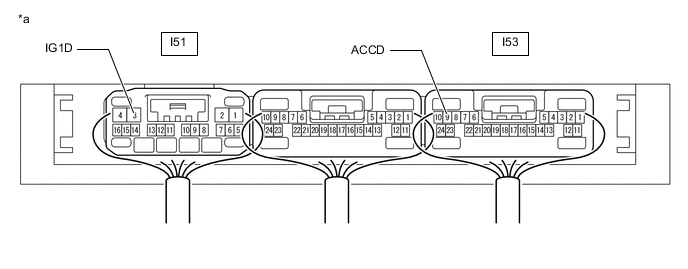
*a Component with harness connected
(Certification ECU [Smart Key ECU Assembly])
- -
Body Electrical > Power Source Control > Data ListTester Display Measurement Item Range Normal Condition Diagnostic Note Power Supply Condition Power supply state All OFF, ACC ON, IG ON or ST ON All OFF: Power switch off (ACC and IG)
ACC ON: Power switch on (ACC)
IG ON: Power switch on (IG)
ST ON: Sending hubrid control system start request signal
-
Body Electrical > Power Source Control > Data ListTester Display Power Supply Condition Standard Voltage Tester Connection Switch Condition Specified Condition I51-3 (IG1D) - Body ground Power switch off Below 1 V Power switch on (ACC) Below 1 V Power switch on (IG) 9 V or higher I53-9 (ACCD) - Body ground Power switch off Below 1 V Power switch on (ACC) 9 V or higher Power switch on (IG) 9 V or higher
Result Proceed to OK NG -
NG
REPLACE CERTIFICATION ECU (SMART KEY ECU ASSEMBLY)
OK
-
-
READ VALUE USING GTS (ACC SW, IG SW)
-
Connect the GTS to the DLC3.
-
Turn the power switch on (IG).
-
Turn the GTS on.
-
Enter the following menus: Body Electrical / Main Body / Data List.
-
Read the Data List according to the display on the GTS.
Body Electrical > Main Body > Data ListTester Display Measurement Item Range Normal Condition Diagnostic Note ACC SW Power switch on (ACC) signal ON or OFF ON: Power switch on (ACC)
OFF: Power switch off
"ON" is also displayed for this item when the power switch is on (IG). IG SW Power switch on (IG) signal ON or OFF ON: Power switch on (IG)
OFF: Power switch off or on (ACC)
OFF" is also displayed for this item when the power switch is on (ACC).
Body Electrical > Main Body > Data ListTester Display ACC SW IG SW Tech Tips
If the certification ECU (smart key ECU assembly) misjudges for any reason that the power switch is on (IG) even though the power switch is off, the wireless door lock and unlock functions stop.
Result Result Proceed to The certification ECU (smart key ECU assembly) judges properly that the power source is off when the power switch is off A The main body ECU (multiplex network body ECU) does not judge properly that the power source is off when the power switch is off B
B
TROUBLESHOOT MAIN BODY ECU (MULTIPLEX NETWORK BODY ECU) Click here
A
-
-
CHECK HARNESS AND CONNECTOR (CERTIFICATION ECU [SMART KEY ECU ASSEMBLY] - DOOR CONTROL RECEIVER)
-
Disconnect the I52 certification ECU (smart key ECU assembly) connector.
-
Disconnect the P11 door control receiver connector.
-
Measure the resistance according to the value(s) in the table below.
Standard Resistance Tester Connection Condition Specified Condition I52-18 (RCO) - P11-10 (+5) Always Below 1 Ω I52-20 (RDAM) - P11-9 (DATA) Always Below 1 Ω I52-19 (CSEL) - P11-6 (CSEL) Always Below 1 Ω I52-18 (RCO) - Body ground Always 10 kΩ or higher P11-10 (+5) - Body ground Always 10 kΩ or higher I52-20 (RDAM) - Body ground Always 10 kΩ or higher P11-9 (DATA) - Body ground Always 10 kΩ or higher I52-19 (CSEL) - Body ground Always 10 kΩ or higher P11-6 (CSEL) - Body ground Always 10 kΩ or higher Result Proceed to OK NG
NG
REPAIR OR REPLACE HARNESS OR CONNECTOR
OK
-
-
CHECK WIRELESS DOOR LOCK OPERATION
-
Connect all connectors and check that the wireless door lock functions operate normally.
OK Wireless door lock functions operate normally. Result Proceed to OK NG
OK
END (CONNECTOR WAS NOT CONNECTED SECURELY)
NG
CHECK DOOR CONTROL RECEIVER Click here
-
-
INSPECT TRANSMITTER BATTERY
-
Inspect the transmitter battery.
Note
Do not wrap the lead wire around a terminal, wedge it between terminals, or solder it. The terminal may be deformed or damaged, and the transmitter battery will not be able to be installed correctly.
Result Proceed to OK NG
OK
REPLACE ELECTRICAL KEY TRANSMITTER SUB-ASSEMBLY
NG
REPLACE TRANSMITTER BATTERY Click here
-
-
CHECK DOOR CONTROL RECEIVER
-
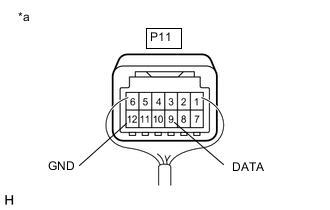
*a Component with harness connected
(Door Control Receiver)
Measure the resistance according to the value(s) in the table below.
Standard Resistance Tester Connection Condition Specified Condition P11-12 (GND) - Body ground Always Below 1 Ω -
Measure the voltage according to the value(s) in the table below.
Standard Voltage Tester Connection Condition Specified Condition P11-9 (DATA) - P11-12 (GND)
-
Power switch off
-
All doors closed
-
All doors locked
-
Lock or unlock switch of electrical key transmitter sub-assembly pressed
Procedure:
Below 1 V → Pulse generation
(See waveform 1)
Result Proceed to OK NG -
-
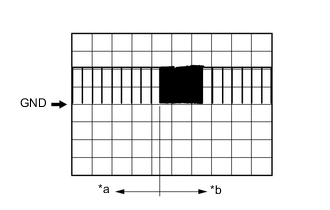
*a Before lock or unlock switch of electrical key transmitter sub-assembly pressed *b After lock or unlock switch of electrical key transmitter sub-assembly pressed Using an oscilloscope, check waveform 1.
Note
The oscilloscope waveform shown in the illustration is an example for reference only. Noise, chattering, etc. are not shown.
Waveform 1 (Reference) Item Content Tester Connection P11-9 (DATA) - P11-12 (GND) Tool Setting 5 V/DIV., 500 ms/DIV. Condition Procedure:
-
Power switch off
-
All doors closed
-
All doors locked
-
Lock or unlock switch of electrical key transmitter sub-assembly pressed
-
NG
REPLACE DOOR CONTROL RECEIVER Click here
OK
-
-
CHECK CERTIFICATION ECU (SMART KEY ECU ASSEMBLY)
-
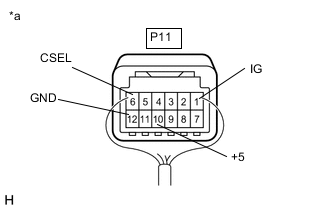
*a Component with harness connected
(Door Control Receiver)
Measure the voltage according to the value(s) in the table below.
Standard Voltage Tester Connection Condition Specified Condition P11-1 (IG) - P11-12 (GND) Power switch on (IG) 10 to 16 V P11-10 (+5) - P11-12 (GND) Procedure:
-
Power switch off
-
Electrical key transmitter sub-assembly switch not pressed → pressed
Below 1 V → 4.5 to 6.0 V → Below 1 V P11-6 (CSEL) - P11-12 (GND) Procedure:
-
Power switch off
-
All doors closed
Below 1 V → Pulse generation Result Proceed to OK NG -
NG
REPLACE CERTIFICATION ECU (SMART KEY ECU ASSEMBLY)
OK
-
-
CHECK WIRELESS DOOR LOCK OPERATION
-
Connect all connectors and check that the wireless door lock functions operate normally.
OK Wireless door lock functions operate normally. Result Proceed to OK NG
OK
END (CONNECTOR WAS NOT CONNECTED SECURELY)
NG
-
-
REPLACE CERTIFICATION ECU (SMART KEY ECU ASSEMBLY)
-
Temporarily replace the certification ECU (smart key ECU assembly) with a new one.
Tech Tips
Refer to the Service Bulletin.
Result Proceed to NEXT
NEXT
-
-
CHECK WIRELESS DOOR LOCK CONTROL SYSTEM
-
Check that the wireless door lock functions operate normally.
OK Wireless door lock functions operate normally. Result Proceed to OK NG
OK
END (CERTIFICATION ECU [SMART KEY ECU ASSEMBLY] WAS DEFECTIVE)
NG
REPLACE MAIN BODY ECU (MULTIPLEX NETWORK BODY ECU) for LHD: Click here for RHD: Click here
-