AUDIO AND VISUAL SYSTEM(except 8 Speakers), Diagnostic DTC:B1321, B1323, B1324, B1563
| DTC Code | DTC Name |
|---|---|
| B1321 | Lost Communication with EMV |
| B1323 | Lost Communication with Haptic Device |
| B1324 | Lost Communication with Meter |
| B1563 | Haptic Device Disconnected |
DESCRIPTION
These DTCs are stored when communication between the radio receiver assembly and remote touch is not possible.
| DTC No. | Detection Item | DTC Detection Condition | Trouble Area |
|---|---|---|---|
| B1321 | Lost Communication with EMV | The radio receiver assembly cannot receive data from the remote touch. |
|
| B1323 | Lost Communication with Haptic Device | The remote touch cannot receive data from the radio receiver assembly. |
|
| B1324 | Lost Communication with Meter | After the radio receiver assembly receives a registration information signal, which is sent by the combination meter assembly when the power switch is on (IG), 1 or more times, the radio receiver assembly cannot receive the signal for 30 seconds or more. |
|
| B1563 | Haptic Device Disconnected | The remote touch is/was not connected while the power switch is/was on (ACC or IG). |
|
WIRING DIAGRAM
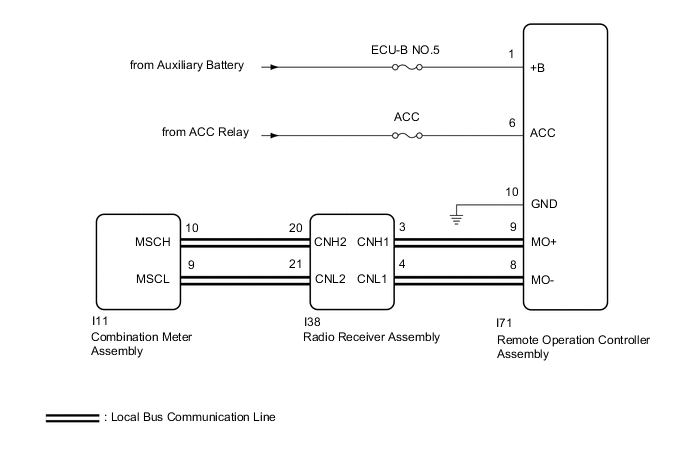
CAUTION / NOTICE / HINT
Note
-
Inspect the fuses for circuits related to this system before performing the following inspection procedure.
-
Depending on the parts that are replaced during vehicle inspection or maintenance, performing initialization, registration or calibration may be needed. Refer to precaution for audio and visual system.
-
After turning the power switch off, waiting time may be required before disconnecting the cable from the negative (-) auxiliary battery terminal. Therefore, make sure to read the disconnecting the cable from the negative (-) auxiliary battery terminal notices before proceeding with work.
PROCEDURE
-
CHECK HARNESS AND CONNECTOR (RADIO RECEIVER ASSEMBLY - REMOTE OPERATION CONTROLLER ASSEMBLY)
-
Disconnect the cable from the negative (-) auxiliary battery terminal.
-
Disconnect the I38 radio receiver assembly connector.
-
Disconnect the I71 remote operation controller assembly connector.
-
Measure the resistance according to the value(s) in the table below.
Standard Resistance Tester Connection Condition Specified Condition I38-3 (CNH1) - I71-9 (MO+) Always Below 1 Ω I38-4 (CNL1) - I71-8 (MO-) Always Below 1 Ω I38-3 (CNH1) - Body ground Always 10 kΩ or higher I38-4 (CNL1) - Body ground Always 10 kΩ or higher I71-9 (MO+) - I71-8 (MO-) Always 10 kΩ or higher I71-9 (MO+) - I71-1 (+B) Cable disconnected from negative (-) auxiliary battery terminal 6 kΩ or higher I71-8 (MO-) - I71-1 (+B) Cable disconnected from negative (-) auxiliary battery terminal 6 kΩ or higher Result Proceed to OK NG
NG 
REPAIR OR REPLACE HARNESS OR CONNECTOR
OK 
-
-
CHECK HARNESS AND CONNECTOR (RADIO RECEIVER ASSEMBLY - COMBINATION METER ASSEMBLY)
-
Disconnect the cable from the negative (-) auxiliary battery terminal.
-
Disconnect the I38 radio receiver assembly connector.
-
Disconnect the I11 combination meter assembly connector.
-
Measure the resistance according to the value(s) in the table below.
Standard Resistance Tester Connection Condition Specified Condition I38-20 (CNH2) - I11-10 (MSCH) Always Below 1 Ω I38-21 (CNL2) - I11-9 (MSCL) Always Below 1 Ω I38-20 (CNH2) - Body ground Always 10 kΩ or higher I38-21 (CNL2) - Body ground Always 10 kΩ or higher I11-10 (MSCH) - I11-9 (MSCL) Always 10 kΩ or higher I11-10 (MSCH) - I71-1 (+B) Cable disconnected from negative (-) auxiliary battery terminal 6 kΩ or higher I11-9 (MSCL) - I71-1 (+B) Cable disconnected from negative (-) auxiliary battery terminal 6 kΩ or higher Result Proceed to OK NG
NG
REPAIR OR REPLACE HARNESS OR CONNECTOR
OK
-
-
CHECK HARNESS AND CONNECTOR (REMOTE OPERATION CONTROLLER ASSEMBLY - BATTERY AND BODY GROUND)
-
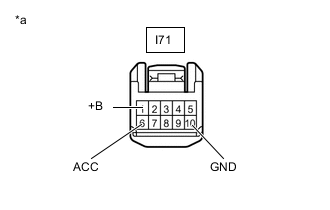
*a Front view of wire harness connector
(to Remote Operation Controller Assembly)
Disconnect the remote operation controller assembly connector.
-
Measure the resistance according to the value(s) in the table below.
Standard Resistance Tester Connection Condition Specified Condition I71-10 (GND) - Body ground Always Below 1 Ω -
Measure the voltage according to the value(s) in the table below.
Standard Voltage Tester Connection Switch Condition Specified Condition I71-1 (+B) - Body ground Power switch off 11 to 14 V I71-6 (ACC) - Body ground Power switch on (ACC) 11 to 14 V Result Proceed to OK NG
NG
REPAIR OR REPLACE HARNESS OR CONNECTOR
OK
-
-
INSPECT COMBINATION METER ASSEMBLY
-
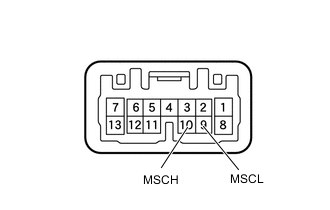
Remove the combination meter assembly.
-
Measure the resistance according to the value(s) in the table below.
Standard Resistance Tester Connection Condition Specified Condition 10 (MSCH) - 9 (MSCL) Always 108 to 132 Ω Result Proceed to OK NG
NG
REPLACE COMBINATION METER ASSEMBLY Click here
OK
-
-
INSPECT RADIO RECEIVER ASSEMBLY
-
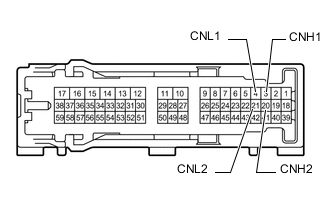
Remove the radio receiver assembly.
-
Measure the resistance according to the value(s) in the table below.
Standard Resistance Tester Connection Condition Specified Condition 3 (CNH1) - 4 (CNL1) Always 108 to 132 Ω 20 (CNH2) - 21 (CNL2) Always 108 to 132 Ω 3 (CNH1) - 20 (CNH2) Always Below 1 Ω 4 (CNL1) - 21 (CNL2) Always Below 1 Ω Result Proceed to OK NG
NG
REPLACE RADIO RECEIVER ASSEMBLY Click here
OK
-
-
REMOTE TOUCH SELF CHECK (CHECK REACTION FORCE SETTING SIGNAL)
-
Enter self-diagnostic mode.
-
Operate the remote touch screen to move the pointer displayed on the multi-display screen and check that the touch screen generates vibration feedback according to the display screen and pointer display position.
OK The touch screen generates vibration feedback according to the display screen and pointer display position. Result Proceed to OK NG
NG
REPLACE REMOTE OPERATION CONTROLLER ASSEMBLY Click here
OK
-
-
CHECK COMBINATION METER ASSEMBLY
-
Replace the combination meter assembly.
-
Clear the DTCs.
Body Electrical > Navigation System > Clear DTCs -
Recheck for DTCs and check that no DTCs are output.
Body Electrical > Navigation System > Trouble CodesOK No DTCs are output. Result Proceed to OK NG
NG 
GO TO STEP 9 Click here
OK
-
-
CHECK METER / GAUGE SYSTEM
-
Turn the power switch on (IG) and wait 30 seconds.
-
Operate the steering pad switch assembly and check that the audio tab is displayed on the multi-information display in the combination meter assembly and the audio system can be operated normally.
OK Audio system returns to normal. Result Proceed to OK NG
OK
END
NG
-
-
CHECK RADIO RECEIVER ASSEMBLY
-
Replace the radio receiver assembly.
-
Clear the DTCs.
Body Electrical > Navigation System > Clear DTCs -
Recheck for DTCs and check that no DTCs are output.
Body Electrical > Navigation System > Trouble CodesOK No DTCs are output. Result Proceed to OK NG
NG
REPLACE REMOTE OPERATION CONTROLLER ASSEMBLY Click here
OK
-
-
CHECK REMOTE OPERATION CONTROLLER ASSEMBLY
-
Turn the power switch on (IG) and wait 30 seconds.
-
Check that the audio and visual system can be operated normally using the remote operation controller assembly.
OK Audio and visual system returns to normal. Result Proceed to OK NG
OK
END
NG
REPLACE REMOTE OPERATION CONTROLLER ASSEMBLY Click here
-