ELECTRONICALLY CONTROLLED BRAKE SYSTEM Brake Hold Standby Indicator Light Circuit
DESCRIPTION
The brake hold standby indicator light turns on if brake hold control is possible when the following conditions required for operation standby are met and the brake hold switch (integration control and panel assembly) is turned on while the power switch is on (IG).
-
Conditions required for operation standby:
-
The driver's door is closed.
-
Driver's seat belt is fastened.
-
The engine hood is closed.
-
The back door is closed.
-
The system is normal.
WIRING DIAGRAM
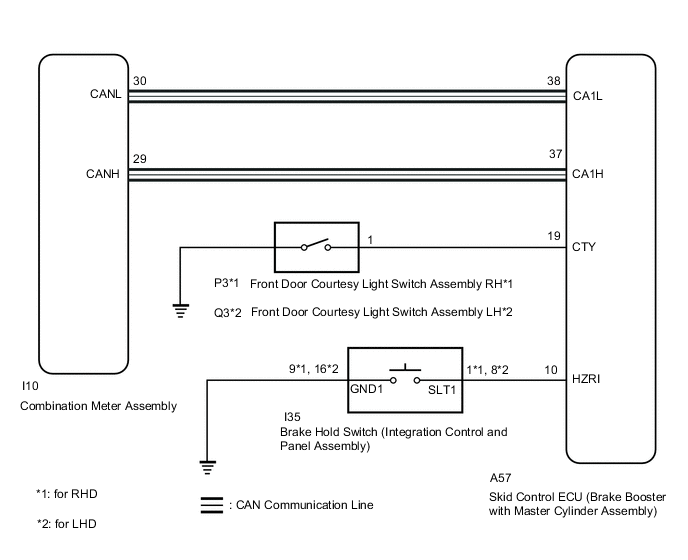
CAUTION / NOTICE / HINT
Tech Tips
When replacing the skid control ECU (brake booster with master cylinder assembly), perform initialization and calibration of the linear solenoid valve.
PROCEDURE
-
PRE-CHECK
-
If the brake hold standby indicator light does not illuminate even though the brake hold switch (integration control and panel assembly) is pushed, check that the brake hold function operation conditions are met.
-
The driver's door is closed.
-
Driver's seat belt is fastened.
-
The engine hood is closed.
-
The back door is closed.
-
The system is normal.
Tech Tips
If a malfunction occurs in one of the following systems, the brake hold operated indicator light will blink. If this occurs, perform troubleshooting on the malfunctioning system.
-
Brake system
-
Electric parking brake system
-
Hybrid control system
Result Proceed to NEXT -
NEXT 
-
-
CHECK CAN COMMUNICATION SYSTEM
-
Check if CAN communication system DTCs are output.
Result Result Proceed to DTCs are not output. A DTCs are output. B
B 
INSPECT CAN COMMUNICATION SYSTEM Click here
A
-
-
PERFORM ACTIVE TEST USING GTS (BRAKE HOLD STANDBY INDICATOR LIGHT)
-
Connect the GTS to the DLC3.
-
Turn the power switch on (IG).
-
Select the Active Test on the GTS.
Chassis > ABS/VSC/TRC > Active TestTester Display Measurement Item Control Range Diagnostic Note BH Standby Light Brake hold standby indicator light Indicator light ON/OFF Observe combination meter
Chassis > ABS/VSC/TRC > Active TestTester Display BH Standby Light -
Select the Data List on the GTS.
Chassis > ABS/VSC/TRC > Data ListTester Display Measurement Item Range Normal Condition Diagnostic Note BH Standby Light Brake hold standby indicator light ON or OFF ON: Indicator light on
OFF: Indicator light off
-
Chassis > ABS/VSC/TRC > Data ListTester Display BH Standby Light -
Check the operating condition of the brake hold standby indicator light when operating it using the GTS.
Result Result Proceed to Brake hold standby indicator light in the Data List does not change using the Active Test. A Brake hold standby indicator light in the Data List turns ON/OFF using the Active Test. B Tech Tips
If troubleshooting has been carried out according to Problem Symptoms Table, refer back to the table and proceed to the next step before replacing the parts.
A
REPLACE BRAKE BOOSTER WITH MASTER CYLINDER ASSEMBLY for LHD: Click here
REPLACE BRAKE BOOSTER WITH MASTER CYLINDER ASSEMBLY for RHD: Click hereB
-
-
INSPECT COMBINATION METER ASSEMBLY
-
Turn the power switch off.
-
Perform the Active Test of the combination meter assembly (meter CPU) using the GTS.
Body Electrical > Combination Meter > Active TestTester Display Indicat. Brake Hold -
Check the combination meter assembly.
OK The brake hold standby indicator light turns on or off in accordance with GTS operation. Tech Tips
If troubleshooting has been carried out according to Problem Symptoms Table, refer back to the table and proceed to the next step.
Result Proceed to OK NG
NG
INSPECT METER / GAUGE SYSTEM Click here
OK
-
-
INSPECT INTEGRATION CONTROL AND PANEL ASSEMBLY
-
Turn the power switch off.
-
Remove the brake hold switch (integration control and panel assembly).
-
Inspect the brake hold switch (integration control and panel assembly).
OK The brake hold switch (integration control and panel assembly) operates normally. Result Proceed to OK NG
NG
REPLACE INTEGRATION CONTROL AND PANEL ASSEMBLY Click here
OK
-
-
CHECK HARNESS AND CONNECTOR (BRAKE BOOSTER WITH MASTER CYLINDER ASSEMBLY - INTEGRATION CONTROL AND PANEL ASSEMBLY)
-
Disconnect the A57 skid control ECU (brake booster with master cylinder assembly) connector.
-
Measure the resistance according to the value(s) in the table below.
Standard Resistance for LHD Tester Connection Condition Specified Condition A57-10 (HZRI) - I35-8 (SLT1) Always Below 1 Ω A57-10 (HZRI) or I35-8 (SLT1) - Body ground Always 10 kΩ or higher I35-16 (GND1) - Body ground Always Below 1 Ω for RHD Tester Connection Condition Specified Condition A57-10 (HZRI) - I35-1 (SLT1) Always Below 1 Ω A57-10 (HZRI) or I35-1 (SLT1) - Body ground Always 10 kΩ or higher I35-9 (GND1) - Body ground Always Below 1 Ω Result Proceed to OK NG
NG
REPAIR OR REPLACE HARNESS OR CONNECTOR
OK
-
-
INSPECT FRONT DOOR COURTESY LIGHT SWITCH ASSEMBLY
-
Turn on the interior lights and check that they illuminate, and then set the switch so that the lights illuminate when the door is opened.
-
Check that the lights illuminate when the driver door is opened.
OK The interior lights illuminate when the driver door is opened. Result Proceed to OK NG
NG
INSPECT LIGHTING SYSTEM Click here
OK
-
-
CHECK HARNESS AND CONNECTOR (CTY TERMINAL)
-
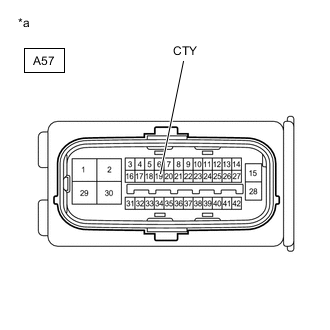
*a Front view of wire harness connector
(to Skid Control ECU (Brake Booster with Master Cylinder Assembly))
Measure the voltage according to the value(s) in the table below.
Standard Voltage Tester Connection Condition Specified Condition A57-19 (CTY) - Body ground Driver door open Below 1 V A57-19 (CTY) - Body ground Driver door closed Pulse generation Result Proceed to OK NG
OK
REPLACE BRAKE BOOSTER WITH MASTER CYLINDER ASSEMBLY for LHD: Click here
REPLACE BRAKE BOOSTER WITH MASTER CYLINDER ASSEMBLY for RHD: Click hereNG
REPAIR OR REPLACE HARNESS OR CONNECTOR (CTY CIRCUIT)
-