BATTERY VOLTAGE SENSOR REMOVAL
CAUTION / NOTICE / HINT
Note
-
The type of battery voltage sensor to be used varies depending on the vehicle model.
-
If the wrong type of battery voltage sensor is installed, the power switch cannot be turned on (READY).
-
After installing the battery voltage sensor, perform the following to check that the power switch can be turned on (READY).
-
Turn the power switch on (READY).
-
Turn the power switch off and wait for 30 seconds or more.
-
Turn the power switch on (READY) again.
PROCEDURE
-
PRECAUTION
-
CHECK FOR DTC
-
Check for DTC.
Note
Confirm that P0AA6 (Hybrid Battery Voltage System Isolation Fault) is not output before removing or installing the HV battery. If this DTC is output, perform troubleshooting for this DTC first.
-
-
REMOVE HV BATTERY JUNCTION BLOCK ASSEMBLY
-
REMOVE LOWER NO. 2 HYBRID BATTERY CARRIER PATCH
CAUTION:
Wear insulated gloves and use insulated tools.
-
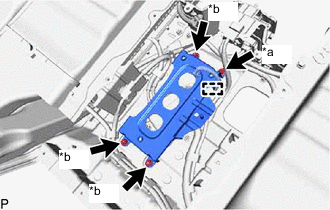
*a Bolt *b Nut Disconnect the wire harness clamp.
-
Remove the 3 nuts, bolt and lower No. 2 hybrid battery carrier patch.
-
-
REMOVE BATTERY VOLTAGE SENSOR
CAUTION:
Wear insulated gloves and use insulated tools.
-
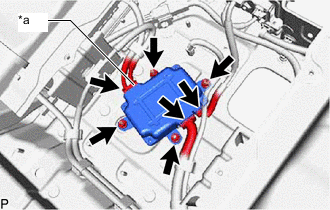
*a High Voltage Connector Disconnect the 3 battery voltage sensor connectors.
Note
-
Insulate the disconnected high voltage connectors with insulating tape.
-
High voltage wiring connectors are orange.
-
-
Remove the 4 nuts and battery voltage sensor.
-