OUTER REAR VIEW MIRROR COVER REMOVAL
CAUTION / NOTICE / HINT
Tech Tips
-
Use the same procedure for the RH side and LH side.
-
The following procedure is for the LH side.
PROCEDURE
-
REMOVE OUTER MIRROR
-
REMOVE OUTER MIRROR COVER WITH LOWER HOUSING
-
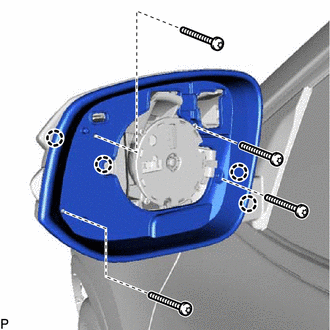
Using a T10 "TORX" socket wrench, remove the 4 screws.
-
Disengage the 4 claws and remove the visor.
-
w/ Panoramic View Monitor System:
-
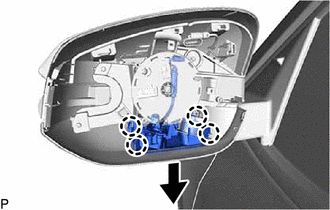
Disengage the 4 claws as shown in the illustration.
-
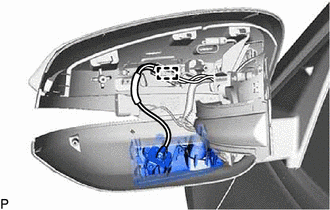
Disengage the clamp.
-
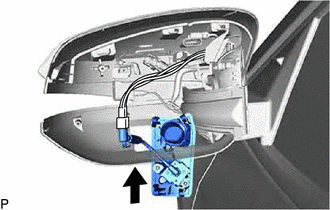
Pass the side television camera assembly with cover through the outer mirror cover with lower housing as shown in the illustration.
-
-
w/ Foot Light:
-
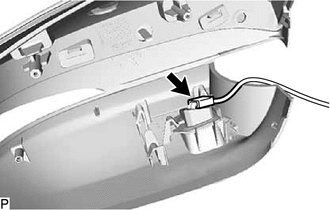
Disconnect the connector.
-
-
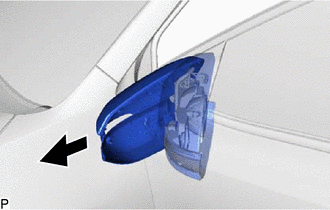
Remove the outer mirror cover with lower housing as shown in the illustration.
-
-
REMOVE OUTER MIRROR COVER
-
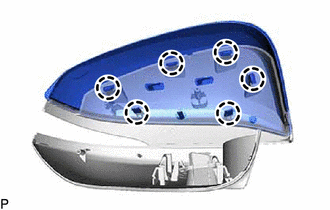
Disengage the 6 claws and remove the outer mirror cover.
-