POWER BACK DOOR SYSTEM TERMINALS OF ECU
-
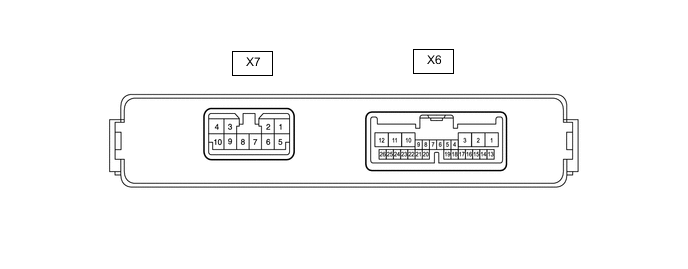
CHECK MULTIPLEX NETWORK DOOR ECU
-
Disconnect the X6 and X7 multiplex network door ECU connectors.
-
Measure the voltage and resistance according to the value(s) in the table below.
Terminal No. (Symbol) Wiring Color Terminal Description Condition Specified Condition X6-1 (ECUB) - Body ground BE - Body ground Battery power supply Always 11 to 14 V X6-7 (IG) - Body ground Y - Body ground IG power supply Engine switch on (IG) 11 to 14 V X6-7 (IG) - Body ground Y - Body ground IG power supply Engine switch off Below 1 V X7-8 (B) - Body ground G - Body ground Battery power supply Always 11 to 14 V X7-7 (GND) - Body ground W-B - Body ground Body ground Always Below 1 Ω -
Reconnect the X6 and X7 multiplex network door ECU connectors.
-
Measure the voltage according to the value(s) in the table below.
Terminal No. (Symbol) Wiring Color Terminal Description Condition Specified Condition X6-2 (DSG2) - Body ground BR - Body ground Power back door unit assembly set RH (door sensor) ground Always Below 1 V X6-3 (DSV2) - Body ground L - Body ground Power back door unit assembly set RH (door sensor) power supply Always 7 V or higher X6-5 (BZR+) - Body ground B - Body ground Wireless door lock buzzer signal Power back door warning buzzer sounding Pulse generation Power back door warning buzzer not sounding Below 1 V X6-6 (BDDN) - Body ground L - Body ground Back door control switch signal Back door control switch on Below 1 V Back door control switch off Pulse generation X6-11 (DSG) - Body ground R - Body ground Power back door unit assembly set LH (door sensor) ground Always Below 1 V X6-12 (DSV) - Body ground GR - Body ground Power back door unit assembly set LH (door sensor) power supply Always 7 V or higher X6-16 (OSR) - X6-17 (OSE) SB - Y Power back door sensor assembly RH signal Power back door sensor assembly RH not pressed 4 to 6 V Power back door sensor assembly RH pressed Below 1 V X6-18 (OSL) - X6-17 (OSE) LG - Y Power back door sensor assembly LH signal Power back door sensor assembly LH not pressed 4 to 6 V Power back door sensor assembly LH pressed Below 1 V X6-22 (DS2) - Body ground B - Body ground Power back door unit assembly set LH (door sensor) signal Power back door not operating 7 V or higher Power back door operating Pulse generation
(See waveform 2)
X6-23 (DS1) - Body ground SB - Body ground Power back door unit assembly set LH (door sensor) signal Power back door not operating 7 V or higher Power back door operating Pulse generation
(See waveform 1)
X6-25 (DS22) - Body ground W - Body ground Power back door unit assembly set RH (door sensor) signal Power back door not operating 7 V or higher Power back door operating Pulse generation
(See waveform 2)
X6-26 (DS12) - Body ground V - Body ground Power back door unit assembly set RH (door sensor) signal Power back door not operating 7 V or higher Power back door operating Pulse generation
(See waveform 1)
X7-10 (DC+) - X7-9 (DC-) LA-V - LA-W Back door lock assembly (back door lock motor) circuit Back door lock motor operating 11 to 14 V
-
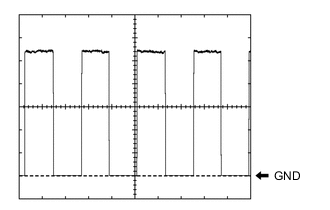
Using an oscilloscope, check waveform 1.
Waveform 1 (Reference) Item Condition Tester connection
-
X6-23 (DS1) - Body ground
-
X6-26 (DS12) - Body ground
Tool setting 2 V/DIV., 2 ms./DIV. Vehicle condition Power back door operating Tech Tips
The period changes in accordance to the speed at which the power back door is opened and closed.
-
-
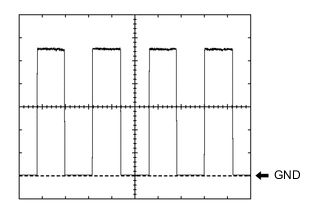
Using an oscilloscope, check waveform 2.
Waveform 2 (Reference) Item Condition Tester connection
-
X6-22 (DS2) - Body ground
-
X6-25 (DS22) - Body ground
Tool setting 2 V/DIV., 2 ms./DIV. Vehicle condition Power back door operating Tech Tips
The period changes in accordance to the speed at which the power back door is opened and closed.
-
-
-
-
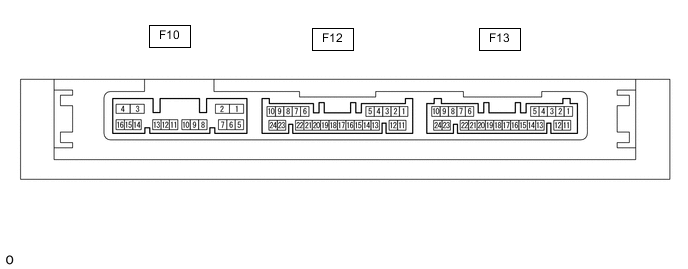
CHECK CERTIFICATION ECU (SMART KEY ECU ASSEMBLY)
-
Disconnect the F13 and F10 certification ECU (smart key ECU assembly) connectors.
-
Measure the voltage and resistance according to the value(s) in the table below.
Terminal No. (Symbol) Wiring Color Terminal Description Condition Specified Condition F13-10 (+B) - Body ground GR - Body ground Battery power supply Always 11 to 14 V F10-4 (CUTB) - Body ground BE - Body ground Battery power supply Always 11 to 14 V F13-11 (E) - Body ground W-B - Body ground Body ground Always Below 1 Ω -
Reconnect the F13 and F10 certification ECU (smart key ECU assembly) connectors.
-
Measure the voltage according to the value(s) in the table below.
Terminal No. (Symbol) Wiring Color Terminal Description Condition Specified Condition F10-3 (IG1D) - Body ground G - Body ground IG power supply Engine switch on (IG) 11 to 14 V F10-3 (IG1D) - Body ground G - Body ground IG power supply Engine switch off Below 1 V F12-5 (TSW5) - Body ground R - Body ground Back door opener switch assembly signal Back door opener switch assembly off Pulse generation F12-5 (TSW5) - Body ground R - Body ground Back door opener switch assembly signal Back door opener switch assembly on Below 1 V
-
-
CHECK MAIN BODY ECU (MULTIPLEX NETWORK BODY ECU) AND INSTRUMENT PANEL JUNCTION BLOCK ASSEMBLY
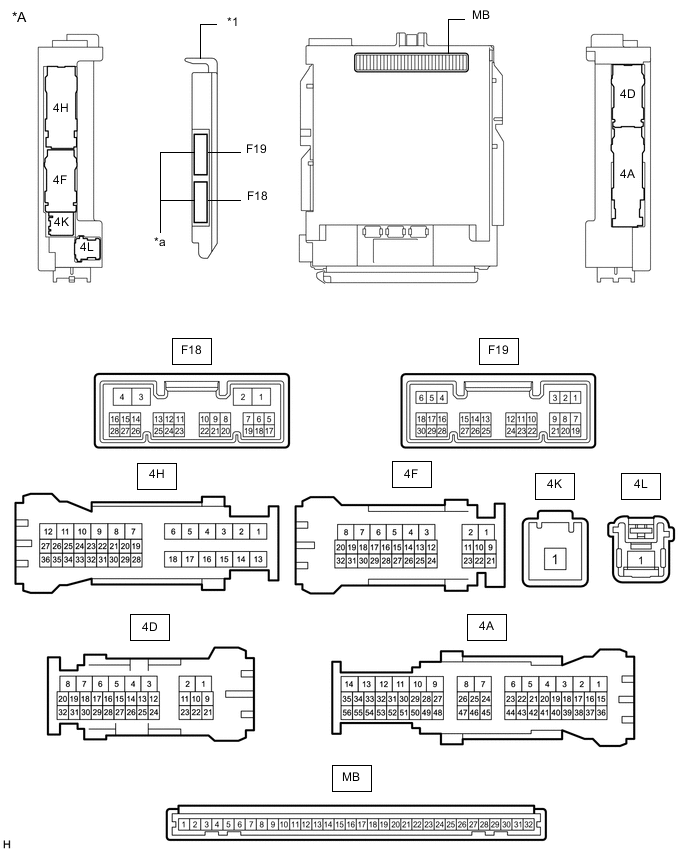
*A Main Body ECU (Multiplex Network Body ECU) with 2 Connectors - - *1 Main Body ECU (Multiplex Network Body ECU) - - *a 2 Connectors - - 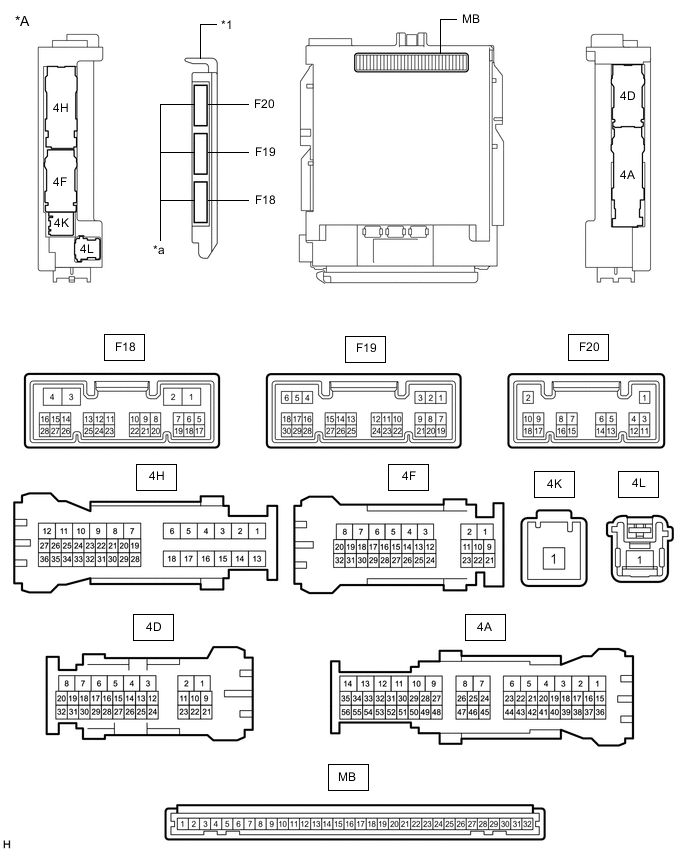
*A Main Body ECU (Multiplex Network Body ECU) with 3 Connectors - - *1 Main Body ECU (Multiplex Network Body ECU) - - *a 3 Connectors - -
-
Remove the main body ECU (multiplex network body ECU) from the instrument panel junction block assembly.
-
Reconnect the instrument panel junction block assembly connectors.
-
Measure the voltage and resistance according to the value(s) in the table below.
Tech Tips
Measure the values on the wire harness side with the connector disconnected.
Terminal No. (Symbol) Wiring Color Terminal Description Condition Specified Condition MB-31 (BECU) - Body ground - Battery power supply Always 11 to 14 V MB-30 (ACC) - Body ground - ACC power supply Engine switch on (ACC) 11 to 14 V MB-30 (ACC) - Body ground - ACC power supply Engine switch off Below 1 V MB-32 (IG) - Body ground - IG power supply Engine switch on (IG) 11 to 14 V MB-32 (IG) - Body ground - IG power supply Engine switch off Below 1 V MB-11 (GND1) - Body ground - Body ground Always Below 1 Ω -
Install the main body ECU (multiplex network body ECU) to the instrument panel junction block assembly.
-
Measure the voltage and check for pulses according to the value(s) in the table below.
Terminal No. (Symbol) Wiring Color Terminal Description Condition Specified Condition F18-5 (PBDS) - Body ground GR - Body ground Rear door control switch signal Rear door control switch off Pulse generation F18-5 (PBDS) - Body ground GR - Body ground Rear door control switch signal Rear door control switch on Below 1 V
-