WIRELESS DOOR LOCK CONTROL SYSTEM(w/o Smart Entry and Start System) Only Wireless Control Function is Inoperative
DESCRIPTION
The door control receiver receives signals from the door control transmitter module set sub-assembly and sends these signals to the main body ECU (multiplex network body ECU). The main body ECU (multiplex network body ECU) then controls all doors by sending lock/unlock signals to each door, and sends hazard flasher signals to the combination meter assembly.
WIRING DIAGRAM
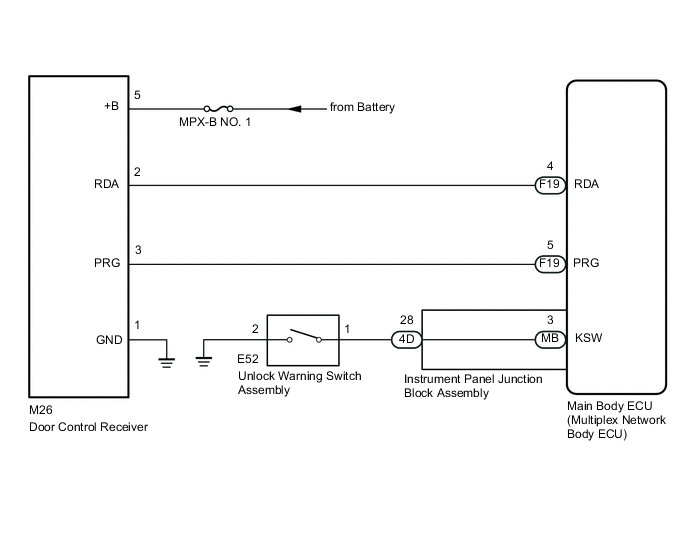
CAUTION / NOTICE / HINT
Note
-
Inspect the fuses for circuits related to this system before performing the following procedure.
-
When replacing or inspecting the door control receiver and wire harness, do not change the position or length of the wire harness. If the wire harness is too close to the door control receiver, wireless function performance may be affected.
-
As the door control battery is installed between the vehicle battery and main body ECU (multiplex network body ECU), first perform the inspections in On-Vehicle Inspection to confirm that there are no malfunctions in the power source circuit for the main body ECU (multiplex network body ECU) before performing this troubleshooting procedure.*
-
*: for LHD
PROCEDURE
-
CHECK POWER DOOR LOCK OPERATION
-
Check the power door lock operation.
OK Locked doors unlock. Result Proceed to OK NG
NG 
GO TO POWER DOOR LOCK CONTROL SYSTEM Click here
OK 
-
-
CHECK KEY REMINDER WARNING SYSTEM
-
Check that the key reminder warning buzzer operates properly.
OK Key reminder warning buzzer operates properly. Result Proceed to OK NG
NG
GO TO KEY REMINDER WARNING SYSTEM Click here
OK
-
-
CHECK DOOR CONTROL TRANSMITTER MODULE SET SUB-ASSEMBLY
-
When a known good registered door control transmitter module set sub-assembly is used, check that the wireless functions operate properly.
Result Result Proceed to Wireless door lock/unlock function operates properly with a known good door control transmitter module set sub-assembly A Wireless door lock/unlock function does not operate B
B 
CHECK WAVE ENVIRONMENT Click here
A
-
-
CHECK TRANSMITTER BATTERY (VOLTAGE)
-
Inspect the transmitter battery capacity.
-
Remove the transmitter battery from the door control transmitter module set sub-assembly that does not operate. Attach a lead wire (0.6 mm (0.0236 in.) in diameter or less including wire sheath) with tape or equivalent to the negative (-) terminal.
Note
Do not wrap the lead wire around a terminal, wedge it between the terminals, or solder it. A terminal may be deformed or damaged, and the transmitter battery will not be able to be installed correctly.
-
-
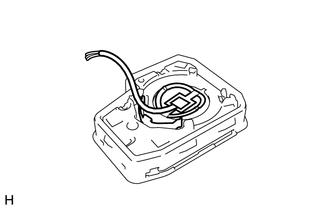
Carefully pull the lead wire out from the position shown in the illustration and install the previously removed transmitter battery.
Note
When replacing the transmitter battery, before starting work, remove static electricity that has built up in the body by touching, for example, the vehicle to prevent the door control transmitter module set sub-assembly from being damaged.
-
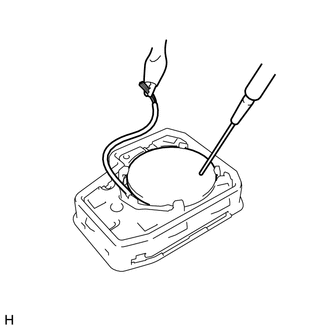
Check the transmitter battery voltage.
Tech Tips
Measure the transmitter battery voltage while pressing the lock or unlock switch on the door control transmitter module set sub-assembly.
Standard Voltage Connection Condition Specified Condition Transmitter battery positive (+) - Transmitter battery negative (-) Ignition switch off, all doors closed and lock or unlock switch pressed 2.5 to 3.2 V Result Proceed to OK NG
OK
REPLACE DOOR CONTROL TRANSMITTER MODULE SET SUB-ASSEMBLY
NG
REPLACE TRANSMITTER BATTERY Click here
-
-
CHECK WAVE ENVIRONMENT
-
Bring the door control transmitter module set sub-assembly near the door control receiver, and perform wireless operation check.
Tech Tips
-
When the door control transmitter module set sub-assembly is brought near the door control receiver, the possibility of wave interference decreases, and it can be determined if wave interference is causing the problem symptom.
-
If the inspection result is that the problem only occurs in certain locations or times of day, the possibility of wave interference is high. Also, added vehicle components may cause wave interference. If installed, remove them and perform the operation check.
OK Wireless functions operate properly. Result Proceed to OK NG -
OK
END (AFFECTED BY WAVE INTERFERENCE)
NG
-
-
SWITCH TO SELF-DIAGNOSTIC MODE (USING GTS)
-
Connect the GTS to the DLC3.
-
Turn the ignition switch to ON.
-
Turn the GTS on.
-
Enter the following menus: Body Electrical / Main Body / Utility / Wireless Door Lock Diagnosis Mode.
Body Electrical > Main Body > UtilityTester Display Wireless Door Lock Diagnosis Mode -
Proceed to the next step in accordance with the prompts on the GTS screen.
-
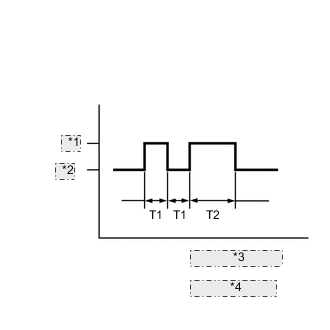
Interior Light Output *1 ON *2 OFF *3 T1: 0.25 seconds *4 T2: 0.5 seconds Check that the system has switched to self-diagnostic mode by checking the interior light output pattern.
Result Proceed to NEXT
NEXT
-
-
CHECK SELF DIAGNOSTIC MODE
-
Inspect the diagnostic outputs when the door control transmitter module set sub-assembly switch is pressed. The diagnostic outputs can be checked by the interior light flash pattern.
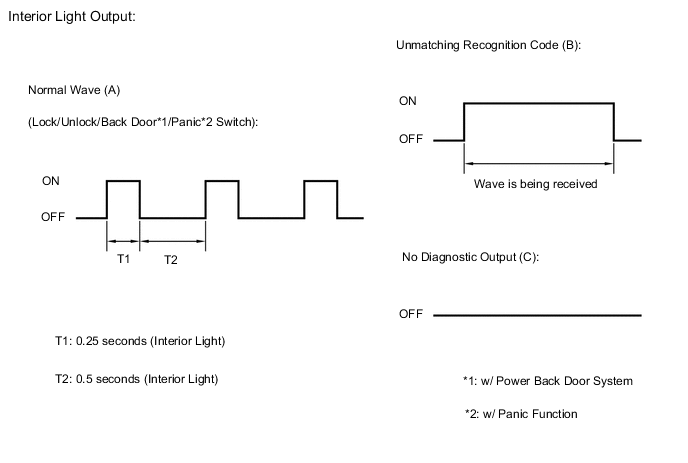
Result Result Proceed to Normal wave (light flash pattern) is output A Unmatching recognition code is output B No diagnostic outputs C
A
REPLACE MAIN BODY ECU (MULTIPLEX NETWORK BODY ECU) Click here
C
CHECK DOOR CONTROL RECEIVER (RESPONSE) Click here
B
-
-
CHECK REGISTER RECOGNITION CODE
-
Check that the system can be switched to rewrite mode or add mode, and that a recognition code can be registered.
OK Recognition code can be registered. Result Proceed to OK NG
OK
END (GO TO OPERATION CHECK)
NG
GO TO STEP 13 Click here
-
-
CHECK DOOR CONTROL RECEIVER (RESPONSE)
-
Prepare a door control transmitter module set sub-assembly from another vehicle.
-
Press and hold a door control transmitter module set sub-assembly switch.
-
Check that an unmatching recognition code is output.
OK Unmatching recognition code is output. Result Proceed to OK NG
OK
REPLACE DOOR CONTROL TRANSMITTER MODULE SET SUB-ASSEMBLY
NG
-
-
CHECK DOOR CONTROL RECEIVER (+B, GND)
-
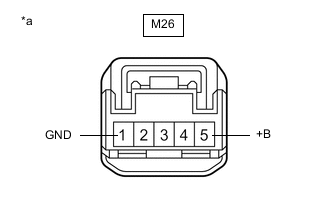
*a Front view of wire harness connector
(to Door Control Receiver)
Disconnect the M26 door control receiver connector.
-
Measure the resistance according to the value(s) in the table below.
Standard Resistance Tester Connection Condition Specified Condition M26-1 (GND) - Body ground Always Below 1 Ω -
Measure the voltage according to the value(s) in the table below.
Standard Voltage Tester Connection Condition Specified Condition M26-5 (+B) - Body ground Always 11 to 14 V Result Proceed to OK NG
NG
REPAIR OR REPLACE HARNESS OR CONNECTOR
OK
-
-
CHECK DOOR CONTROL RECEIVER (OUTPUT)
-
Reconnect the M26 door control receiver connector.
-
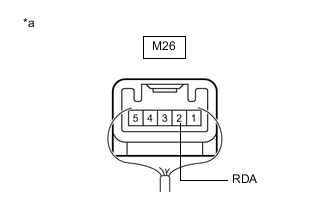
*a Component with harness connected
(Door Control Receiver)
Measure the voltage according to the value(s) in the table below.
Standard Voltage Tester Connection Condition Specified Condition M26-2 (RDA) - Body ground Ignition switch off, all doors closed and door control transmitter module set sub-assembly switch not pressed 11 to 14 V Ignition switch off, all doors closed and door control transmitter module set sub-assembly switch pressed Pulse generation
(0 to 12 V)
Result Proceed to OK NG
NG
REPLACE DOOR CONTROL RECEIVER Click here
OK
-
-
CHECK HARNESS AND CONNECTOR (MAIN BODY ECU (MULTIPLEX NETWORK BODY ECU) - DOOR CONTROL RECEIVER)
-
Disconnect the F19 main body ECU (multiplex network body ECU) connector.
-
Disconnect the M26 door control receiver connector.
-
Measure the resistance according to the value(s) in the table below.
Standard Resistance Tester Connection Condition Specified Condition M26-2 (RDA) - F19-4 (RDA) Always Below 1 Ω M26-3 (PRG) - F19-5 (PRG) Always Below 1 Ω M26-2 (RDA) or F19-4 (RDA) - Body ground Always 10 kΩ or higher M26-3 (PRG) or F19-5 (PRG) - Body ground Always 10 kΩ or higher Result Proceed to OK NG
NG
REPAIR OR REPLACE HARNESS OR CONNECTOR
OK
-
-
REPLACE DOOR CONTROL RECEIVER
-
Temporarily replace the door control receiver with a new or known good one.
Result Proceed to NEXT
NEXT
-
-
REGISTER RECOGNITION CODE
-
Perform the Registration procedure.
Result Proceed to NEXT
NEXT
-
-
CHECK DOOR CONTROL RECEIVER (OPERATION)
-
Check that the doors can be locked and unlocked by the door control transmitter module set sub-assembly lock and unlock switches.
OK Doors can be locked and unlocked by the door control transmitter module set sub-assembly. Result Proceed to OK NG
OK
END (DOOR CONTROL RECEIVER WAS DEFECTIVE)
NG
REPLACE MAIN BODY ECU (MULTIPLEX NETWORK BODY ECU) Click here
-