POWER DOOR LOCK CONTROL SYSTEM Only Back Door cannot be Opened
DESCRIPTION
The main body ECU (multiplex network body ECU) receives signals from the back door opener switch assembly. When a signal received is the main body ECU (multiplex network body ECU) activates the back door lock motor.
WIRING DIAGRAM
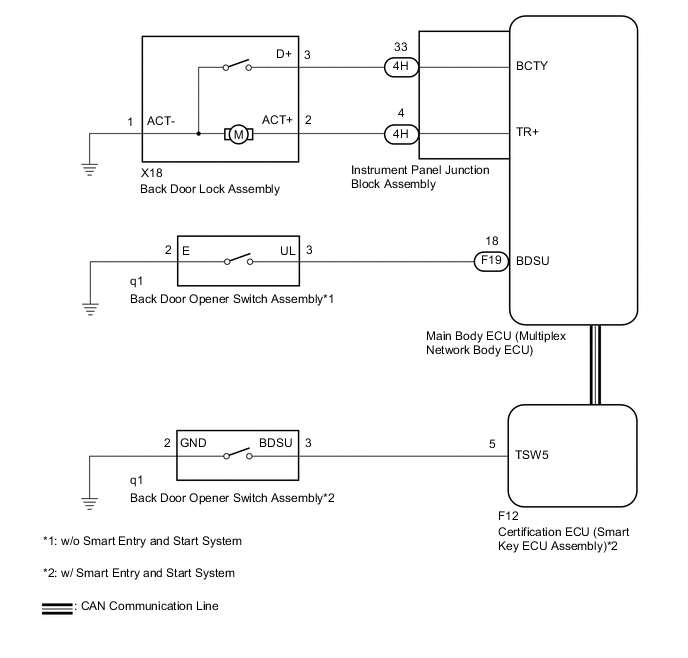
CAUTION / NOTICE / HINT
Note
-
If the main body ECU (multiplex network body ECU) is replaced, refer to Service Bulletin.*
-
*: w/ Smart Entry and Start System
-
The power door lock control system uses the CAN communication system. Inspect the communication function by following How to Proceed with Troubleshooting. Troubleshoot the power door lock control system after confirming that the communication systems are functioning properly.
-
w/ Smart Entry and Start System:
Before performing this troubleshooting procedure , perform troubleshooting for the smart entry and start system (for Entry Function) (Back Door Entry Unlock Function does not Operate) first.
-
As the door control battery is installed between the vehicle battery and main body ECU (multiplex network body ECU), first perform the inspections in On-Vehicle Inspection to confirm that there are no malfunctions in the power source circuit for the main body ECU (multiplex network body ECU) before performing this troubleshooting procedure.*
-
*: for LHD
PROCEDURE
-
SYSTEM CHECK
-
Check the vehicle specification.
Result Result Proceed to w/o Smart Entry and Start System A w/ Smart Entry and Start System B
B 
INSPECT BACK DOOR LOCK ASSEMBLY Click here
A 
-
-
CHECK POWER DOOR LOCK OPERATION (BASIC FUNCTION)
-
Check the power door lock basic functions.
OK The power door lock basic functions operate properly. Result Proceed to OK NG
NG 
GO TO PROBLEM SYMPTOMS TABLE Click here
OK
-
-
READ VALUE USING GTS (Back Door Open)
-
Connect the GTS to the DLC3.
-
Turn the ignition switch to ON.
-
Turn the GTS on.
-
Enter the following menus: Body Electrical / Main Body / Data List.
-
Read the Data List according to the display on the GTS.
Body Electrical > Main Body > Data ListTester Display Measurement Item Range Normal Condition Diagnostic Note Back Door Open Back door lock signal Prohibit or Permit Prohibit: Back door locked
Permit: Back door unlocked
-
Body Electrical > Main Body > Data ListTester Display Back Door Open OK The GTS displays Permit or Prohibit according to the back door lock assembly operation. Result Proceed to OK NG
NG
REPLACE MAIN BODY ECU (MULTIPLEX NETWORK BODY ECU) Click here
OK
-
-
PERFORM ACTIVE TEST USING GTS (Trunk and Back-Door Open)
-
Connect the GTS to the DLC3.
-
Turn the ignition switch to ON.
-
Turn the GTS on.
-
Enter the following menus: Body Electrical / Main Body / Active Test.
-
Perform the Active Test according to the display on the GTS.
Body Electrical > Main Body > Active TestTester Display Measurement Item Control Range Diagnostic Note Trunk and Back-Door Open Back door lock motor OFF/ON -
Body Electrical > Main Body > Active TestTester Display Trunk and Back-Door Open OK The back door lock assembly unlatches when ON is selected. Result Proceed to OK NG
NG
GO TO STEP 8 Click here
OK
-
-
READ VALUE USING GTS (Back Door Open Handle SW)
-
Connect the GTS to the DLC3.
-
Turn the ignition switch to ON.
-
Turn the GTS on.
-
Enter the following menus: Body Electrical / Main Body / Data List.
-
Read the Data List according to the display on the GTS.
Body Electrical > Main Body > Data ListTester Display Measurement Item Range Normal Condition Diagnostic Note Back Door Open Handle SW Back door opener switch signal OFF or ON OFF: Back door opener switch not pushed
ON: Back door opener switch pushed
-
Body Electrical > Main Body > Data ListTester Display Back Door Open Handle SW OK The GTS displays ON or OFF according to the back door opener switch assembly operation. Result Proceed to OK NG
OK
REPLACE MAIN BODY ECU (MULTIPLEX NETWORK BODY ECU) Click here
NG
-
-
INSPECT BACK DOOR OPENER SWITCH ASSEMBLY
-
Remove the back door opener switch assembly.
-
Inspect the back door opener switch assembly.
Result Proceed to OK NG
NG
REPLACE BACK DOOR OPENER SWITCH ASSEMBLY Click here
OK
-
-
CHECK HARNESS AND CONNECTOR (BACK DOOR OPENER SWITCH ASSEMBLY - MAIN BODY ECU (MULTIPLEX NETWORK BODY ECU))
-
Disconnect the F19 main body ECU (multiplex network body ECU) connector.
-
Measure the resistance according to the value(s) in the table below.
Standard Resistance Tester Connection Condition Specified Condition q1-3 (UL) - F19-18 (BDSU) Always Below 1 Ω q1-2 (E) - Body ground Always Below 1 Ω q1-3 (UL) or F19-18 (BDSU) - Body ground Always 10 kΩ or higher Result Proceed to OK NG
OK
REPLACE MAIN BODY ECU (MULTIPLEX NETWORK BODY ECU) Click here
NG
REPAIR OR REPLACE HARNESS OR CONNECTOR
-
-
INSPECT BACK DOOR LOCK ASSEMBLY
-
Remove the back door lock assembly.
-
Inspect the back door lock assembly.
Result Proceed to OK NG
NG
REPLACE BACK DOOR LOCK ASSEMBLY Click here
OK
-
-
CHECK HARNESS AND CONNECTOR (BACK DOOR LOCK ASSEMBLY - MAIN BODY ECU (MULTIPLEX NETWORK BODY ECU))
-
Disconnect the 4H instrument panel junction block assembly connector.
-
Measure the resistance according to the value(s) in the table below.
Standard Resistance Tester Connection Condition Specified Condition X18-2 (ACT+) - 4H-4 Always Below 1 Ω X18-3 (D+) - 4H-33 Always Below 1 Ω X18-1 (ACT-) - Body ground Always Below 1 Ω X18-2 (ACT+) or 4H-4 - Body ground Always 10 kΩ or higher X18-3 (D+) or 4H-33 - Body ground Always 10 kΩ or higher Result Proceed to OK NG
NG
REPAIR OR REPLACE HARNESS OR CONNECTOR
OK
-
-
REPLACE INSTRUMENT PANEL JUNCTION BLOCK ASSEMBLY
-
Replace the instrument panel junction block assembly.
Result Proceed to NEXT
NEXT
-
-
CHECK BACK DOOR OPEN OPERATION
-
Check that the back door can be opened.
OK The back door can be opened. Result Proceed to OK NG
OK
END (INSTRUMENT PANEL JUNCTION BLOCK ASSEMBLY WAS DEFECTIVE)
NG
REPLACE MAIN BODY ECU (MULTIPLEX NETWORK BODY ECU) Click here
-