NAVIGATION SYSTEM(for Radio and Display Type), Diagnostic DTC:B15C3
| DTC Code | DTC Name |
|---|---|
| B15C3 | Speaker Output Short |
DESCRIPTION
This DTC is stored when a malfunction occurs in the speakers.
| DTC No. | Detection Item | DTC Detection Condition | Trouble Area |
|---|---|---|---|
| B15C3 | Speaker Output Short | A short is detected in the speaker output circuit |
|
-
*: w/ Manual (SOS) Switch
WIRING DIAGRAM
-
for 6 Speakers
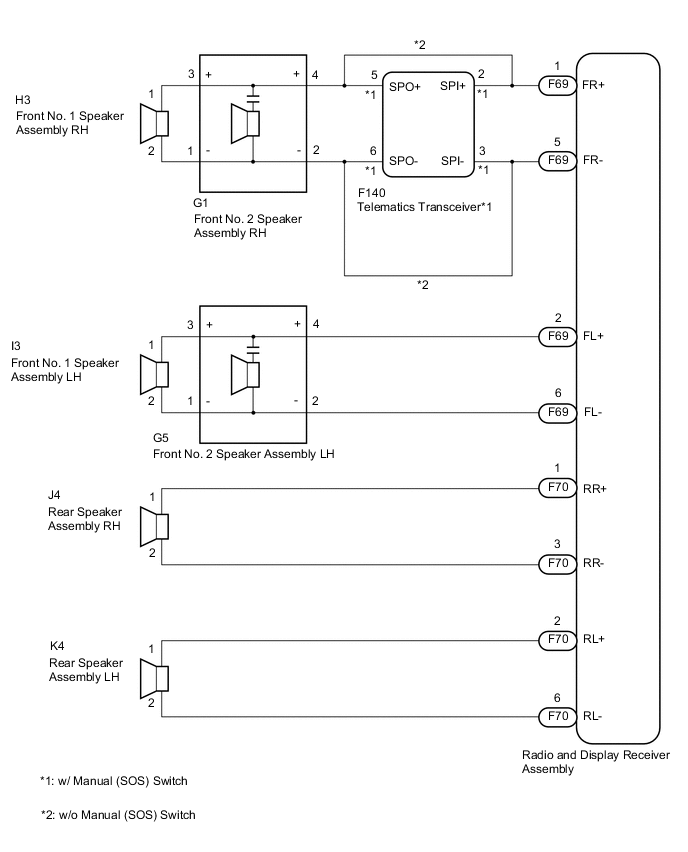
-
for 12 Speakers
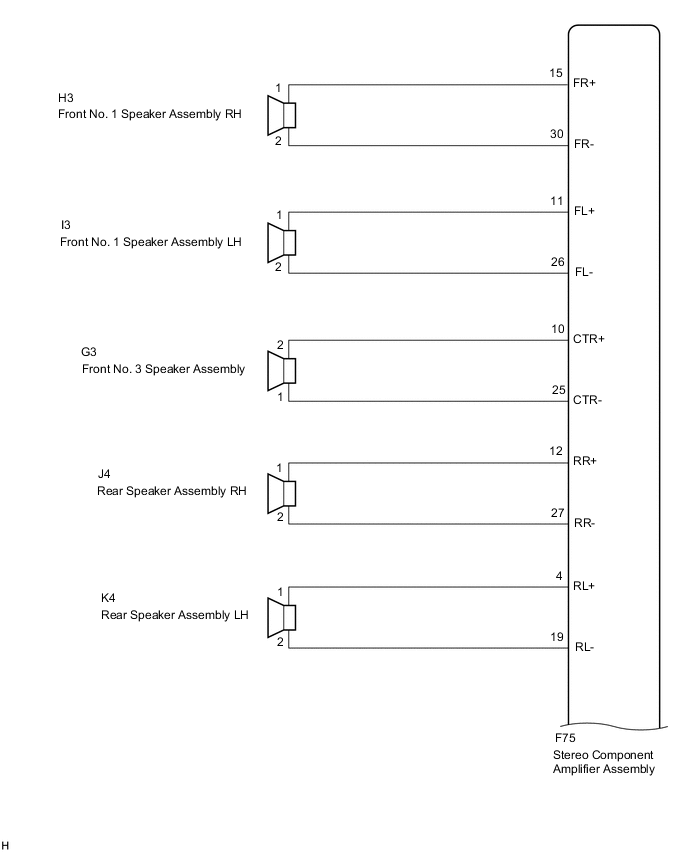
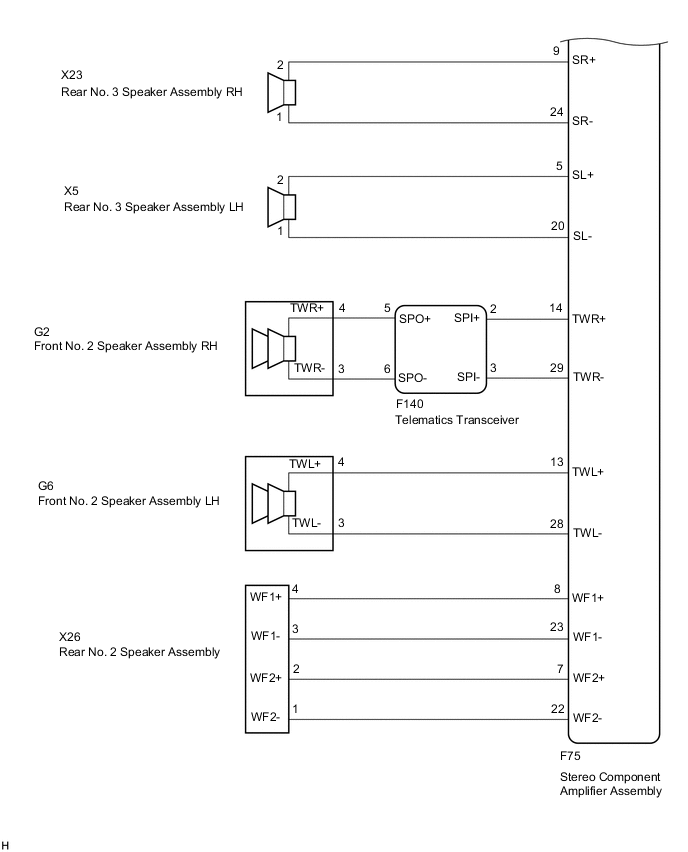
CAUTION / NOTICE / HINT
Note
Depending on the parts that are replaced during vehicle inspection or maintenance, performing initialization, registration or calibration may be needed. Refer to Precaution for Navigation System.
PROCEDURE
-
CONFIRM MODEL
-
Choose the model to be inspected.
Result Result Proceed to for 6 Speakers A for 12 Speakers B
B 
CHECK HARNESS AND CONNECTOR (STEREO COMPONENT AMPLIFIER ASSEMBLY - BODY GROUND) Click here
A 
-
-
CONFIRM MODEL
-
Choose the model to be inspected.
Result Result Proceed to w/ Manual (SOS) Switch A w/o Manual (SOS) Switch B
B
CHECK HARNESS AND CONNECTOR (RADIO AND DISPLAY RECEIVER ASSEMBLY - BODY GROUND) Click here
A
-
-
CHECK HARNESS AND CONNECTOR (RADIO AND DISPLAY RECEIVER ASSEMBLY - BODY GROUND)
-
Disconnect the F69 and F70 radio and display receiver assembly connectors.
-
Disconnect the F140 telematics transceiver assembly connector.
-
Disconnect the G5 front No. 2 speaker assembly LH connector.
-
Disconnect the K4 and J4 rear speaker assembly connectors.
-
Measure the resistance according to the value(s) in the table below.
Standard Resistance Tester Connection Condition Specified Condition F69-1 (FR+) or F140-2 (SPI+) - Body ground Always 10 kΩ or higher F69-5 (FR-) or F140-3 (SPI-) - Body ground Always 10 kΩ or higher F69-2 (FL+) or G5-4 (+) - Body ground Always 10 kΩ or higher F69-6 (FL-) or G5-2 (-) - Body ground Always 10 kΩ or higher F70-1 (RR+) or J4-1 - Body ground Always 10 kΩ or higher F70-3 (RR-) or J4-2 - Body ground Always 10 kΩ or higher F70-2 (RL+) or K4-1 - Body ground Always 10 kΩ or higher F70-6 (RL-) or K4-2 - Body ground Always 10 kΩ or higher Result Proceed to OK NG
NG 
REPAIR OR REPLACE HARNESS OR CONNECTOR
OK
-
-
CHECK HARNESS AND CONNECTOR (TELEMATICS TRANSCEIVER - BODY GROUND)
-
Disconnect the F140 telematics transceiver connector.
-
Disconnect the G1 front No. 2 speaker assembly RH connector.
-
Measure the resistance according to the value(s) in the table below.
Standard Resistance Tester Connection Condition Specified Condition F140-5 (SPO+) or G1-4 (+) - Body ground Always 10 kΩ or higher F140-6 (SPO-) or G1-2 (-) - Body ground Always 10 kΩ or higher Result Proceed to OK NG
NG
REPAIR OR REPLACE HARNESS OR CONNECTOR
OK
-
-
CHECK HARNESS AND CONNECTOR (FRONT NO. 2 SPEAKER ASSEMBLY - BODY GROUND)
-
Disconnect the H3 and I3 front No. 1 speaker assembly connectors.
-
Disconnect the G1 and G5 front No. 2 speaker assembly connectors.
-
Measure the resistance according to the value(s) in the table below.
Standard Resistance Tester Connection Condition Specified Condition G1-3 (+) or H3-1 - Body ground Always 10 kΩ or higher G1-1 (-) or H3-2 - Body ground Always 10 kΩ or higher G5-3 (+) or I3-1 - Body ground Always 10 kΩ or higher G5-1 (-) or I3-2 - Body ground Always 10 kΩ or higher Result Proceed to OK NG
NG
REPAIR OR REPLACE HARNESS OR CONNECTOR
OK
-
-
INSPECT FRONT NO. 1 SPEAKER ASSEMBLY
-
Remove the front No. 1 speaker assembly.
-
Inspect the front No. 1 speaker assembly.
Result Proceed to OK NG
NG
REPLACE FRONT NO. 1 SPEAKER ASSEMBLY Click here
OK
-
-
REPLACE FRONT NO. 2 SPEAKER ASSEMBLY
-
Remove the front No. 2 speaker assembly.
-
Inspect the front No. 2 speaker assembly.
-
Clear the DTCs.
Body Electrical > Navigation System > Clear DTCs -
Recheck for DTCs and check that no DTCs are output.
Body Electrical > Navigation System > Trouble CodesOK No DTCs are output. Result Proceed to OK NG
OK
END
NG
-
-
INSPECT REAR SPEAKER ASSEMBLY
-
Remove the rear speaker assembly.
-
Inspect the rear speaker assembly.
Result Proceed to OK NG
NG
REPLACE REAR SPEAKER ASSEMBLY Click here
OK
-
-
INSPECT TELEMATICS TRANSCEIVER
-
Remove the telematics transceiver.
-
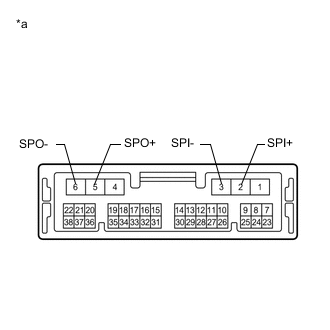
*a Component without harness connected
(Telematics Transceiver)
Measure the resistance according to the value(s) in the table below.
Standard Resistance Tester Connection Condition Specified Condition 2 (SPI+) - 5 (SPO+) Always Below 1 Ω 3 (SPI-) - 6 (SPO-) Always Below 1 Ω 2 (SPI+) - 3 (SPI-) Always 10 kΩ or higher 5 (SPO+) - 6 (SPO-) Always 10 kΩ or higher 2 (SPI+) or 5 (SPO+) - Body ground Always 10 kΩ or higher 3 (SPI-) or 6 (SPO-) - Body ground Always 10 kΩ or higher Result Proceed to OK NG
OK
REPLACE RADIO AND DISPLAY RECEIVER ASSEMBLY Click here
NG
REPLACE TELEMATICS TRANSCEIVER Click here
-
-
CHECK HARNESS AND CONNECTOR (RADIO AND DISPLAY RECEIVER ASSEMBLY - BODY GROUND)
-
Disconnect the F69 and F70 radio and display receiver assembly connectors.
-
Disconnect the G1 and G5 front No. 2 speaker assembly connectors.
-
Disconnect the K4 and J4 rear speaker assembly connectors.
-
Measure the resistance between the radio and display receiver assembly and body ground to check for a short circuit in the wire harness.
Standard Resistance Tester Connection Condition Specified Condition F69-1 (FR+) or G1-4 (+) - Body ground Always 10 kΩ or higher F69-5 (FR-) or G1-2 (-) - Body ground Always 10 kΩ or higher F69-2 (FL+) or G5-4 (+) - Body ground Always 10 kΩ or higher F69-6 (FL-) or G5-2 (-) - Body ground Always 10 kΩ or higher F70-1 (RR+) or J4-1 - Body ground Always 10 kΩ or higher F70-3 (RR-) or J4-2 - Body ground Always 10 kΩ or higher F70-2 (RL+) or K4-1 - Body ground Always 10 kΩ or higher F70-6 (RL-) or K4-2 - Body ground Always 10 kΩ or higher Result Proceed to OK NG
NG
REPAIR OR REPLACE HARNESS OR CONNECTOR
OK
-
-
CHECK HARNESS AND CONNECTOR (FRONT NO. 2 SPEAKER ASSEMBLY - BODY GROUND)
-
Disconnect the H3 and I3 front No. 1 speaker assembly connectors.
-
Disconnect the G1 and G5 front No. 2 speaker assembly connectors.
-
Measure the resistance between each of the front No. 2 speaker assemblies and body ground to check for a short circuit in the wire harness.
Standard Resistance Tester Connection Condition Specified Condition G1-3 (+) or H3-1 - Body ground Always 10 kΩ or higher G1-1 (-) or H3-2 - Body ground Always 10 kΩ or higher G5-3 (+) or I3-1 - Body ground Always 10 kΩ or higher G5-1 (-) or I3-2 - Body ground Always 10 kΩ or higher Result Proceed to OK NG
NG
REPAIR OR REPLACE HARNESS OR CONNECTOR
OK
-
-
INSPECT FRONT NO. 1 SPEAKER ASSEMBLY
-
Remove the front No. 1 speaker assembly.
-
Inspect the front No. 1 speaker assembly.
Result Proceed to OK NG
NG
REPLACE FRONT NO. 1 SPEAKER ASSEMBLY Click here
OK
-
-
REPLACE FRONT NO. 2 SPEAKER ASSEMBLY
-
Remove the front No. 2 speaker assembly.
-
Inspect the front No. 2 speaker assembly.
-
Clear the DTCs.
Body Electrical > Navigation System > Clear DTCs -
Recheck for DTCs and check that no DTCs are output.
Body Electrical > Navigation System > Trouble CodesOK No DTCs are output. Result Proceed to OK NG
OK
END
NG
-
-
INSPECT REAR SPEAKER ASSEMBLY
-
Remove the rear speaker assembly.
-
Inspect the rear speaker assembly.
Result Proceed to OK NG
OK
REPLACE RADIO AND DISPLAY RECEIVER ASSEMBLY Click here
NG
REPLACE REAR SPEAKER ASSEMBLY Click here
-
-
CHECK HARNESS AND CONNECTOR (STEREO COMPONENT AMPLIFIER ASSEMBLY - BODY GROUND)
-
Disconnect the F75 stereo component amplifier assembly connector.
-
Disconnect the F140 telematics transceiver connector.
-
Disconnect the H3 and I3 front No. 1 speaker assembly connector.
-
Disconnect the G3 front No. 3 speaker assembly connector.
-
Disconnect the J4 and K4 rear speaker assembly connectors.
-
Disconnect the X23 and X5 rear No. 3 speaker assembly connectors.
-
Disconnect the G2 and G6 front No. 2 speaker assembly connectors.
-
Disconnect the X26 rear No. 2 speaker assembly connector.
-
Measure the resistance according to the value(s) in the table below.
Standard Resistance Tester Connection Condition Specified Condition F75-15 (FR+) or H3-1 - Body ground Always 10 kΩ or higher F75-30 (FR-) or H3-2 - Body ground Always 10 kΩ or higher F75-11 (FL+) or I3-1 - Body ground Always 10 kΩ or higher F75-26 (FL-) or I3-2 - Body ground Always 10 kΩ or higher F75-10 (CTR+) or G3-2 - Body ground Always 10 kΩ or higher F75-25 (CTR-) or G3-1 - Body ground Always 10 kΩ or higher F75-12 (RR+) or J4-1 - Body ground Always 10 kΩ or higher F75-27 (RR-) or J4-2 - Body ground Always 10 kΩ or higher F75-4 (RL+) or K4-1 - Body ground Always 10 kΩ or higher F75-19 (RL-) or K4-2 - Body ground Always 10 kΩ or higher F75-9 (SR+) or X23-2 - Body ground Always 10 kΩ or higher F75-24 (SR-) or X23-1 - Body ground Always 10 kΩ or higher F75-5 (SL+) or X5-2 - Body ground Always 10 kΩ or higher F75-20 (SL-) or X5-1 - Body ground Always 10 kΩ or higher F75-14 (TWR+) or F140-2 (SPI+) - Body ground Always 10 kΩ or higher F75-29 (TWR-) or F140-3 (SPI-) - Body ground Always 10 kΩ or higher F75-13 (TWL+) or G6-4 (TWL+) - Body ground Always 10 kΩ or higher F75-28 (TWL-) or G6-3 (TWL-) - Body ground Always 10 kΩ or higher F75-8 (WF1+) or X26-4 (WF1+) - Body ground Always 10 kΩ or higher F75-23 (WF1-) or X26-3 (WF1-) - Body ground Always 10 kΩ or higher F75-7 (WF2+) or X26-2 (WF2+) - Body ground Always 10 kΩ or higher F75-22 (WF2-) or X26-1 (WF2-) - Body ground Always 10 kΩ or higher Result Proceed to OK NG
NG
REPAIR OR REPLACE HARNESS OR CONNECTOR
OK
-
-
CHECK HARNESS AND CONNECTOR (TELEMATICS TRANSCEIVER - BODY GROUND)
-
Disconnect the F140 telematics transceiver connector.
-
Disconnect the G2 front No. 2 speaker assembly RH connector.
-
Measure the resistance according to the value(s) in the table below.
Standard Resistance Tester Connection Condition Specified Condition F140-5 (SPO+) or G2-4 (TWR+) - Body ground Always 10 kΩ or higher F140-6 (SPO-) or G2-3 (TWR-) - Body ground Always 10 kΩ or higher Result Proceed to OK NG
NG
REPAIR OR REPLACE HARNESS OR CONNECTOR
OK
-
-
INSPECT TELEMATICS TRANSCEIVER
-
Remove the telematics transceiver.
-
*a Component without harness connected
(Telematics Transceiver)
Measure the resistance according to the value(s) in the table below.
Standard Resistance Tester Connection Condition Specified Condition 2 (SPI+) - 5 (SPO+) Always Below 1 Ω 3 (SPI-) - 6 (SPO-) Always Below 1 Ω 2 (SPI+) - 3 (SPI-) Always 10 kΩ or higher 5 (SPO+) - 6 (SPO-) Always 10 kΩ or higher 2 (SPI+) or 5 (SPO+) - Body ground Always 10 kΩ or higher 3 (SPI-) or 6 (SPO-) - Body ground Always 10 kΩ or higher Result Proceed to OK NG
NG
REPLACE TELEMATICS TRANSCEIVER Click here
OK
-
-
INSPECT FRONT NO. 1 SPEAKER ASSEMBLY
-
Remove the front No. 1 speaker assembly.
Click here
-
Inspect the front No. 1 speaker assembly.
Result Proceed to OK NG
NG
REPLACE FRONT NO. 1 SPEAKER ASSEMBLY Click here
OK
-
-
INSPECT FRONT NO. 3 SPEAKER ASSEMBLY
-
Remove the front No. 3 speaker assembly.
-
Inspect the front No. 3 speaker assembly.
Result Proceed to OK NG
NG
REPLACE FRONT NO. 3 SPEAKER ASSEMBLY Click here
OK
-
-
INSPECT REAR SPEAKER ASSEMBLY
-
Remove the rear speaker assembly.
-
Inspect the rear speaker assembly.
Result Proceed to OK NG
NG
REPLACE REAR SPEAKER ASSEMBLY Click here
OK
-
-
INSPECT REAR NO. 3 SPEAKER ASSEMBLY
-
Remove the rear No. 3 speaker assembly.
-
Inspect the rear No. 3 speaker assembly.
Result Proceed to OK NG
NG
REPLACE REAR NO. 3 SPEAKER ASSEMBLY Click here
OK
-
-
REPLACE FRONT NO. 2 SPEAKER ASSEMBLY
-
Remove the front No. 2 speaker assembly.
-
Inspect the front No. 2 speaker assembly.
-
Clear the DTCs.
Body Electrical > Navigation System > Clear DTCs -
Recheck for DTCs and check that no DTCs are output.
Body Electrical > Navigation System > Trouble CodesOK No DTCs are output. Result Proceed to OK NG
OK
END
NG
-
-
INSPECT REAR NO. 2 SPEAKER ASSEMBLY
-
Remove the rear No. 2 speaker assembly.
-
Inspect the rear NO.2 speaker assembly.
Result Proceed to OK NG
OK
REPLACE STEREO COMPONENT AMPLIFIER ASSEMBLY Click here
NG
REPLACE REAR NO. 2 SPEAKER ASSEMBLY Click here
-