NAVIGATION SYSTEM(for Radio and Display Type), Diagnostic DTC:B1324
| DTC Code | DTC Name |
|---|---|
| B1324 | Lost Communication with Meter |
DESCRIPTION
This DTC is stored when a communication error occurs between the radio and display receiver assembly and combination meter assembly.
| DTC No. | Detection Item | DTC Detection Condition | Trouble Area |
|---|---|---|---|
| B1324 | Lost Communication with Meter | After the radio and display receiver assembly receives a registration information signal, which is sent by the combination meter assembly when the engine switch is on (ACC), 1 or more times, the radio and display receiver assembly cannot receive the signal for 30 seconds or more. |
|
WIRING DIAGRAM
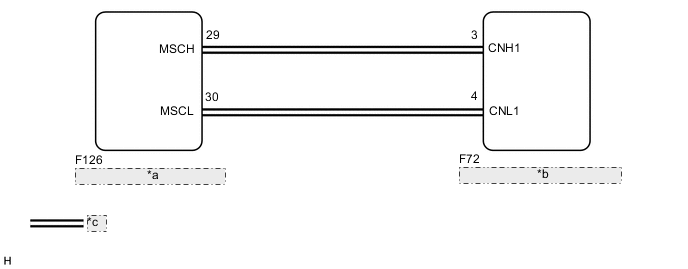
| *a | Combination Meter Assembly |
| *b | Radio and Display Receiver Assembly |
| *c | Local Bus Communication Line |
PROCEDURE
-
CHECK HARNESS AND CONNECTOR (RADIO AND DISPLAY RECEIVER ASSEMBLY - COMBINATION METER ASSEMBLY)
-
Disconnect the F72 radio and display receiver assembly connector.
-
Disconnect the F126 combination meter assembly connector.
-
Measure the resistance according to the value(s) in the table below.
Standard Resistance Tester Connection Condition Specified Condition F72-3 (CNH1) - F126-29 (MSCH) Always Below 1 Ω F72-4 (CNL1) - F126-30 (MSCL) Always Below 1 Ω F72-3 (CNH1) - Body ground Always 10 kΩ or higher F72-4 (CNL1) - Body ground Always 10 kΩ or higher F72-3 (CNH1) - F72-4 (CNL1) Always 10 kΩ or higher -
Measure the voltage according to the value(s) in the table below.
Standard Voltage Tester Connection Condition Specified Condition F72-3 (CNH1) - Body ground Always Below 1 V F72-4 (CNL1) - Body ground Always Below 1 V Result Proceed to OK NG
NG 
REPAIR OR REPLACE HARNESS OR CONNECTOR
OK 
-
-
INSPECT COMBINATION METER ASSEMBLY
-
Remove the combination meter assembly.
-
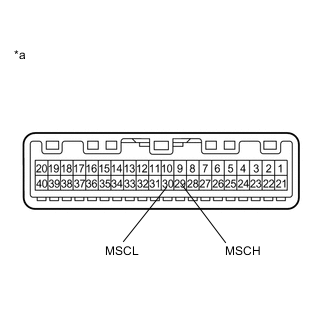
*a Component without harness connected
(Combination Meter Assembly)
Measure the resistance according to the value(s) in the table below.
Standard Resistance Tester Connection Condition Specified Condition 29 (MSCH) - 30 (MSCL) Always 108 to 132 Ω Result Proceed to OK NG
NG
REPLACE COMBINATION METER ASSEMBLY Click here
OK
-
-
INSPECT RADIO AND DISPLAY RECEIVER ASSEMBLY
-
Remove the radio and display receiver assembly.
-
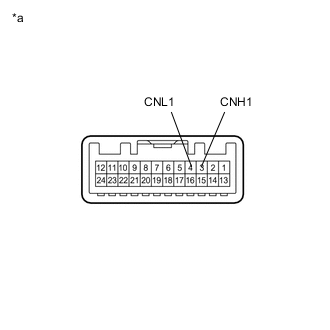
*a Component without harness connected
(Radio and Display Receiver Assembly)
Measure the resistance according to the value(s) in the table below.
Standard Resistance Tester Connection Condition Specified Condition 3 (CNH1) - 4 (CNL1) Always 108 to 132 Ω Result Proceed to OK NG
NG
REPLACE RADIO AND DISPLAY RECEIVER ASSEMBLY Click here
OK
-
-
REPLACE COMBINATION METER ASSEMBLY
-
Replace the combination meter assembly with a new or known good one.
-
Clear the DTCs.
Body Electrical > Navigation System > Clear DTCs -
Recheck for DTCs and check that no DTCs are output.
Body Electrical > Navigation System > Trouble CodesOK No DTCs are output. Result Proceed to OK NG
NG
REPLACE RADIO AND DISPLAY RECEIVER ASSEMBLY Click here
OK
-
-
CHECK METER / GAUGE SYSTEM
-
Turn the engine switch on (IG) and wait 30 seconds.
-
Operate the steering pad switch assembly and check that the audio tab is displayed on the multi-information display in the combination meter assembly and the audio system can be operated normally.
OK Audio system returns to normal. Result Proceed to OK NG
OK
END
NG
REPLACE RADIO AND DISPLAY RECEIVER ASSEMBLY Click here
-