DIGITAL AUDIO BROADCASTING ANTENNA INSTALLATION
PROCEDURE
-
INSTALL DIGITAL AUDIO BROADCASTING ANTENNA ASSEMBLY
Tech Tips
Butyl tape and adhesive tape are not available as supply parts. If these pieces of tape still have enough adhesion to secure the digital audio broadcasting antenna assembly to the roof headlining assembly, reuse them. If the adhesive tape and/or the butyl tape is no longer sticky, apply new tape following the procedure below.
-
Apply new butyl tape.
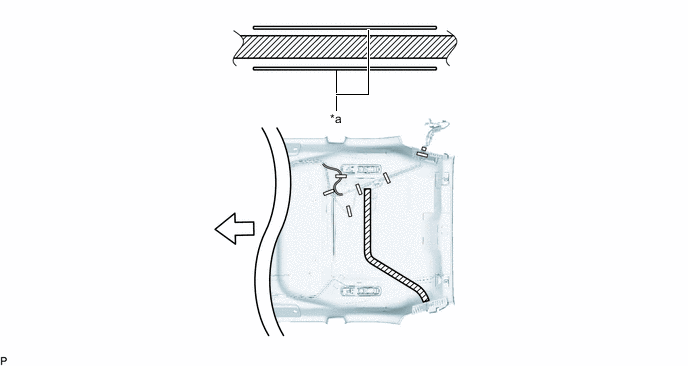
*a Marking - - 
Butyl tape 
Front
-
Remove the old butyl tape from the roof headlining assembly.
-
Prepare the appropriate amount of new butyl tape.
Tech Tips
Be careful not to touch the adhesive surface.
-
Apply the butyl tape to the roof headlining assembly while aligning the tape with the markings on the roof headlining assembly.
-
Peel off the release paper from the butyl tape.
-
-
Engage the clamp.
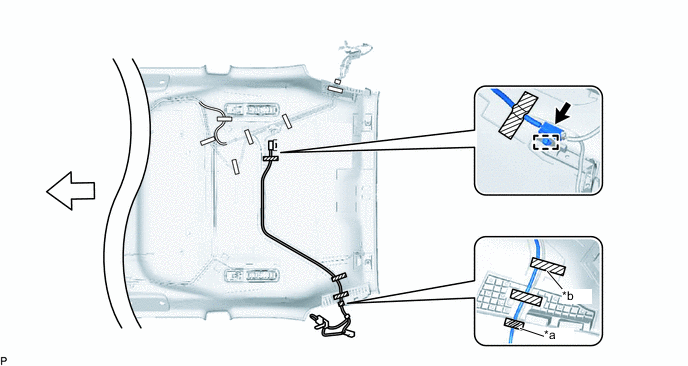
*a Protrusion *b Adjustment Area Adhesive Tape 
Marking Tape Front - - -
Connect the connector.
-
Install the digital audio broadcasting antenna assembly to the roof headlining assembly from the center of the roof headlining assembly.
-
Put the pieces of tape back to the positions shown in the illustration in order to secure the digital audio broadcasting antenna assembly with No. 1 amplifier antenna assembly to the roof headlining assembly.
Tech Tips
-
If the tape is no longer sticky, use other tape, such as packing tape, that has enough adhesion to secure the antenna cord to the roof headlining assembly.
-
Align the marking tape on the digital audio broadcasting antenna assembly with the protrusion of the roof headlining assembly, and wrap tape around the digital audio broadcasting antenna assembly and roof headlining assembly once or twice to securely hold them.
-
Secure the extra length of the digital audio broadcasting antenna assembly in the adjustment area shown in the illustration.
-
-
-
INSTALL ROOF HEADLINING ASSEMBLY