REAR SEAT ENTERTAINMENT SYSTEM Sound from Wireless Headphones is Difficult to Hear, cannot be Heard, or Quality is Poor
PROCEDURE
-
CHECK WIRELESS HEADPHONE BATTERY
-
Check that the dry-cell battery of the wireless headphone is not depleted.
OK Battery is not depleted. Result Proceed to OK NG
NG 
REPLACE WIRELESS HEADPHONE BATTERY
OK 
-
-
CHECK WIRELESS HEADPHONE SETTING
-
Check the wireless headphone settings.
-
Check that the volume is not set to "0".
-
Check that mute is off.
OK The volume is not set to "0" and mute is off.
Result Proceed to OK NG -
NG
SET VOLUME TO HIGH OR TURN MUTE OFF
OK
-
-
CLEAN INFRARED RAY RECEIVING PORTION
-
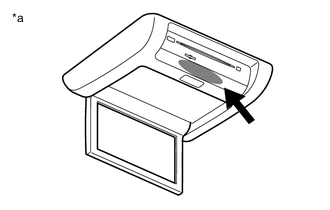
*a Example Clean the infrared ray receiving portion on the television display assembly.
-
Check if the malfunction recurs.
OK The wireless headphone returns to normal. Result Proceed to OK NG
OK
END
NG
-
-
REPLACE WIRELESS HEADPHONE
-
Replace the wireless headphone with a new or known good one and check if the malfunction recurs.
OK The wireless headphone operates normally. Result Proceed to OK NG
OK
END (WIRELESS HEADPHONE WAS DEFECTIVE)
NG
PROCEED TO NEXT SUSPECTED AREA SHOWN IN PROBLEM SYMPTOMS TABLE Click here
-