INNER REAR VIEW MIRROR CALIBRATION
-
SELECT COMPASS DISPLAY MODE (w/ Compass)
-
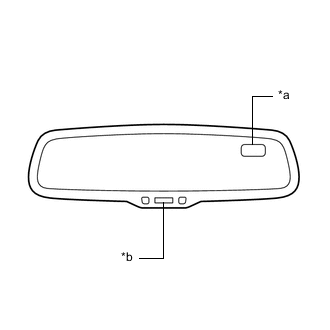
*a Compass Display *b AUTO Switch The AUTO switch allows selection of the compass display.
-
-
PERFORM CALIBRATION (w/ Compass)
-
The compass indicates the direction that the vehicle is heading by detecting the direction and strength of the earth's magnetic field (magnetic north).
-
Because each vehicle has its own magnetic field, calibration should be performed. The calibration function is used to compensate for the residual magnetism of the vehicle.
-
-
WHEN COMPASS IS MAGNETIZED (w/ Compass)
-
The compass or vehicle may become magnetized while the vehicle is being shipped. As a result, it is necessary to perform calibration for the compass before the vehicle is delivered to the customer. If calibration cannot be performed successfully (calibration cannot be completed despite driving in calibration mode several times), it may be caused by excessive magnetization of the vehicle. Demagnetize the vehicle using a demagnetizer and perform calibration again.
-
-
SET COMPASS (w/ Compass)
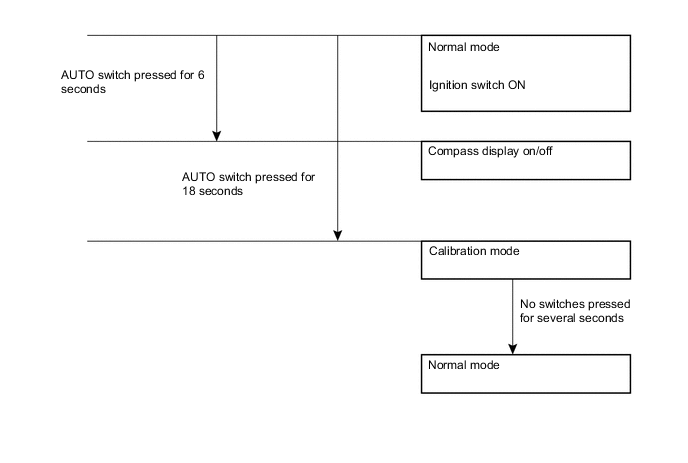
-
CALIBRATION MODE (w/ Compass)
-
When the compass is in normal mode, pressing the AUTO switch for 18 seconds will activate calibration mode.
-
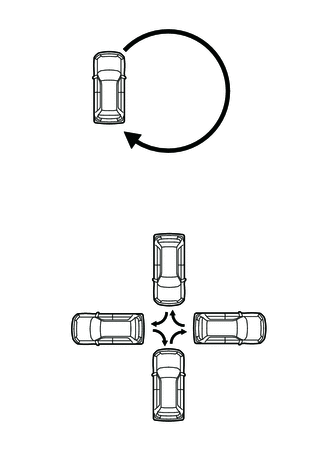
Drive the vehicle in a circle at a speed of 8 km/h (5 mph) or less.
-
After driving in a circle 1 to 3 times, the direction (N, NE, E, SE, S, SW, W or NW) will be displayed on the compass display. This indicates that calibration has finished.
Tech Tips
After calibration is performed, it is not necessary to repeat the calibration procedure unless the magnetic field of the vehicle changes drastically. If the magnetic field changes drastically, the compass display will indicate "C".
-