METER / GAUGE SYSTEM, Diagnostic DTC:B150A
| DTC Code | DTC Name |
|---|---|
| B150A | Lost Communication with HMI-LAN |
DESCRIPTION
The combination meter assembly receives a text data signal from the navigation receiver assembly*1 or radio and display receiver assembly*2 via local bus communication.
Based on this signal, navigation system information is displayed on the multi-information display.
This DTC is stored when the combination meter assembly cannot receive the signal.
-
*1: for Navigation Receiver Type
-
*2: for Radio and Display Type
| DTC No. | Detection Item | DTC Detection Condition | Trouble Area | Memory | Note |
|---|---|---|---|---|---|
| B150A | Lost Communication with HMI-LAN | After the combination meter assembly receives a registration information signal, which is sent by the navigation receiver assembly*1 or radio and display receiver assembly*2 when the ignition switch is ACC, 1 or more times, the combination meter assembly cannot receive the signal for 30 seconds or more. |
|
DTC stored | - |
-
*1: for Navigation Receiver Type
-
*2: for Radio and Display Type
WIRING DIAGRAM
-
for Navigation Receiver Type
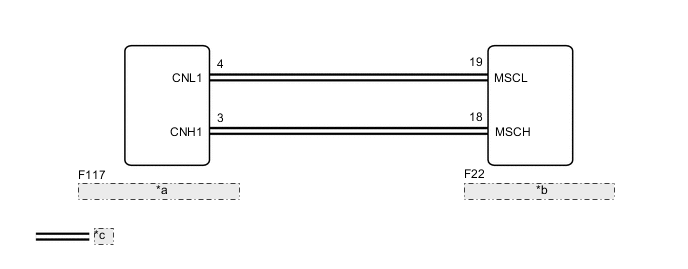
*a Navigation Receiver Assembly *b Combination Meter Assembly *c Local Bus Communication Line -
for Radio and Display Type
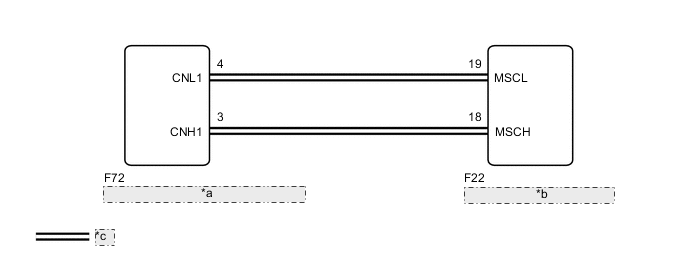
*a Radio and Display Receiver Assembly *b Combination Meter Assembly *c Local Bus Communication Line
PROCEDURE
-
CHECK FOR DTC
-
Check if Navigation System DTCs are output.
for Navigation Receiver Type: Click here
for Radio and Display Type: Click here
Body Electrical > Navigation System > Trouble CodesOK Navigation system DTCs are not output. Result Result Proceed to Navigation system DTCs are not output. A Navigation system DTCs are output. B
B 
GO TO NAVIGATION SYSTEM for Navigation Receiver Type: Click here
GO TO NAVIGATION SYSTEM for Radio and Display Type: Click hereA 
-
-
CHECK HARNESS AND CONNECTOR (COMBINATION METER ASSEMBLY - NAVIGATION RECEIVER ASSEMBLY OR RADIO AND DISPLAY RECEIVER ASSEMBLY)
-
Disconnect the F22 combination meter assembly connector.
-
Disconnect the F117 navigation receiver assembly*1 or F72 radio and display receiver assembly*2 connector.
-
Measure the resistance according to the value(s) in the table below.
Standard Resistance Tester Connection Condition Specified Condition F117-3 (CNH1) - F22-18 (MSCH)*1 Always Below 1 Ω F117-4 (CNL1) - F22-19 (MSCL)*1 Always Below 1 Ω F72-3 (CNH1) - F22-18 (MSCH)*2 Always Below 1 Ω F72-4 (CNL1) - F22-19 (MSCL)*2 Always Below 1 Ω F22-18 (MSCH) - Body ground Always 10 kΩ or higher F22-19 (MSCL) - Body ground Always 10 kΩ or higher
-
*1: for Navigation Receiver Type
*2: for Radio and Display Type
Result Proceed to OK NG -
NG
REPAIR OR REPLACE HARNESS OR CONNECTOR
OK
-
-
REPLACE COMBINATION METER ASSEMBLY
-
Replace the combination meter assembly with a new or known good one.
-
Turn the ignition switch to ON and wait 30 seconds.
Note
A maximum of 30 seconds is required to send/receive the registration information between the combination meter assembly and navigation receiver assembly*1 or radio and display receiver assembly*2.
-
*1: for Navigation Receiver Type
*2: for Radio and Display Type
-
-
Operate the steering pad switch assembly and check that the audio tab illuminates.
-
Check for DTCs.
Body Electrical > Combination Meter > Trouble CodesResult Result Proceed to The audio tab illuminates and DTC B150A is not output. A The audio tab does not illuminate and DTC B150A is output. (for Navigation Receiver Type) B The audio tab does not illuminate and DTC B150A is output. (for Radio and Display Type) C
A
END
B
REPLACE NAVIGATION RECEIVER ASSEMBLY Click here
C
REPLACE RADIO AND DISPLAY RECEIVER ASSEMBLY Click here
-