DYNAMIC TORQUE CONTROL 4WD/AWD SYSTEM, Diagnostic DTC:C1337/91

| DTC Code | DTC Name |
|---|---|
| C1337/91 | Diameter of the Tire is not Uniform |
DESCRIPTION
The 4WD ECU assembly outputs this DTC if a difference in tire size is detected.
| DTC No. | Detection Item | DTC Detection Condition | Trouble Area | Memory |
|---|---|---|---|---|
| C1337/91 | Diameter of the Tire is not Uniform | When the vehicle speed is 30 km/h or more, the difference between the average speed of the front and rear wheels is 4% or more for 36 seconds or more. |
|
DTC stored |
WIRING DIAGRAM
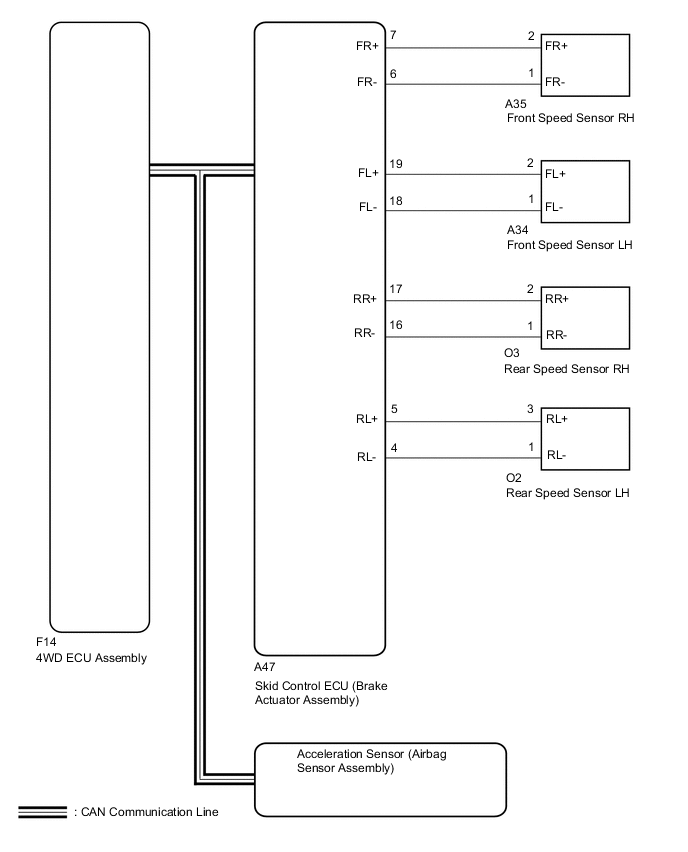
CAUTION / NOTICE / HINT
PROCEDURE
-
CHECK TIRE CONDITION
-
Check the size and condition of all 4 tires.
Tech Tips
This DTC is output when tire deformation or a difference in tire size is detected.
OK The diameter and air pressure of all 4 tires are the same. Result Proceed to OK NG
NG 
PERFORM AIR PRESSURE ADJUSTMENT OR REPLACE TIRES SO THAT ALL 4 TIRES ARE SAME IN SIZE Click here
OK 
-
-
CHECK FOR DTC
-
Clear the DTCs.
Chassis > Four Wheel Drive > Clear DTCs -
Start the engine.
-
Drive the vehicle at a speed of 20 km/h (12 mph) or more so that the same DTC is output.
Chassis > Four Wheel Drive > Trouble Codes -
Check if speed sensor DTCs (brake control system DTCs) are output.
Chassis > ABS/VSC/TRAC > Trouble Codes -
Read the DTCs using the GTS.
Result Result Proceed to Only DTC C1377/91 is output A DTCs are not output B Speed sensor DTCs (brake control system DTC) are output C
B
CHECK FOR INTERMITTENT PROBLEMS Click here
C
REPAIR CIRCUIT INDICATED BY OUTPUT CODE (BRAKE CONTROL SYSTEM) Click here
A
-
-
CHECK HARNESS AND CONNECTOR (SPEED SENSOR - BRAKE ACTUATOR ASSEMBLY)
-
Make sure that there is no looseness at the locking part and the connecting part of the connectors.
-
Turn the ignition switch off.
-
Disconnect the A47 skid control ECU (brake actuator assembly) connector.
-
Disconnect the A34, A35, O3 and/or O2 speed sensor connector(s).
-
Measure the resistance according to the value(s) in the table below.
Standard Resistance for Front RH: Tester Connection Condition Specified Condition A47-7 (FR+) - A35-2 (FR+) Always Below 1 Ω A47-7 (FR+) or A35-2 (FR+) - Body ground Always 10 kΩ or higher A47-6 (FR-) - A35-1 (FR-) Always Below 1 Ω A47-6 (FR-) or A35-1 (FR-) - Body ground Always 10 kΩ or higher for Front LH: Tester Connection Condition Specified Condition A47-19 (FL+) - A34-2 (FL+) Always Below 1 Ω A47-19 (FL+) or A34-2 (FL+) - Body ground Always 10 kΩ or higher A47-18 (FL-) - A34-1 (FL-) Always Below 1 Ω A47-18 (FL-) or A34-1 (FL-) - Body ground Always 10 kΩ or higher for Rear RH: Tester Connection Condition Specified Condition A47-17 (RR+) - O3-2 (RR+) Always Below 1 Ω A47-17 (RR+) or O3-2 (RR+) - Body ground Always 10 kΩ or higher A47-16 (RR-) - O3-1 (RR-) Always Below 1 Ω A47-16 (RR-) or O3-1 (RR-) - Body ground Always 10 kΩ or higher for Rear LH: Tester Connection Condition Specified Condition A47-5 (RL+) - O2-3 (RL+) Always Below 1 Ω A47-5 (RL+) or O2-3 (RL+) - Body ground Always 10 kΩ or higher A47-4 (RL-) - O2-1 (RL-) Always Below 1 Ω A47-4 (RL-) or O2-1 (RL-) - Body ground Always 10 kΩ or higher Result Proceed to OK NG
NG
REPAIR OR REPLACE HARNESS OR CONNECTOR
OK
-
-
PERFORM TEST MODE (SIGNAL CHECK)
-
Turn the ignition switch off.
-
Perform the sensor check in the Test Mode procedure.
Chassis > ABS/VSC/TRC > UtilityTester Display Signal Check OK All Test Mode DTCs are cleared. Result Proceed to OK NG
NG 
CHECK SPEED SENSOR ROTOR Click here
OK
-
-
RECONFIRM DTC
-
Clear the DTCs.
Chassis > Four Wheel Drive > Clear DTCs -
Start the engine.
-
Drive the vehicle at a speed of 20 km/h (12 mph) or more and check that the same DTC is output.
Chassis > Four Wheel Drive > Trouble CodesResult Result Proceed to DTCs are output A DTCs are not output B
A
REPLACE BRAKE ACTUATOR ASSEMBLY Click here
B
CHECK FOR INTERMITTENT PROBLEMS Click here
-
-
CHECK SPEED SENSOR ROTOR
-
Turn the ignition switch off.
-
Remove the front speed sensor rotor (front drive shaft assembly) or rear speed sensor rotor (rear axle hub and bearing assembly).
For front: Click here
For rear: Click here
-
Check the speed sensor rotor.
OK No scratches, oil, or foreign matter on the rotors. Tech Tips
-
If the front speed sensor rotor needs to be replaced, replace it together with the front drive shaft assembly.
-
If the rear speed sensor rotor needs to be replaced, replace it together with the rear axle hub and bearing assembly.
Result Proceed to OK NG -
NG
CLEAN OR REPLACE SPEED SENSOR ROTOR
OK
-
-
REPLACE SPEED SENSOR
-
Turn the ignition switch off.
-
Replace the front speed sensor or the rear speed sensor.
For front: Click here
For rear: Click here
Result Proceed to NEXT
NEXT
-
-
RECONFIRM DTC
-
Clear the DTCs.
Chassis > Four Wheel Drive > Clear DTCs -
Start the engine.
-
Drive the vehicle at a speed of 20 km/h (12 mph) or more and check that the same DTC is output.
Chassis > Four Wheel Drive > Trouble CodesTech Tips
Reinstall the sensor, connectors, etc. and restore the vehicle to its prior condition before rechecking DTCs.
Result Result Proceed to DTCs are output A DTCs are not output B
B
END
A
-
-
REPLACE BRAKE ACTUATOR ASSEMBLY
-
Replace the skid control ECU (brake actuator assembly).
Result Proceed to NEXT
NEXT
-
-
RECONFIRM DTC
-
Clear the DTCs.
Chassis > Four Wheel Drive > Clear DTCs -
Start the engine.
-
Drive the vehicle at a speed of 20 km/h (12 mph) or more and check that the same DTC is output.
Chassis > Four Wheel Drive > Trouble CodesResult Result Proceed to DTCs are output A DTCs are not output B
A
REPLACE 4WD ECU ASSEMBLY Click here
B
END
-