DYNAMIC TORQUE CONTROL 4WD/AWD SYSTEM DIAGNOSIS SYSTEM

-
DESCRIPTION
Dynamic torque control 4WD/AWD system data can be read through the Data Link Connector 3 (DLC3) of the vehicle. When the system seems to be malfunctioning, use the GTS to check for malfunctions and perform repairs. Therefore when there seems to be a problem with the dynamic torque control 4WD/AWD system, use the GTS or SST to check and troubleshoot it.
-
CHECK DATA LINK CONNECTOR 3 (DLC3)
-
Check the DLC3.
-
-
FUNCTION OF AWD WARNING
-
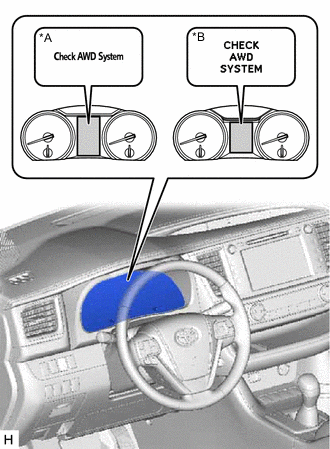
*A Multi-information Display (Color Type) *B Multi-information Display (Monochrome Type) If a malfunction occurs during system operation, "CHECK AWD SYSTEM" will be displayed on the multi-information display to inform the driver of the system malfunction.
Tech Tips
Check that the master warning light comes on for approximately 4 seconds.
-
-
CHECK MASTER WARNING LIGHT
-
Turn the ignition switch to ON, and check that the master warning light comes on for approximately 4 seconds.
Tech Tips
The master warning light goes off while the system is in DTC output mode.
-
-
CHECK AWD WARNING
-
Check AWD warning.
-
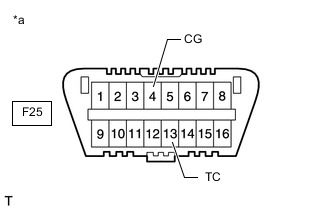
*a Front view of DLC3 Using SST, connect terminals 13 (TC) and 4 (CG) of the DLC3 (to enter DTC output mode).
- SST
- 09843-18040
-
Turn the ignition switch to ON.
-
"DIAGNOSIS CODE AWD" is displayed on the multi-information display, and the 4WD ECU assembly checks the system for malfunctions.
-
If the AWD control system is normal, "DIAGNOSIS CODE AWD FF" will be displayed on the multi-information display.
-
If the AWD control system is not normal, "DIAGNOSIS CODE AWD XX (DTC)" will be displayed on the multi-information display.
-
Although Test Mode is not set for the dynamic torque control 4WD/AWD system, a message will be displayed on the multi-information display when Test Mode is activated for checking the VSC, etc.
Tech Tips
-
Test mode DTCs will not be stored because test mode is not set.
-
If the systems above are not displayed on the multi-information display, there may be a malfunction in the TC and CG terminal circuit.
-
If the AWD warning check result is not normal, proceed to troubleshooting for the AWD warning circuit.
Trouble Area See Procedure AWD warning (Remains on) AWD warning (Does not come on) -
-
-
-
CHECK AWD LOCK MODE INDICATOR LIGHT
-
Check AWD lock mode indicator light.
-
When the ignition switch is turned to ON, check that the AWD lock mode indicator light comes on and goes off within approximately 4 seconds.
Tech Tips
If the AWD lock mode indicator light do not illuminate, check for combination meter assembly and CAN communication system DTCs, since the 4WD ECU assembly and combination meter assembly are connected by the CAN communication line.
If the AWD lock mode indicator light does not come on, perform relevant troubleshooting procedures. The relevant troubleshooting procedures are in the sections listed in the table below.
Trouble Area See Procedure AWD lock indicator light (Does not come on)
-
-