INTAKE AIR CONTROL VALVE(for ACIS) ON-VEHICLE INSPECTION
PROCEDURE
-
INSPECT INTAKE AIR CONTROL VALVE (for ACIS)
-
When using the GTS:
-
Remove the V-bank cover sub-assembly.
-
Connect the GTS to the DLC3.
-
Turn the ignition switch to ON.
-
Turn the GTS on.
-
Enter the following menus: Powertrain / Engine / Active Test / Activate the VSV for Intake Control.
Powertrain > Engine > Active TestTester Display Activate the VSV for Intake Control -
Make sure that a "click" sound is heard from the intake air control valve (for ACIS) when current flows.
If the intake air control valve (for ACIS) does not operate, check the ACIS control circuit.
-
Install the V-bank cover sub-assembly.
-
-
When not using the GTS:
-
Remove the V-bank cover sub-assembly.
-
Disconnect the intake air control valve (for ACIS) connector.
-
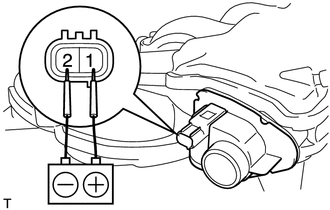
Apply battery voltage between terminals 1 (+) and 2 (-) of the intake air control valve (for ACIS). Check that a "click" sound is heard from the intake air control valve (for ACIS).
If the result is not as specified, replace the intake air surge tank assembly.
-
Install the V-bank cover sub-assembly.
-
-