POWER MIRROR CONTROL SYSTEM(w/ Memory) Reverse Shift-linked Function of Power Mirrors does not Operate
DESCRIPTION
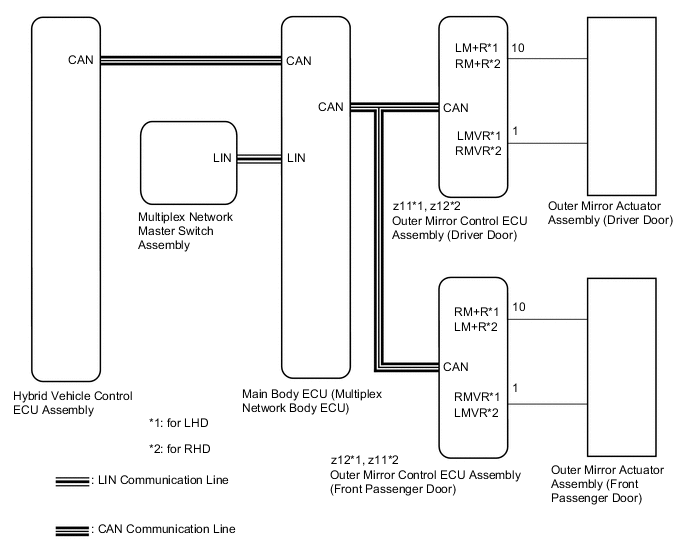
The power management control ECU sends the reverse signal to the main body ECU (multiplex network body ECU) via CAN communication. When receiving the reverse signal, the main body ECU (multiplex network body ECU) sends the reverse request signal to each outer mirror control ECU assembly. Based on the signal, each outer mirror control ECU assembly then performs control.
WIRING DIAGRAM
CAUTION / NOTICE / HINT
Note
-
The power mirror control system (w/ Memory) uses the CAN communication system. First, confirm that there is no malfunction in the CAN communication system. Refer to the How to Proceed with Troubleshooting procedure.
-
Before replacing the main body ECU (multiplex network body ECU), refer to Service Bulletin.
Tech Tips
The reverse shift-linked function will not activate when both the mirror select switch L and R switch are off.
PROCEDURE
-
CHECK MEMORY AND REACTIVATION FUNCTION
-
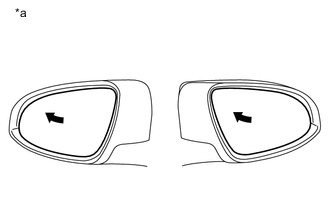
*a Turn to Fully Left Position Turn the power switch on (IG).
-
Using the multiplex network master switch assembly, turn the mirror surface to the fully left position.
-
Press the M1 switch while the SET switch is being pressed.
-
Check that the buzzer sounds for 0.5 seconds and the mirror surface position is memorized.
-
Using the multiplex network master switch assembly, turn the mirror surface to the fully right position.
-
Press the M1 switch.
-
Check that the buzzer sounds for 0.1 seconds and the outer mirror automatically moves to the memorized fully left position.
Result Result Proceed to Memory and reactivation functions are normal A Memory function is not normal B Reactivation function is not normal C
B 
GO TO OTHER DIAGNOSIS PROCEDURE (Power Mirror Surface Position is not Memorized) Click here
C
GO TO OTHER DIAGNOSIS PROCEDURE (Power Mirrors do not Return to Memorized Position) Click here
A 
-
-
CHECK FOR DTC
-
Connect the GTS to the DLC3.
-
Turn the power switch on (IG).
-
Turn the GTS on.
-
Enter the following menus: Powertrain / Hybrid Control / DTC.
-
Check if hybrid control system DTCs are output.
Powertrain > Hybrid Control > Trouble CodesOK Hybrid control system DTCs are not output. Result Proceed to OK NG
NG
GO TO HYBRID CONTROL SYSTEM Click here
OK
-
-
CHECK COMBINATION METER ASSEMBLY
-
Check if the shift position indicator light in the combination meter assembly operates normally.
OK Shift position indicator light indicates the actual shift position correctly. Result Proceed to OK NG
NG
GO TO METER / GAUGE SYSTEM Click here
OK
-
-
CHECK REVERSE SHIFT-LINKED FUNCTION
-
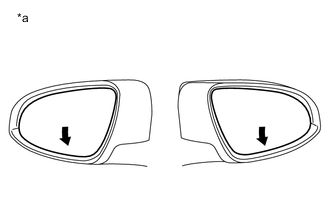
*a Turns Downward Turn the power switch on (IG).
-
Turn the mirror select switch R or L switch on.
-
Check that the mirror surface turns downward when the shift lever is moved to R.
Result Result Proceed to Reverse shift-linked functions on both mirrors are not normal A Reverse shift-linked function on driver door is not normal B Reverse shift-linked function on front passenger door is not normal C
B
REPLACE OUTER MIRROR CONTROL ECU ASSEMBLY (DRIVER DOOR) Click here
C
REPLACE OUTER MIRROR CONTROL ECU ASSEMBLY (FRONT PASSENGER DOOR) Click here
A
-
-
READ VALUE USING GTS
-
Connect the GTS to the DLC3.
-
Turn the power switch on (IG).
-
Turn the GTS on.
-
Enter the following menus: Body Electrical / Master Switch / Data List.
-
Read the Data List according to the display on the GTS.
Body Electrical > Master Switch > Data ListTester Display Measurement Item Range Normal Condition Diagnostic Note Mirror Selection SW (L) Mirror select switch signal for LH mirror OFF or ON OFF: Mirror select switch off
ON: Mirror select switch L switch on
- Mirror Selection SW (R) Mirror select switch signal for RH mirror OFF or ON OFF: Mirror select switch off
ON: Mirror select switch R switch on
-
Body Electrical > Master Switch > Data ListTester Display Mirror Selection SW (L) Mirror Selection SW (R) OK On the GTS screen, ON or OFF is displayed for each item according to the table above. Result Proceed to OK NG
OK
REPLACE MAIN BODY ECU (MULTIPLEX NETWORK BODY ECU) Click here
NG
REPLACE MULTIPLEX NETWORK MASTER SWITCH ASSEMBLY Click here
-