LIGHTING SYSTEM Interior Light Switch Signal Circuit
DESCRIPTION
The main body ECU (multiplex network body ECU) detects the condition of the door switch and front dome light switch.
WIRING DIAGRAM
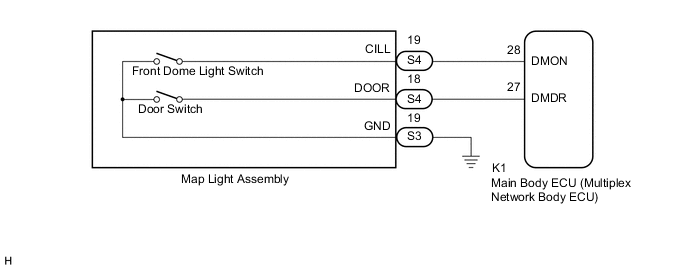
CAUTION / NOTICE / HINT
Note
Before replacing the main body ECU (multiplex network body ECU), refer to Service Bulletin.
PROCEDURE
-
READ VALUE USING GTS
-
Connect the GTS to the DLC3.
-
Turn the power switch on (IG).
-
Turn the GTS on.
-
Enter the following menus: Body Electrical / Main Body / Data List.
-
Read the Data List according to the display on the GTS.
Body Electrical > Main Body > Data ListTester Display Measurement Item Range Normal Condition Diagnostic Note Dome Light DOOR SW Door switch signal ON or OFF ON: Door switch pressed
OFF: Door switch not pressed
- Dome Light SW Front dome light switch signal ON or OFF ON: Front dome light switch pressed
OFF: Front dome light switch not pressed
-
Body Electrical > Main Body > Data ListTester Display Dome Light DOOR SW Dome Light SW OK Normal conditions listed above are displayed. Result Result Proceed to OK A Dome Light DOOR SW is not normal B Dome Light SW is not normal C
A 
PROCEED TO NEXT SUSPECTED AREA SHOWN IN PROBLEM SYMPTOMS TABLE Click here
C 
INSPECT MAP LIGHT ASSEMBLY Click here
B 
-
-
INSPECT MAP LIGHT ASSEMBLY
-
Remove the map light assembly.
-
Inspect the map light assembly.
OK Map light assembly is normal. Result Proceed to OK NG
NG
REPLACE MAP LIGHT ASSEMBLY Click here
OK
-
-
CHECK HARNESS AND CONNECTOR (MAP LIGHT ASSEMBLY - MAIN BODY ECU (MULTIPLEX NETWORK BODY ECU) AND BODY GROUND)
-
Disconnect the K1 main body ECU (multiplex network body ECU) connector.
-
Measure the resistance according to the value(s) in the table below.
Standard Resistance Tester Connection Condition Specified Condition S4-18 (DOOR) - K1-27 (DMDR) Always Below 1 Ω S3-19 (GND) - Body ground Always Below 1 Ω S4-18 (DOOR) - Body ground Always 10 kΩ or higher Result Proceed to OK NG
OK
REPLACE MAIN BODY ECU (MULTIPLEX NETWORK BODY ECU) Click here
NG
REPAIR OR REPLACE HARNESS OR CONNECTOR
-
-
INSPECT MAP LIGHT ASSEMBLY
-
Remove the map light assembly.
-
Inspect the map light assembly.
OK Map light assembly is normal. Result Proceed to OK NG
NG
REPLACE MAP LIGHT ASSEMBLY Click here
OK
-
-
CHECK HARNESS AND CONNECTOR (MAP LIGHT ASSEMBLY - MAIN BODY ECU (MULTIPLEX NETWORK BODY ECU) AND BODY GROUND)
-
Disconnect the K1 main body ECU (multiplex network body ECU) connector.
-
Measure the resistance according to the value(s) in the table below.
Standard Resistance Tester Connection Condition Specified Condition S4-19 (CILL) - K1-28 (DMON) Always Below 1 Ω S3-19 (GND) - Body ground Always Below 1 Ω S4-19 (CILL) - Body ground Always 10 kΩ or higher Result Proceed to OK NG
OK
REPLACE MAIN BODY ECU (MULTIPLEX NETWORK BODY ECU) Click here
NG
REPAIR OR REPLACE HARNESS OR CONNECTOR
-