CAN COMMUNICATION SYSTEM, Diagnostic DTC:U0265
| DTC Code | DTC Name |
|---|---|
| U0265 | Lost Communication with Parking Assist Monitor Module |
DESCRIPTION
| DTC No. | Detection Item | DTC Detection Condition | Trouble Area | Note |
|---|---|---|---|---|
| U0265 | Lost Communication with Parking Assist Monitor Module | No communication from the rear television camera assembly continues. |
|
Tech Tips The main body ECU (multiplex network body ECU) stores DTCs when it detects a communication stop or network communication error for ECUs connected to sub bus 1. |
Tech Tips
This diagnostic procedure is for when DTC U0265 is output by the main body ECU (multiplex network body ECU) (GTS display: Main Body).
WIRING DIAGRAM
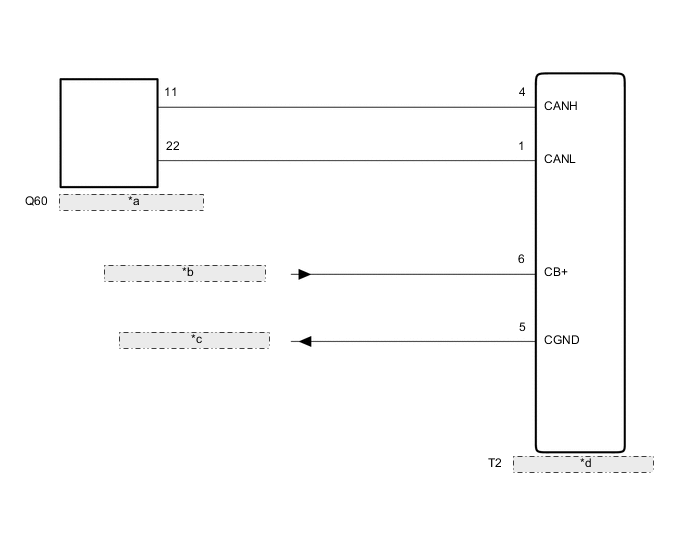
| *a | No. 15 Junction Connector |
| *b | from Radio Receiver Assembly |
| *c | to Radio Receiver Assembly |
| *d | Rear Television Camera Assembly |
CAUTION / NOTICE / HINT
Note
-
Before measuring the resistance of the CAN bus, turn the power switch off and leave the vehicle for 1 minute or more without operating the key or any switches, or opening or closing the doors. After that, disconnect the cable from the negative (-) auxiliary battery terminal and leave the vehicle for 1 minute or more before measuring the resistance.
-
After turning the power switch off, waiting time may be required before disconnecting the cable from the negative (-) auxiliary battery terminal. Therefore, make sure to read the disconnecting the cable from the negative (-) auxiliary battery terminal notices before proceeding with work.
-
Because the order of diagnosis is important to allow correct diagnosis, make sure to begin troubleshooting using How to Proceed with Troubleshooting when CAN communication system related DTCs are output.
-
After performing repairs, perform the DTC check procedure and confirm that the DTCs are not output again.
DTC check procedure: Turn the power switch on (IG) and wait at least 20 seconds.
-
After the repair, perform the CAN bus check and check that all the ECUs and sensors connected to the CAN communication system are displayed as normal.
Tech Tips
-
Before disconnecting related connectors for inspection, push in on each connector body to check that the connector is not loose or disconnected.
-
When a connector is disconnected, check that the terminals and connector body are not cracked, deformed or corroded.
PROCEDURE
-
RECONFIRM DTC OUTPUT
-
Reconfirm DTCs.
Body Electrical > Main Body > Trouble CodesTech Tips
If DTC U1002 is output from Main Body of the main body ECU (multiplex network body ECU), this indicates a sub bus 1 malfunction. Troubleshoot for DTC U1002 and check for malfunctions in sub bus 1.
Result Result Proceed to DTC U1002 is not output from the main body ECU (multiplex network body ECU)
(GTS display: Main Body)
A DTC U1002 is output from the main body ECU (multiplex network body ECU)
(GTS display: Main Body)
B
B 
GO TO DIAGNOSTIC PROCEDURE INDICATED BY OUTPUT DTC Click here
A 
-
-
CHECK FOR OPEN IN SUB BUS 1 LINES (REAR TELEVISION CAMERA ASSEMBLY BRANCH LINE)
-
Disconnect the cable from the negative (-) auxiliary battery terminal.
-
Disconnect the T2 rear television camera assembly connector.
-
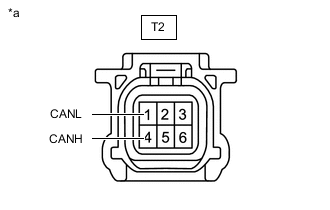
*a Front view of wire harness connector
(to Rear Television Camera Assembly)
Measure the resistance according to the value(s) in the table below.
Standard Resistance Tester Connection Condition Specified Condition T2-4 (CANH) - T2-1 (CANL) Cable disconnected from negative (-) auxiliary battery terminal 54 to 69 Ω Result Result OK NG
NG
REPAIR OR REPLACE CAN BRANCH LINES OR CONNECTOR (REAR TELEVISION CAMERA ASSEMBLY)
OK
-
-
CHECK HARNESS AND CONNECTOR (POWER SOURCE CIRCUIT)
-
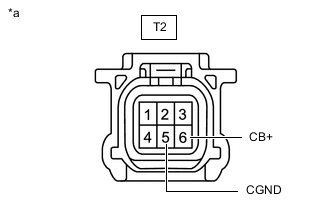
*a Front view of wire harness connector
(to Rear Television Camera Assembly)
Measure the resistance according to the value(s) in the table below.
Standard Resistance Tester Connection Condition Specified Condition T2-5 (CGND) - Body ground Cable disconnected from negative (-) auxiliary battery terminal Below 1 Ω -
Reconnect the cable to the negative (-) auxiliary battery terminal.
-
Measure the voltage according to the value(s) in the table below.
Standard Voltage Tester Connection Condition Specified Condition T2-6 (CB+) - Body ground Power switch on (ACC) 5.5 to 7.05 V Result Result OK NG
OK
REPLACE REAR TELEVISION CAMERA ASSEMBLY Click here
NG
REPAIR OR REPLACE HARNESS OR CONNECTOR (POWER SOURCE CIRCUIT)
-