NAVIGATION SYSTEM Knob of Remote Touch Moves Spontaneously
PROCEDURE
-
CONFIRM SYMPTOMS
-
Recheck the situation in which the malfunction occurs.
Tech Tips
-
When the power switch is turned on (ACC), the remote touch switch knob moves automatically to the center of the movable area.
-
When driving on a rough road where the vehicle lurches or shakes around due to bumps, the remote touch switch knob may move unexpectedly as a result.
Result Result Proceed to Symptom occurs in any situation. A Remote touch switch knob moves to the center when the power switch is turned on (ACC). B Symptom occurs when driving on a rough road causes the vehicle to lurch or shake around. -
B 
END
A 
-
-
CHECK FOR FOREIGN MATTER
-
Check if there is any foreign matter around the remote touch switch knob that interferes with knob operation.
OK There is no foreign matter around the remote touch switch knob that interferes with its operation. Result Proceed to OK NG
NG
REMOVE FOREIGN MATTER (CHECK KNOB OPERATION AGAIN AFTER REMOVING MATTER)
OK
-
-
REMOTE TOUCH SELF CHECK (REMOTE TOUCH SWITCH KNOB FEEDBACK FORCE GENERATION CHECK)
-
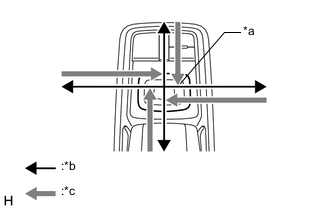
*a Switch Knob *b Control Direction *c Feedback Force Check the remote touch switch knob feedback force.
-
Move the remote touch switch knob up, down, right and left to check that feedback force is generated.
OK Feedback force is generated. Tech Tips
When the power switch is turned on (ACC), feedback force is generated. When the power switch is turned off, feedback force is not generated, and the remote touch switch knob will move freely.
Result Proceed to OK NG -
OK
USE SIMULATION METHOD TO CHECK Click here
NG
REPLACE REMOTE OPERATION BOARD Click here
-