REMOTE TOUCH(for Multi-Media Module Receiver Type) REMOVAL
PROCEDURE
-
REMOVE SHIFT LEVER KNOB SUB-ASSEMBLY
-
REMOVE INSTRUMENT PANEL FINISH PANEL END LH
-
REMOVE INSTRUMENT PANEL FINISH PANEL END RH
-
REMOVE FRONT PANEL GARNISH LH
-
REMOVE FRONT PANEL GARNISH RH
-
REMOVE CONSOLE PANEL SUB-ASSEMBLY
-
REMOVE REMOTE TOUCH
-
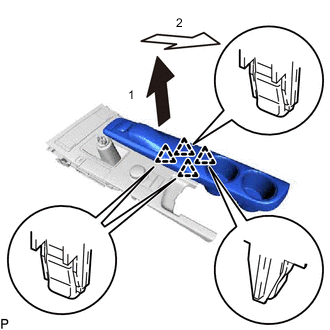
Pull the remote touch as indicated by the arrows, in the order shown in the illustration to disengage the 4 clips and remove the remote touch.
-