MULTI-DISPLAY INSTALLATION
PROCEDURE
-
INSTALL MULTI-DISPLAY ASSEMBLY
-
INSTALL NO. 1 MULTI-DISPLAY BRACKET
-
Install the No. 1 multi-display bracket with the 2 screws.
-
-
INSTALL DOUBLE LOCK DOOR CONTROL RELAY ASSEMBLY (w/ Double Locking System)
-
INSTALL MULTI-DISPLAY ASSEMBLY WITH BRACKET
-
Connect each connector.
-
w/ Double Locking System:
-
Engage the clamp.
-
-
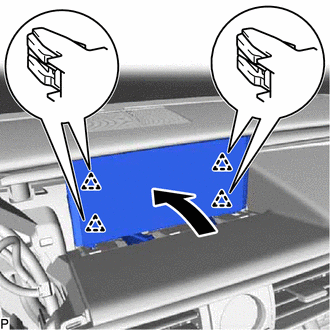
Push the multi-display assembly with bracket as shown in the illustration to engage the 4 clips.
-
Install the multi-display assembly with bracket with the 2 bolts.
-
-
INSTALL NO. 2 INSTRUMENT CLUSTER FINISH PANEL SUB-ASSEMBLY
-
INSTALL METER HOOD SUB-ASSEMBLY
-
INSTALL LOWER INSTRUMENT PANEL FINISH PANEL SUB-ASSEMBLY
-
CONNECT HOOD LOCK CONTROL LEVER SUB-ASSEMBLY
-
INSTALL NO. 1 INSTRUMENT PANEL UNDER COVER SUB-ASSEMBLY
-
CONNECT CABLE TO NEGATIVE AUXILIARY BATTERY TERMINAL
Note
When disconnecting the cable, some systems need to be initialized after the cable is reconnected.
-
INSTALL BATTERY SERVICE HOLE COVER LH
-
CUSTOMIZE POWER TILT AND POWER TELESCOPIC STEERING COLUMN SYSTEM (for Power Tilt and Power Telescopic Steering Column)