INSTRUMENT PANEL SPEAKER INSPECTION
PROCEDURE
-
INSPECT FRONT NO. 2 SPEAKER ASSEMBLY (except 15 Speakers)
-
With the speaker installed, check that there is no looseness or other abnormalities.
-
Check that there is no foreign matter in the speaker, no tears on the speaker cone or other abnormalities.
-
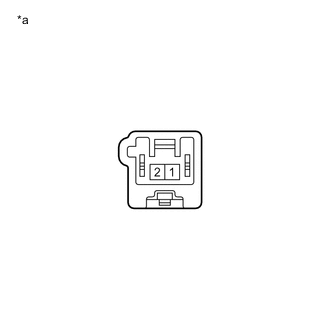
*a Component without harness connected
(Front No. 2 Speaker Assembly)
Measure the resistance of the speaker.
Standard Resistance Tester Connection Condition Specified Condition 1 - 2 Always 3.2 to 4.8 Ω If the result is not as specified, replace the speaker.
-
-
INSPECT FRONT NO. 2 SPEAKER ASSEMBLY (for 15 Speakers)
-
With the speaker installed, check that there is no looseness or other abnormalities.
-
Check that there is no foreign matter in the speaker, no tears on the speaker cone or other abnormalities.
-
*a Component without harness connected
(Front No. 2 Speaker Assembly)
Measure the resistance of the speaker.
Standard Resistance Tester Connection Condition Specified Condition 1 - 2 Always 10 kΩ or higher If the result is not as specified, replace the speaker.
-
When there is a possibility that either the right or left speaker is malfunctioning, interchange the speakers and perform an inspection. If the malfunction disappears after interchanging the speakers, replace the malfunctioning speaker.
Tech Tips
Connect all connectors to the speakers when performing an inspection. If the result is not as specified, replace the speaker.
-
-
INSPECT FRONT NO. 3 SPEAKER ASSEMBLY (except 15 Speakers)
-
With the speaker installed, check that there is no looseness or other abnormalities.
-
Check that there is no foreign matter in the speaker, no tears on the speaker cone or other abnormalities.
-
*a Component without harness connected
(Front No. 3 Speaker Assembly)
Measure the resistance of the speaker.
Standard Resistance Tester Connection Condition Specified Condition 1 - 2 Always 4.0 to 6.0 Ω If the result is not as specified, replace the speaker.
-
-
INSPECT FRONT NO. 3 SPEAKER ASSEMBLY (for 15 Speakers)
-
With the speaker installed, check that there is no looseness or other abnormalities.
-
Check that there is no foreign matter in the speaker, no tears on the speaker cone or other abnormalities.
-
*a Component without harness connected
(Front No. 3 Speaker Assembly)
Measure the resistance of the speaker.
Standard Resistance Tester Connection Condition Specified Condition 1 - 2 Always 10 kΩ or higher If the result is not as specified, replace the speaker.
-
When there is a possibility that either the right or left speaker is malfunctioning, interchange the speakers and perform an inspection. If the malfunction disappears after interchanging the speakers, replace the malfunctioning speaker.
Tech Tips
Connect all connectors to the speakers when performing an inspection. If the result is not as specified, replace the speaker.
-