AUDIO AND VISUAL SYSTEM(w/o Parking Assist Monitor System) Microphone Circuit between Microphone and Radio Receiver
DESCRIPTION
-
The radio receiver assembly and map light assembly (telephone microphone assembly) are connected to each other using the microphone connection detection signal lines.
-
Using this circuit, the radio receiver assembly sends power to the map light assembly (telephone microphone assembly), and the map light assembly (telephone microphone assembly) sends microphone signals to the radio receiver assembly.
WIRING DIAGRAM
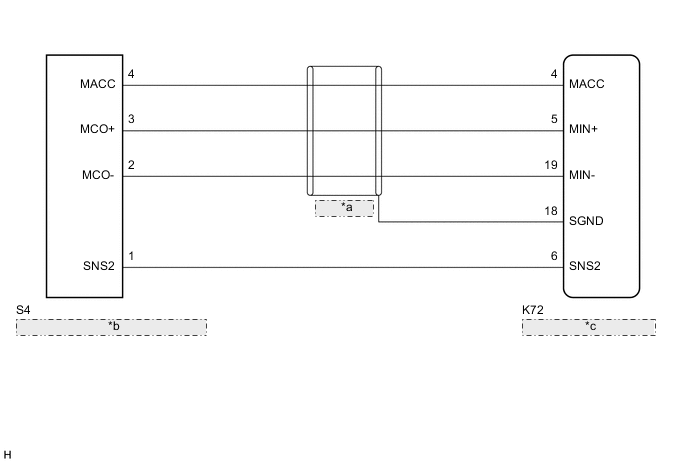
| *a | (Shielded) |
| *b | Map Light Assembly (Telephone Microphone Assembly) |
| *c | Radio Receiver Assembly |
PROCEDURE
-
CHECK MICROPHONE (OPERATION CHECK)
-
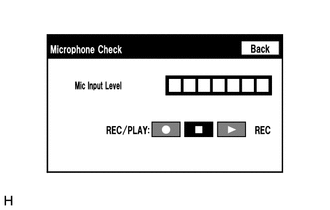
Enter the "Microphone Check" screen. Refer to Check Mic & Voice Recognition in Operation Check.
-
When a voice is input into the microphone, check that the microphone input level meter changes according to the input voice.
-
Push the recording switch and perform voice recording.
Tech Tips
-
Select the recording switch with the blower motor of the air conditioning system stopped. If an outlet of the air conditioning system is facing the microphone, noise may be recorded.
-
Voice can be recorded for up to 5 seconds.
-
-
Check that the recording indicator remains on while recording and that the recorded voice is played normally without noise or distortion.
OK All check results are normal. Result Proceed to OK NG
OK 
REPLACE RADIO RECEIVER ASSEMBLY Click here
NG 
-
-
CHECK HARNESS AND CONNECTOR (RADIO RECEIVER ASSEMBLY - MAP LIGHT ASSEMBLY (TELEPHONE MICROPHONE ASSEMBLY))
-
Disconnect the K72 radio receiver assembly connector.
-
Disconnect the S4 map light assembly (telephone microphone assembly) connector.
-
Measure the resistance according to the value(s) in the table below.
Standard Resistance Tester Connection Condition Specified Condition K72-6 (SNS2) - S4-1 (SNS2) Always Below 1 Ω K72-4 (MACC) - S4-4 (MACC) Always Below 1 Ω K72-5 (MIN+) - S4-3 (MCO+) Always Below 1 Ω K72-19 (MIN-) - S4-2 (MCO-) Always Below 1 Ω K72-6 (SNS2) - Body ground Always 10 kΩ or higher K72-4 (MACC) - Body ground Always 10 kΩ or higher K72-5 (MIN+) - Body ground Always 10 kΩ or higher K72-19 (MIN-) - Body ground Always 10 kΩ or higher K72-18 (SGND) - Body ground Always 10 kΩ or higher Result Proceed to OK NG
NG
REPAIR OR REPLACE HARNESS OR CONNECTOR
OK
-
-
INSPECT RADIO RECEIVER ASSEMBLY
-
Reconnect the K72 radio receiver assembly connector.
-
Reconnect the S4 map light assembly (telephone microphone assembly) connector.
-
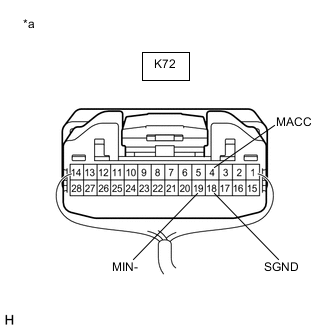
*a Component with harness connected
(Radio Receiver Assembly)
Measure the voltage according to the value(s) in the table below.
Standard Voltage Tester Connection Condition Specified Condition K72-4 (MACC) - Body ground Power switch on (ACC) 4 to 6 V -
Measure the resistance according to the value(s) in the table below.
Standard Resistance Tester Connection Condition Specified Condition K72-18 (SGND) - Body ground Always Below 1 Ω K72-19 (MIN-) - Body ground Always Below 1 Ω Result Proceed to OK NG
NG
REPLACE RADIO RECEIVER ASSEMBLY Click here
OK
-
-
INSPECT MAP LIGHT ASSEMBLY (TELEPHONE MICROPHONE ASSEMBLY)
-
Remove the map light assembly (telephone microphone assembly).
-
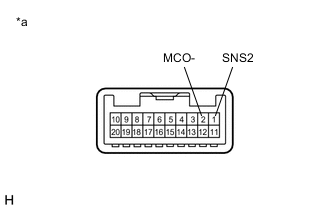
*a Component without harness connected
(Map Light Assembly (Telephone Microphone Assembly))
Measure the resistance according to the value(s) in the table below.
Standard Resistance Tester Connection Condition Specified Condition 1 (SNS2) - 2 (MCO-) Always Below 1 Ω Result Proceed to OK NG
NG 
GO TO STEP 6 Click here
OK
-
-
INSPECT MAP LIGHT ASSEMBLY (TELEPHONE MICROPHONE ASSEMBLY)
-
Reconnect the K72 radio receiver assembly connector.
-
Reconnect the S4 map light assembly (telephone microphone assembly) connector.
-
Turn the power switch on (ACC).
-
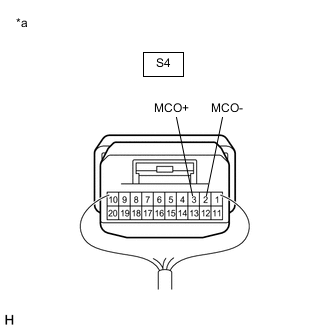
*a Component with harness connected
(Map Light Assembly (Telephone Microphone Assembly))
Connect an oscilloscope to terminals 3 (MCO+) and 2 (MCO-) of the S4 map light assembly (telephone microphone assembly) connector.
-
Check the waveform of the map light assembly (telephone microphone assembly) using the oscilloscope.
Result Result Proceed to A waveform synchronized with the voice input to the map light assembly (telephone microphone assembly) is output. A A waveform synchronized with the voice input to the map light assembly (telephone microphone assembly) is not output. B
A
PROCEED TO NEXT SUSPECTED AREA SHOWN IN PROBLEM SYMPTOMS TABLE Click here
B
-
-
REPLACE TELEPHONE MICROPHONE ASSEMBLY
-
Replace the telephone microphone assembly.
-
Check if the same malfunction recurs.
Result Result Proceed to Malfunction does not recur (returns to normal). A Malfunction recurs. B
A
END
B
REPLACE MAP LIGHT ASSEMBLY Click here
-