AUDIO AND VISUAL SYSTEM(w/ Parking Assist Monitor System), Diagnostic DTC:B1321, B1323, B1563
| DTC Code | DTC Name |
|---|---|
| B1321 | Lost Communication with EMV |
| B1323 | Lost Communication with Haptic Device |
| B1563 | Haptic Device Disconnected |
DESCRIPTION
These DTCs are stored when communication between the radio receiver assembly and remote touch is not possible.
| DTC No. | Detection Item | DTC Detection Condition | Trouble Area |
|---|---|---|---|
| B1321 | Lost Communication with EMV | The radio receiver assembly cannot receive data from the remote touch. |
|
| B1323 | Lost Communication with Haptic Device | The remote touch cannot receive data from the radio receiver assembly. |
|
| B1563 | Haptic Device Disconnected | The remote touch is/was not connected while the power switch is/was on (ACC or IG). |
|
WIRING DIAGRAM
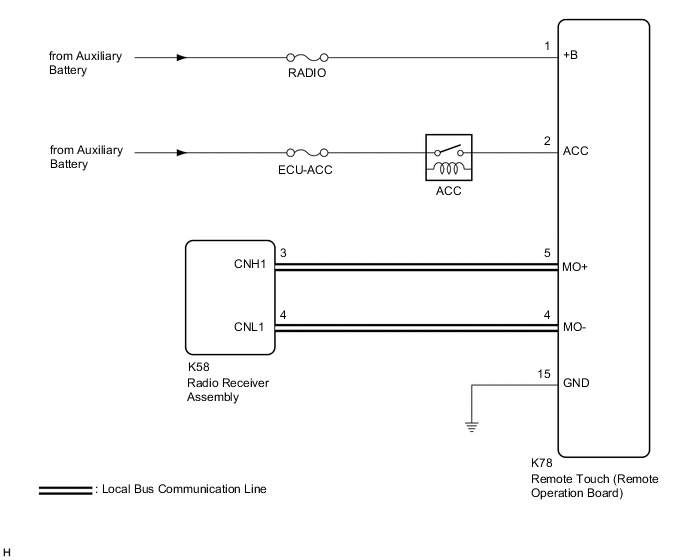
CAUTION / NOTICE / HINT
Note
-
Inspect the fuses for circuits related to this system before performing the following procedure.
-
Depending on the parts that are replaced during vehicle inspection or maintenance, performing initialization, registration or calibration may be needed. Refer to Precaution for Audio and Visual System.
PROCEDURE
-
CHECK HARNESS AND CONNECTOR (RADIO RECEIVER ASSEMBLY - REMOTE TOUCH (REMOTE OPERATION BOARD))
-
Disconnect the K58 radio receiver assembly connector.
-
Disconnect the K78 remote touch (remote operation board) connector.
-
Measure the resistance according to the value(s) in the table below.
Standard Resistance Tester Connection Condition Specified Condition K58-3 (CNH1) - K78-5 (MO+) Always Below 1 Ω K58-4 (CNL1) - K78-4 (MO-) Always Below 1 Ω K58-3 (CNH1) - Body ground Always 10 kΩ or higher K58-4 (CNL1) - Body ground Always 10 kΩ or higher Result Proceed to OK NG
NG 
REPAIR OR REPLACE HARNESS OR CONNECTOR
OK 
-
-
CHECK HARNESS AND CONNECTOR (REMOTE TOUCH (REMOTE OPERATION BOARD) POWER SOURCE)
-
Disconnect the K78 remote touch (remote operation board) connector.
-
Measure the voltage according to the value(s) in the table below.
Standard Voltage Tester Connection Condition Specified Condition K78-1 (+B) - Body ground Power switch off 11 to 14 V K78-2 (ACC) - Body ground Power switch on (ACC) 11 to 14 V -
Measure the resistance according to the value(s) in the table below.
Standard Resistance Tester Connection Condition Specified Condition K78-15 (GND) - Body ground Always Below 1 Ω Result Proceed to OK NG
NG
REPAIR OR REPLACE HARNESS OR CONNECTOR
OK
-
-
REMOTE TOUCH SELF CHECK (REMOTE TOUCH SWITCH KNOB FEEDBACK FORCE GENERATION CHECK)
-
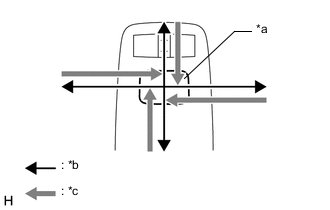
*a Switch Knob *b Control Direction *c Feedback Force Check the remote touch switch knob feedback force.
-
Move the remote touch switch knob up, down, right and left to check that feedback force is generated.
OK Feedback force is generated. Tech Tips
When the power switch is turned on (ACC), feedback force is generated. When the power switch is turned off, feedback force is not generated, and the remote touch switch knob will move freely.
Result Proceed to OK NG -
NG
REPLACE REMOTE OPERATION BOARD Click here
OK
-
-
REPLACE RADIO RECEIVER ASSEMBLY
-
Replace the radio receiver assembly with a new or known good one.
-
Check if the same malfunction recurs.
Result Result Proceed to Malfunction does not recur (returns to normal) A Malfunction recurs B
A
END
B
REPLACE REMOTE OPERATION BOARD Click here
-