POWER STEERING SYSTEM, Diagnostic DTC:C1511, C1512, C1513

| DTC Code | DTC Name |
|---|---|
| C1511 | Torque Sensor1 |
| C1512 | Torque Sensor2 |
| C1513 | Torque Sensor Deviation Excessive |
DESCRIPTION
The torque sensor converts the rotation torque received from the steering wheel into electric signals and sends them to the power steering ECU assembly.
| DTC No. | Detection Item | DTC Detection Condition | Trouble Area | Warning Indicate | Note |
|---|---|---|---|---|---|
| C1511 | Torque Sensor1 | Torque sensor malfunction |
|
EPS warning light: Comes on | - |
| C1512 | Torque Sensor2 | Torque sensor malfunction |
|
EPS warning light: Comes on | - |
| C1513 | Torque Sensor Deviation Excessive | Torque sensor malfunction |
|
EPS warning light: Comes on | - |
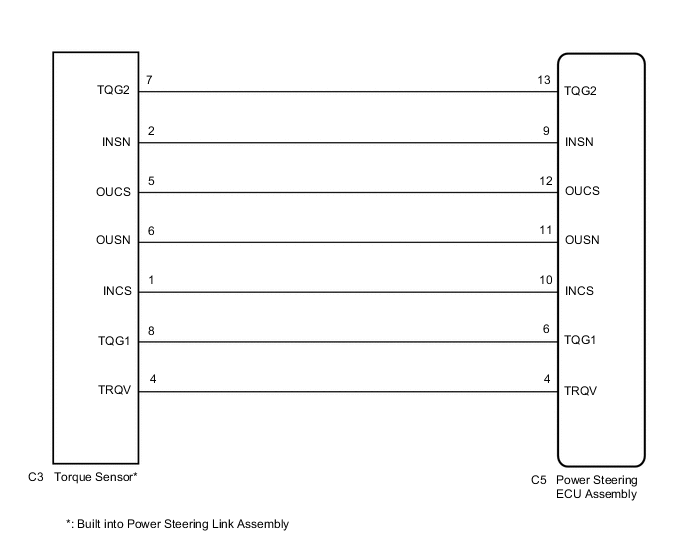
WIRING DIAGRAM
CAUTION / NOTICE / HINT
Note
-
If the power steering ECU assembly has been replaced, perform assist map writing, rotation angle sensor initialization and torque sensor zero point calibration.
-
If the power steering link assembly has been replaced, perform rotation angle sensor initialization and torque sensor zero point calibration.
PROCEDURE
-
CHECK CONNECTORS
-
Check the connection of the power steering ECU assembly and power steering link assembly connectors.
-
Visually inspect the terminals of the power steering ECU assembly and power steering link assembly connectors.
Result Result Proceed to Normal A Connectors not properly connected B Power steering ECU assembly connector terminals abnormal C Power steering link assembly connector terminals abnormal D
B 
CONNECT CONNECTORS PROPERLY
C
REPLACE POWER STEERING ECU ASSEMBLY for LHD: Click here
REPLACE POWER STEERING ECU ASSEMBLY for RHD: Click hereD
REPLACE POWER STEERING LINK ASSEMBLY Click here
A 
-
-
CHECK HARNESS AND CONNECTOR (POWER STEERING ECU ASSEMBLY - TORQUE SENSOR)
-
Disconnect the C5 power steering ECU assembly connector.
-
Disconnect the C3 torque sensor connector.
-
Measure the resistance according to the value(s) in the table below.
Standard Resistance Tester Connection Condition Specified Condition C3-7 (TQG2) - C5-13 (TQG2) Always Below 1 Ω C3-2 (INSN) - C5-9 (INSN) Always Below 1 Ω C3-5 (OUCS) - C5-12 (OUCS) Always Below 1 Ω C3-6 (OUSN) - C5-11 (OUSN) Always Below 1 Ω C3-1 (INCS) - C5-10 (INCS) Always Below 1 Ω C3-8 (TQG1) - C5-6 (TQG1) Always Below 1 Ω C3-4 (TRQV) - C5-4 (TRQV) Always Below 1 Ω C3-7 (TQG2) - Body ground Always 10 kΩ or higher C3-2 (INSN) - Body ground Always 10 kΩ or higher C3-5 (OUCS) - Body ground Always 10 kΩ or higher C3-6 (OUSN) - Body ground Always 10 kΩ or higher C3-1 (INCS) - Body ground Always 10 kΩ or higher C3-8 (TQG1) - Body ground Always 10 kΩ or higher C3-4 (TRQV) - Body ground Always 10 kΩ or higher Result Proceed to OK NG
NG
REPAIR OR REPLACE HARNESS OR CONNECTOR
OK
-
-
INSPECT POWER STEERING LINK ASSEMBLY (TORQUE SENSOR)
-
Disconnect the C3 torque sensor connector.
-
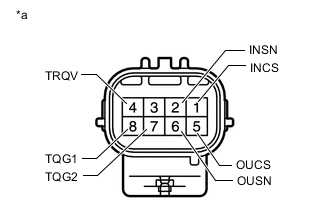
*a Component without harness connected
(Torque Sensor)
Measure the resistance according to the value(s) in the table below.
Standard Resistance Tester Connection Condition Specified Condition 1 (INCS) - 7 (TQG2) Always 90 to 170 Ω 2 (INSN) - 7 (TQG2) Always 300 to 430 Ω 4 (TRQV) - 8 (TQG1) Always 4 to 14 Ω 5 (OUCS) - 7 (TQG2) Always 90 to 170 Ω 6 (OUSN) - 7 (TQG2) Always 300 to 430 Ω Result Proceed to OK NG
NG
REPLACE POWER STEERING LINK ASSEMBLY Click here
OK
-
-
REPLACE POWER STEERING ECU ASSEMBLY
-
Replace the power steering ECU assembly.
for LHD: Click here
for RHD: Click here
Result Proceed to NEXT
NEXT
-
-
ASSIST MAP WRITING, INITIALIZE ROTATION ANGLE SENSOR AND CALIBRATE TORQUE SENSOR ZERO POINT
-
Perform assist map writing, rotation angle sensor initialization and torque sensor zero point calibration.
Chassis > EMPS > UtilityTester Display Torque Sensor Adjustment Result Proceed to NEXT
NEXT
-
-
RECONFIRM DTC
-
Clear the DTCs.
Chassis > EMPS > Clear DTCs -
Check for DTCs.
Chassis > EMPS > Trouble CodesResult Result Proceed to DTC C1511, C1512 or C1513 is not output. A DTC C1511, C1512 or C1513 is output. B
A
END
B
REPLACE POWER STEERING LINK ASSEMBLY Click here
-