YAW RATE AND ACCELERATION SENSOR REMOVAL
CAUTION / NOTICE / HINT
Note
While the auxiliary battery is connected, even if the power switch is off, the brake control system activates when the brake pedal is depressed or any door courtesy switch is turned on. Therefore, when servicing brake system components, do not depress the brake pedal or open/close the doors while the auxiliary battery is connected.
PROCEDURE
-
PRECAUTION
Note
After turning the power switch off, waiting time may be required before disconnecting the cable from the negative (-) auxiliary battery terminal. Therefore, make sure to read the disconnecting the cable from the negative (-) auxiliary battery terminal notices before proceeding with work.
-
REMOVE BATTERY SERVICE HOLE COVER LH
-
DISCONNECT CABLE FROM NEGATIVE AUXILIARY BATTERY TERMINAL
Note
When disconnecting the cable from the negative (-) auxiliary battery terminal, some systems need to be initialized after the cable is reconnected.
-
REMOVE CONSOLE BOX ASSEMBLY
-
REMOVE NO. 1 CONSOLE BOX DUCT
-
REMOVE YAW RATE SENSOR
-
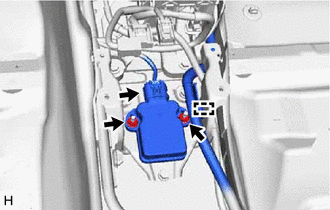
Disengage the wire harness clamp from the yaw rate sensor bracket.
-
Disconnect the connector from the yaw rate sensor.
-
Remove the 2 nuts and yaw rate sensor.
Note
-
Do not drop the yaw rate sensor.
-
If the yaw rate sensor is dropped, replace it with a new one.
-
-
-
REMOVE YAW RATE SENSOR BRACKET
-
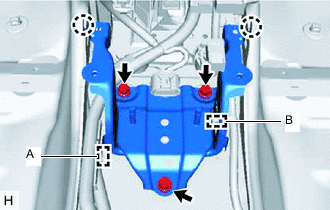
Disengage the wire harness clamp (A) from the yaw rate sensor bracket.
-
w/ Navigation System:
-
Disengage the wire harness clamp (B) from the yaw rate sensor bracket.
-
-
Remove the 3 bolts.
-
Disengage the 2 claws of the floor carpet, and remove the yaw rate sensor bracket.
Tech Tips
Remove the yaw rate sensor bracket while avoiding the wire harness.
-