TIRE PRESSURE WARNING SYSTEM, Diagnostic DTC:C2197/97

| DTC Code | DTC Name |
|---|---|
| C2197/97 | Tire Position Non-decision (Test Mode DTC) |
DESCRIPTION
Tire position identification operates using the following principles.
For front position identification (rear position identification is performed in the same way):
-
The front tire pressure monitor initiator sends a position identification signal to all of the tire pressure warning valve and transmitters.
-
The tire pressure warning valve and transmitters respond to the received position identification signal by sending a signal to the tire pressure warning ECU and receiver indicating the strength of the received signal.
Tech Tips
The strength of the signals is different because the distance between the front tire pressure monitor initiator and each tire is different.
-
The tire pressure warning ECU and receiver receives the signal strength information signals from each of the tire pressure warning valve and transmitters and associates them with their correct position based on the received information.
| DTC No. | Detection Item | DTC Detection Condition | Trouble Area | Note |
|---|---|---|---|---|
| C2197/97 | Tire Position Non-decision (Test Mode DTC) | Test mode procedure is performed. |
|
w/ Tire Inflation Pressure Display Function |
CAUTION / NOTICE / HINT
Note
It is necessary to perform initialization after registration Click here of the transmitter IDs into the tire pressure warning ECU and receiver if one of the tire pressure warning valve and transmitter has been replaced.
PROCEDURE
-
CHECK DTC
-
Clear the DTCs.
Chassis > Tire Pressure Monitor > Clear DTCs -
Turn the power switch off.
-
Drive the vehicle at a speed of 8 km/h (5 mph) or more for 30 seconds or more.
-
Check that DTCs C2151/51, C2152/52, C2153/53 or C2154/54 is not output.
Chassis > Tire Pressure Monitor > Trouble CodesResult Result Proceed to DTCs C2151/51, C2152/52, C2153/53 and C2154/54 are not output A DTC C2151/51, C2152/52, C2153/53 or C2154/54 is output B
B 
REPAIR TROUBLE AREA INDICATED BY OUTPUT DTC Click here
A 
-
-
INSPECT FRONT/REAR TIRE PRESSURE MONITOR INITIATOR
-
Check that the installation areas of the front and rear tire pressure monitor initiators are not damaged.
Tech Tips
-
Front tire pressure monitor initiator: Click here
-
Rear tire pressure monitor initiator: Click here
Refer to the following procedures to inspect the installation.
Result Result Proceed to OK A Front tire pressure monitor initiator is abnormal B Rear tire pressure monitor initiator is abnormal C -
B
REPLACE FRONT TIRE PRESSURE MONITOR INITIATOR Click here
C
REPLACE REAR TIRE PRESSURE MONITOR INITIATOR Click here
A
-
-
CHECK TIRE PRESSURE WARNING VALVE AND TRANSMITTER (FRONT/REAR TIRE PRESSURE MONITOR INITIATOR SIGNAL RECEPTION)
-
Turn the power switch off.
-
Connect the GTS to the DLC3.
-
Turn the power switch on (IG).
-
Turn the GTS on.
-
Enter the following menus: Chassis / Tire Pressure Monitor / Utility / Signal Check.
Chassis > Tire Pressure Monitor > UtilityTester Display Signal Check -
Perform the test mode inspection.
-
Turn the power switch off after entering test mode.
-
Turn the power switch on (IG).
-
Drive the vehicle at a speed of 37 km/h (23 mph) or more for 90 seconds or more.
-
Check that the test mode DTCs are cleared.
Result Result Proceed to DTCs C2181/81, C2182/82, C2183/83 and C2184/84 are cleared but C2197/97 is not cleared A DTCs C2181/81, C2182/82, C2183/83 and C2184/84 are all not cleared, or one of them is not cleared and C2197/97 is not cleared B DTCs C2181/81, C2182/82, C2183/83, C2184/84 and C2197/97 are cleared C
B
GO TO DTC (C2181/81 TO C2184/84) Click here
C
CHECK FOR INTERMITTENT PROBLEMS Click here
A
-
-
CHECK TIRE PRESSURE WARNING VALVE AND TRANSMITTER (DETERMINE LOCATION OF MALFUNCTION)
-
Turn the power switch off.
-
Connect the GTS to the DLC3.
-
Turn the power switch on (IG).
-
Turn the GTS on.
-
Enter the following menus: Chassis / Tire Pressure Monitor / Data List.
-
Record all of the tire pressure warning valve and transmitter IDs from the Data List screen.
-
Perform the following procedure to determine the location of the malfunction.
-
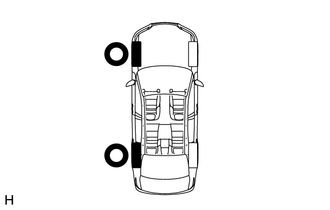
For front tires:
-
Remove the right front tire and place it near the left front tire.
-
Remove the right rear tire and place it near the left rear tire.
-
Perform tire pressure warning valve and transmitter ID registration.
-
-
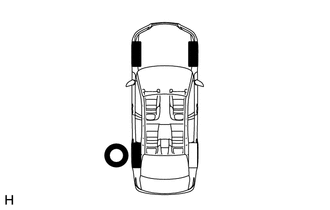
For rear tires:
-
Install the front right tire.
-
Perform tire pressure warning valve and transmitter ID registration.
Note
If ID verification does not complete approximately 2 seconds after registration is completed, rotate the tires 90 to 270 degrees and perform the inspection again.
Result Result Proceed to ID verification completes approximately 90 seconds after ID registration is completed A When checking the front tires, ID verification completes approximately 2 seconds after ID registration is completed B When checking the rear tires, ID verification completes approximately 2 seconds after ID registration is completed C -
Tech Tips
After completing transmitter ID registration, the tire pressure warning light blinks for 1 minute and then illuminates continuously. When ID verification is completed, the tire pressure warning light turns off.
-
B
REPLACE FRONT TIRE PRESSURE MONITOR INITIATOR Click here
C
REPLACE REAR TIRE PRESSURE MONITOR INITIATOR Click here
A
-
-
DETERMINE MALFUNCTIONING TIRE PRESSURE WARNING VALVE AND TRANSMITTER
-
Turn the power switch off.
-
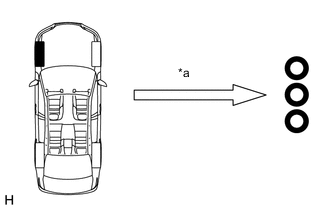
*a 10 m (32.8 ft.) or more Install only the left front tire and move the remaining tires 10 m (32.8 ft.) or more away from the vehicle.
-
Connect the GTS to the DLC3.
-
Turn the power switch on (IG).
-
Turn the GTS on.
-
Enter the following menus: Chassis / Tire Pressure Monitor / Utility / Signal Check.
Chassis > Tire Pressure Monitor > UtilityTester Display Signal Check -
Step A: Enter test mode.
-
Step B: Turn the engine switch off and then on (IG), and then perform a test mode inspection to check whether any DTCs C2181/81 to C2184/84 are cleared.
-
Step C: Repeat steps A and B after returning to normal mode from test mode.
Note
Be sure to perform steps A through C within 60 seconds.
Tech Tips
In order to determine whether the system is responding to the tire pressure warning valve and transmitter periodic transmission (sent at approximately 1.5 second intervals) or the front or rear tire pressure monitor initiator transmission, perform the check twice within 60 seconds.
-
Perform the same inspection for all of the remaining tires.
Malfunctioning Tire Identification The malfunctioning tire is the one which none of the DTCs C2181/81 to C2184/84 were cleared. The tire pressure warning valve and transmitter for that tire can be determined to be malfunctioning. Result Proceed to NEXT
NEXT
REPLACE TIRE PRESSURE WARNING VALVE AND TRANSMITTER Click here
-