POWER WINDOW CONTROL SYSTEM Driver Side Power Window does not Operate with Power Window Master Switch
DESCRIPTION
When the power switch is on (IG), the power window regulator motor assembly (for driver door) is operated by the multiplex network master switch assembly. The power window regulator motor assembly (for driver door) has motor, regulator and ECU functions.
WIRING DIAGRAM
-
for LHD
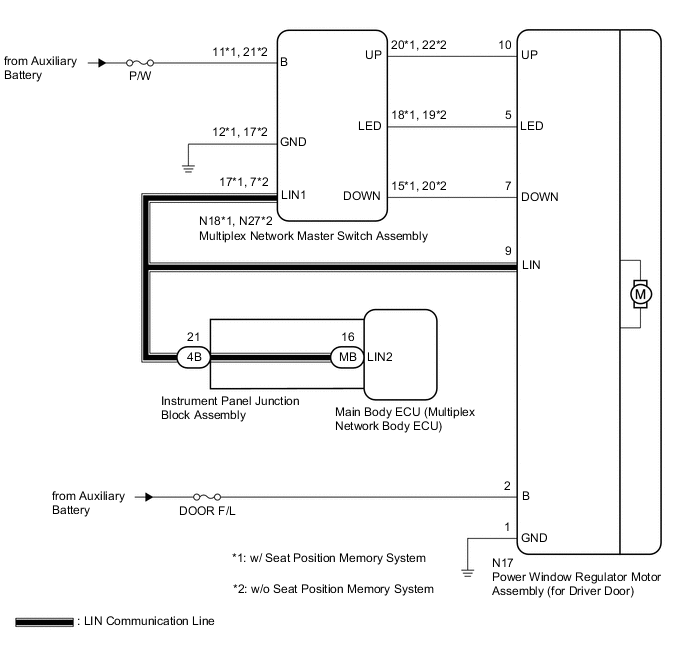
-
for RHD
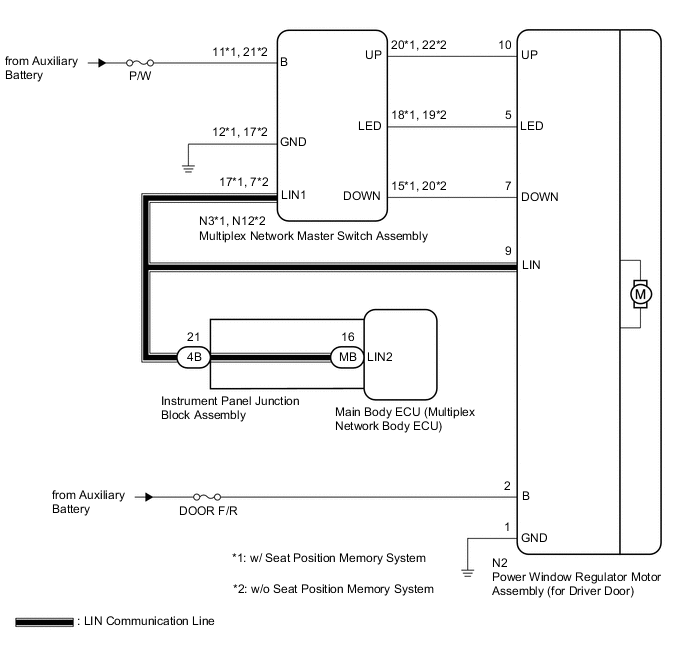
CAUTION / NOTICE / HINT
Note
-
The power window control system uses the LIN communication system. Inspect the communication function by following How to Proceed with Troubleshooting. Troubleshoot the power window control system after confirming that the communication system is functioning properly.
-
If the power window regulator motor assembly (for driver door) has been replaced with a new one, initialize the power window control system.
-
Inspect the fuses for circuits related to this system before performing the following procedure.
-
If the main body ECU (multiplex network body ECU) is replaced, refer to Service Bulletin.
PROCEDURE
-
READ VALUE USING GTS (MAIN BODY)
-
Connect the GTS to the DLC3.
-
Turn the power switch on (IG).
-
Turn the GTS on.
-
Enter the following menus: Body Electrical / Main Body / Data List.
-
Read the Data List according to the display on the GTS.
Body Electrical > Main Body > Data ListTester Display Measurement Item Range Normal Condition Diagnostic Note Communication D-Door Motor Connection status between power window regulator motor assembly (for driver door) and main body ECU (multiplex network body ECU) STOP or OK STOP: Communication stopped
OK: Normal communication
- Communication Master SW Connection status between multiplex network master switch assembly and main body ECU (multiplex network body ECU) STOP or OK STOP: Communication stopped
OK: Normal communication
-
Body Electrical > Main Body > Data ListTester Display Communication D-Door Motor Communication Master SW OK On the GTS screen, OK is displayed. Result Proceed to OK NG
NG 
GO TO LIN COMMUNICATION SYSTEM (Proceed to How to Proceed with Troubleshooting) Click here
OK 
-
-
READ VALUE USING GTS (D-DOOR MOTOR)
-
Enter the following menus: Body Electrical / D-Door Motor / Data List.
-
Read the Data List according to the display on the GTS.
Body Electrical > D-Door Motor > Data ListTester Display Measurement Item Range Normal Condition Diagnostic Note D Door P/W Up SW Driver door power window manual up switch signal OFF or ON OFF: Driver door power window manual up switch not being operated
ON: Driver door power window manual up switch being operated
- D Door P/W Down SW Driver door power window manual down switch signal OFF or ON OFF: Driver door power window manual down switch not being operated
ON: Driver door power window manual down switch being operated
-
Body Electrical > D-Door Motor > Data ListTester Display D Door P/W Up SW D Door P/W Down SW OK On the GTS screen, ON or OFF is displayed accordingly. Result Proceed to OK NG
NG 
CHECK HARNESS AND CONNECTOR (MULTIPLEX NETWORK MASTER SWITCH ASSEMBLY - POWER WINDOW REGULATOR MOTOR ASSEMBLY (FOR DRIVER DOOR)) Click here
OK
-
-
PERFORM ACTIVE TEST USING GTS (D-DOOR MOTOR)
-
Enter the following menus: Body Electrical / D-Door Motor / Active Test.
-
Perform the Active Test according to the display on the GTS.
CAUTION:
Be careful to avoid injuries as this test causes vehicle parts to move. During the Active Test, the jam protection function will not operate.
Body Electrical > D-Door Motor > Active TestTester Display Measurement Item Control Range Diagnostic Note Power Window Power window OFF / DOWN / UP -
Body Electrical > D-Door Motor > Active TestTester Display Power Window OK Driver door power window operates normally. Result Proceed to OK NG
OK
REPLACE MAIN BODY ECU (MULTIPLEX NETWORK BODY ECU) Click here
NG
REPLACE POWER WINDOW REGULATOR MOTOR ASSEMBLY (FOR DRIVER DOOR) Click here
-
-
CHECK HARNESS AND CONNECTOR (MULTIPLEX NETWORK MASTER SWITCH ASSEMBLY - POWER WINDOW REGULATOR MOTOR ASSEMBLY (FOR DRIVER DOOR))
-
for LHD
-
Disconnect the N18*1 or N27*2 multiplex network master switch assembly connector.
-
*1: w/ Seat Position Memory System
-
*2: w/o Seat Position Memory System
-
-
Disconnect the N17 power window regulator motor assembly (for driver door) connector.
-
Measure the resistance according to the value(s) in the table below.
Standard Resistance w/ Seat Position Memory System Tester Connection Condition Specified Condition N18-20 (UP) - N17-10 (UP) Always Below 1 Ω N18-20 (UP) - Body ground Always 10 kΩ or higher N17-10 (UP) - Body ground Always 10 kΩ or higher N18-15 (DOWN) - N17-7 (DOWN) Always Below 1 Ω N18-15 (DOWN) - Body ground Always 10 kΩ or higher N17-7 (DOWN) - Body ground Always 10 kΩ or higher w/o Seat Position Memory System Tester Connection Condition Specified Condition N27-22 (UP) - N17-10 (UP) Always Below 1 Ω N27-22 (UP) - Body ground Always 10 kΩ or higher N17-10 (UP) - Body ground Always 10 kΩ or higher N27-20 (DOWN) - N17-7 (DOWN) Always Below 1 Ω N27-20 (DOWN) - Body ground Always 10 kΩ or higher N17-7 (DOWN) - Body ground Always 10 kΩ or higher
-
-
for RHD
-
Disconnect the N3*1 or N12*2 multiplex network master switch assembly connector.
-
*1: w/ Seat Position Memory System
-
*2: w/o Seat Position Memory System
-
-
Disconnect the N2 power window regulator motor assembly (for driver door) connector.
-
Measure the resistance according to the value(s) in the table below.
Standard Resistance w/ Seat Position Memory System Tester Connection Condition Specified Condition N3-20 (UP) - N2-10 (UP) Always Below 1 Ω N3-20 (UP) - Body ground Always 10 kΩ or higher N2-10 (UP) - Body ground Always 10 kΩ or higher N3-15 (DOWN) - N2-7 (DOWN) Always Below 1 Ω N3-15 (DOWN) - Body ground Always 10 kΩ or higher N2-7 (DOWN) - Body ground Always 10 kΩ or higher w/o Seat Position Memory System Tester Connection Condition Specified Condition N12-22 (UP) - N2-10 (UP) Always Below 1 Ω N12-22 (UP) - Body ground Always 10 kΩ or higher N2-10 (UP) - Body ground Always 10 kΩ or higher N12-20 (DOWN) - N2-7 (DOWN) Always Below 1 Ω N12-20 (DOWN) - Body ground Always 10 kΩ or higher N2-7 (DOWN) - Body ground Always 10 kΩ or higher
Result Proceed to OK NG -
NG
REPAIR OR REPLACE HARNESS OR CONNECTOR
OK
-
-
REPLACE MULTIPLEX NETWORK MASTER SWITCH ASSEMBLY
-
Replace the multiplex network master switch assembly.
Result Proceed to NEXT
NEXT
-
-
CHECK MANUAL UP / DOWN FUNCTION (FOR DRIVER DOOR)
-
Check that the driver door power window moves when the manual up and down function of the power window regulator master switch assembly is operated.
OK Driver door manual up and down function is normal. Result Proceed to OK NG
OK
END (MULTIPLEX NETWORK MASTER SWITCH ASSEMBLY WAS DEFECTIVE)
NG
REPLACE POWER WINDOW REGULATOR MOTOR ASSEMBLY (FOR DRIVER DOOR) Click here
-