| DTC Code | DTC Name |
|---|---|
| B1810/53 | Short in Driver Side Squib 2nd Step Circuit |
| B1811/53 | Open in Driver Side Squib 2nd Step Circuit |
| B1812/53 | Short to GND in Driver Side Squib 2nd Step Circuit |
| B1813/53 | Short to B+ in Driver Side Squib 2nd Step Circuit |
DESCRIPTION
The driver side squib 2nd step circuit consists of the airbag sensor assembly, spiral cable sub-assembly and horn button assembly.
The airbag sensor assembly uses this circuit to deploy the airbag when deployment conditions are met.
These DTCs are stored when a malfunction is detected in the driver side squib 2nd step circuit.
| DTC No. | Detection Item | DTC Detection Condition | Trouble Area | Test Mode / Check Mode |
|---|---|---|---|---|
| B1810/53 | Short in Driver Side Squib 2nd Step Circuit |
|
|
Applies to check mode |
| B1811/53 | Open in Driver Side Squib 2nd Step Circuit |
|
|
Applies to check mode |
| B1812/53 | Short to GND in Driver Side Squib 2nd Step Circuit |
|
|
Applies to check mode |
| B1813/53 | Short to B+ in Driver Side Squib 2nd Step Circuit |
|
|
Applies to check mode |
WIRING DIAGRAM
CAUTION / NOTICE / HINT
After turning the power switch off, waiting time may be required before disconnecting the cable from the negative (-) auxiliary battery terminal. Therefore, make sure to read the disconnecting the cable from the negative (-) auxiliary battery terminal notices before proceeding with work.
-
Perform the simulation method by selecting check mode (Signal Check) using the GTS.
-
After selecting check mode (Signal Check), perform the simulation method by wiggling each connector of the airbag system or driving the vehicle on a city road or rough road.
PROCEDURE
- Click here
CHECK CONNECTORS
-
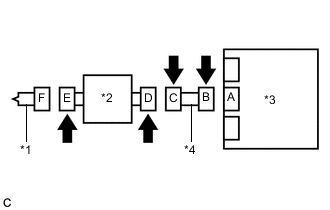
*1 Horn Button Assembly *2 Spiral Cable Sub-assembly *3 Airbag Sensor Assembly *4 Instrument Panel Wire Turn the power switch off.
-
Disconnect the cable from the negative (-) auxiliary battery terminal.
CAUTION:Wait at least 90 seconds after disconnecting the cable from the negative (-) auxiliary battery terminal to disable the SRS system.
-
Check that the connectors are properly connected to the horn button assembly, spiral cable sub-assembly and airbag sensor assembly.
OK The connectors are properly connected. Tip:If the connectors are not properly connected, reconnect the connectors and proceed to the next inspection.
-
Disconnect the connectors from the horn button assembly, spiral cable sub-assembly and airbag sensor assembly.
-
Check that the terminals of the connectors are not damaged.
OK The terminals are not deformed or damaged. -
Check that the spiral cable sub-assembly connector (on the horn button assembly side) is not damaged.
OK The connector locking button is not disengaged, or the claw of the lock is not deformed or damaged. -
Check that the short springs for the instrument panel wire and spiral cable sub-assembly with the activation prevention mechanism are not deformed or damaged.
OK The short springs are not deformed or damaged. Result Proceed to OK NG
- OKClick here
- NG
REPLACE WIRE HARNESS
-
- Click here
CHECK HORN BUTTON ASSEMBLY
-
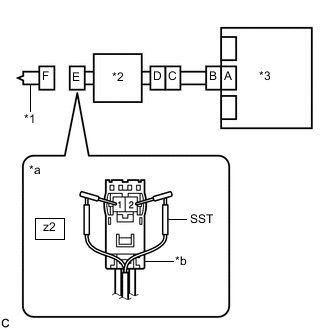
*1 Horn Button Assembly *2 Spiral Cable Sub-assembly *3 Airbag Sensor Assembly *a Front view of wire harness connector
(to Horn Button Assembly)
*b Color: Black Connect the instrument panel wire to the airbag sensor assembly and spiral cable sub-assembly.
-
Connect SST (resistance 2.1 Ω) to connector E (black connector).
CAUTION:Never connect a tester to the horn button assembly for measurement, as this may lead to a serious injury due to airbag deployment.
Note:
-
Do not forcibly insert SST into the terminals of the connector when connecting it.
-
Insert SST straight into the terminals of the connector.
09843-18061 -
-
Connect the cable to the negative (-) auxiliary battery terminal.
-
Clear the DTCs stored in memory.
- Body Electrical > SRS Airbag > Clear DTCs
-
-
-
Turn the power switch off.
-
Turn the power switch on (IG), and wait for at least 60 seconds.
-
Check for DTCs.
- Body Electrical > SRS Airbag > Trouble Codes
-
-
OK DTC B1810/53, B1811/53, B1812/53 or B1813/53 is not output. Tip:Codes other than DTCs B1810/53, B1811/53, B1812/53 and B1813/53 may be output at this time, but they are not related to this check.
-
Turn the power switch off.
-
Disconnect the cable from the negative (-) auxiliary battery terminal.
CAUTION:Wait at least 90 seconds after disconnecting the cable from the negative (-) auxiliary battery terminal to disable the SRS system.
-
Disconnect SST from connector E.
Result Proceed to OK NG
- OK
REPLACE HORN BUTTON ASSEMBLYClick here
- NGClick here
-
- Click here
CHECK DRIVER SIDE SQUIB 2ND STEP CIRCUIT
-
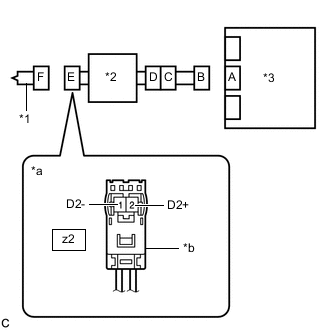
*1 Horn Button Assembly *2 Spiral Cable Sub-assembly *3 Airbag Sensor Assembly *a Front view of wire harness connector
(to Horn Button Assembly)
*b Color: Black Disconnect the instrument panel wire from the airbag sensor assembly.
-
Check for a short to B+ in the circuit.
-
Connect the cable to the negative (-) auxiliary battery terminal.
-
Turn the power switch on (IG).
-
Measure the voltage according to the value(s) in the table below.
Standard Voltage Tester Connection Condition Specified Condition z2-2 (D2+) - Body ground Power switch on (IG) Below 1 V z2-1 (D2-) - Body ground Power switch on (IG) Below 1 V -
Turn the power switch off.
-
Disconnect the cable from the negative (-) auxiliary battery terminal.
CAUTION:Wait at least 90 seconds after disconnecting the cable from the negative (-) auxiliary battery terminal to disable the SRS system.
-
-
Check for an open in the circuit.
-
Measure the resistance according to the value(s) in the table below.
Standard Resistance Tester Connection Condition Specified Condition z2-2 (D2+) - z2-1 (D2-) Always Below 1 Ω
-
-
Check for a short to ground in the circuit.
-
Measure the resistance according to the value(s) in the table below.
Standard Resistance Tester Connection Condition Specified Condition z2-2 (D2+) - Body ground Always 1 MΩ or higher z2-1 (D2-) - Body ground Always 1 MΩ or higher
-
-
Check for a short in the circuit.
-
Release the activation prevention mechanism built into connector B.
-
Measure the resistance according to the value(s) in the table below.
Standard Resistance Tester Connection Condition Specified Condition z2-2 (D2+) - z2-1 (D2-) Always 1 MΩ or higher -
Restore the released activation prevention mechanism of connector B to the original condition.
Result Proceed to OK NG -
- OKClick here
- NGClick here
-
- Click here
CHECK DTC
-
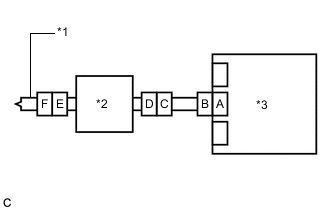
*1 Horn Button Assembly *2 Spiral Cable Sub-assembly *3 Airbag Sensor Assembly Connect the connectors to the horn button assembly and airbag sensor assembly.
-
Connect the cable to the negative (-) auxiliary battery terminal.
-
Clear the DTCs stored in memory.
- Body Electrical > SRS Airbag > Clear DTCs
-
-
-
Turn the power switch off.
-
Turn the power switch on (IG), and wait for at least 60 seconds.
-
Check for DTCs.
- Body Electrical > SRS Airbag > Trouble Codes
-
-
OK DTC B1810/53, B1811/53, B1812/53 or B1813/53 is not output. Tip:Codes other than DTCs B1810/53, B1811/53, B1812/53 and B1813/53 may be output at this time, but they are not related to this check.
Result Proceed to OK NG
- OK
USE SIMULATION METHOD TO CHECKClick here
- NG
REPLACE AIRBAG SENSOR ASSEMBLYClick here
-
- Click here
CHECK INSTRUMENT PANEL WIRE
-
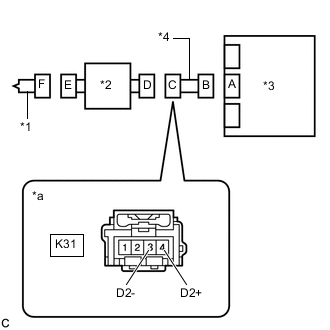
*1 Horn Button Assembly *2 Spiral Cable Sub-assembly *3 Airbag Sensor Assembly *4 Instrument Panel Wire *a Front view of wire harness connector
(to Spiral Cable Sub-assembly)
Disconnect the instrument panel wire from the spiral cable sub-assembly.
-
Check for a short to B+ in the circuit.
-
Connect the cable to the negative (-) auxiliary battery terminal.
-
Turn the power switch on (IG).
-
Measure the voltage according to the value(s) in the table below.
Standard Voltage Tester Connection Condition Specified Condition K31-4 (D2+) - Body ground Power switch on (IG) Below 1 V K31-3 (D2-) - Body ground Power switch on (IG) Below 1 V -
Turn the power switch off.
-
Disconnect the cable from the negative (-) auxiliary battery terminal.
CAUTION:Wait at least 90 seconds after disconnecting the cable from the negative (-) auxiliary battery terminal to disable the SRS system.
-
-
Check for an open in the circuit.
-
Measure the resistance according to the value(s) in the table below.
Standard Resistance Tester Connection Condition Specified Condition K31-4 (D2+) - K31-3 (D2-) Always Below 1 Ω
-
-
Check for a short to ground in the circuit.
-
Measure the resistance according to the value(s) in the table below.
Standard Resistance Tester Connection Condition Specified Condition K31-4 (D2+) - Body ground Always 1 MΩ or higher K31-3 (D2-) - Body ground Always 1 MΩ or higher
-
-
Check for a short in the circuit.
-
Release the activation prevention mechanism built into connector B.
-
Measure the resistance according to the value(s) in the table below.
Standard Resistance Tester Connection Condition Specified Condition K31-4 (D2+) - K31-3 (D2-) Always 1 MΩ or higher -
Restore the released activation prevention mechanism of connector B to the original condition.
Result Proceed to OK NG -
- OKClick here
- NG
REPLACE INSTRUMENT PANEL WIRE
-
- Click here
CHECK SPIRAL CABLE SUB-ASSEMBLY
-
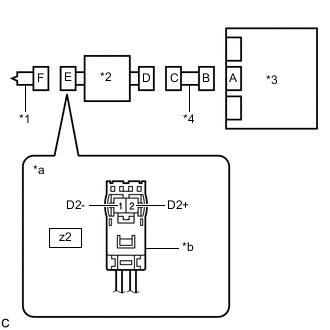
*1 Horn Button Assembly *2 Spiral Cable Sub-assembly *3 Airbag Sensor Assembly *4 Instrument Panel Wire *a Front view of wire harness connector
(to Horn Button Assembly)
*b Color: Black Check for a short to B+ in the circuit.
-
Connect the cable to the negative (-) auxiliary battery terminal.
-
Turn the power switch on (IG).
-
Measure the voltage according to the value(s) in the table below.
Standard Voltage Tester Connection Condition Specified Condition z2-2 (D2+) - Body ground Power switch on (IG) Below 1 V z2-1 (D2-) - Body ground Power switch on (IG) Below 1 V -
Turn the power switch off.
-
Disconnect the cable from the negative (-) auxiliary battery terminal.
CAUTION:Wait at least 90 seconds after disconnecting the cable from the negative (-) auxiliary battery terminal to disable the SRS system.
-
-
Check for an open in the circuit.
-
Measure the resistance according to the value(s) in the table below.
Standard Resistance Tester Connection Condition Specified Condition z2-2 (D2+) - z2-1 (D2-) Always Below 1 Ω
-
-
Check for a short to ground in the circuit.
-
Measure the resistance according to the value(s) in the table below.
Standard Resistance Tester Connection Condition Specified Condition z2-2 (D2+) - Body ground Always 1 MΩ or higher z2-1 (D2-) - Body ground Always 1 MΩ or higher
-
-
Check for a short in the circuit.
-
Release the activation prevention mechanism built into connector D.
-
Measure the resistance according to the value(s) in the table below.
Standard Resistance Tester Connection Condition Specified Condition z2-2 (D2+) - z2-1 (D2-) Always 1 MΩ or higher -
Restore the released activation prevention mechanism of connector D to the original condition.
Result Proceed to OK NG -
- OK
USE SIMULATION METHOD TO CHECKClick here
- NG
REPLACE SPIRAL CABLE SUB-ASSEMBLYClick here
-