AIRBAG SYSTEM, Diagnostic DTC:B16A1/A3

| DTC Code | DTC Name |
|---|---|
| B16A1/A3 | Pedestrian Detection Sensor Difference |
DESCRIPTION
The pedestrian detection sensor circuit (pedestrian detection sensor LH circuit and pedestrian detection sensor RH circuit) consists of the airbag sensor assembly, pedestrian protection sensor LH and pedestrian protection sensor RH.
The pedestrian protection sensor LH and pedestrian protection sensor RH detect impacts to the vehicle and send signals to the airbag sensor assembly to determine if the pop up hood should be deployed.
When the pedestrian protection sensor LH or pedestrian protection sensor RH detects pressure out of the specified range, DTC B16A1/A3 is stored in the airbag sensor assembly.
| DTC No. | Detection Item | DTC Detection Condition | Trouble Area | Test Mode / Check Mode |
|---|---|---|---|---|
| B16A1/A3 | Pedestrian Detection Sensor Difference |
|
|
Does not apply to test/check mode |
WIRING DIAGRAM
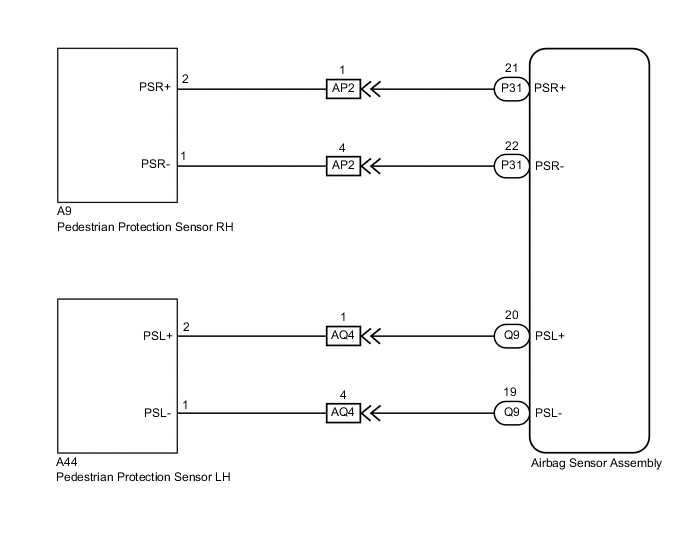
CAUTION / NOTICE / HINT
Note
After turning the power switch off, waiting time may be required before disconnecting the cable from the negative (-) auxiliary battery terminal. Therefore, make sure to read the disconnecting the cable from the negative (-) auxiliary battery terminal notices before proceeding with work.
PROCEDURE
-
REPLACE PEDESTRIAN PROTECTION SENSOR AND PEDESTRIAN DETECTION CHAMBER
-
Turn the power switch off.
-
Disconnect the cable from the negative (-) auxiliary battery terminal.
CAUTION:
Wait at least 90 seconds after disconnecting the cable from the negative (-) auxiliary battery terminal to disable the SRS system.
-
Replace the pedestrian protection sensor LH, pedestrian protection sensor RH and pedestrian detection chamber with a new one.
-
Connect the cable to the negative (-) auxiliary battery terminal.
Result Proceed to NEXT
NEXT 
-
-
CHECK DTC
-
Clear the DTCs stored in memory.
Body Electrical > SRS Airbag > Clear DTCs -
Turn the power switch off.
-
Turn the power switch on (IG), and wait for at least 60 seconds.
-
Check for DTCs.
Body Electrical > SRS Airbag > Trouble CodesOK DTC B16A1/A3 is not output. Tech Tips
Codes other than DTC B16A1/A3 may be output at this time, but they are not related to this check.
Result Result OK NG
OK 
END (PEDESTRIAN PROTECTION SENSOR AND PEDESTRIAN DETECTION CHAMBER WERE DEFECTIVE)
NG
REPLACE AIRBAG SENSOR ASSEMBLY Click here
-