G-BOOK SYSTEM(w/ Telematics Transceiver), Diagnostic DTC:B15C4
| DTC Code | DTC Name |
|---|---|
| B15C4 | Airbag Signal Malfunction/Not Input |
DESCRIPTION
If the telematics transceiver detects an error in communication between the telematics transceiver and airbag sensor assembly as a result of the telematics transceiver self check, this DTC will be stored.
| DTC No. | Detection Item | DTC Detection Condition | Trouble Area |
|---|---|---|---|
| B15C4 | Airbag Signal Malfunction/Not Input | Airbag signal problem |
|
WIRING DIAGRAM
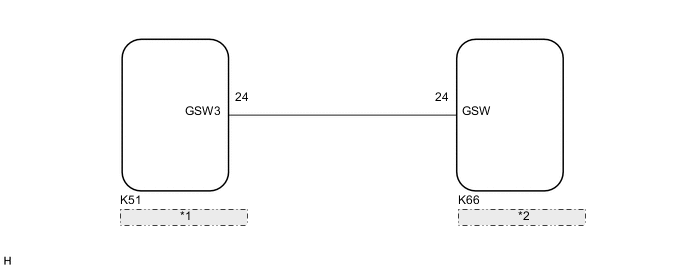
| *1 | Airbag Sensor Assembly |
| *2 | Telematics Transceiver |
CAUTION / NOTICE / HINT
Note
Depending on the parts that are replaced during vehicle inspection or maintenance, performing initialization, registration or calibration may be needed. Refer to Precaution for G-BOOK.
PROCEDURE
-
CHECK DTC OUTPUT (AIRBAG SYSTEM)
-
Check for DTCs and check that no DTCs are output.
Result Result Proceed to No DTCs are output. A DTCs for airbag system are output. B
B 
GO TO AIRBAG SYSTEM Click here
A 
-
-
CHECK DTC OUTPUT
-
Clear the DTCs.
Body Electrical > Navigation System > Clear DTCs -
Recheck for DTCs and check if the same DTC is output again.
Body Electrical > Navigation System > Trouble CodesResult Result Proceed to No DTCs are output. A DTCs are output. B
A
USE SIMULATION METHOD TO CHECK Click here
B
-
-
CHECK HARNESS AND CONNECTOR (TELEMATICS TRANSCEIVER - AIRBAG SENSOR ASSEMBLY)
-
Disconnect the K66 telematics transceiver connector.
-
Disconnect the K51 airbag sensor assembly connector.
-
Measure the resistance according to the value(s) in the table below.
Standard Resistance Tester Connection Condition Specified Condition K66-24 (GSW) - K51-24 (GSW3) Always Below 1 Ω K66-24 (GSW) - Body ground Always 10 kΩ or higher Result Proceed to OK NG
NG
REPAIR OR REPLACE HARNESS OR CONNECTOR
OK
-
-
INSPECT TELEMATICS TRANSCEIVER
-
Disconnect the K66 telematics transceiver connector.
-
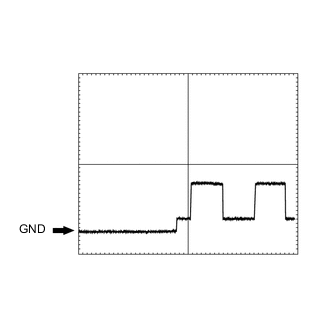
Check the input waveform.
-
Check the signal waveform according to the condition(s) in the table below. (Check the waveform from the back of the wire harness connector of the telematics transceiver while the airbag sensor assembly connectors are connected.)
Item Condition Tester Connection K66-24 (GSW) - Body ground Tool setting 5.0 V/DIV., 20 ms./DIV. Vehicle condition Engine switch on (IG) OK The waveform is similar to that shown in the illustration.
Result Proceed to OK NG -
OK
REPLACE TELEMATICS TRANSCEIVER Click here
NG
-
-
REPLACE AIRBAG SENSOR ASSEMBLY
-
Replace the airbag sensor assembly.
Result Proceed to NEXT
NEXT
-
-
CHECK DTC OUTPUT
-
Clear the DTCs.
Body Electrical > Navigation System > Clear DTCs -
Recheck for DTCs and check if the same DTC is output again.
Body Electrical > Navigation System > Trouble CodesResult Result Proceed to No DTCs are output. A DTCs are output. B
A
END
B
REPLACE TELEMATICS TRANSCEIVER Click here
-