NAVIGATION SYSTEM, Diagnostic DTC:B15DB
| DTC Code | DTC Name |
|---|---|
| B15DB | Telematics Transceiver Disconnected |
DESCRIPTION
If the radio receiver assembly cannot detect the telematics transceiver for a certain period of time (15 seconds) after the engine switch is turned on (ACC) and the radio receiver assembly confirms that the information is missing by checking past telematics transceiver recognition information (registered information), this DTC will be stored.
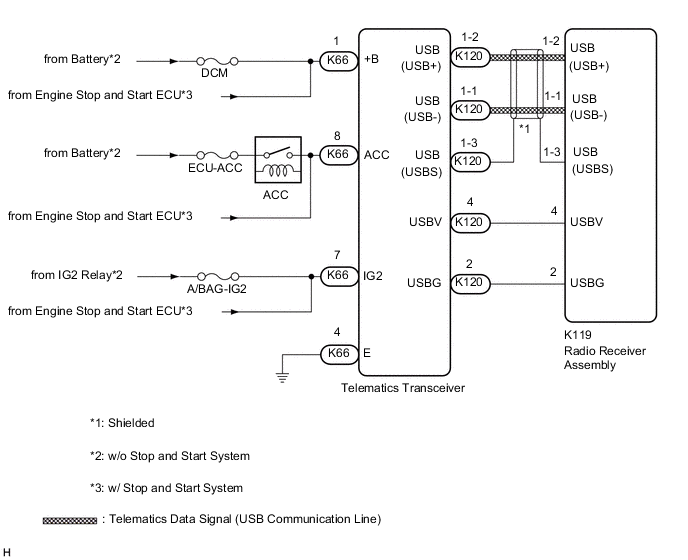
The G-BOOK system uses USB communication between devices. If an open, short, short to +B or short to ground occurs in the USB circuit, communication is interrupted and the G-BOOK system will not operate normally.
| DTC No. | Detection Item | DTC Detection Condition | Trouble Area |
|---|---|---|---|
| B15DB | Telematics Transceiver Disconnected | Telematics transceiver disconnected |
|
Tech Tips
This DTC may be stored due to environmental reasons such as electrical noise or interference.
WIRING DIAGRAM
CAUTION / NOTICE / HINT
Note
-
Inspect the fuses for circuits related to this system before performing the following procedure.
-
Depending on the parts that are replaced during vehicle inspection or maintenance, performing initialization, registration or calibration may be needed. Refer to Precaution for Navigation System.
PROCEDURE
-
CHECK HARNESS AND CONNECTOR (TELEMATICS TRANSCEIVER POWER SOURCE)
-
Disconnect the K66 telematics transceiver connector.
-
Measure the resistance according to the value(s) in the table below.
Standard Resistance Tester Connection Condition Specified Condition K66-4 (E) - Body ground Always Below 1 Ω -
Measure the voltage according to the value(s) in the table below.
Standard Voltage Tester Connection Condition Specified Condition K66-1 (+B) - K66-4 (E) Always 11 to 14 V*1
9.5 to 14 V*2
K66-8 (ACC) - K66-4 (E) Engine switch on (ACC) 11 to 14 V*1
9.5 to 14 V*2
K66-7 (IG2) - K66-4 (E) Engine switch on (IG) 11 to 14 V*1
9.5 to 14 V*2
-
*1: w/o Stop and Start System
*2: w/ Stop and Start System
Result Result Proceed to OK A NG (w/o Stop and Start System) B NG (w/ Stop and Start System) C -
B 
REPAIR OR REPLACE HARNESS OR CONNECTOR
C
GO TO STOP AND START SYSTEM Click here
A 
-
-
INSPECT RADIO RECEIVER ASSEMBLY
-
Disconnect the K119 radio receiver assembly connector.
-
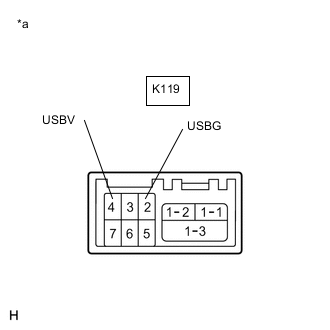
*a Component without harness connected
(Radio Receiver Assembly)
Measure the resistance according to the value(s) in the table below.
Standard Resistance Tester Connection Condition Specified Condition K119-2 (USBG) - Body ground Always Below 1 Ω -
Measure the voltage according to the value(s) in the table below.
Standard Voltage Tester Connection Condition Specified Condition K119-4 (USBV) - K119-2 (USBG) Engine switch on (IG) 4.75 to 5.25 V Result Proceed to OK NG
NG
REPLACE RADIO RECEIVER ASSEMBLY Click here
OK
-
-
CHECK HARNESS AND CONNECTOR (RADIO RECEIVER ASSEMBLY - TELEMATICS TRANSCEIVER)
-
Check the installation condition.
-
Check the USB communication cable (digital communication cable) between the radio receiver assembly and telematics transceiver for any installation or connection problems.
-
-
Disconnect the K119 radio receiver assembly connector.
-
Disconnect the K120 telematics transceiver connector.
-
Measure the resistance according to the value(s) in the table below.
Standard Resistance Tester Connection Condition Specified Condition K119-4 (USBV) - K120-4 (USBV) Always Below 1 Ω K119-2 (USBG) - K120-2 (USBG) Always Below 1 Ω K119-4 (USBV) - Body ground Always 10 kΩ or higher K119-2 (USBG) - Body ground Always 10 kΩ or higher Standard Resistance (USB Cable) Tester Connection Condition Specified Condition K119-1-2 (USB+) - K120-1-2 (USB+) Always Below 1 Ω K119-1-1 (USB-) - K120-1-1 (USB-) Always Below 1 Ω K119-1-3 (USBS) - K120-1-3 (USBS) Always Below 1 Ω K120-1-2 (USB+) - Body ground Always 10 kΩ or higher K120-1-1 (USB-) - Body ground Always 10 kΩ or higher K120-1-3 (USBS) - Body ground Always 10 kΩ or higher Result Proceed to OK NG
NG
REPAIR OR REPLACE HARNESS OR CONNECTOR
OK
-
-
REPLACE TELEMATICS TRANSCEIVER
-
Replace the telematics transceiver.
-
Clear the DTCs.
Body Electrical > Navigation System > Clear DTCs -
Recheck for DTCs and check that no DTCs are output.
Body Electrical > Navigation System > Trouble CodesOK No DTCs are output. Result Proceed to OK NG
OK
END
NG
REPLACE RADIO RECEIVER ASSEMBLY Click here
-