ASC SYSTEM, Diagnostic DTC:B1360
| DTC Code | DTC Name |
|---|---|
| B1360 | Speaker Circuit |
DESCRIPTION
This DTC is stored when a connection malfunction, such as an open, is detected in the wire harness between the stereo component equalizer assembly and No. 1 speaker assembly with box.
| DTC No. | Detection Item | DTC Detection Condition | Trouble Area | Memory |
|---|---|---|---|---|
| B1360 | Speaker Circuit | Open in the speaker circuit |
|
Memorized |
WIRING DIAGRAM
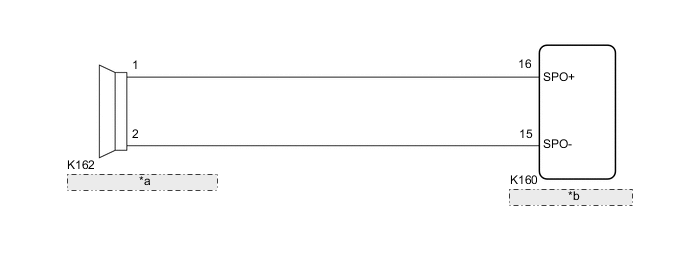
| *a | No. 1 Speaker Assembly with Box |
| *b | Stereo Component Equalizer Assembly |
PROCEDURE
-
CLEAR DTC
-
Connect the GTS to the DLC3.
-
Turn the engine switch on (IG).
-
Turn the GTS on.
-
Enter the following menus: Body Electrical / ASC / Trouble Codes.
-
Clear the DTCs.
Body Electrical > ASC > Clear DTCsResult Proceed to NEXT
NEXT 
-
-
CHECK FOR DTC
-
Connect the GTS to the DLC3.
-
Turn the engine switch on (IG).
-
Make sure that the DTC detection conditions are met.
Tech Tips
If the detection conditions are not met, the system cannot detect the malfunction.
-
Turn the GTS on.
-
Enter the following menus: Body Electrical / ASC / Trouble Codes.
-
Check for DTCs.
Body Electrical > ASC > Trouble CodesOK DTC B1360 is not output. Result Proceed to OK NG
OK 
USE SIMULATION METHOD TO CHECK Click here
NG
-
-
PERFORM ACTIVE TEST USING GTS
-
Connect the GTS to the DLC3.
-
Turn the engine switch on (IG).
-
Turn the GTS on.
-
Enter the following menus: Body Electrical / ASC / Active Test.
-
Perform the Active Test according to the display on the GTS.
Body Electrical > ASC > Active TestTester Display Measurement Item Control Range Diagnostic Note Sound ASC system OFF or ON Perform the Active Test with the turn on the vehicle sound switch.
Body Electrical > ASC > Active TestTester Display Sound OK Sound is output. Result Proceed to OK NG
OK
REPLACE STEREO COMPONENT EQUALIZER ASSEMBLY for LHD: Click here
REPLACE STEREO COMPONENT EQUALIZER ASSEMBLY for RHD: Click hereNG
-
-
INSPECT NO. 1 SPEAKER ASSEMBLY WITH BOX
-
Remove the No. 1 speaker assembly with box.
-
Inspect the No. 1 speaker assembly with box.
Result Proceed to OK NG
NG
REPLACE NO. 1 SPEAKER ASSEMBLY WITH BOX Click here
OK
-
-
CHECK HARNESS AND CONNECTOR (NO. 1 SPEAKER ASSEMBLY WITH BOX - STEREO COMPONENT EQUALIZER ASSEMBLY)
-
Disconnect the K160 stereo component equalizer assembly connector.
-
Measure the resistance according to the value(s) in the table below.
Standard Resistance Tester Connection Condition Specified Condition K162-1 - K160-16 (SPO+) Always Below 1 Ω K162-2 - K160-15 (SPO-) Always Below 1 Ω K162-1 or K160-16 (SPO+) - Body ground Always 10 kΩ or higher K162-2 or K160-15 (SPO-) - Body ground Always 10 kΩ or higher Result Proceed to OK NG
OK
REPLACE STEREO COMPONENT EQUALIZER ASSEMBLY for LHD: Click here
REPLACE STEREO COMPONENT EQUALIZER ASSEMBLY for RHD: Click hereNG
REPAIR OR REPLACE HARNESS OR CONNECTOR
-