ASC SYSTEM, Diagnostic DTC:B1361
| DTC Code | DTC Name |
|---|---|
| B1361 | Volume Switch Circuit |
DESCRIPTION
The stereo component equalizer assembly adjusts dynamic engine sound volume based on the signal sent by the vehicle sound switch.
| DTC No. | Detection Item | DTC Detection Condition | Trouble Area | Memory |
|---|---|---|---|---|
| B1361 | Volume Switch Circuit | Open in the volume switch circuit |
|
Memorized |
WIRING DIAGRAM
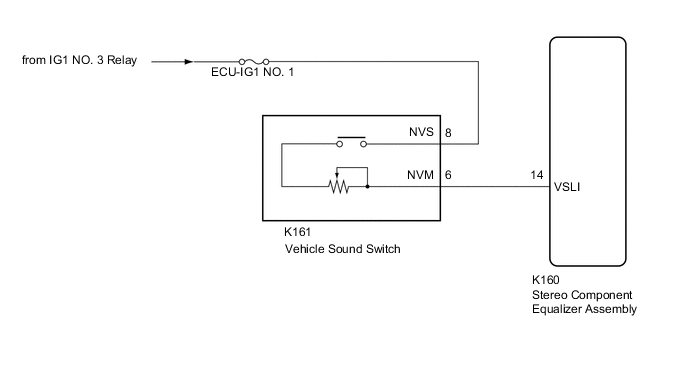
CAUTION / NOTICE / HINT
Note
Inspect the fuses for circuits related to this system before performing following procedure.
PROCEDURE
-
CLEAR DTC
-
Connect the GTS to the DLC3.
-
Turn the engine switch on (IG).
-
Turn the GTS on.
-
Enter the following menus: Body Electrical / ASC / Trouble Codes.
-
Clear the DTCs.
Body Electrical > ASC > Clear DTCsResult Proceed to NEXT
NEXT 
-
-
CHECK FOR DTC
-
Connect the GTS to the DLC3.
-
Turn the engine switch on (IG).
-
Make sure that the DTC detection conditions are met.
Tech Tips
If the detection conditions are not met, the system cannot detect the malfunction.
-
Turn the GTS on.
-
Enter the following menus: Body Electrical / ASC / Trouble Codes.
-
Check for DTCs.
Body Electrical > ASC > Trouble CodesOK DTC B1361 is not output. Result Proceed to OK NG
OK 
USE SIMULATION METHOD TO CHECK Click here
NG
-
-
READ VALUE USING GTS
-
Connect the GTS to the DLC3.
-
Turn the engine switch on (IG).
-
Turn the GTS on.
-
Enter the following menus: Body Electrical / ASC / Data List.
-
Read the Data List according to the display on the GTS.
Body Electrical > ASC > Data ListTester Display Measurement Item Range Normal Condition Diagnostic Note Volume Switch Voltage The VSLI terminal voltage to the CPU of the stereo component equalizer assembly Min.: 0.00 V
Max.: 5.00 V
Changes according to vehicle sound switch volume setting -
Body Electrical > ASC > Data ListTester Display Volume Switch Voltage OK Normal conditions listed above are displayed. Result Proceed to OK NG
OK
REPLACE STEREO COMPONENT EQUALIZER ASSEMBLY for LHD: Click here
REPLACE STEREO COMPONENT EQUALIZER ASSEMBLY for RHD: Click hereNG
-
-
CHECK HARNESS AND CONNECTOR (POWER SOURCE - VEHICLE SOUND SWITCH)
-
Disconnect the K161 vehicle sound switch connector.
-
Measure the voltage according to the value(s) in the table below.
Standard Voltage Tester Connection Condition Specified Condition K161-8 (NVS) - Body ground Engine switch on (IG) 11 to 14 V Result Proceed to OK NG
NG
REPAIR OR REPLACE HARNESS OR CONNECTOR
OK
-
-
INSPECT VEHICLE SOUND SWITCH
-
Remove the vehicle sound switch.
-
Inspect the vehicle sound switch.
Result Proceed to OK NG
NG
REPLACE VEHICLE SOUND SWITCH Click here
OK
-
-
CHECK HARNESS AND CONNECTOR (VEHICLE SOUND SWITCH - STEREO COMPONENT EQUALIZER ASSEMBLY)
-
Disconnect the K160 stereo component equalizer assembly connector.
-
Measure the resistance according to the value(s) in the table below.
Standard Resistance Tester Connection Condition Specified Condition K161-6 (NVM) - K160-14 (VSLI) Always Below 1 Ω K161-6 (NVM) or K160-14 (VSLI) - Body ground Always 10 kΩ or higher Result Proceed to OK NG
OK
REPLACE STEREO COMPONENT EQUALIZER ASSEMBLY for LHD: Click here
REPLACE STEREO COMPONENT EQUALIZER ASSEMBLY for RHD: Click hereNG
REPAIR OR REPLACE HARNESS OR CONNECTOR
-