VEHICLE STABILITY CONTROL SYSTEM, Diagnostic DTC:C1271, C1272, C1275, C1276, C1413, C1414

| DTC Code | DTC Name |
|---|---|
| C1271 | Low Output Signal of Front Speed Sensor RH (Test Mode DTC) |
| C1272 | Low Output Signal of Front Speed Sensor LH (Test Mode DTC) |
| C1275 | Abnormal Change in Output Signal of Front Speed Sensor RH (Test Mode DTC) |
| C1276 | Abnormal Change in Output Signal of Front Speed Sensor LH (Test Mode DTC) |
| C1413 | Front Speed Sensor RH Output Malfunction |
| C1414 | Front Speed Sensor LH Output Malfunction |
DESCRIPTION
Each speed sensor detects wheel speed and sends signals to the skid control ECU (brake actuator assembly). These signals are used by the ABS.
The speed sensor rotors have rows of alternating N and S magnetic poles.
Hall IC type speed sensors use the frequency of output pulses to detect the vehicle speed. Because the sensor outputs digital pulses, it can detect the vehicle speed even when the vehicle is nearly stationary.
DTCs C1271, C1272, C1275 and C1276 are cleared when the speed sensor sends a vehicle speed signal or when Test Mode ends. DTCs C1271, C1272, C1275 and C1276 are output only in Test Mode.
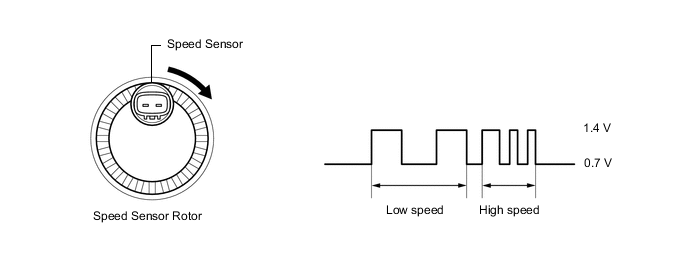
Tech Tips
Check the connection status between the sensor connector and the vehicle wire harness.
| DTC No. | Detection Item | DTC Detection Condition | Trouble Area |
|---|---|---|---|
| C1271 | Low Output Signal of Front Speed Sensor RH (Test Mode DTC) | Detected only during Test Mode. |
|
| C1272 | Low Output Signal of Front Speed Sensor LH (Test Mode DTC) | Detected only during Test Mode. |
|
| C1275 | Abnormal Change in Output Signal of Front Speed Sensor RH (Test Mode DTC) | Detected only during Test Mode. | Front speed sensor rotor RH (front axle hub sub-assembly RH) |
| C1276 | Abnormal Change in Output Signal of Front Speed Sensor LH (Test Mode DTC) | Detected only during Test Mode. | Front speed sensor rotor LH (front axle hub sub-assembly LH) |
| C1413 | Front Speed Sensor RH Output Malfunction | Any of the following is detected:
|
|
| C1414 | Front Speed Sensor LH Output Malfunction | Any of the following is detected:
|
|
Tech Tips
for C1413 and C1414: Even after the trouble areas are repaired, the ABS warning light will not go off unless the following operations are performed.
-
Drive the vehicle at 30 km/h (19 mph) for 30 seconds or more and check that the ABS warning light goes off.
-
Clear the DTCs.
Tech Tips
-
DTC C1413 is for the front speed sensor RH.
-
DTC C1414 is for the front speed sensor LH.
WIRING DIAGRAM
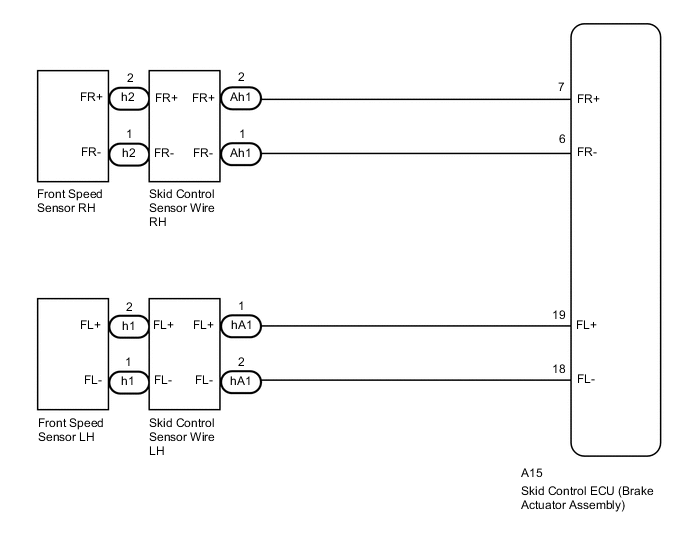
CAUTION / NOTICE / HINT
Note
When replacing the skid control ECU (brake actuator assembly), perform zero point calibration and store system information.
PROCEDURE
-
CHECK HARNESS AND CONNECTOR (MOMENTARY INTERRUPTION)
-
Using the GTS, check for any momentary interruption in the wire harness and connector corresponding to a DTC.
Chassis > ABS/VSC/TRC > Data ListTester Display Measurement Item Range Normal Condition Diagnostic Note FR Speed Open Front speed sensor RH open detection Error or Normal Error: Momentary interruption
Normal: Normal
- FL Speed Open Front speed sensor LH open detection Error or Normal Error: Momentary interruption
Normal: Normal
-
Chassis > ABS/VSC/TRC > Data ListTester Display FR Speed Open FL Speed Open OK There are no momentary interruptions. Tech Tips
Perform the above inspection before removing the sensor and connector.
Result Proceed to OK NG
NG 
CHECK FRONT SPEED SENSOR INSTALLATION Click here
OK 
-
-
READ VALUE USING GTS (FRONT SPEED SENSOR)
-
Turn the engine switch off.
-
Connect the GTS to the DLC3.
-
Start the engine.
-
Select the Data List using the GTS.
Chassis > ABS/VSC/TRC > Data ListTester Display Measurement Item Range Normal Condition Diagnostic Note FR Wheel Speed Front wheel speed sensor RH reading Min.: 0 km/h (0 mph), Max.: 326 km/h (202 mph) Vehicle stopped: 0 km/h (0 mph) When driving at constant speed: No large fluctuations FL Wheel Speed Front wheel speed sensor LH reading Min.: 0 km/h (0 mph), Max.: 326 km/h (202 mph) Vehicle stopped: 0 km/h (0 mph) When driving at constant speed: No large fluctuations
Chassis > ABS/VSC/TRC > Data ListTester Display FR Wheel Speed FL Wheel Speed -
Check the speed value output from the speed sensor displayed on the GTS.
Tech Tips
Factors that affect the indicated vehicle speed include tire size, tire pressure, and tire wear. The speed indicated on the speedometer has an allowable margin of error. This can be tested using a speedometer tester (calibrated chassis dynamometer). For details about testing and the margin of error, see the reference chart.
OK The speed value output from the speed sensor displayed on the GTS is similar to the speed indicated on the speedometer. Result Proceed to OK NG
NG
GO TO STEP 4 Click here
OK
-
-
RECONFIRM DTC
-
Turn the engine switch off.
-
Clear the DTCs.
Chassis > ABS/VSC/TRC > Clear DTCs -
Turn the engine switch off.
-
Start the engine.
-
Perform a road test.
-
Check if the same DTC is output.
Chassis > ABS/VSC/TRC > Trouble CodesResult Result Proceed to DTCs C1413 and C1414 are not output. A DTCs C1413 and/or C1414 are output. B Tech Tips
If troubleshooting has been carried out according to Problem Symptoms Table, refer back to the table and proceed to the next step before replacing parts.
A 
USE SIMULATION METHOD TO CHECK Click here
B
REPLACE BRAKE ACTUATOR ASSEMBLY for LHD: Click here
REPLACE BRAKE ACTUATOR ASSEMBLY for RHD: Click here -
-
CHECK FRONT SPEED SENSOR INSTALLATION
-
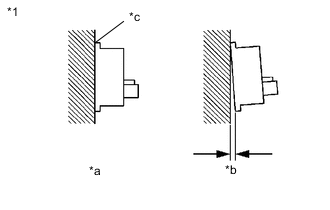
*1 Front Speed Sensor *a Correct *b Incorrect *c No clearance Check the speed sensor installation.
OK There is no clearance between the sensor and the front steering knuckle. Result Proceed to OK NG
NG
INSTALL FRONT SPEED SENSOR CORRECTLY Click here
OK
-
-
INSPECT SKID CONTROL SENSOR WIRE
-
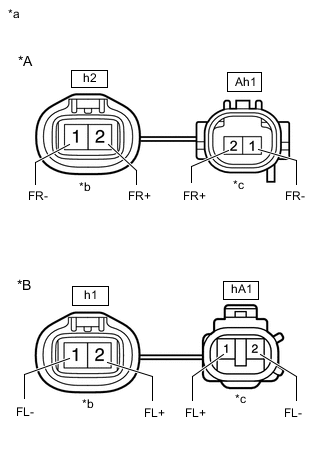
*A RH *B LH *a Front view of Skid Control Sensor Wire *b Front view of wire harness connector
(to Sensor Side Connector)
*c Front view of wire harness connector
(to Vehicle Side Connector)
Turn the engine switch off.
-
Make sure that there is no looseness at the locking part and the connecting part of the connectors.
-
Remove the skid control sensor wire.
-
Measure the resistance according to the value(s) in the table below.
Standard Resistance for RH Tester Connection Condition Specified Condition h2-2 (FR+) - Ah1-2 (FR+) Always Below 1 Ω h2-2 (FR+) - Ah1-1 (FR-) Always 10 kΩ or higher h2-2 (FR+) - Body ground Always 10 kΩ or higher Ah1-1 (FR-) - Body ground Always 10 kΩ or higher h2-1 (FR-) - Ah1-1 (FR-) Always Below 1 Ω h2-1 (FR-) - Ah1-2 (FR+) Always 10 kΩ or higher h2-1 (FR-) - Body ground Always 10 kΩ or higher Ah1-2 (FR+) - Body ground Always 10 kΩ or higher for LH Tester Connection Condition Specified Condition h1-2 (FL+) - hA1-1 (FL+) Always Below 1 Ω h1-2 (FL+) - hA1-2 (FL-) Always 10 kΩ or higher h1-2 (FL+) - Body ground Always 10 kΩ or higher hA1-2 (FL-) - Body ground Always 10 kΩ or higher h1-1 (FL-) - hA1-2 (FL-) Always Below 1 Ω h1-1 (FL-) - hA1-1 (FL+) Always 10 kΩ or higher h1-1 (FL-) - Body ground Always 10 kΩ or higher hA1-1 (FL+) - Body ground Always 10 kΩ or higher Result Proceed to OK NG
NG
REPLACE SKID CONTROL SENSOR WIRE Click here
OK
-
-
CHECK HARNESS AND CONNECTOR (BRAKE ACTUATOR ASSEMBLY - SKID CONTROL SENSOR WIRE)
-
Make sure that there is no looseness at the locking part and the connecting part of the connector.
-
Reconnect the Ah1 or hA1 skid control sensor wire connector (for vehicle side connector).
-
Disconnect the A15 skid control ECU (brake actuator assembly) connector.
-
Measure the resistance according to the value(s) in the table below.
Standard Resistance for RH Tester Connection Condition Specified Condition A15-7 (FR+) - h2-2 (FR+) Always Below 1 Ω A15-7 (FR+) - Body ground Always 10 kΩ or higher h2-2 (FR+) - Body ground Always 10 kΩ or higher A15-6 (FR-) - h2-1 (FR-) Always Below 1 Ω A15-6 (FR-) - Body ground Always 10 kΩ or higher h2-1 (FR-) - Body ground Always 10 kΩ or higher for LH Tester Connection Condition Specified Condition A15-19 (FL+) - h1-2 (FL+) Always Below 1 Ω A15-19 (FL+) - Body ground Always 10 kΩ or higher h1-2 (FL+) - Body ground Always 10 kΩ or higher A15-18 (FL-) - h1-1 (FL-) Always Below 1 Ω A15-18 (FL-) - Body ground Always 10 kΩ or higher h1-1 (FL-) - Body ground Always 10 kΩ or higher Result Proceed to OK NG
NG
REPAIR OR REPLACE HARNESS OR CONNECTOR
OK
-
-
INSPECT BRAKE ACTUATOR ASSEMBLY (SENSOR INPUT)
-
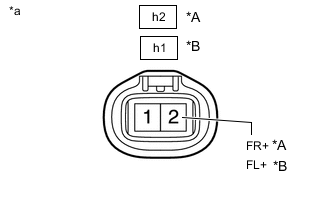
*A RH *B LH *a Front view of wire harness connector
(to Skid Control Sensor Wire)
Reconnect the A15 skid control ECU (brake actuator assembly) connector.
-
Turn the engine switch on (IG).
-
Measure the voltage according to the value(s) in the table below.
Standard Voltage for RH Tester Connection Condition Specified Condition h2-2 (FR+) - Body ground Engine switch on (IG) 5.7 to 14 V for LH Tester Connection Condition Specified Condition h1-2 (FL+) - Body ground Engine switch on (IG) 5.7 to 14 V Tech Tips
-
The front speed sensor rotor and front speed sensor are incorporated into the front axle hub sub-assembly.
If the front speed sensor rotor needs to be replaced, replace the front axle hub sub-assembly with front speed sensor.
-
If troubleshooting has been carried out according to Problem Symptoms Table, refer back to the table and proceed to the next step before replacing parts.
Result Proceed to OK NG -
OK
REPLACE FRONT AXLE HUB SUB-ASSEMBLY Click here
NG
REPLACE BRAKE ACTUATOR ASSEMBLY for LHD: Click here
REPLACE BRAKE ACTUATOR ASSEMBLY for RHD: Click here -